
1. Įvadas
The MeesMeek Traffic Light Visual Timer is designed to assist with time management through visual and auditory cues. It features a traffic light display that changes color as time progresses, an LCD screen for precise time display, and adjustable volume with multiple alert options. This timer is suitable for various environments including classrooms, homes, and offices, and can be particularly beneficial for individuals who benefit from visual time tracking.
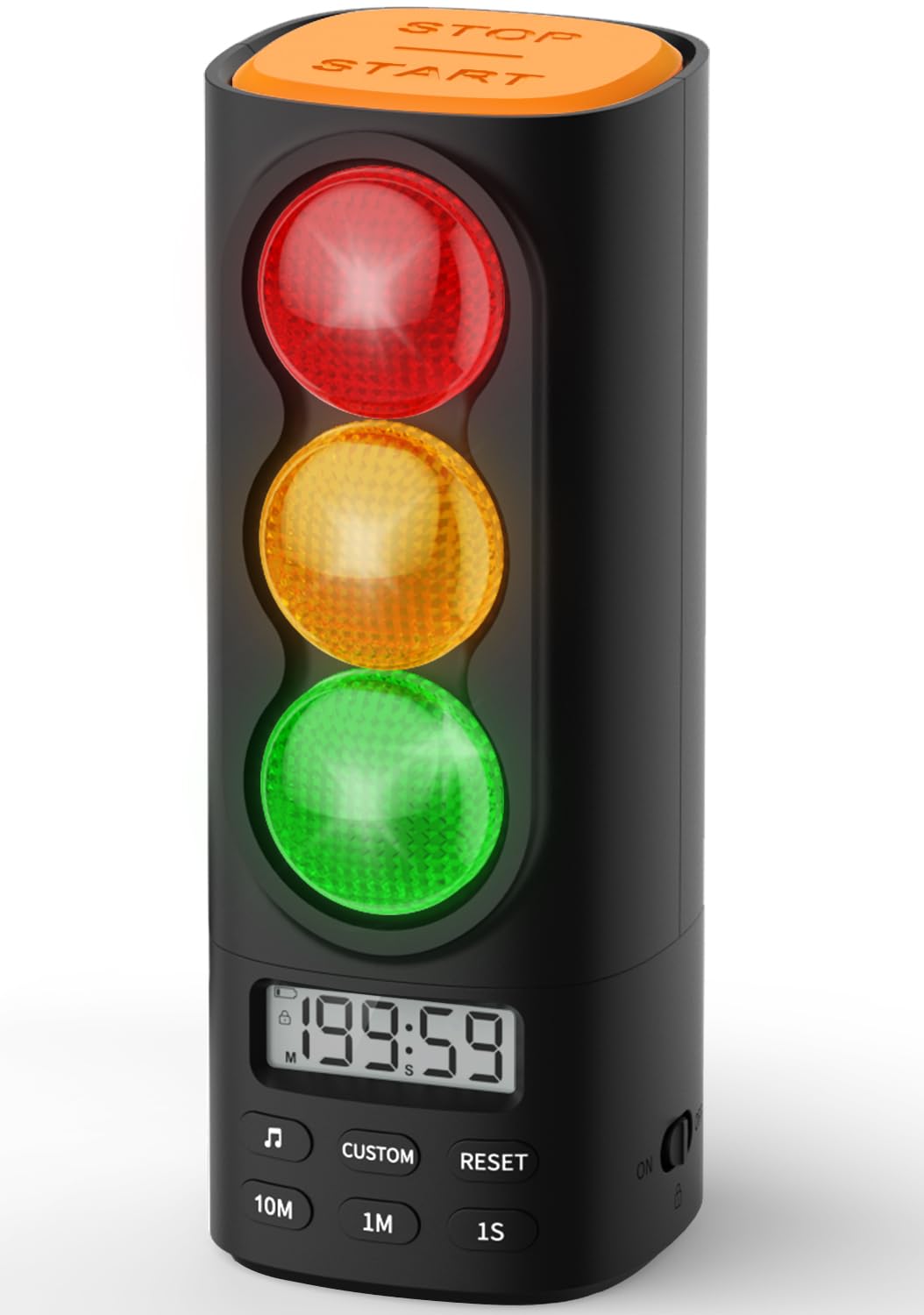
Image 1.1: The MeesMeek Traffic Light Visual Timer in black.
Key features include a countdown/count-up function up to 199 minutes and 59 seconds, a child safety lock, and a memory function that saves previous settings. The device is USB-C rechargeable for convenience and portability.
2. Pakuotės turinys
Prašome patikrinti, ar pakuotėje yra visi reikalingi daiktai:
- MeesMeek Traffic Light Visual Timer (Model 6236)
- USB-C įkrovimo laidas
- Maitinimo adapteris
- Instrukcijų vadovas (šis dokumentas)
3. Produktas baigtasview
Familiarize yourself with the various parts and controls of your MeesMeek Visual Timer.

Image 3.1: Labeled diagram of the timer's buttons and ports.
- Sustabdymo / paleidimo mygtukas: Located at the top, used to begin or pause the timer.
- Raudona šviesa: Indicates time is up.
- Geltona šviesa: Indicates the last 30 seconds of the countdown (default setting).
- Žalia šviesa: Indicates the timer is active.
- LCD ekranas: Shows current time, countdown/count-up, and other indicators.
- Muzikos mygtukas: Selects alert tones.
- Pasirinktinis mygtukas: For setting custom yellow light duration (refer to manual for details).
- Atkūrimo mygtukas: Clears current timer settings.
- 10M / 1M / 1S Buttons: Used to increase time by 10 minutes, 1 minute, or 1 second respectively when setting the timer.
- Garso slankiklis: Located on the side for stepless volume adjustment.
- ĮJUNGIMO/IŠJUNGIMO/Vaikų užrakto jungiklis: Located on the side to power on/off and activate child lock.
- USB-C įvesties prievadas: Prietaiso įkrovimui.
4. Sąranka
4.1 Pradinis įkrovimas
Before first use, fully charge the timer. Connect the provided USB-C cable to the timer's USB-C input port and the power adapter, then plug it into a wall outlet. The red charging indicator will show the charging status. A full charge takes approximately 4.5 hours and provides up to 36 hours of runtime.

Image 4.1: The timer connected to its USB-C charger.
4.2 Įjungimas / išjungimas
Locate the ON/OFF switch on the side of the timer. Slide the switch to the 'ON' position to power on the device. To power off, slide the switch to the 'OFF' position.
5. Naudojimo instrukcijos
5.1 Setting the Timer (Countdown Mode)
- Įsitikinkite, kad laikmatis įjungtas.
- Use the '10M', '1M', and '1S' buttons to set the desired countdown time. The maximum time is 199 minutes and 59 seconds.
- Press the 'Stop/Start' button on top to begin the countdown. The green light will illuminate.
- During the countdown, the green light will remain on. For the last 30 seconds (default), the yellow light will illuminate. When the time reaches zero, the red light will illuminate, and the selected alarm will sound.
- To pause the timer, press the 'Stop/Start' button again. Press it once more to resume.
- To reset the timer, press the 'Reset' button.

Image 5.1: Pressing the Stop/Start button to control the timer.
5.2 Skaičiavimo į priekį režimas (chronometras)
To use the timer as a stopwatch, ensure the timer is reset to 00:00. Press the 'Stop/Start' button to begin counting up. The green light will illuminate. Press 'Stop/Start' again to pause, and 'Reset' to clear.
5.3 Adjusting Volume and Alert Tones
Use the volume slider on the side of the device to adjust the alarm volume. Slide it to the left for lower volume or mute, and to the right for higher volume. Press the 'Music' button to cycle through the 4 available alert options (gentle beep, chime, buzzer, melody).

Image 5.2: Location of the volume slider and child lock switch.
5.4 Užrakto nuo vaikų funkcija
To prevent unintended adjustments, slide the ON/OFF switch to the 'Child Lock' position (indicated by a lock icon). This will disable all buttons on the timer. To unlock, slide the switch back to the 'ON' position.
5.5 Atminties funkcija
The timer automatically saves the last set countdown duration and alert tone. This allows for quick reuse of common settings without needing to reprogram them each time.
5.6 Customizing Yellow Light Duration
The factory default for the yellow light duration is 30 seconds. To customize this: Press and hold the 'Music' button for 3 seconds. Then, use the '10M', '1M', or '1S' buttons to adjust the desired yellow light pre-alarm time. Refer to the instruction manual for more detailed steps.
6. Produkto demonstracinis vaizdo įrašas
Watch this official product video for a visual guide on the timer's features and operation.
Video 6.1: A 44-second video demonstrating the MeesMeek Traffic Light Visual Timer's functions, including setting time, traffic light changes, and sound alerts.
7. Priežiūra
7.1 Valymas
To clean the timer, wipe it with a soft, dry cloth. Do not use abrasive cleaners or immerse the device in water.
7.2 Akumuliatoriaus priežiūra
The timer contains a rechargeable battery. For optimal battery life, avoid fully discharging the battery frequently. If storing the device for an extended period, charge it to approximately 50% before storage and recharge every few months.
8. Problemų sprendimas
| Problema | Galima priežastis | Sprendimas |
|---|---|---|
| Laikmatis neįsijungia. | Baterija išsikrovusi. | Charge the timer using the provided USB-C cable and adapter. |
| Mygtukai nereaguoja. | Įjungtas užraktas nuo vaikų. | Slide the ON/OFF switch to the 'ON' position to deactivate child lock. |
| No sound from alarm. | Volume is set to mute or very low. | Adjust the volume slider on the side of the timer. |
| Yellow light duration is incorrect. | Custom setting was changed. | Refer to section 5.6 to reset or adjust the yellow light duration. |
9. Specifikacijos

Image 9.1: Dimensions of the MeesMeek Traffic Light Visual Timer.
- Modelio numeris: 6236
- Spalva: Juoda
- Medžiaga: Akrilnitrilo butadieno stirenas (ABS)
- Gaminio matmenys: 2.9" gylio x 2.6" pločio x 6.8" aukščio (apytiksliai 7.4 cm gylio x 6.6 cm pločio x 17.3 cm aukščio)
- Prekės svoris: 12 uncijos (apie 340 gramų)
- Baterija: 1 C battery (included, rechargeable)
- Įkrovimo laikas: Maždaug 4.5 val
- Veikimo laikas: Vienu įkrovimu veikia iki 36 valandų
- Max Timer Duration: 199 minutės 59 sekundžių
- Įspėjimo parinktys: 4 (gentle beep, chime, buzzer, melody)
10. Garantija ir palaikymas
For warranty information or technical support, please refer to the contact details provided with your purchase or visit the official MeesMeek websvetainę. Išsaugokite pirkimo čekį garantiniams reikalavimams.