
MOBAPAD Huben2 H6
MOBAPAD Huben2 Wireless Switch Controller Pro Instruction Manual
Model: Huben2 H6 | Brand: MOBAPAD
1. Įvadas
This manual provides detailed instructions for the setup, operation, and maintenance of your MOBAPAD Huben2 Wireless Switch Controller Pro. Please read this manual thoroughly before using the product to ensure optimal performance and longevity.
2. Saugos informacija
- Laikykite valdiklį atokiau nuo vandens ir kitų skysčių.
- Nelaikykite valdiklio ekstremaliose temperatūrose.
- Venkite valdiklio numetimo ir stiprių smūgių.
- Do not attempt to disassemble or repair the controller yourself. Contact customer support for assistance.
- Įkrovimui naudokite tik pridedamą įkrovimo laidą arba sertifikuotą USB-C laidą.
3. Pakuotės turinys
Patikrinkite, ar pakuotėje yra visi reikalingi daiktai:
- MOBAPAD Huben2 Wireless Controller Pro
- USB-C įkrovimo laidas
- Wireless Dongle (2.4G)
- PU Travel Case
- Replaceable D-pad (Cross/Circle)
- Instrukcijų vadovas (šis dokumentas)
4. Valdiklio išdėstymas
Familiarize yourself with the buttons and features of your Huben2 controller.

4.1 pav.: priekis view of the MOBAPAD Huben2 Wireless Controller Pro. Shows the joysticks, face buttons (A, B, X, Y), D-pad, and central function buttons.
- Kairysis/dešinysis analoginiai valdikliai: Capacitive joysticks with 4,096-step precision.
- A/B/X/Y mygtukai: Omron mechanical face buttons.
- D-pad: Replaceable cross or circle D-pad.
- L1/R1 (Shoulder Buttons): Standartinės pečių sagos.
- L2/R2 (Triggers): Dual-mode triggers (Hall Effect and Microswitch).
- M1/M2/M3/M4 Buttons: Four programmable back buttons.
- Namų mygtukas: Powers on/off and returns to system home screen.
- Ekrano kopijos mygtukas: Fiksuoja ekrano kopijas.
- Pliuso / minuso mygtukai: Standard system menu buttons.
- Turbo mygtukas: Įjungia / išjungia turbo funkciją.
- USB-C prievadas: Įkrovimui ir laidiniam prijungimui.

4.2 pav.: galinis view showing the four programmable M1, M2, M3, M4 back buttons.
5. Sąranka
5.1 Valdiklio įkrovimas
Before first use, fully charge the controller. Connect the provided USB-C cable to the controller's USB-C port and the other end to a USB power source (e.g., console, PC, or USB wall adapter). The charging indicator will show the charging status.
- A full charge provides approximately 15 hours of gameplay.

Figure 5.1: The controller features a 1000mAh battery for extended gameplay.
5.2 Ryšio režimai
The Huben2 controller supports three connection methods:

Figure 5.2: The controller supports 2.4G wireless, Bluetooth, and wired connections across various platforms.
- 2.4G Wireless (via Dongle):
- Compatible with Windows PC, Steam, and Android TV.
- Įkiškite 2.4G belaidį adapterį į savo įrenginio USB prievadą.
- Įjunkite valdiklį. Jis turėtų automatiškai prisijungti prie adapterio.
- „Bluetooth“ belaidis ryšys:
- Compatible with Nintendo Switch, Nintendo Switch 2, Android, and iOS devices.
- Savo įrenginyje eikite į „Bluetooth“ nustatymus ir įjunkite „Bluetooth“.
- Valdiklyje paspauskite ir palaikykite „Bluetooth“ susiejimo mygtuką (tikslią vietą žr. valdiklio išdėstyme), kol indikatoriaus lemputės ims greitai mirksėti.
- Select "MOBAPAD Huben2" from the list of available devices on your system to pair.
- For Nintendo Switch, the controller can wake the console from sleep mode after initial pairing and firmware update via the Mobapad app.
- Laidinis ryšys:
- Compatible with Windows PC and Android TV.
- Connect the controller to your device using the USB-C cable. The controller will be recognized automatically.
6. Naudojimo instrukcijos
6.1 Maitinimo įjungimas/išjungimas
- Maitinimas: Paspauskite pradžios mygtuką.
- Išjungti: Press and hold the Home button for 3-5 seconds. The controller will also power off automatically after a period of inactivity.
6.2 Dvigubo paleidimo režimai
The L2 and R2 triggers feature dual modes for different gaming experiences:

Figure 6.1: Visual representation of the 2mm Microswitch Trigger and 10mm Hall Linear Trigger modes.
- Microswitch Trigger (2mm): Provides a short, tactile click for rapid input, ideal for FPS games.
- Hall Effect Linear Trigger (10mm): Offers analog input with a longer travel distance, suitable for racing or simulation games.
- Perjungimo režimai: Use the physical switches located near the L2/R2 triggers to toggle between modes.
6.3 Customizable Features (Back Buttons, Macros, App Support)
The Huben2 controller offers extensive customization options:
- Programmable Back Buttons (M1-M4): Assign single button presses or complex macros to the four back buttons using the dedicated Mobapad PC/mobile application.
- Rapid-Fire Turbo Mode: Activate turbo functionality for any button. Refer to the Mobapad app or controller manual for specific button combinations to enable/disable.
- Mobapad App: Download the official Mobapad application for Windows or mobile devices to:
- Adjust joystick dead zones and response curves.
- Customize vibration intensity.
- Kurti ir valdyti makrokomandas.
- Atnaujinkite valdiklio programinę-aparatinę įrangą.
6.4 HD Rumble and ALPS Linear Motors
The controller features dual ALPS linear motors for precise HD Rumble feedback, reacting to in-game sound and motion with 0ms startup time.
6.5 6-Axis Motion Control
The integrated 6-axis motion sensor provides precise motion control for compatible games.

Figure 6.2: The controller's internal 6-axis sensing motors enable precise motion control.
6.6 Replaceable D-pad and Faceplate
The controller allows for customization of the D-pad and faceplate.
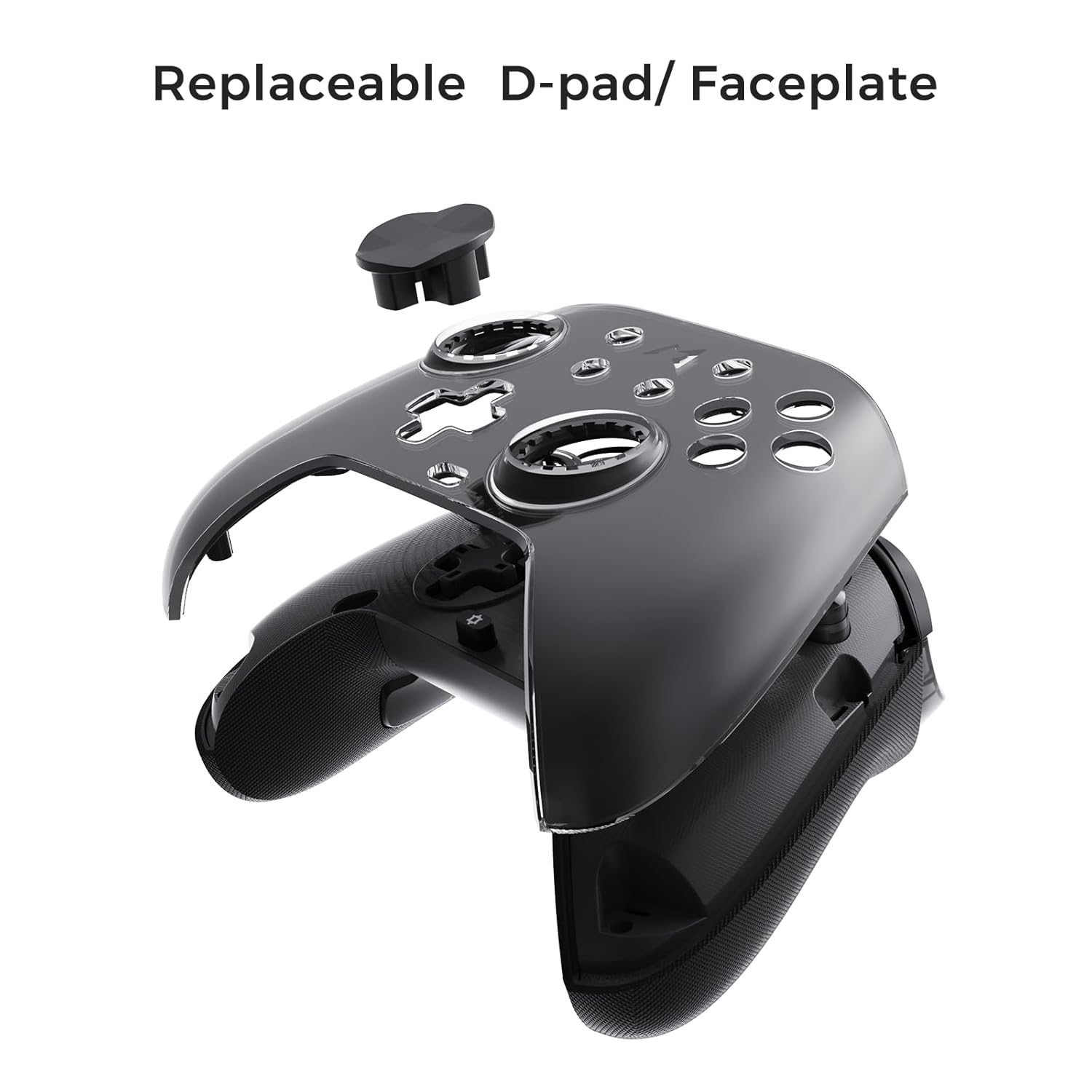
Figure 6.3: The D-pad and faceplate can be replaced for customization or preference.
- To replace the D-pad, gently remove the magnetic faceplate and then lift out the D-pad. Insert the desired D-pad (cross or circle) and reattach the faceplate.
7. Priežiūra
- Valymas: Valdiklį valykite minkšta, sausa šluoste. Jei nešvarumai sunkiai įveikiami, šiek tiek nuvalykite.ampNuvalykite šluostę vandeniu. Nenaudokite stiprių cheminių medžiagų ar abrazyvinių valiklių.
- Saugykla: Store the controller in a cool, dry place, away from direct sunlight and extreme temperatures. When not in use for extended periods, store it in the provided PU travel case.
- Akumuliatoriaus priežiūra: Norėdami pailginti baterijos veikimo laiką, venkite dažnai visiškai iškrauti valdiklį. Reguliariai jį įkraukite, net jei nenaudojate nuolat.
8. Problemų sprendimas
| Problema | Galima priežastis | Sprendimas |
|---|---|---|
| Valdiklis neįsijungia. | Senka baterija. | Įkraukite valdiklį bent 30 minučių. |
| Valdiklis neprisijungia belaidžiu ryšiu. | Not in pairing mode; out of range; interference; incorrect mode selected. | Ensure controller is in pairing mode. Move closer to the device. Check for other wireless devices causing interference. Verify correct connection mode (2.4G or Bluetooth). |
| Input lag or dropped connections. | Wireless interference; low battery; outdated firmware. | Reduce distance to device. Charge controller. Update firmware via Mobapad app. Try wired connection. |
| Mygtukai arba valdymo svirtys nereaguoja. | Software glitch; physical obstruction; calibration issue. | Restart the controller and the connected device. Check for physical debris. Calibrate joysticks via Mobapad app. |
| HD triukšmas neveikia. | Feature disabled in game/system settings; low battery. | Ensure rumble is enabled in game and system settings. Charge controller. |
If you encounter issues not listed here, please refer to the official MOBAPAD support websvetainėje arba susisiekite su klientų aptarnavimo tarnyba.
9. Specifikacijos
| Funkcija | Detalė |
|---|---|
| Modelio numeris | Mobapad Huben2 H6 |
| Ryšys | 2.4G belaidis, „Bluetooth“, laidinis (USB-C) |
| Suderinamumas | Nintendo Switch, Nintendo Switch 2, Windows, Steam, Android, iOS |
| Vairasvirtės | Capacitive, 4,096-step precision, 1000Hz polling rate |
| Trigeriai | Dual Mode: 2mm Omron Microswitch, 10mm Hall Effect Linear |
| Mygtukai | Omron Mechanical Face Buttons, Programmable Back Buttons (M1-M4) |
| Vibracija | Dual ALPS Linear Motors (HD Rumble) |
| Judesio valdymas | 6 ašių giroskopas |
| Baterijos talpa | 1000 mAh ličio jonų |
| Baterijos veikimo laikas | Iki 15 valandų (apytiksliai) |
| Matmenys | 6.3 x 4.13 x 2.76 colio |
| Svoris | 1.87 svaro |
10. Garantija ir palaikymas
MOBAPAD products are designed and manufactured to the highest quality standards. For warranty information, technical support, or customer service inquiries, please visit the official MOBAPAD website or contact their authorized support channels. Please retain your proof of purchase for warranty claims.
Websvetainė: Visit the MOBAPAD Store on Amazon
Ask a question about this manual
Ask about setup, troubleshooting, compatibility, parts, safety, or missing instructions. Manuals+ will review the question and use this page’s manual context to help answer it.