
1. Produktas baigtasview
The WESECUU Light Bulb Security Camera offers comprehensive home surveillance with easy installation. Designed for both indoor and outdoor use, this camera provides a 360° panoramic view, motion tracking, and AI detection for enhanced security.
- Nesudėtingas montavimas: Screws into a standard light bulb socket, requiring no drilling or complex wiring.
- 360 ° panoraminė View & Auto Motion Tracking: Provides full-area coverage and automatically follows detected movement.
- Išmanusis AI aptikimas: Distinguishes between people and other movements to reduce false alerts.
- Dvipusis garsas: Features a built-in speaker and microphone for real-time communication.
- 24/7 Day & Night Monitoring: Ensures continuous surveillance in various lighting conditions.

2. Pakuotės turinys
Prašome patikrinti, ar pakuotėje yra visi reikalingi daiktai:
- WESECUU Light Bulb Security Camera
- Instrukcijų vadovas (šis dokumentas)
3. Sąrankos instrukcijos
3.1 Fizinis įrengimas
The camera is designed for simple installation into a standard E27/E26 light bulb socket.
- Ensure the power to the light socket is turned off at the circuit breaker before installation.
- Carefully screw the WESECUU Light Bulb Security Camera into the light bulb socket until it is secure. Do not overtighten.
- Turn the power back on at the circuit breaker. The camera will power on and initiate its startup sequence.
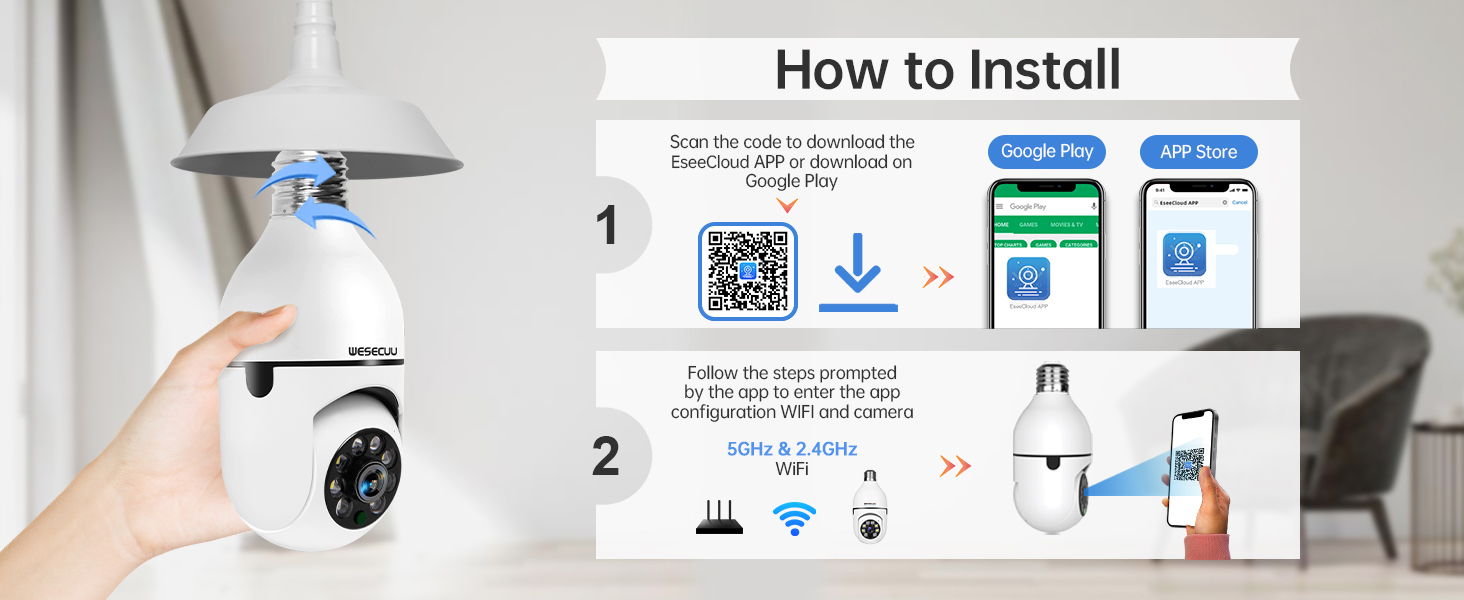
3.2 Programėlės atsisiuntimas ir kameros susiejimas
To operate your camera, you need to download the EseeCloud APP and pair the device.
- Download the EseeCloud APP from the Google Play Store or Apple App Store. You can also scan the QR code provided in the installation image below or visit http://www.e-seenet.com/download/indexm.php?p=tjesee.
- Open the EseeCloud APP and create an account or log in.
- Follow the in-app instructions to add your new camera. Ensure your smartphone is connected to a 2.4GHz or 5GHz Wi-Fi network during the pairing process. The camera supports both 2.4GHz and 5GHz Wi-Fi.
- Once successfully paired, you can access the live feed and camera settings through the app.
4. Naudojimo instrukcijos
4.1 Tiesiogiai View ir Atkūrimas
Access the EseeCloud APP to view the live feed from your camera. You can also review įrašytas footage from the SD card (if installed) or cloud storage (if subscribed).

4.2 Judesio aptikimas ir sekimas
The camera features advanced motion detection and automatic tracking. When motion is detected, the camera will pan and tilt to follow the subject, ensuring continuous coverage. Alerts will be sent to your smartphone.

4.3 AI Detection Alerts
The integrated AI technology helps differentiate between human movement and other sources of motion, such as pets or passing vehicles, reducing irrelevant notifications.

4.4 Dvipusis garsas
Utilize the two-way audio feature to communicate through the camera. This allows you to speak to visitors, deter intruders, or comfort pets remotely.

4.5 Naktinis matymas
The camera provides both full-color night vision and infrared night vision modes for clear monitoring in low-light conditions.

4.6 Saugojimo parinktys
The camera supports local storage via an SD card (16-128GB, not included) and offers optional cloud storage plans for continuous recording and advanced features.

5. Priežiūra
To ensure optimal performance and longevity of your WESECUU Light Bulb Security Camera, follow these maintenance guidelines:
- Objektyvo valymas: Gently wipe the camera lens with a soft, dry microfiber cloth to remove dust or smudges. Avoid abrasive cleaners.
- Maitinimas: Ensure the camera receives a stable power supply. Avoid frequent power interruptions.
- Firmware atnaujinimai: Regularly check the EseeCloud APP for available firmware updates to ensure your camera has the latest features and security enhancements.
- Aplinkos sąlygos: While designed for outdoor use, avoid direct exposure to extreme weather conditions if possible, and ensure the light socket is weather-protected.
6. Problemų sprendimas
If you encounter issues with your WESECUU Light Bulb Security Camera, refer to the following common solutions:
- Fotoaparatas neprisijungia prie „Wi-Fi“:
- Įsitikinkite, kad jūsų „Wi-Fi“ tinklas yra 2.4 GHz arba 5 GHz dažnio ir stabilus.
- Patikrinkite, ar programėlėje teisingai įvestas „Wi-Fi“ slaptažodis.
- Move the camera closer to your Wi-Fi router during setup.
- Iš naujo paleiskite maršrutizatorių ir kamerą.
- No Image or Black Screen:
- Check if the camera is properly powered on and the light socket has power.
- Įsitikinkite, kad kameros objektyvas nėra uždengtas.
- Restart the camera by turning off and on the power to the socket.
- Judesio aptikimas neveikia:
- Check motion detection settings in the EseeCloud APP.
- Ensure the detection sensitivity is set appropriately.
- Verify that notification permissions are enabled for the app on your smartphone.
- Prasta vaizdo kokybė:
- Nuvalykite fotoaparato objektyvą.
- Ensure adequate lighting for optimal image clarity, especially for color night vision.
- Patikrinkite interneto ryšio greitį, nes lėtas ryšys gali paveikti transliacijos kokybę.

Figure 10: Visual comparison demonstrating the superior clarity of WESECUU's 3MP resolution compared to other standard resolutions.
7. Specifikacijos
| Funkcija | Specifikacija |
|---|---|
| Modelio numeris | TP-8052BW3 |
| Prekės ženklas | WESECUU |
| Naudojimas viduje / lauke | Lauke |
| Ryšio technologija | Belaidis ryšys (Wi-Fi) |
| Ryšio protokolas | „Wi-Fi“ (2.4 GHz ir 5 GHz) |
| Maitinimo šaltinis | Su laidu elektra |
| Vaizdo įrašymo raiška | 4K |
| Montavimo tipas | Montavimas ant lubų |
| Ypatinga funkcija | Reguliuojamas |
| Suderinami įrenginiai | Amazon Alexa |
| Valdiklio tipas | Amazon Alexa |
| Gaminio matmenys (I x P x A) | 1 x 1 x 1 colio |
| Prekės svoris | 7.2 uncijos (0.21 kilogramo) |
8. Informacija apie garantiją
For detailed warranty information, please refer to the warranty card included with your product packaging or visit the official WESECUU websvetainėje. Garantijos sąlygos gali skirtis priklausomai nuo regiono ir pirkimo datos.
9. Pagalba klientams
If you require further assistance or have questions not covered in this manual, please contact WESECUU customer support:
- Klientų karštoji linija: +1-888-9716718
- Darbo valandos: Pacific Standard Time 6:00 PM - 3:00 AM, Monday to Friday
- Palaikymas internetu: Visit the official WESECUU webDUK, pagalbos išteklių ir kontaktinių formų svetainė.