
1. Įvadas
This manual provides detailed instructions for the installation, operation, and maintenance of your Girafit GRF-T350SW 3K 5MP Indoor/Outdoor Pan/Tilt/Zoom Wi-Fi Security Camera. Please read this manual thoroughly before using the product to ensure proper functionality and safety. Keep this manual for future reference.
2. Produktas baigtasview
Pagrindinės savybės
- 3K 5MP Resolution with 4X Digital Zoom: Pateikiamas aiškus ir išsamus vaizdo įrašastage.
- 360° Pan and 180° Tilt: Offers comprehensive coverage of your monitoring area.
- AI Person/Pet/Vehicle Detection: Advanced artificial intelligence for accurate identification of subjects, reducing false alerts.
- Auto Motion Tracking: Automatically follows detected subjects within the camera's field of view.
- Žvaigždžių šviesos spalvų naktinis matymas: Enhanced low-light performance for vivid color images at night.
- Dvipusis garsas: Integruotas mikrofonas ir garsiakalbis bendravimui realiuoju laiku.
- Auto Alert Siren: Deters intruders with an audible alarm.
- IP65 atsparumo oro sąlygoms įvertinimas: Tinka naudoti lauke įvairiomis oro sąlygomis.
- Lanksčios saugojimo parinktys: Supports encrypted US cloud storage and local Micro SD card storage (up to 256GB).
- 2.4GHz/5GHz Wi-Fi Connectivity: Dual-band Wi-Fi support for stable connection.
Kas yra dėžutėje
- Girafit GRF-T350SW Camera Body
- Maitinimo adapteris
- Montavimo varžtai ir inkarai
- Montavimo šablonas
- Vartotojo vadovas

Figure 2.1: Girafit GRF-T350SW camera showing its pan and tilt capabilities.

Figure 2.2: The Girafit GRF-T350SW camera operating reliably in both rainy and sunny conditions, highlighting its IP65 weatherproof design.
3. Sąranka
3.1 Fizinis įrengimas
- Pasirinkite vietą: Select a suitable outdoor or indoor location that provides the desired viewing angle and is within range of your Wi-Fi network. Ensure the power outlet is accessible.
- Sumontuokite fotoaparatą: Use the provided mounting template to mark drill holes. Secure the mounting bracket to the wall or ceiling using the screws and anchors. Attach the camera to the bracket.
- Prijunkite maitinimą: Plug the power adapter into the camera and then into a power outlet. The camera will power on and initiate its startup sequence.
3.2 Programėlės diegimas ir paskyros sukūrimas
- Download the Girafit App: Ieškokite 'Girafit' in your smartphone's app store (iOS or Android) and download the official application.
- Sukurti paskyrą: Open the app and follow the on-screen instructions to register a new account.
3.3 Tinklo jungtis
- Pridėti įrenginį: In the Girafit app, tap the '+' icon to add a new device. Select your camera model.
- Vykdykite instrukcijas programėlėje: The app will guide you through connecting the camera to your 2.4GHz or 5GHz Wi-Fi network. This typically involves scanning a QR code displayed on your phone with the camera lens.
- Užbaigimas: Once connected, the camera's status indicator will change, and you will see the live feed in the app.
4. Operacinis
4.1 Pasukimo, pakreipimo ir priartinimo valdymas
Iš tiesioginio view in the Girafit app, use the on-screen controls to remotely adjust the camera's viewing angle. The camera supports 360° horizontal pan and 180° vertical tilt. You can also digitally zoom in up to 4X to view detales.

Figure 4.1: Visual comparison demonstrating the clarity of 3K 5MP resolution with 4X zoom compared to standard 3MP resolution.
4.2 Judesio aptikimas ir automatinis sekimas
The camera features advanced AI detection capabilities to identify humans, pets, and vehicles. When motion is detected, the camera can automatically track the subject, zoom in, record the event, and send push notifications to your smartphone.
- Įjungti aptikimą: Navigate to the camera settings in the app to enable AI Person/Pet/Vehicle Detection.
- Nustatyti aptikimo zonas: Apibrėžkite konkrečias sritis kameros viduje view where you want motion detection to be active.
- Activate Auto Tracking: Enable auto tracking in the settings to allow the camera to follow detected subjects.
- Auto Alert Siren: Configure the camera to trigger an audible siren upon detection to deter unwanted visitors.

Figure 4.2: Illustration of the camera's automatic tracking feature, showing a person being followed with a 4X zoom.

Figure 4.3: The camera's AI accurately detecting a human, a pet, and a vehicle in a home environment.

Figure 4.4: The camera detecting activity in a defined hexagonal area and issuing an auto voice alert.
4.3 Naktinis matymas
The GRF-T350SW offers multiple night vision modes for clear surveillance in low-light conditions.
- Žvaigždžių šviesos spalvų naktinis matymas: Utilizes a Starlight Sensor and f/1.6 aperture to capture more light, providing full-color video even in very dim environments.
- Infraraudonųjų spindulių režimas: Standartinis nespalvotas naktinis matymas naudojant infraraudonųjų spindulių šviesos diodus.
- „Spotlight“ režimas: Activates built-in spotlights to illuminate the area and capture color video when motion is detected at night.
Programėlės nustatymuose galite perjungti šiuos režimus arba nustatyti juos į automatinius.

Figure 4.5: Visual representation of the camera's Starlight Color Night Vision, Infrared Mode, and Spotlight Mode capabilities.
4.4 Dvipusis garsas
The integrated microphone and speaker allow for two-way communication. You can speak through the camera to visitors or deter intruders directly from your smartphone via the Girafit app.
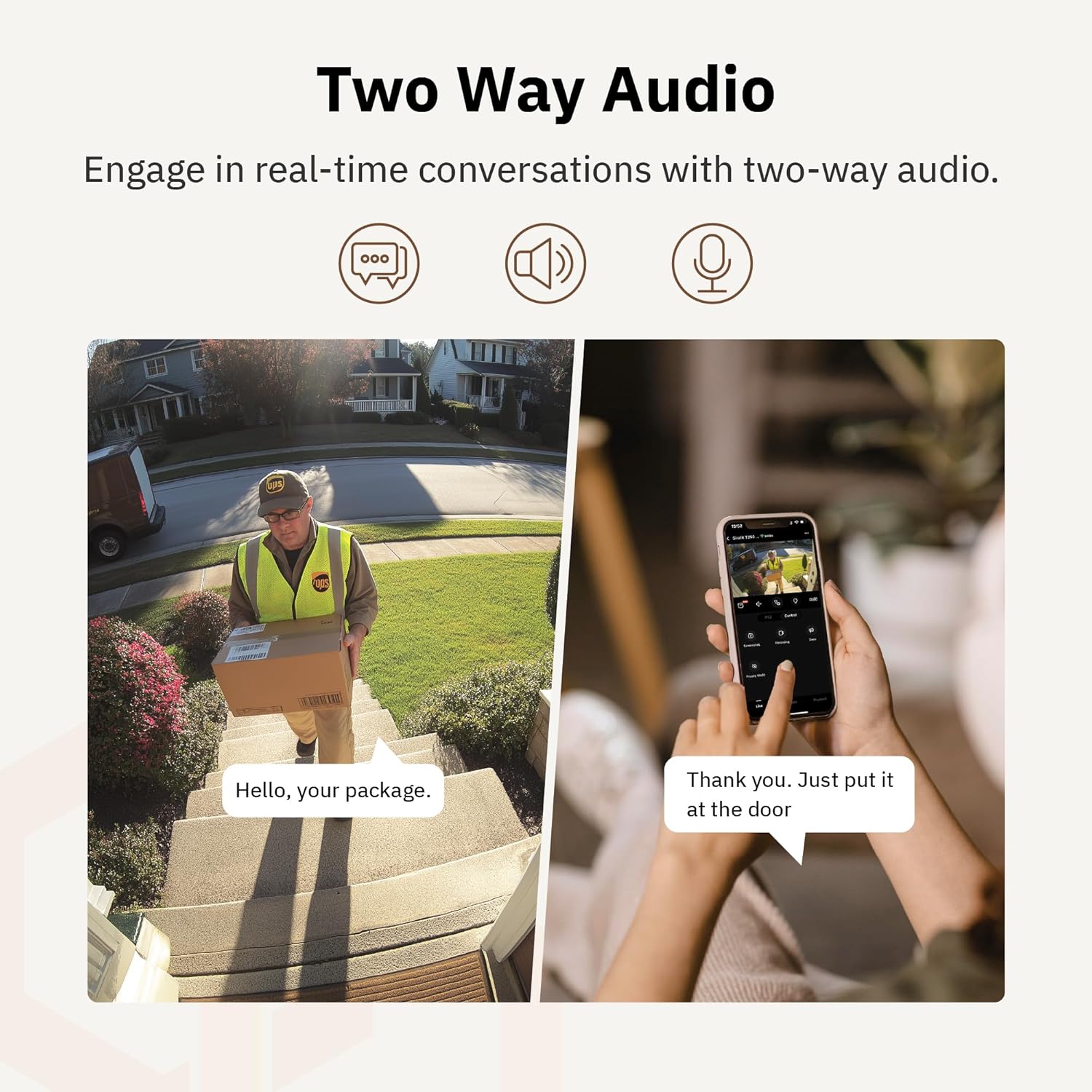
4.6 paveikslas: buvęsample of using two-way audio to communicate with a delivery person at the door.
4.5 Privatumo režimas
For enhanced privacy, the camera features a privacy mode. When activated, the camera lens physically tilts down by 180°, ensuring no live feed is captured or transmitted. This provides 100% privacy protection when needed.

Figure 4.7: The camera in privacy mode, with the lens tilted downwards to ensure no recording or live view.
4.6 Vaizdo įrašų saugykla
The camera supports two primary methods for video storage:
- „Micro SD“ kortelė: Insert a Micro SD card (up to 256GB, not included) into the designated slot on the camera for local storage of recordings.
- Saugykla debesyje: Girafit offers encrypted cloud storage services in the US. Refer to the app for subscription options and details.
5. Priežiūra
5.1 Valymas
Norėdami išlaikyti optimalų veikimą, periodiškai valykite kameros objektyvą ir korpusą. Naudokite minkštą, sausą šluostę.amp šluoste nuvalykite dulkes ir nešvarumus. Venkite naudoti stiprias chemines medžiagas ar abrazyvines medžiagas, kurios gali pažeisti objektyvą ar apdailą.
5.2 Firmware atnaujinimai
Girafit regularly releases firmware updates to improve camera performance, add new features, and enhance security. Check the Girafit app periodically for available updates and follow the in-app instructions to install them. Ensure the camera has a stable power supply during updates.
6. Problemų sprendimas
- Fotoaparatas neprisijungia prie „Wi-Fi“:
- Ensure your Wi-Fi network is 2.4GHz or 5GHz and the password is correct.
- Perkelkite kamerą arčiau „Wi-Fi“ maršrutizatoriaus.
- Iš naujo paleiskite maršrutizatorių ir kamerą.
- Prasta vaizdo kokybė:
- Patikrinkite savo interneto ryšio greitį.
- Nuvalykite fotoaparato objektyvą.
- Įsitikinkite, kad kamera gauna pakankamai maitinimo.
- Judesio aptikimas neveikia:
- Patikrinkite, ar programėlės nustatymuose įjungtas judesio aptikimas.
- Adjust detection sensitivity and detection zones.
- Įsitikinkite, kad nėra jokių kliūčių, blokuojančių kameros view.
- Dvipusio garso problemos:
- Check microphone and speaker permissions for the Girafit app on your phone.
- Įsitikinkite, kad kameros mikrofonas ir garsiakalbis nėra uždengti.
For further assistance, please contact Girafit customer support.
7. Specifikacijos
| Funkcija | Aprašymas |
|---|---|
| Modelio pavadinimas | GRF-T350SW |
| Vaizdo įrašymo raiška | 3K (5MP) |
| Naudojimas viduje / lauke | Lauke |
| Ryšio technologija | Wi-Fi (2.4GHz/5GHz), Wired |
| Maitinimo šaltinis | Su laidu elektra |
| Montavimo tipas | Sieninis laikiklis |
| Ypatinga funkcija | 2-Way Audio, AI Detection (Human/Pet/Vehicle), Auto Tracking, Color Night Vision, IP65 Weatherproof |
| Suderinami įrenginiai | Desktop, Laptop, Smartphone (Android/iOS) |
| Prekės matmenys (I x P x A) | 2.63 x 2.63 x 4.76 colio |
| Prekės svoris | 14.7 uncijos |
| Saugojimo parinktys | „Micro SD“ kortelė (iki 256 GB), debesies saugykla |
| UPC | 764742517881 |
8. Garantija ir palaikymas
Girafit products are designed for reliability and performance. For warranty information, please refer to the warranty card included with your product or visit the official Girafit website. For technical support, troubleshooting assistance, or any inquiries regarding your Girafit GRF-T350SW camera, please contact Girafit customer service through the contact information provided on the official website or within the Girafit app.