
1. Įvadas
This manual provides essential information for the installation, operation, and maintenance of your Astralpool E-next 7 pH Salt Water Chlorinator System. Please read this manual thoroughly before attempting to install or operate the unit. Proper installation and adherence to these instructions will ensure optimal performance and longevity of your system.
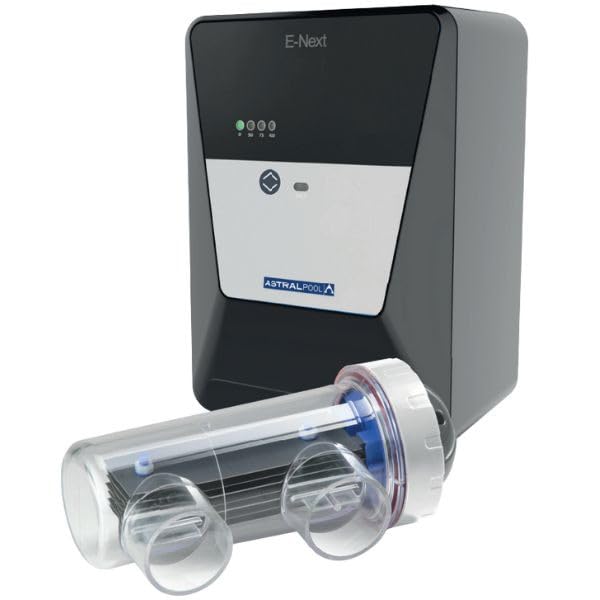
Image 1: Astralpool E-next 7 pH Salt Water Chlorinator System. This image displays the main unit of the salt water chlorinator, typically showing the control panel and the electrolytic cell connection points.
2. Saugos informacija
Visada laikykitės toliau nurodytų saugos priemonių, kad sumažintumėte sužalojimų, elektros smūgio, gaisro ar gaminio sugadinimo riziką.
- Elektros sauga: Ensure the unit is connected to a properly grounded outlet. Disconnect power before performing any service or maintenance.
- Cheminis tvarkymas: Handle pool chemicals, especially salt and pH adjusters, with care. Wear appropriate personal protective equipment (PPE) such as gloves and eye protection.
- Montavimas: Montavimą turi atlikti kvalifikuotas specialistas, laikydamasis visų vietinių ir nacionalinių elektros ir santechnikos kodeksų.
- Vaikai: Keep the unit and all chemicals out of reach of children.
- Vandens kokybė: Maintain proper water balance as specified in this manual to prevent damage to the unit and ensure safe pool conditions.
3. Sąranka
3.1 Išpakavimas
Carefully remove all components from the packaging. Verify that all parts listed in the packing list are present and undamaged. Retain packaging for future transport or storage.
3.2 diegimas
The E-next 7 pH system requires both electrical and plumbing connections. It is recommended to install the unit after the pool filter and heater, but before any return jets.
- Valdymo bloko montavimas: Select a dry, well-ventilated location, away from direct sunlight and heat sources. Mount the control unit vertically using appropriate fasteners.
- Ląstelės diegimas: Install the electrolytic cell in the pool's return plumbing line. Ensure proper water flow direction as indicated on the cell. Use PVC unions for easy removal.
- pH zondo montavimas: Install the pH probe into the designated port on the plumbing line, ensuring it is submerged in flowing water.
- Elektros jungtys: Connect the control unit to a dedicated, grounded power supply. Connect the electrolytic cell and pH probe cables to the control unit as per the wiring diagram provided in the full manual.
- Initial Water Chemistry: Before starting the system, ensure the pool water chemistry is balanced, especially the salt level (typically 3000-4000 ppm) and alkalinity.
3.3 Pirmasis paleidimas
After installation and water balancing:
- Įjunkite baseino siurblį.
- Power on the Astralpool E-next 7 pH control unit.
- Follow the on-screen prompts for initial calibration of the pH probe and setting desired chlorine production levels.
- Monitor the system for the first 24-48 hours to ensure stable operation and proper chemical levels.
4. Naudojimo instrukcijos
4.1 Valdymo skydas baigtasview
The control panel features a digital display and several buttons for navigation and setting adjustments. Refer to the detailed diagram in the complete manual for specific button functions.
- Ekranas: Shows current pH level, chlorine production percentage, salt level, and system status.
- Režimo mygtukas: Toggles between different operating modes (e.g., Auto, Manual, Super Chlorinate).
- Aukštyn/žemyn mygtukai: Adjust settings such as chlorine output percentage and pH set points.
- Enter/Menu Button: Confirms selections and accesses the main menu.
4.2 Pagrindinės operacijos
The system automatically generates chlorine from salt and adjusts pH levels based on your settings.
- Setting Chlorine Output: Use the Up/Down buttons to set the desired chlorine production percentage (e.g., 50% to 100%). Start with a moderate setting and adjust based on pool usage and chlorine demand.
- pH Control: The E-next 7 pH system automatically monitors and adjusts the pool's pH. Set your desired pH range (e.g., 7.4-7.6). The system will inject pH adjuster (acid or base, depending on model and setup) to maintain this range.
- Stebėjimas: Regularly check the display for current readings and system status. Perform manual water tests periodically to verify automated readings.
4.3 Išplėstiniai nustatymai
Access the main menu to configure advanced settings such as:
- Laikmačio nustatymai: Schedule operating hours for chlorine production.
- Superchlorinimo režimas: Activates a high-output chlorine boost for a set period.
- Žiemos režimas: Reduces or suspends operation for colder temperatures.
- Srauto jutiklis: Configure flow sensor settings to ensure the system only operates when water is flowing.
5. Priežiūra
Regular maintenance ensures efficient operation and extends the lifespan of your chlorinator system.
5.1 Reguliarus valymas
- Valdymo blokas: Keep the control unit clean and dry. Wipe with a damp audinys pagal poreikį.
- pH zondas: Calibrate the pH probe regularly (e.g., monthly) using buffer solutions. Clean the probe tip gently with a soft brush if mineral deposits are visible.
5.2 Electrolytic Cell Inspection and Cleaning
Inspect the electrolytic cell every 3 months or if chlorine production decreases.
- Turn off the power to the chlorinator and pool pump.
- Close isolation valves to prevent water flow.
- Remove the electrolytic cell from the plumbing.
- Inspect the plates for scale buildup (white, flaky deposits).
- If scale is present, clean the cell by soaking it in a diluted acid solution (e.g., 1 part muriatic acid to 4 parts water) until the scale dissolves. Always add acid to water, never water to acid.
- Rinse the cell thoroughly with fresh water before reinstallation.
5.3 Žieminimas
In regions with freezing temperatures, the system must be properly winterized.
- Atjunkite įrenginio maitinimą.
- Drain all water from the electrolytic cell and pH probe housing.
- Remove the cell and pH probe, clean them, and store them in a dry, frost-free location.
- Cover the control unit or remove it for indoor storage if exposed to harsh winter conditions.
6. Problemų sprendimas
This section addresses common issues. For more complex problems, contact technical support.
| Problema | Galima priežastis | Sprendimas |
|---|---|---|
| Low/No Chlorine Output | Low salt level; dirty cell; low water flow; incorrect output setting. | Check and adjust salt level; clean cell; ensure pump is running and valves are open; increase chlorine output setting. |
| pH Imbalance | pH probe needs calibration/cleaning; pH adjuster reservoir empty; incorrect pH set point. | Calibrate or clean pH probe; refill pH adjuster; adjust pH set point. |
| "No Flow" Error | Pool pump off; clogged filter; closed valve; faulty flow sensor. | Ensure pump is on; clean filter; open all valves; inspect/replace flow sensor. |
| Sistema neįsijungia | No power supply; tripped breaker; faulty wiring. | Check power connection and circuit breaker; consult an electrician. |
7. Specifikacijos
- Modelis: Astralpool E-next 7 pH
- Chloro gamyba: Up to 7 g/h (grams per hour)
- Rekomenduojamas baseino tūris: Up to 30 m³ (cubic meters)
- pH Control: Integrated automatic pH regulation
- Salt Requirement: Typically 3000-4000 ppm (parts per million)
- Maitinimas: (Konkretų tūrį žr. produkto etiketėje)tage/ampera)
- ASIN: B0FDYCBRWZ
- GTIN: 08435610902376
8. Informacija apie garantiją
Astralpool products are manufactured to high-quality standards and are backed by a limited warranty. The specific terms and duration of your warranty may vary by region and product. Please retain your proof of purchase. For detailed warranty information, refer to the warranty card included with your product or visit the official Astralpool websvetainę.
This warranty typically covers defects in materials and workmanship under normal use and service. It does not cover damage resulting from improper installation, misuse, neglect, freezing, or unauthorized repairs.
9. Pagalba klientams
If you have any questions, require technical assistance, or need to report a problem with your Astralpool E-next 7 pH Salt Water Chlorinator System, please contact Astralpool customer support or your authorized dealer.
- Websvetainė: www.astralpool.com (for local contact information and resources)
- Pardavėjas: Contact the authorized Astralpool dealer from whom you purchased the product.
When contacting support, please have your product model number (E-next 7 pH) and serial number (if applicable) ready.


