
Įvadas
This manual provides detailed instructions for the installation, operation, and maintenance of your UNITOPSCI Single Din Car Stereo, Model 6886C. This unit features a 6.86-inch HD touchscreen, Apple CarPlay, Android Auto, Bluetooth 5.0, FM radio, USB connectivity, and support for a backup camera. Please read this manual thoroughly before use to ensure proper functionality and safety.
Pakuotės turinys
Patikrinkite, ar pakuotėje yra visi toliau išvardyti daiktai:
- 1 x Car Stereo
- 1 x atsarginė kamera
- 1x maitinimo laidas
- 1 x garsiakalbio laidas
- 1 x Remote Control (Battery Not included)
- 1 x Vartotojo vadovas
- 1x mikrofonas

Image: All components included in the UNITOPSCI car stereo package.
Produktas baigtasview
The UNITOPSCI 6886C is a single DIN car stereo featuring a 6.86-inch HD touchscreen. Its compact design allows for installation in standard single DIN openings.
Matmenys ir jungtys
The unit measures approximately 187mm (7.3 inches) in length and 52mm (2.0 inches) in height. The screen itself is 6.86 inches. The rear panel includes various ports for power, speakers, microphone, video output, camera input, and GPS antenna.

Vaizdas: Priekyje ir gale view with dimensions and connection ports labeled.
Sąranka ir diegimas
Rekomenduojamas profesionalus montavimas. Prieš pradėdami montavimą, įsitikinkite, kad transporto priemonės maitinimas yra atjungtas.
Diegimo žingsniai:
- Prepare Dash Opening: Confirm your vehicle's dash opening is suitable for a single DIN unit (187mm x 52mm). A suitable dash kit may be required if the opening is not standard.
- Laidų jungtys: Connect the power cable and speaker cable to the corresponding ports on the car stereo and your vehicle's wiring harness. Refer to the wiring diagram in the included user manual for specific connections.
- Atsarginė kamera: Connect the backup camera cable to the 'CAMIN' port on the rear of the stereo. Ensure the camera's power is correctly wired to the vehicle's reverse light circuit for automatic activation.
- Mikrofonas: Connect the external microphone to the 'MIC' port for improved hands-free calling audio quality.
- GPS antena: If applicable, connect the GPS antenna to the 'GPS' port.
- Saugus vienetas: Mount the car stereo securely into the dash opening.
- Iš naujo prijunkite maitinimą: Prijunkite automobilio akumuliatorių ir patikrinkite visas funkcijas.
Naudojimo instrukcijos
This section details the primary functions and features of your car stereo.
1. Apple CarPlay & Android Auto (Wired Connection)
Connect your iPhone or Android smartphone via a USB cable to access Apple CarPlay or Android Auto. This allows you to use navigation, make calls, send messages, and listen to music directly from your phone's interface displayed on the stereo screen. Voice control (Siri for CarPlay, Google Assistant for Android Auto) is supported for hands-free operation.

Image: Apple CarPlay, Android Auto, and Mirror Link functionality via wired USB connection.
2. Bluetooth 5.0
Pair your mobile device with the stereo via Bluetooth 5.0 for hands-free calling and wireless audio streaming. Access your phonebook and dial directly from the stereo's touchscreen. The Bluetooth name for pairing is 'CAR BT'.
3. FM radijas
Tune into FM radio stations (frequency range 87.5-108MHz). The unit supports 18 preset stations, allowing quick access to your favorite channels for news, music, and traffic updates.
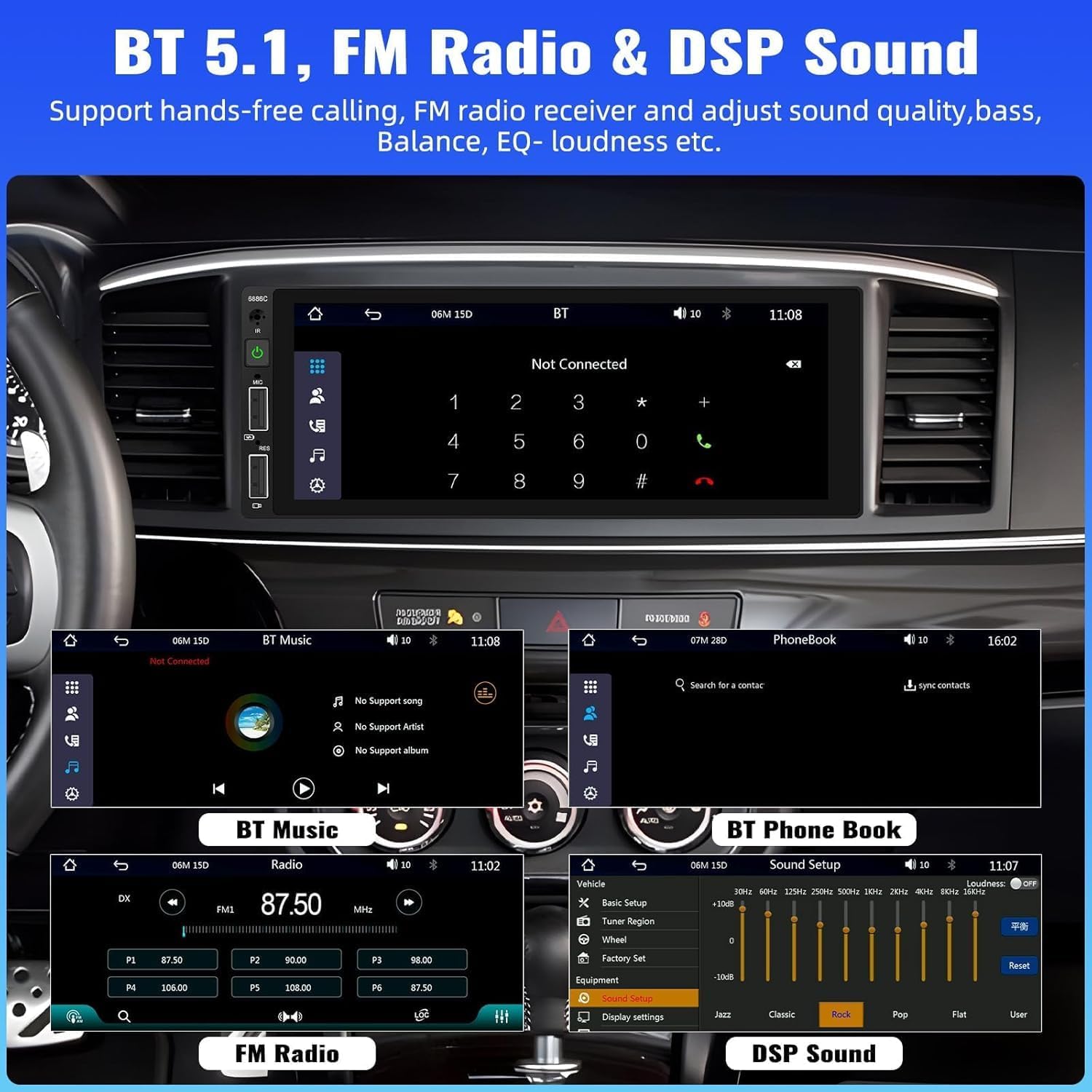
Image: Bluetooth, FM Radio, and Digital Sound Processing (DSP) settings interface.
4. Veidrodinis saitas
Utilize the Mirror Link function to display your smartphone's screen directly on the car stereo. Connect your device using its original USB cable. This feature is useful for viewing maps or playing videos from your phone.
5. USB atkūrimas ir įkrovimas
The stereo features dual USB slots. Use these ports for media playback from USB drives or for fast charging your mobile devices. The unit also supports DVR connection via USB (DVR not included).

Image: Multiple playback options including USB charging and DVR support.
6. EQ Sound Feature
Adjust the audio output to your preference using the built-in EQ sound feature. Customize settings for bass, balance, and loudness to optimize your listening experience.
7. Vairo valdymas (SWC)
If your vehicle supports it, connect the steering wheel control wires to easily manage radio functions, adjust volume, and handle calls without taking your hands off the wheel. This enhances driving safety.
8. Atsarginės kameros įvestis
When the vehicle is shifted into reverse gear, the stereo automatically displays the video feed from the connected backup camera. The included camera features 4 LED lights for clear night vision and parking lines to assist with safer parking maneuvers.

Image: Backup camera input and steering wheel control interface.
9. Seven Color Backlight
Customize the button backlight color to match your vehicle's interior or your personal preference. Choose from seven available colors.
10. Išjunkite atmintį
The unit retains the last playing state (e.g., radio station, music track) when powered off and resumes from that point upon restart.
Priežiūra
Norėdami užtikrinti automobilio garso sistemos ilgaamžiškumą ir optimalų veikimą, laikykitės šių priežiūros nurodymų:
- Valymas: Ekraną ir išorę valykite minkšta, sausa šluoste. Venkite abrazyvinių valiklių ar tirpiklių.
- Temperatūra: Saugokite įrenginį nuo ekstremalių temperatūrų.
- Drėgmė: Laikykite įrenginį sausą ir atokiau nuo drėgmės.
- Firmware atnaujinimai: Patikrinkite gamintojo websvetainėje periodiškai ieškokite galimų programinės įrangos atnaujinimų, skirtų našumui pagerinti ir funkcijoms papildyti.
Trikčių šalinimas
Jei kyla problemų dėl automobilio garso sistemos, žr. šias dažniausiai pasitaikančias problemas ir sprendimus:
| Problema | Galima priežastis | Sprendimas |
|---|---|---|
| Nėra galios | Neteisingas laidų prijungimas; Perdegęs saugiklis; Išsikrovęs automobilio akumuliatorius. | Check power connections; Replace fuse; Check vehicle battery. |
| Nėra garso | Atjungti garsiakalbio laidai; per mažas garsumas; įjungta nutildymo funkcija. | Patikrinkite garsiakalbių jungtis; padidinkite garsumą; išjunkite nutildymą. |
| „Bluetooth“ neprisijungia | Bluetooth not enabled on device; Incorrect pairing process. | Ensure Bluetooth is on; Re-attempt pairing (Bluetooth name: CAR BT). |
| „CarPlay“ / „Android Auto“ neveikia | Sugedęs USB laidas; Nesuderinamas telefonas; Programinės įrangos problema. | Use original USB cable; Check phone compatibility; Restart phone and stereo. |
| Galinio vaizdo kamera be ekrano | Camera not powered; Video cable disconnected; Incorrect trigger wire. | Check camera power supply; Verify video cable connection; Ensure reverse trigger wire is connected. |
Specifikacijos
Detailed technical specifications for the UNITOPSCI 6886C car stereo:
- Modelis: 6886C
- ttage: DC12V
- Sistema: SURAUKTI
- CPU lustas: F133
- Ekrano dydis: 6.86 colių
- Ekrano skiriamoji geba: 1280*480
- Veidrodinė nuoroda: Palaikoma
- Radijo grupė: FM
- Radijo lustas: QN8035
- Galia: 45W*4 (180 Watts total)
- Darbo temperatūra: -10-60 ℃
- Bluetooth versija: 5.0
- Bluetooth pavadinimas: AUTOMOBILIS BT
- Spalvingas foninis apšvietimas: Palaikoma
- Atbulinės eigos įvestis: CVBS
- Galia Amppakėlimo lustas: TDA7388
- Radijo dažnis: 87.5-108MHz
- Garso formato palaikymas: MP3 / WMA / WAV / APE / FLAC
- Vaizdo įrašo formato palaikymas: RM/RMVB/AVI/MP4/MKV/3GP
- Palaikomi vaizdo formatai: JPG BMP PNG
- Palaikomos kalbos: Anglų, kinų, ispanų, portugalų, rusų, italų, vokiečių, prancūzų, turkų, čekų, arabų, lenkų, hebrajų
Garantija ir palaikymas
Your UNITOPSCI car stereo comes with a 2 metų garantija from the date of purchase, covering manufacturing defects. For technical assistance, troubleshooting, or warranty claims, please contact our support team.
Palaikymas internetu: UNITOPSCI@126.com