
1. Įvadas
The VSTARCAM VS-CS663DR is a 2MP dual-lens outdoor security camera designed for comprehensive surveillance. It features dual lenses for wide-angle and telephoto views, 2.4GHz WiFi connectivity, motion detection with auto-tracking, two-way audio communication, and both full-color and infrared night vision capabilities. This manual provides detailed instructions for the setup, operation, and maintenance of your security camera.
2. Pakuotės turinys
Prieš tęsdami diegimą, patikrinkite, ar pakuotėje yra visi toliau išvardyti elementai:
- VSTARCAM VS-CS663DR Dual Lens Security Camera
- Instrukcijų vadovas
- Maitinimo adapteris
- Tvirtinimo varžtai
- Įkrovimo kabelis
- Stand (for mounting)

Vaizdas: Contents of the VSTARCAM VS-CS663DR package, including the camera, user manual, mounting screws, and power adapter.
3. Produktas baigtasview
The VS-CS663DR camera features a robust design with dual antennas for stable connectivity and dual lenses for comprehensive coverage. It is equipped with infrared and white light dual core lamp beads for enhanced night vision.
Vaizdas: Išsamus view of the VSTARCAM VS-CS663DR camera, highlighting its dimensions (approximately 18cm/7.08in width, 23cm/9.06in height, 14cm/5.51in depth) and components such as dual antennas, HD lenses, and microphone.
Dual Lens Functionality
This camera integrates two lenses: a 2.8mm wide-angle lens for a broad panoramic view and a 6.0mm telephoto lens for capturing detailed close-ups. Both views can be displayed simultaneously on one screen within the application.
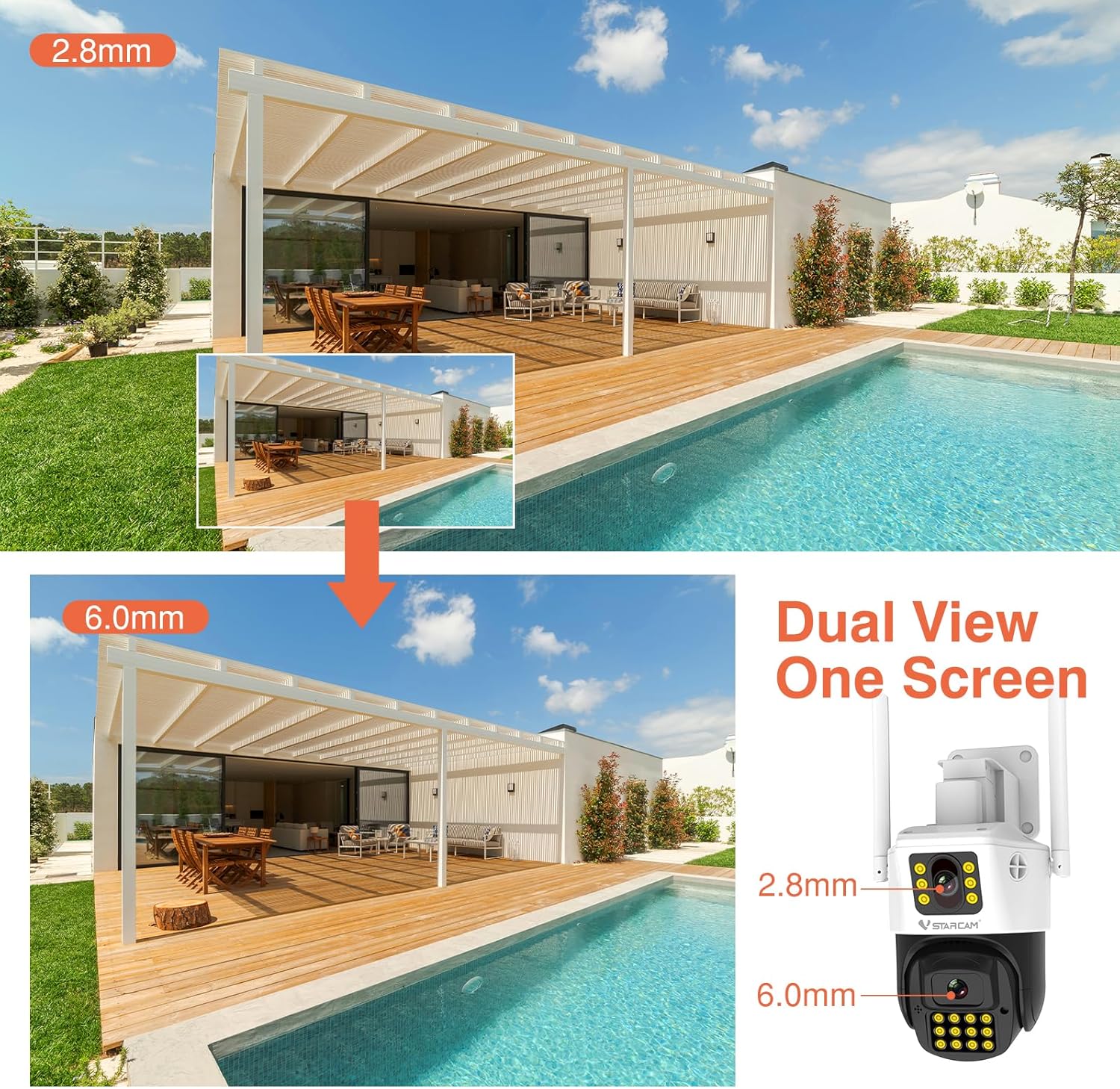
Vaizdas: Demonstrates the dual-view capability of the camera, showing a wide-angle perspective from the 2.8mm lens and a magnified view from the 6.0mm lens simultaneously.
Pakreipimo ir pasukimo mechanizmas
The camera offers a horizontal rotation of 350° (Pan) and a vertical tilt of 90°, allowing for extensive coverage of your surveillance area. This movement can be controlled remotely via the mobile application.

Vaizdas: The VSTARCAM outdoor camera illustrating its pan (360°) and tilt (90°) rotation angles, providing flexible monitoring.
4. Sąranka
4.1 Fizinis įrengimas
The camera can be mounted on a wall or placed on a desktop using the included bracket. Ensure the mounting location provides a clear view of the desired surveillance area and is within range of your 2.4GHz WiFi network.
- Pasirinkite vietą: Select a suitable outdoor location for optimal coverage.
- Montavimas: Use the provided screws and stand to securely attach the camera to a wall or place it on a stable surface for desktop mounting.
- Maitinimo jungtis: Prijunkite maitinimo adapterį prie fotoaparato ir įjunkite jį į elektros lizdą.

Vaizdas: The camera's versatile mounting options, illustrating how it can be installed on a wall or placed on a desktop using its integrated rotating bracket.
4.2 App Installation and Network Connection
To operate the camera, you need to download and install the O-KAM mobile application on your smartphone.
- Atsisiųsti programą: Ieškokite "O-KAM" in your smartphone's app store (iOS or Android) and install it.
- Registruotis / Prisijungti: Open the O-KAM app and create a new account or log in if you already have one.
- Pridėti įrenginį: Follow the in-app instructions to add your VS-CS663DR camera. Ensure your smartphone is connected to a 2.4GHz WiFi network during this process, as the camera does not support 5GHz WiFi.
- Poravimas: The app will guide you through the pairing process, which typically involves scanning a QR code on the camera or listening for an audio prompt.
5. Naudojimo instrukcijos
5.1 Judesio aptikimas ir automatinis sekimas
The camera is equipped with advanced motion detection and humanoid detection capabilities. When motion or a human figure is detected, the camera can automatically track the subject and send alerts to your O-KAM app.
- Aktyvinimas: Enable motion detection and humanoid tracking in the O-KAM app settings for your camera.
- Įspėjimai: Upon detection, the camera can emit a white light alarm deterrent and send push notifications to your phone.
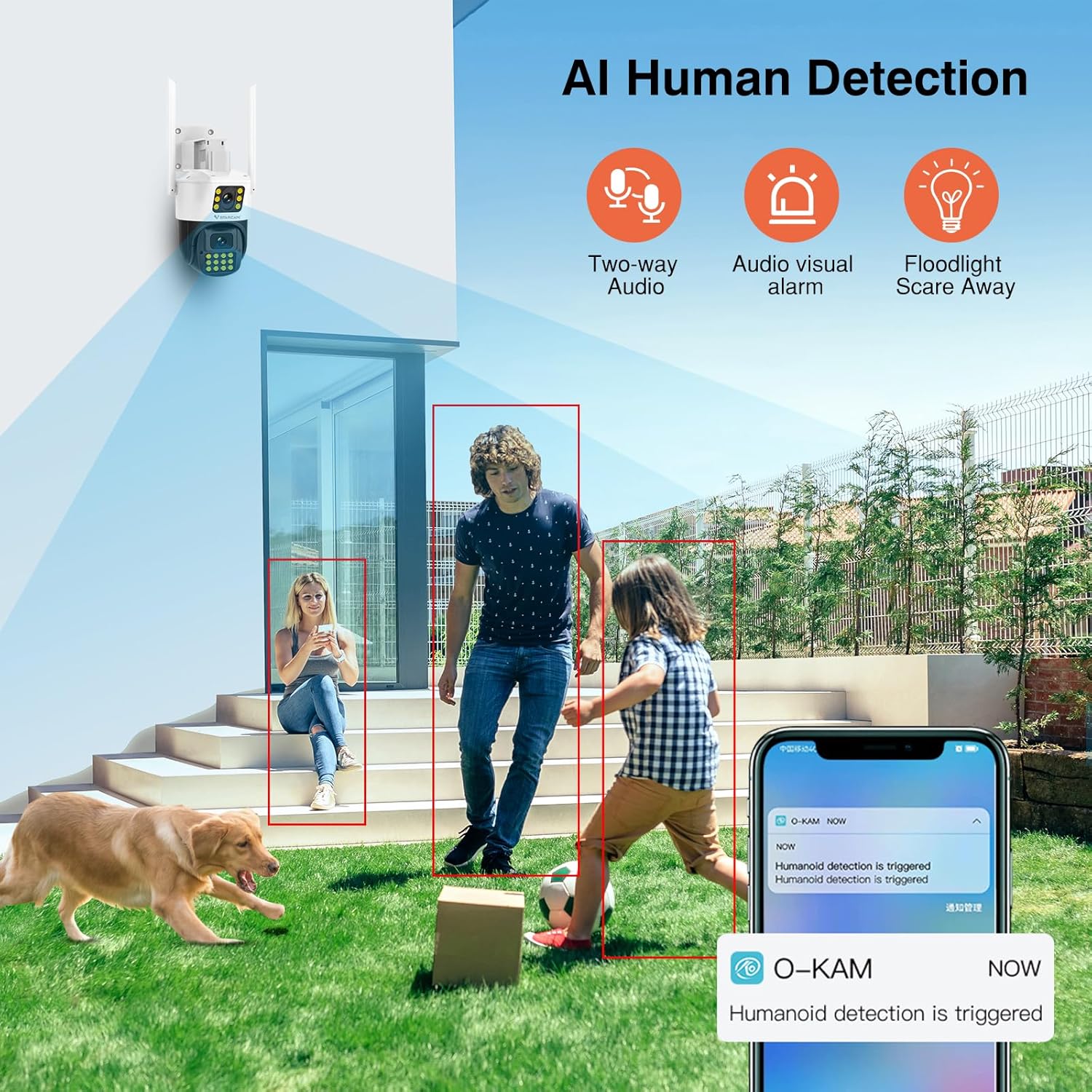
Vaizdas: The camera's AI Human Detection feature in action, showing how it identifies individuals and triggers alerts, two-way audio, and floodlight deterrence.
5.2 Dvipusis pokalbis
Utilize the built-in microphone and speaker for two-way audio communication. This allows you to speak to individuals near the camera and hear their responses through the O-KAM app.
- Initiate Talk: Prisijunkite prie tiesioginės transliacijos view in the O-KAM app and tap the microphone icon to begin two-way communication.
5.3 Naktinis matymas
The camera provides both full-color and infrared night vision, ensuring clear monitoring in low-light or complete darkness up to 30 meters.
- Režimai: The camera can automatically switch between infrared (black and white) and full-color night vision depending on ambient light conditions or user settings.
5.4 Remote Monitoring and Multi-User Sharing
Prieiga prie gyvo footage and recorded videos from anywhere using the O-KAM app, provided your camera is connected to the internet. You can also share camera access with family members.
- Tiesiogiai View: Open the O-KAM app to view realaus laiko footage.
- Dalijimasis: Use the sharing function within the app to grant access to other users.
5.5 Saugojimo parinktys
The camera supports local storage via a T-Flash (microSD) card (up to 256GB, not included) for 24/7 continuous recording, as well as cloud storage services (subscription may be required).
- SD kortelės įdiegimas: Insert a compatible microSD card into the designated slot on the camera. Format the card via the app if prompted.
- Saugykla debesyje: Explore cloud storage options and subscription details within the O-KAM app.
6. Priežiūra
Reguliarus fotoaparato aptarnavimas užtikrina optimalų veikimą ir ilgaamžiškumą.
- Valymas: Periodically clean the camera lenses and housing with a soft, damp audinys. Venkite abrazyvinių valiklių.
- Firmware atnaujinimai: Check the O-KAM app regularly for firmware updates. Keeping the firmware updated ensures access to the latest features and security enhancements.
- Apsauga nuo oro sąlygų: The camera has an IP66 waterproof rating, making it suitable for outdoor use in various weather conditions. However, avoid direct high-pressure water jets.

Vaizdas: The camera's IP66 waterproof rating, demonstrating its resilience against various environmental factors like fog, sun, rain, and snow.
7. Problemų sprendimas
Jei kyla problemų dėl fotoaparato, žr. šiuos dažniausiai pasitaikančius sprendimus:
| Problema | Galimas sprendimas |
|---|---|
| Camera is offline/cannot connect to WiFi |
|
| Į SD kortelę įrašymas negalimas |
|
| Judesio aptikimas neveikia |
|
| Prasta vaizdo kokybė naktį |
|
8. Specifikacijos
Detailed technical specifications for the VSTARCAM VS-CS663DR camera:
- Modelio pavadinimas: VS-CS663DR
- Veiksminga nejudančioji rezoliucija: 2 MP
- Nuotraukų jutiklio skiriamoji geba: 4 MP
- Vaizdo įrašo raiška: 1080p
- Kadrų dažnis: 25 kadrų per sekundę
- Ryšio technologija: Wired, Wi-Fi (2.4GHz only)
- Belaidė technologija: Wi-Fi
- Ypatinga funkcija: 2-Way Audio, Motion Detection, Auto Tracking, Night Color
- Naudojimas viduje / lauke: Lauke
- Viewpakreipimo kampas: 360 laipsnių (350° pasukimas, 90° pakreipimas)
- Naktinio matymo diapazonas: 30 metrai
- Atsparumo vandeniui įvertinimas: IP66
- Saugykla: Supports T-Flash card (max 256GB), Cloud Storage
- Kontrolės metodas: App (O-KAM)
- Maitinimo šaltinis: Su laidu elektra
- Operating Condition Temperature: -10 ℃ iki 50 ℃
- Operating Condition Humidity: <90 %
- Prekės matmenys: 6.08 x 5.5 x 8.06 colio
- Korpuso medžiaga: Plastikiniai
9. Garantija ir palaikymas
VSTARCAM products are covered by a manufacturer's warranty. For specific warranty terms and conditions, please refer to the warranty card included in your package or visit the official VSTARCAM website. For technical support, troubleshooting assistance, or service inquiries, please contact VSTARCAM customer support through their official channels.
- Gamintojas: VSTARCAM
- Palaikymas internetu: Refer to the VSTARCAM official websvetainė, kurioje rasite DUK, pagalbos išteklius ir kontaktinę informaciją.