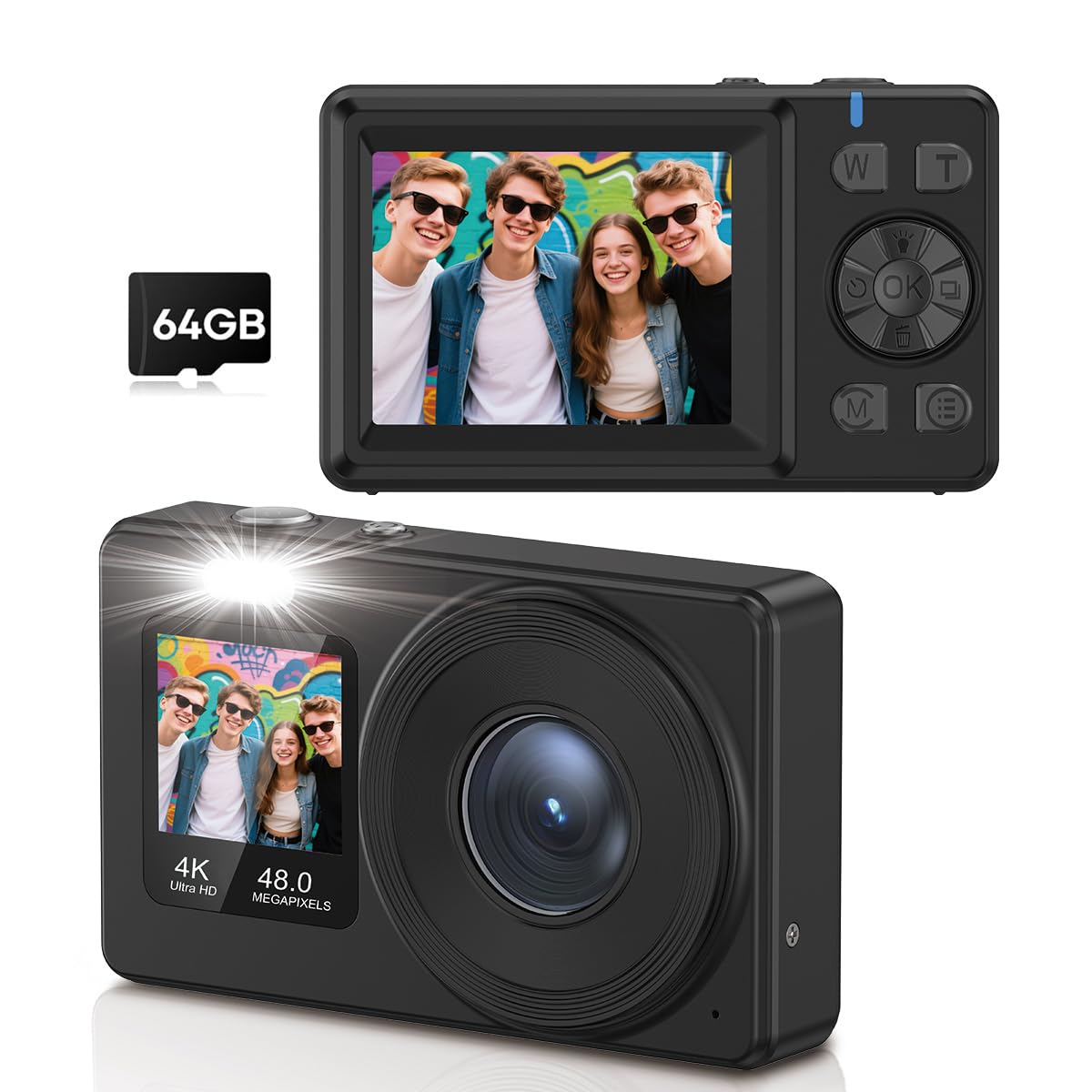
This manual provides detailed instructions for the AILRINNI 4K Digital Camera, Model X9-M. Please read this manual carefully before using the camera to ensure proper operation and to maximize your photography experience. Keep this manual for future reference.
Kas yra dėžutėje
AILRINNI X9-M Digital Camera Body
Rechargeable Battery (1 included)
64GB atminties kortelė
Duomenų kabelis
Vartotojo vadovas
Sąranka
1. Baterijos įdėjimas ir įkrovimas
The camera uses a Lithium-Ion battery. Ensure the battery is fully charged before first use.
Atidarykite baterijų skyriaus dangtelį, esantį fotoaparato apačioje.
Insert the rechargeable battery, ensuring the correct polarity.
Saugiai uždarykite akumuliatoriaus skyriaus dangtelį.
Connect the camera to a power source using the provided data cable to charge the battery. The charging indicator light will show the charging status.
2. Atminties kortelės įdėjimas
A 64GB memory card is included for storage.
Raskite atminties kortelės lizdą, paprastai esantį fotoaparato šone arba apačioje.
Insert the 64GB memory card into the slot until it clicks into place. Ensure it is inserted in the correct orientation.
Norėdami išimti, švelniai stumkite kortelę, kol ji iššoks.
3. Pradinis įjungimas
Paspauskite ir palaikykite maitinimo mygtuką (paprastai pažymėtą ĮJUNGTA/IŠJUNGTA or a power symbol) to turn on the camera. Follow any on-screen prompts for initial setup, such as setting the date and time.
Naudojimo instrukcijos
Fotoaparatas baigtasview ir valdikliai
Familiarize yourself with the camera's buttons and screens.
Vaizdas: Priekyje ir gale view of the AILRINNI X9-M camera, highlighting its compact design and control buttons.
Užrakto mygtukas: Takes photos or starts/stops video recording.
W/T Buttons: Control the 18x digital zoom (Wide/Telephoto).
Gerai mygtukas: Confirms selections, also used to switch to selfie mode.
M (režimo) mygtukas: Switches between different shooting modes (e.g., Photo, Video, Playback).
E (Settings) Button: Accesses camera settings and menu options.
1. Taking Photos (48MP)
The camera captures images at 48-megapixel resolution with autofocus.
Image: A user capturing a moment with the AILRINNI X9-M camera, highlighting its 4K video and 48MP photo capabilities.
Įjunkite fotoaparatą.
Ensure the camera is in Photo mode (check the display or press the M mygtuką).
Frame your shot using the 2.4-inch rear LCD screen.
The camera features one-touch autofocus. Press the Shutter button halfway down to focus, then press fully to capture the image.
2. Recording Videos (4K)
Record high-definition videos at 4K resolution (4320p).
Įjunkite fotoaparatą.
Switch to Video mode using the M mygtuką.
Press the Shutter button to start recording. A recording indicator will appear on the screen.
Norėdami sustabdyti įrašymą, dar kartą paspauskite užrakto mygtuką.
3. Using Dual Screens and Selfie Mode
The camera features a 2.4-inch rear screen and a 1.4-inch front screen for versatile shooting.
Image: The AILRINNI X9-M camera displaying its dual screen functionality, with a 2.4-inch rear screen and a 1.4-inch front screen.
Rear Screen (2.4-inch): Used for general framing, reviewing photos/videos, and accessing menus.
Front Screen (1.4-inch): Ideal for selfies and vlogging. To activate selfie mode, press and hold the OK button for 3 seconds. The front screen will activate, allowing you to frame yourself.
4. 18x Digital Zoom
Utilize the 18x digital zoom to capture distant subjects.
Image: Demonstrates the 18x digital zoom capability and various color filters (Regular, B&W, Red, Blue) available on the camera.
Naudokite W (Platus) ir T (Telephoto) buttons to adjust the zoom level. Press T priartinti ir W norėdami nutolinti.
5. Išplėstinės funkcijos
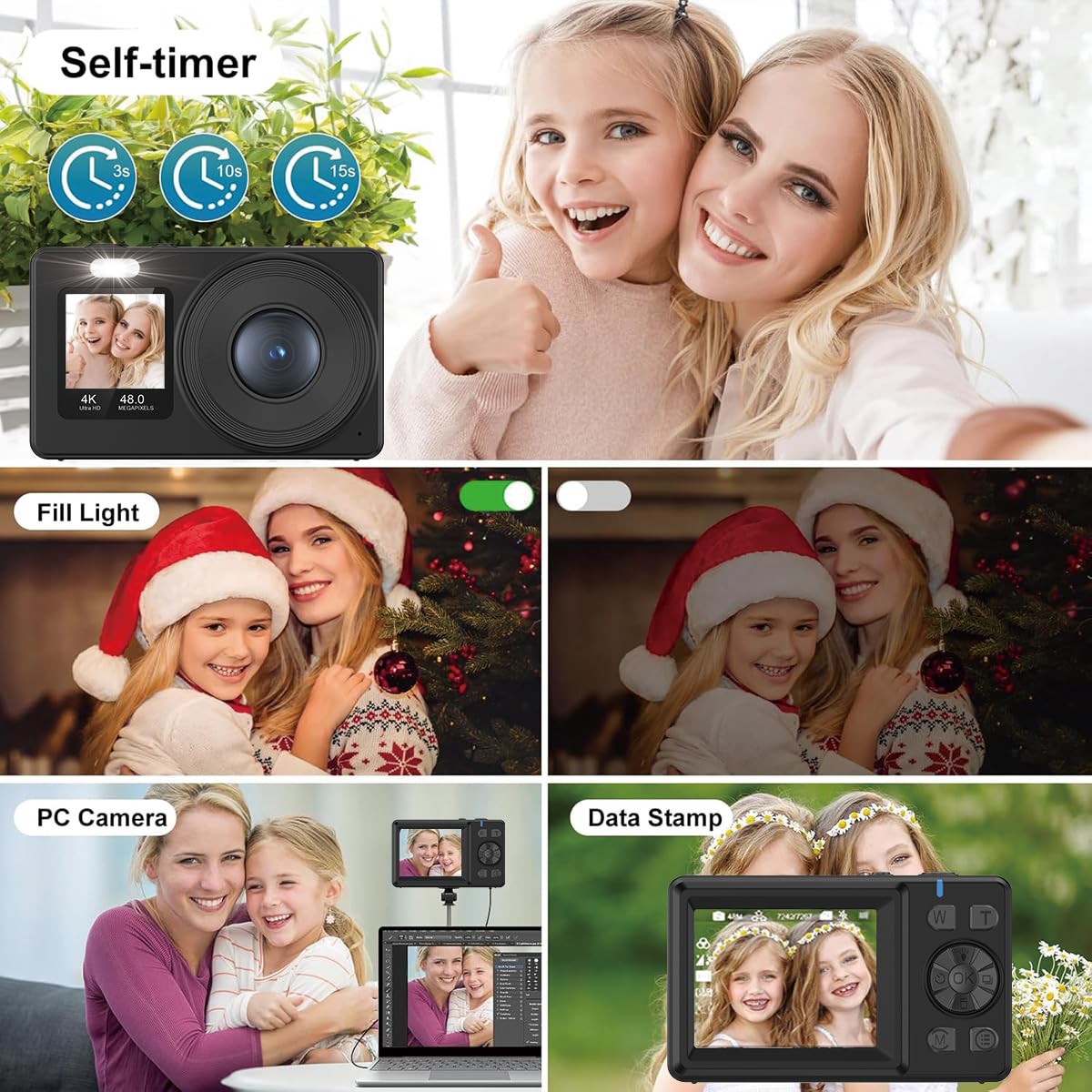
Image: A collage illustrating key features: Self-timer (3s, 10s, 15s options), Fill Light activation, PC Camera function for live streams, and Data Stamp for adding date/time to photos.
Anti-shake and Auto-lighting: These technologies are built-in to ensure sharp photos and videos, even in challenging lighting conditions.
Automatinis išjungimas: The camera can be set to automatically power off after a period of inactivity to save battery. Adjust this setting in the menu.
Vaizdo pasukimas: Rotate images during playback via the menu options.
Auto-shoot & Continuous Shooting: Access these modes through the menu for timed shots or rapid-fire sequences.
Specialieji efektai: Apply various filters and effects to your photos (e.g., B&W, Red, Blue as shown in the zoom image).
Laikmatis: Set a delay (e.g., 3s, 10s, 15s) before taking a photo, useful for group shots or selfies.
Užpildymo lemputė: Activate the built-in fill light for better illumination in low-light conditions.
Data Stamp: Add date and time information directly onto your photos.
6. Webkumštelio funkcija
The camera can function as a high-quality webcam for live streams and video calls.
Prijunkite fotoaparatą prie kompiuterio naudodami pateiktą duomenų kabelį.
Select "PC Camera" or "Webcam Mode" on the camera's screen if prompted.
Jūsų kompiuteris turėtų atpažinti kamerą kaip webkamera. Pasirinkite ją savo vaizdo konferencijų arba srautinio perdavimo programinėje įrangoje.
7. Perkėlimas Files
Transfer photos and videos to your computer or smartphone using the data cable.
Prijunkite fotoaparatą prie kompiuterio naudodami pateiktą duomenų kabelį.
Select "Mass Storage" or "Data Transfer" on the camera's screen if prompted.
The camera's memory card will appear as a removable drive on your computer. You can then copy files į jūsų norimą vietą.
Akumuliatoriaus priežiūra: Store the battery in a cool, dry place when not in use. Do not expose to extreme temperatures. Recharge regularly even if not used for extended periods to maintain battery health.
Saugykla: Store the camera in a protective case or bag to prevent scratches and dust accumulation. Avoid storing in humid or dusty environments.
Trikčių šalinimas
Problema
Galima priežastis
Sprendimas
Kamera neįsijungia.
Baterija išsikrovusi arba netinkamai įdėta.
Įsitikinkite, kad akumuliatorius yra visiškai įkrautas ir teisingai įdėtas.
Vaizdai neryškūs.
Fotoaparato drebėjimas, neteisingas fokusavimas arba nešvarus objektyvas.
Hold camera steady, ensure autofocus is engaged, clean the lens. Check lighting conditions.
Atminties kortelės klaida.
Kortelė įdėta netinkamai, pilna arba sugadinta.
Įdėkite atminties kortelę iš naujo. Ištrinkite nereikalingus filearba formatuokite kortelę (tai ištrins visus duomenis). Pabandykite kitą atminties kortelę.
Negalima perkelti files prie kompiuterio.
Incorrect USB mode selected, faulty cable, or driver issue.
Ensure "Mass Storage" mode is selected on the camera. Try a different USB port or cable. Restart both camera and computer.
Specifikacijos
Funkcija
Detalė
Prekės ženklas
AILRINNI
Modelio pavadinimas
X9-M
Nuotraukų jutiklio skiriamoji geba
48 MP
Vaizdo įrašymo raiška
4320p (4K)
Padidinti
18x skaitmeninis priartinimas
Galinio ekrano dydis
2.4 colio (LCD)
Priekinio ekrano dydis
1.4 colių
Atminties talpa
64 GB (įtraukta)
Baterijos tipas
Ličio jonų (1 komplekte)
Automatinis fokusavimas
Taip
Vaizdo stabilizavimas
Optinis
Webkumštelio funkcija
Taip
Palaikoma File Formatas
JPEG (nuotraukoms)
Yra laikmatis
Taip
Garso įrašymas
Taip
Tinklo ryšio technologija
Wi-Fi
Garantija ir palaikymas
For warranty information or technical support, please refer to the documentation included with your purchase or contact AILRINNI customer service. Keep your proof of purchase for warranty claims.
Ask a question about this manual
Ask about setup, troubleshooting, compatibility, parts, safety, or missing instructions. Manuals+ will review the question and use this page’s manual context to help answer it.