
1. Įvadas
This manual provides detailed instructions for the Loutoc SRC4526 Universal Remote Control, designed for seamless compatibility with Philips Ambilight Smart TVs. Please read this guide thoroughly to ensure optimal use and longevity of your remote control.
1.1 Produktas baigtasview
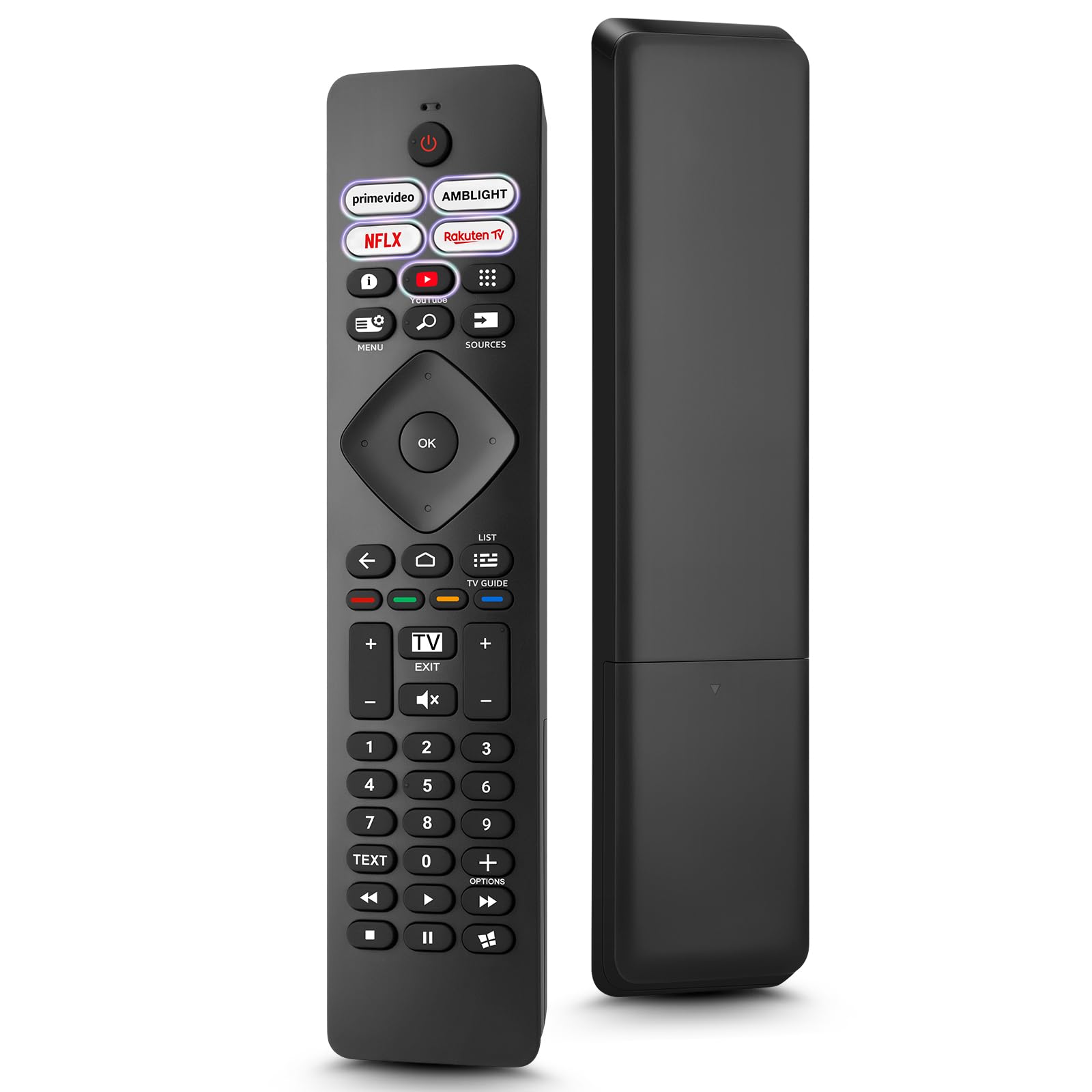
Image: The Loutoc SRC4526 Universal Remote Control, showcasindėl savo ergonomiško dizaino ir mygtukų išdėstymo.
1.2 Pagrindinės savybės
- Convenient Plug-and-Play: No complex setup or programming required. Simply insert batteries and the remote is ready for use.
- Wide TV Compatibility: Fully compatible with Philips Ambilight TVs, including 4K Ambilight LED, OLED, FHD, and Full Ultra HD models.
- Specialūs spartieji mygtukai: Features 5 direct access buttons for popular streaming platforms: Ambilight, Video, NFLX (Netflix), Rakuten TV, and YouTube.
- Patikimas našumas: Offers an effective operating range of 8 meters (26 feet) and an ultra-fast response time of 0.2 seconds.
2. Sąranka
2.1 Akumuliatoriaus įdėjimas
The Loutoc SRC4526 remote control requires two AAA batteries (not included) for operation.
- Nuotolinio valdymo pulto gale raskite baterijų skyrių.
- Atidarykite akumuliatoriaus skyriaus dangtelį.
- Įdėkite dvi AAA tipo baterijas, užtikrindami, kad teigiamas (+) ir neigiamas (-) poliai teisingai sutaptų su indikatoriais skyriaus viduje.
- Saugiai uždarykite akumuliatoriaus skyriaus dangtelį.
2.2 Pradinis naudojimas
This remote control is designed for immediate use with compatible Philips Ambilight TVs. No programming or pairing is required. Once batteries are installed, point the remote at your TV and begin operation.
3. Naudojimo instrukcijos
3.1 Mygtukų funkcijosview
Refer to the image below for a visual guide to the remote control's buttons and their corresponding functions.

Image: Detailed diagram of the Loutoc SRC4526 remote control, illustrating each button and its primary function.
| Mygtukas | Funkcija |
|---|---|
| Galia | Switches the TV on or off (Standby mode). |
| Prime Video, Ambilight, Netflix, Rakuten TV | Quickly launches the corresponding application. |
| Meniu | Opens the Quick Menu with typical TV functions. Hold to show Gaming control bar. |
| Paieška | Opens the Search tab on the Home screen. |
| Šaltiniai | Opens or closes the TV's input sources menu. |
| OK | Patvirtina pasirinkimą arba nustatymą. |
| Arrow/Navigation Keys | Navigates up, down, left, or right through menus and options. |
| Atgal | Grįžta į ankstesnį ekraną arba kanalą. |
| Pradžia | Opens the TV's Home menu. |
| TV vadovas | Opens or closes the TV Guide. Long press to open the channel list. |
| Color Keys (Red, Green, Yellow, Blue) | Provides direct selection of on-screen options. The blue key typically opens Help. |
| Garsas (+/-) | Reguliuoja televizoriaus garsumo lygį. |
| Kanalas (+/-) | Switches to the next or previous channel. |
| Išeiti | Exits current menu/application or returns to live TV. From standby, goes to last viewed šaltinis. |
| Nutildyti | Išjungia arba įjungia televizoriaus garsą. |
| Skaičių klavišai (0–9) | Tiesiogiai pasirenka televizijos kanalus. |
| TEKSTAS | Opens or closes Text/Teletext. |
| Atkūrimo valdikliai | Controls media playback: Play, Pause, Stop, Rewind, Fast Forward. |
| Programėlės | Opens the Apps tab on the Home screen. |
3.2 Ambilight Functionality
For Philips TVs equipped with Ambilight functionality, the dedicated Ambilight button on your remote allows you to control the lighting effects.
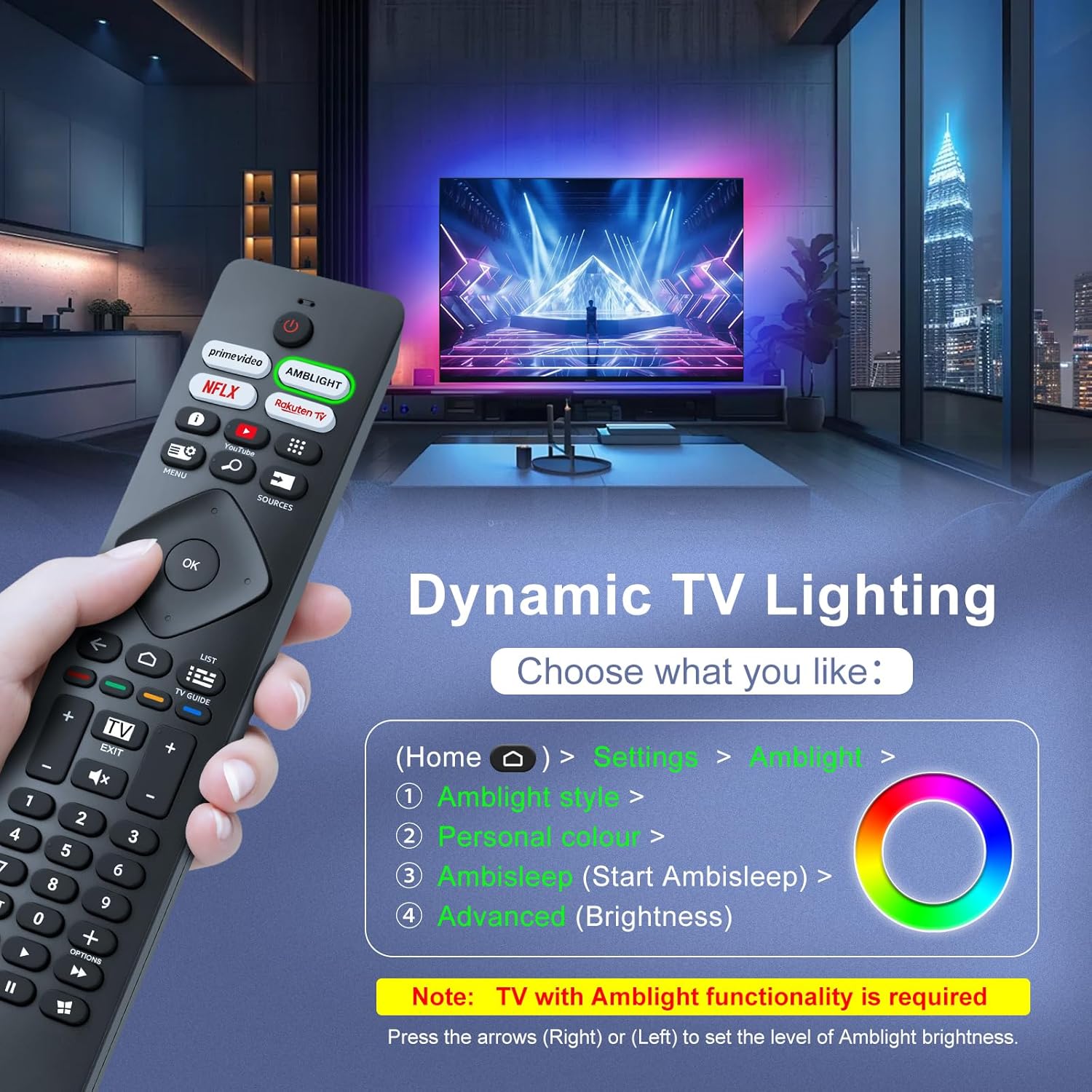
Image: A hand holding the remote control, with an overlay showing Ambilight settings on a TV screen.
After pressing the Ambilight button, you can navigate through the TV's menu to:
- Select different Ambilight display styles.
- Adjust personal color preferences.
- Initiate AmbiSleep mode.
- Adjust Ambilight brightness levels (using the right or left arrow keys).
Note: This feature requires a Philips TV with built-in Ambilight functionality.
4. Priežiūra
4.1 Valymas
To clean your remote control, gently wipe it with a soft, dry cloth. Avoid using liquid cleaners, aerosols, or harsh chemicals, as these can damage the remote's surface or internal components.
4.2 Saugykla
Nuotolinio valdymo pultą laikykite vėsioje, sausoje vietoje, toliau nuo tiesioginių saulės spindulių ir ekstremalių temperatūrų. Jei nuotolinio valdymo pulto ilgesnį laiką nenaudosite, rekomenduojama išimti baterijas, kad jos neištekėtų.
4.3 Akumuliatoriaus priežiūra
- Vienu metu pakeiskite visas baterijas; nemaišykite senų ir naujų baterijų.
- Nemaišykite skirtingų tipų baterijų (pvz., šarminių ir įkraunamų).
- Naudotas baterijas išmeskite atsakingai pagal vietines taisykles.
5. Problemų sprendimas
5.1 Bendrosios problemos ir sprendimai
- Nuotolinis nereaguoja:
- Patikrinkite, ar baterijos įdėtos teisingai, tinkamu poliškumu.
- Pakeiskite baterijas naujomis AAA baterijomis.
- Įsitikinkite, kad tarp nuotolinio valdymo pulto ir televizoriaus infraraudonųjų spindulių imtuvo nėra jokių kliūčių.
- Įsitikinkite, kad esate efektyvaus veikimo diapazone (iki 8 metrų).
- Neveikia tam tikri mygtukai:
- Clean the remote control, especially around the non-functioning buttons, to remove any dirt or debris.
- If only Ambilight functions are not working, ensure your Philips TV model supports Ambilight.
5.2 Susisiekite su palaikymo tarnyba
If you encounter persistent issues that cannot be resolved with the troubleshooting steps above, please contact Loutoc customer support directly. We aim to respond to all inquiries within 12 working hours.
6. Specifikacijos
| Funkcija | Detalė |
|---|---|
| Prekės ženklas | Loutoc |
| Modelio pavadinimas | SRC4526-FBA |
| Prekės modelio numeris | SRC4526 |
| Spalva | Juoda |
| Ryšio technologija | Infraraudonųjų spindulių |
| Ypatingos savybės | No programming required, Ergonomic, Lightweight |
| Suderinami įrenginiai | Television (Philips Ambilight TVs) |
| Maximum Number of Supported Devices | 1 |
| Valdiklio tipas | Mygtukų valdymas |
| Didžiausias diapazonas | 8 metrai (26 pėdos) |
| Baterijos aprašymas | AAA (2 required, not included) |
| Gamintojas | Loutoc |
| Kilmės šalis | Kinija |
| Data, kurią pirmą kartą galima rasti Amazon.com.be svetainėje | 31 m. rugpjūčio 2025 d |
7. Garantija ir palaikymas
7.1 Informacija apie garantiją
This Loutoc remote control comes with a manufacturer's warranty of 30 days from the date of purchase. Please retain your proof of purchase for any warranty claims.
7.2 Pagalba klientams
For any questions, technical assistance, or warranty inquiries, please contact Loutoc customer support. We are committed to providing timely assistance and will respond to your queries within 12 working hours.