
Nelko PM220
Nelko PM220 Bluetooth Thermal Label Printer User Manual
Modelis: PM220
1. Įvadas
Thank you for choosing the Nelko PM220 Bluetooth Thermal Label Printer. This portable device is designed for efficient label printing without the need for ink cartridges, making it ideal for small businesses, address labeling, logo printing, and various organizational tasks. This manual provides detailed instructions for setup, operation, maintenance, and troubleshooting to ensure optimal performance.
2. Produktas baigtasview
The Nelko PM220 is a compact thermal label printer that connects wirelessly via Bluetooth to your smartphone or PC. It supports various label sizes and offers clear, high-resolution printing for text, barcodes, and QR codes.
2.1 Pakuotės turinys
- Nelko PM220 Label Printer
- Label Paper Roll (starter roll)
- USB įkrovimo laidas
- Vartotojo vadovas

1 paveikslas: The Nelko PM220 Bluetooth Thermal Label Printer shown with a roll of blank labels. The printer features a sleek navy blue design with a power button and a paper feed button on the front panel.
3. Sąrankos vadovas
3.1 Etikečių juostos įdėjimas
- Open the printer cover by gently pushing the release button or lifting the designated area.
- Insert the label roll into the paper bin, ensuring the labels face upwards and the leading edge extends slightly out of the printer slot.
- Adjust the paper slot guide to the right to ensure the label paper is tightly attached to the far right side of the paper bin, preventing misalignment during printing.
- Saugiai uždarykite spausdintuvo dangtį.

2 paveikslas: A label roll being correctly inserted into the paper compartment of the Nelko PM220 printer. The roll is placed with the labels facing upwards.
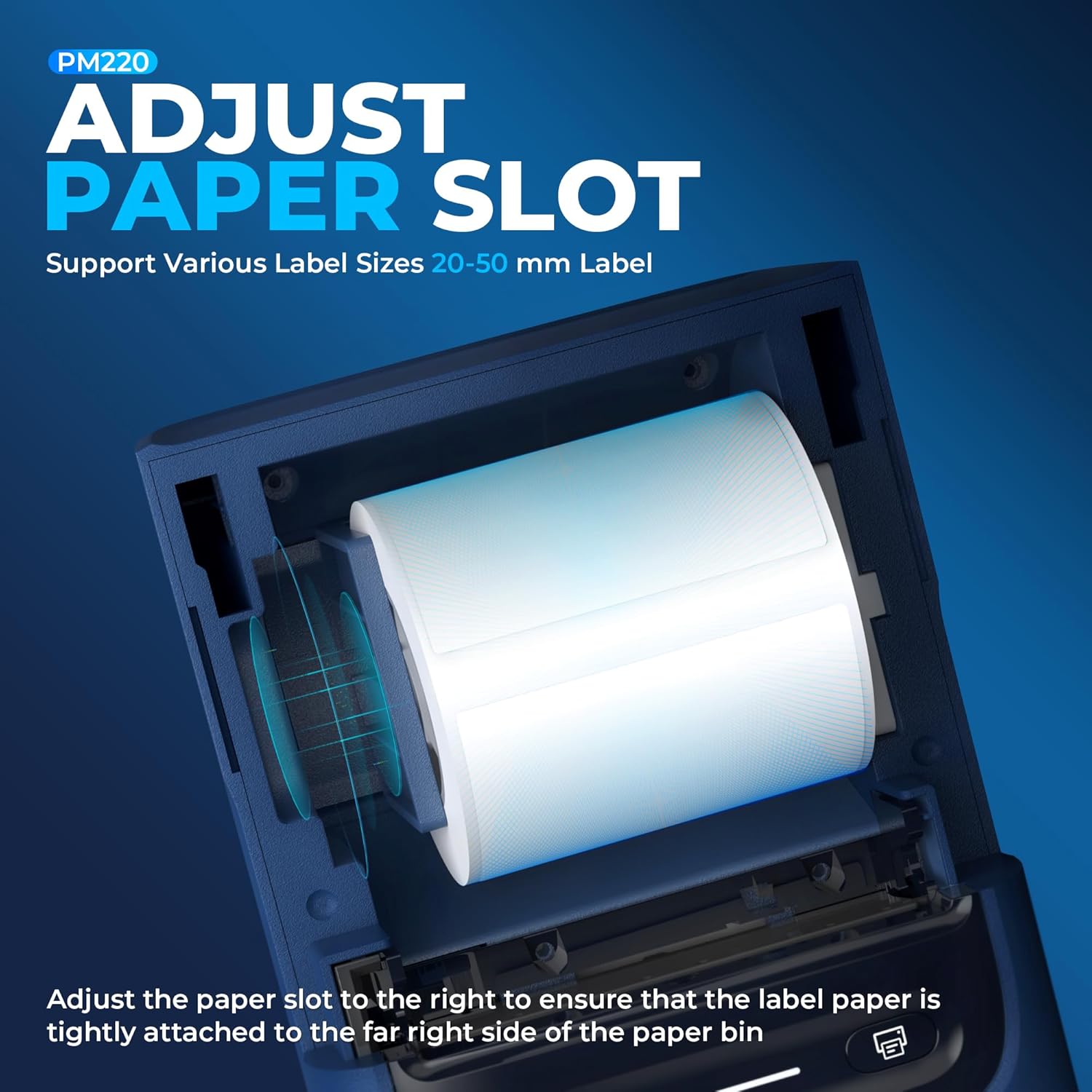
3 paveikslas: Iš arti view demonstrating how to adjust the paper slot guide within the Nelko PM220 printer. The guide is moved to the right to secure the label roll.
3.2 Prijungimas prie elektros tinklo
- Connect the provided USB charging cable to the printer's charging port.
- Kitą USB laido galą prijunkite prie suderinamo USB maitinimo adapterio (nepridedamas) arba kompiuterio USB prievado.
- Allow the printer to charge fully before first use. The indicator light will typically change color to indicate a full charge.
3.3 Programėlės diegimas ir „Bluetooth“ susiejimas
- Download the official Nelko label printing application from your device's app store (e.g., Apple App Store for iOS, Google Play Store for Android). For PC connectivity, download the appropriate driver and software from the official Nelko websvetainę.
- Ensure Bluetooth is enabled on your smartphone or PC.
- Power on the Nelko PM220 printer by pressing and holding the power button until the indicator light illuminates.
- Open the Nelko app (or PC software) and navigate to the device connection section.
- Ieškokite available Bluetooth devices and select 'Nelko PM220' from the list.
- Follow any on-screen prompts to complete the pairing process. A successful connection will be indicated by a change in the printer's indicator light or a message within the app.
4. Naudojimo instrukcijos
4.1 Maitinimo įjungimas/išjungimas
- Norėdami įjungti: Press and hold the power button for approximately 2-3 seconds until the indicator light turns on.
- Norėdami išjungti: Paspauskite ir palaikykite maitinimo mygtuką maždaug 2–3 sekundes, kol indikatoriaus lemputė užges.
4.2 Etiketės spausdinimas
- Ensure the printer is powered on and successfully connected to your device via Bluetooth.
- Open the Nelko app or PC software.
- Select your desired label template or create a new label design.
- Enter the text, add images, barcodes, or QR codes as needed.
- Adjust label size and print settings within the app to match the loaded label tape.
- Preview etiketę, kad būtų užtikrintas tikslumas.
- Programėlėje palieskite mygtuką „Spausdinti“. Spausdintuvas paduos ir atspausdins etiketę.
- Atsargiai nuplėškite atspausdintą etiketę išilgai dantyto krašto.

4 paveikslas: The Nelko PM220 printer actively printing various labels, including shipping labels, product labels, and decorative stickers, demonstrating its versatility.
5. Priežiūra
5.1 Spausdinimo galvutės valymas
Regular cleaning of the print head ensures optimal print quality and extends the life of your printer. Use a soft, lint-free cloth lightly dampsu izopropilo alkoholiu.
- Ensure the printer is powered off and disconnected from power.
- Atidarykite spausdintuvo dangtį.
- Gently wipe the print head surface with the dampened cloth. Avoid touching the print head with bare hands.
- Prieš uždarydami dangtį ir įjungdami spausdintuvą, leiskite spausdinimo galvutei visiškai išdžiūti.
5.2 Saugykla
Store the printer in a cool, dry place away from direct sunlight and extreme temperatures. Remove any label rolls if storing for an extended period.
6. Problemų sprendimas
If you encounter issues with your Nelko PM220 printer, refer to the table below for common problems and solutions.
| Problema | Galima priežastis | Sprendimas |
|---|---|---|
| Spausdintuvas neįsijungia | Žemas akumuliatoriaus lygis arba nėra maitinimo jungties | Charge the printer using the provided USB cable. Ensure the power adapter is working. |
| Nepavyksta prisijungti per Bluetooth | Bluetooth is off, printer is not in pairing mode, or incorrect device selected | Ensure Bluetooth is enabled on your device. Restart the printer and try pairing again. Verify you are selecting 'Nelko PM220'. |
| Poor print quality (faint, blurry) | Dirty print head, incorrect label type, or low battery | Clean the print head as described in Section 5.1. Ensure you are using thermal labels. Charge the printer. |
| Labels are not feeding correctly | Label roll improperly loaded or paper slot not adjusted | Re-load the label roll, ensuring it is seated correctly and the paper slot guide is adjusted tightly against the roll (refer to Section 3.1). |
| Printer stops printing mid-label | Out of labels or low battery | Replace the label roll. Charge the printer. |
7. Techninės specifikacijos
| Funkcija | Specifikacija |
|---|---|
| Prekės ženklas | Nelko |
| Modelio pavadinimas | PM220 |
| Spausdinimo technologija | Šiluminis |
| Ryšio technologija | Bluetooth |
| Spausdintuvo išvestis | Vienspalvis |
| Maksimali juodai balto spausdinimo skiriamoji geba | 203 dpi |
| Maksimalus vienspalvis spausdinimo greitis | 45 mm/s |
| Palaikomi medijos dydžiai | 23-54mm (width) |
| Gaminio matmenys | 13.3 x 8 x 10.2 colio |
| Prekės svoris | 13.4 uncijos |
| Spausdintuvo rašalo tipas | No Ink (Thermal) |
| Įtraukti komponentai | Spausdintuvas, popierius |
8. Garantija ir palaikymas
Nelko products are designed for reliability and performance. For specific warranty information, please refer to the warranty card included with your purchase or visit the official Nelko website. If you require technical assistance or have questions not covered in this manual, please contact Nelko customer support through their official channels.
Palaikymas internetu: Visit the official Nelko webDUK, tvarkyklių ir programinės įrangos atsisiuntimų svetainė.
Pagalba el. paštu: Žiūrėkite savo produkto pakuotę arba oficialų webklientų aptarnavimo el. pašto adresų svetainė.
Ask a question about this manual
Ask about setup, troubleshooting, compatibility, parts, safety, or missing instructions. Manuals+ will review the question and use this page’s manual context to help answer it.