
1. Įvadas
Thank you for choosing the Cecotec Conga Y50 Robot Vacuum and Mop. This device is designed to provide efficient and autonomous cleaning for your home, combining powerful vacuuming with effective mopping. Featuring advanced laser navigation and a convenient self-draining base, the Conga Y50 simplifies your cleaning routine. Please read this manual thoroughly before operating the robot to ensure proper use, maintenance, and optimal performance.
2. Saugos instrukcijos
To reduce the risk of injury or damage, always observe basic safety precautions when operating your robot vacuum cleaner. Keep this manual for future reference.
- Šį prietaisą gali naudoti vaikai nuo 8 metų ir asmenys, turintys ribotų fizinių, jutiminių ar protinių gebėjimų arba neturintys patirties ir žinių, jei jie yra prižiūrimi arba yra instruktuojami, kaip saugiai naudoti prietaisą ir supranta su tuo susijusius pavojus. .
- Vaikus reikia prižiūrėti, kad jie nežaistų su prietaisu.
- Vaikai negali valyti ir atlikti naudotojo priežiūros darbų be priežiūros.
- Įsitikinkite, kad robotas pastatytas ant stabilaus, lygaus paviršiaus.
- Do not expose the robot or its base to water or other liquids.
- Plaukus, laisvus drabužius, pirštus ir visas kūno dalis laikykite toliau nuo angų ir judančių dalių.
- Nenaudokite roboto vietose, kuriose yra atviros liepsnos ar sprogių medžiagų.
- Naudokite tik originalų gamintojo pateiktą maitinimo adapterį ir įkrovimo stotelę.
- Prieš valydami, nuimkite nuo grindų visus palaidus laidus, smulkius daiktus ar trapius daiktus, kad jie nesusipainiotų ir nepažeistų jų.
3. Pakuotės turinys
Carefully unpack the box and ensure all components are present and in good condition. If any items are missing or damaged, contact customer support.
- Conga Y50 Robot Vacuum Cleaner
- Šluostės tvirtinimas
- Savaime išsituštinantis pagrindas
- Dust bag (pre-installed in base)
- Maitinimo adapteris
- Side brushes (spare set)
- Valymo įrankis
- Instrukcijų vadovas
4. Produktas baigtasview
Familiarize yourself with the main components and features of your Conga Y50 robot vacuum.
Robotų komponentai

4.1 paveikslas: viršuje view of the Conga Y50 robot, highlighting the power, home, and Wi-Fi indicator buttons.

4.2 pav. Apatinė dalis view of the robot, illustrating the main multifunctional brush, side brushes, and driving wheels.
Self-Draining Base

Figure 4.3: The Conga Y50 robot next to its self-draining base, ready for automatic dust collection.
Pagrindinės savybės
- Advanced Laser Navigation: The robot uses advanced laser technology to create an interactive map of your home, ensuring precise and personalized cleaning regardless of ambient light. This system provides fast and accurate tracking, reducing navigation errors and ensuring comprehensive coverage.
- 5000Pa didelė siurbimo galia: Equipped with a powerful 5000Pa motor, the robot effectively removes dust, hair, and various types of dirt, leaving surfaces thoroughly clean.
- Self-Draining Base: The self-draining base automatically empties the robot's dustbin into a 3-liter dust bag, providing up to 12 weeks of autonomous cleaning. This feature is ideal for allergy sufferers as it keeps dust and allergens contained.
- Daugiafunkcis šepetys: The robot includes an all-round brush with bristles and rubber silicone, making it suitable for cleaning all types of surfaces, including hard floors and carpets.
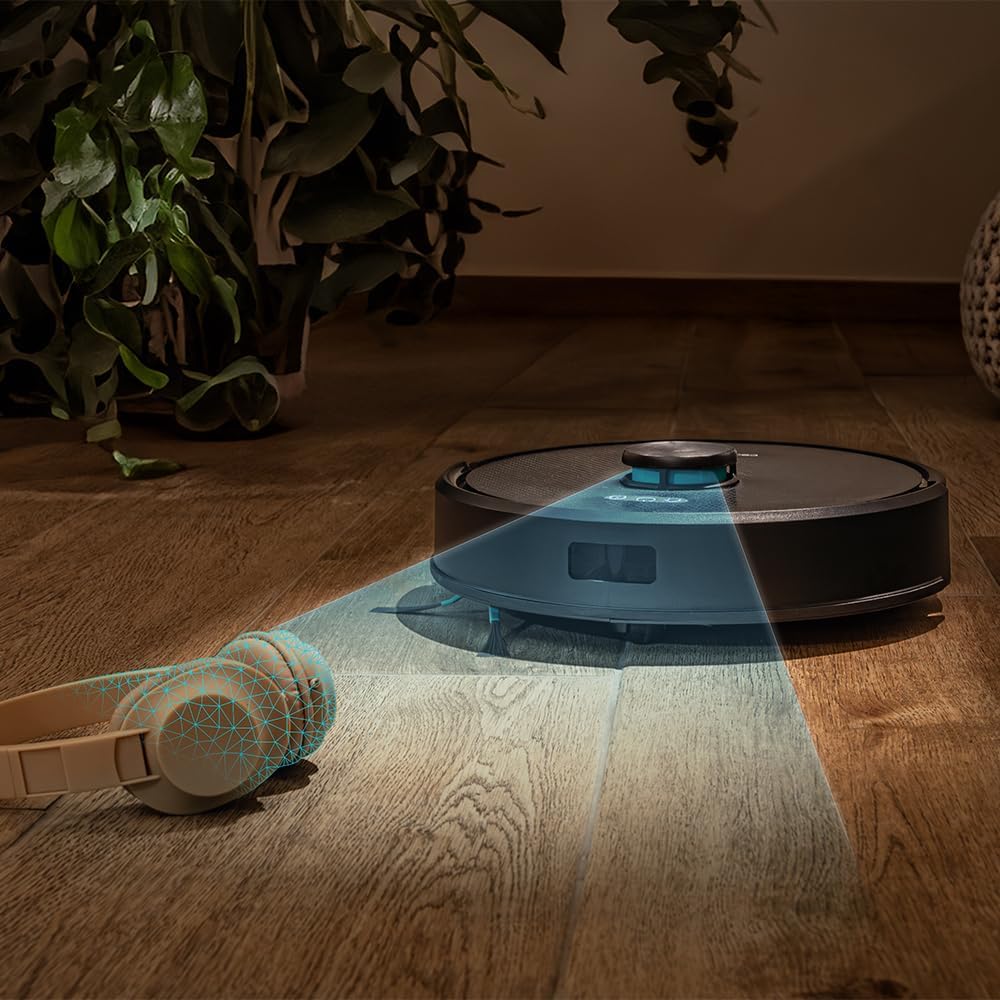
Figure 4.4: The robot's laser navigation system actively mapping its surroundings for efficient cleaning.

Figure 4.5: The robot actively vacuuming a floor, effectively collecting debris.

Figure 4.6: Visual representation of the robot emptying its dustbin into the self-draining base.

Figure 4.7: The robot cleaning a carpet, highlighting the effectiveness of its multifunctional brush.
5. Sąranka
Follow these steps to prepare your Conga Y50 for its first cleaning session.
5.1 Išpakavimas ir įdėjimas
- Remove all packaging materials and protective films from the robot and the self-draining base.
- Place the self-draining base against a wall in an open area, ensuring there is at least 0.5 meters of clear space on both sides and 1.5 meters in front of the base. Avoid placing it near stairs or obstacles that could block the robot's return path.
- Connect the power adapter to the self-draining base and plug it into a wall outlet. Ensure the power cable is neatly tucked away to prevent entanglement.

Figure 5.1: The robot correctly docked at its self-draining base.
5.2 Pradinis įkrovimas
- Place the robot onto the charging contacts of the self-draining base. Ensure the charging indicators on the robot illuminate.
- Allow the robot to charge completely before its first use. This typically takes 4-6 hours. The indicator lights will change to show a full charge.
5.3 Programėlės diegimas ir susiejimas
The Conga Y50 can be controlled via a smartphone app.
- Atsisiųskite oficialią „Cecotec Conga“ programėlę iš savo išmaniojo telefono programėlių parduotuvės („iOS“ arba „Android“).
- Atidarykite programėlę ir sukurkite paskyrą arba prisijunkite.
- Follow the in-app instructions to add your Conga Y50 robot. This usually involves connecting the robot to your home Wi-Fi network.
- Once paired, you can access all smart features, including mapping, scheduling, and cleaning mode selection.

Figure 5.2: Controlling the robot through the dedicated smartphone application.
6. Roboto valdymas
Learn how to start, stop, and manage your robot's cleaning tasks.
6.1 Valymo ciklo pradžia
- Rankinis paleidimas: Press the Power button on the robot once. The robot will begin cleaning in Auto mode.
- Programėlės paleidimas: Open the Cecotec Conga app, select your robot, and tap the 'Start Cleaning' button. You can also choose specific cleaning modes or areas from the app.
6.2 Pristabdymas ir tęsimas
- To pause cleaning, press the Power button on the robot or the 'Pause' button in the app.
- To resume cleaning, press the Power button again or the 'Resume' button in the app.
6.3 Grįžimas į bazę
- Press the Home button on the robot or the 'Return to Base' button in the app. The robot will navigate back to its self-draining base to charge and empty its dustbin.

Figure 6.1: The robot intelligently returning to its charging and self-draining station.
6.4 Cleaning Modes and Scheduling
The app allows for advanced control over cleaning modes (e.g., Auto, Edge, Spot, Restricted Areas) and scheduling cleaning times. Refer to the in-app guide for detailed instructions on these features.

Figure 6.2: The robot following a planned path to clean the floor.

Figure 6.3: The robot demonstrating its versatility across various floor surfaces.
7. Priežiūra
Regular maintenance ensures optimal performance and extends the lifespan of your Conga Y50.
7.1 Emptying the Self-Draining Base Dust Bag
The 3-liter dust bag in the self-draining base typically needs replacement every 12 weeks, depending on usage. The app will notify you when it's full.
- Open the lid of the self-draining base.
- Atsargiai išimkite pilną dulkių maišelį ir jį išmeskite.
- Įdėkite naują dulkių maišelį, įsitikindami, kad jis tinkamai įstatytas.
- Close the lid of the self-draining base.
7.2 valymo šepetėliai
The multifunctional brush and side brushes should be cleaned regularly to prevent hair and debris buildup.
- Pagrindinis šepetys: Turn the robot over. Remove the main brush cover and lift out the brush. Use the provided cleaning tool to cut and remove tangled hair. Reinstall the brush and cover.
- Šoniniai šepečiai: Gently pull the side brushes off. Remove any hair or debris. If damaged, replace with new ones. Push them back into place.
7.3 Jutiklių ir įkrovimo kontaktų valymas
Wipe the anti-drop sensors, wall sensors, and charging contacts on both the robot and the base with a clean, dry cloth. This prevents navigation errors and ensures proper charging.
7.4 Mop Maintenance
If using the mopping function, remove the mop cloth after each use, wash it, and allow it to air dry. Replace mop cloths periodically for best results.
8. Problemų sprendimas
If you encounter issues with your Conga Y50, refer to the following common problems and solutions.
| Problema | Galima priežastis | Sprendimas |
|---|---|---|
| Robotas neįsijungia | Išsikrovęs akumuliatorius; netinkamai paspaustas maitinimo mygtukas | Padėkite robotą ant įkrovimo pagrindo; paspauskite ir 3 sekundes palaikykite maitinimo mygtuką |
| Robotas neranda įkrovimo bazės | Base obstructed; Robot too far from base | Ensure base has clear space; Manually place robot closer to base |
| Prastas valymo efektyvumas | Brushes tangled; Dust bag full; Filters clogged | Clean main and side brushes; Replace dust bag; Clean or replace filters |
| Robotas dažnai užstringa | Kliūtys ant grindų; Nešvarūs jutikliai | Clear floor of clutter; Clean all sensors |
| Programos ryšio problemos | Incorrect Wi-Fi password; Robot out of Wi-Fi range; Router issues | Verify Wi-Fi credentials; Move robot closer to router; Restart router and robot |
For further assistance, consult the FAQ section in the Cecotec Conga app or contact customer support.
9. Specifikacijos
| Funkcija | Detalė |
|---|---|
| Prekės ženklas | Cecotec |
| Modelio pavadinimas | Conga Y50 |
| Modelio numeris | A01_EU01_114519 |
| Gaminio matmenys (I x P x A) | 32L x 32W x 10H centimetrai |
| Prekės svoris | 3.81 kilogramo |
| Siurbimo slėgis | 5000 Pa |
| Self-Emptying Base Capacity | 3 litro (dulkių maišelis) |
| Navigacijos tipas | Lazerinė navigacija |
| Baterijos tipas | Ličio jonas |
| Maitinimo šaltinis | Maitinamas baterijomis |
| Kontrolės metodas | Programėlė |
| Suderinami įrenginiai | Išmanieji telefonai |
| Įtraukti komponentai | Robot vacuum cleaner, mop, self-emptying base, dust bag |
| Gamybos metai | 2025 |
10. Garantija ir palaikymas
Cecotec products are manufactured to high-quality standards. This product comes with a standard manufacturer's warranty. Please refer to the warranty card included in your package or visit the official Cecotec websvetainėje, kurioje pateikiamos išsamios garantijos sąlygos.
For spare parts, Cecotec ensures EU spare part availability for a duration of 10 years from the date of manufacture (2025).
Dėl techninės pagalbos, trikčių šalinimo ar atsarginių dalių kreipkitės į „Cecotec“ klientų aptarnavimo tarnybą per jų oficialią websvetainėje arba kontaktinę informaciją, pateiktą jūsų produkto dokumentuose.