
Svarbios saugos instrukcijos
Prieš naudodami smulkintuvą, atidžiai perskaitykite visas instrukcijas. Išsaugokite šį vadovą ateičiai.
- Vaikus ir gyvūnus laikykite toliau nuo smulkintuvo.
- Laikykite laisvus drabužius, papuošalus, plaukus ir rankas atokiai nuo popieriaus įvedimo angos.
- Do not spray any flammable products onto the shredder.
- Do not shred metal objects, wet paper, or adhesive labels.
- Atjunkite smulkintuvą nuo elektros tinklo, kai jo nenaudojate arba prieš valydami.
- Nenaudokite smulkintuvo, jei pažeistas maitinimo laidas.
Produktas baigtasview
The Staples 12-Sheet Micro-Cut Personal Shredder (ST62153) is designed for secure disposal of personal and office documents. It features micro-cut shredding for enhanced security (P-4 rating), reducing documents to 4mm x 12mm pieces.
Pagrindinės funkcijos:
- Smulkinimo talpa: Up to 12 sheets of paper per pass.
- Medžiagų suderinamumas: Shreds paper, credit cards, standard staples, small paper clips, and CDs/DVDs.
- Apsaugos lygis: P-4 micro-cut for high security.
- Veikimo laikas: 20 minutes continuous operation, followed by a 40-minute cool-down period.
- Šiukšlių dėžė: 5-gallon (18.9L) pull-out bin for easy emptying.
- Saugos savybės: Auto Start/Stop, Auto Reverse, Overload Protection, blue ready LED indicator, red flash for bin full indicator.
- Mobilumas: Įrengtas ratukais, kad būtų lengva judėti.

Image: The shredder in operation, feeding a document into the micro-cut slot.
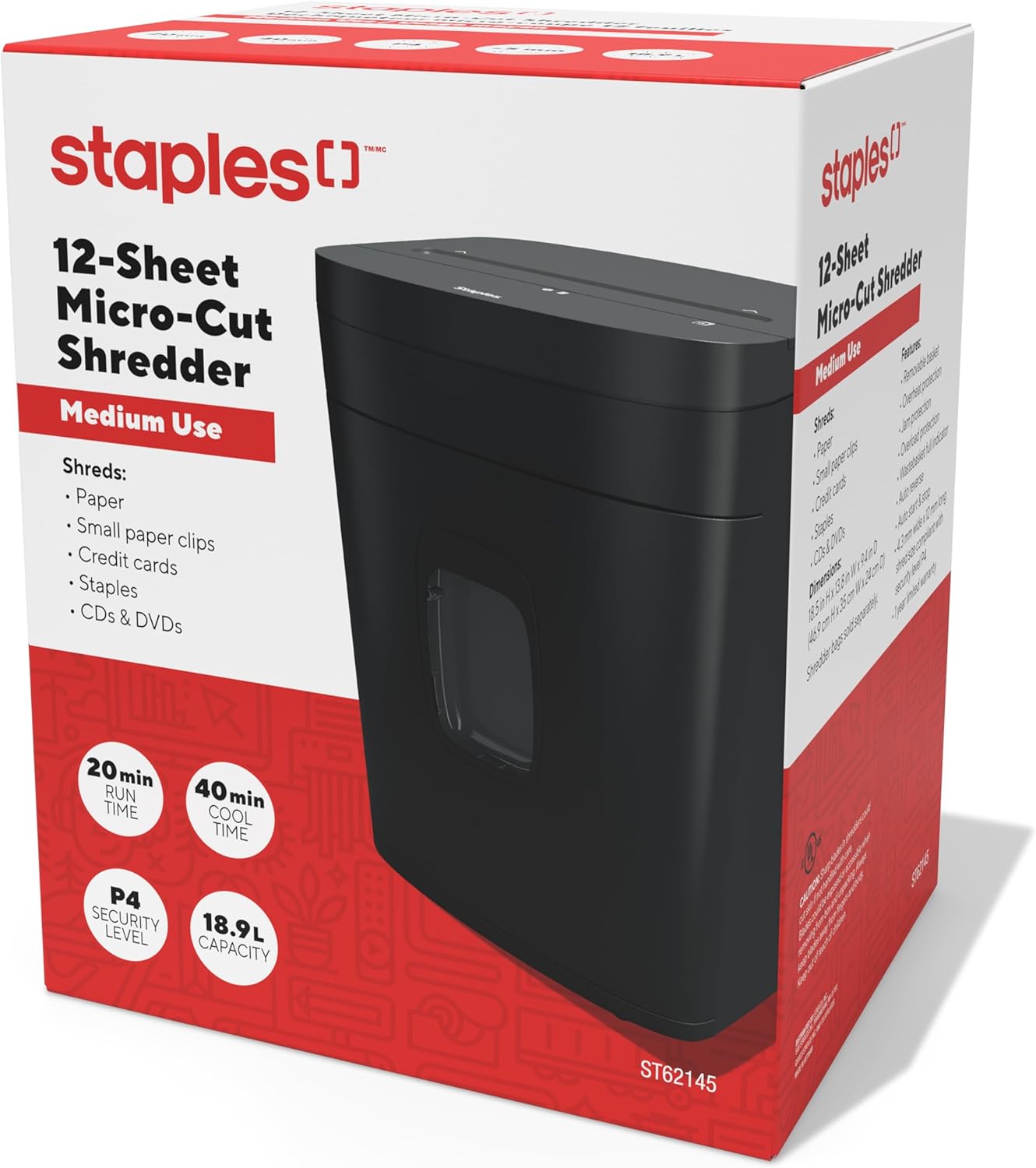
Image: The retail packaging for the Staples 12-Sheet Micro-Cut Personal Shredder.
Pakuotės turinys
Patikrinkite, ar pakuotėje yra visi reikalingi daiktai:
- Staples 12-Sheet Micro-Cut Personal Shredder Unit
- Instrukcijų vadovas (šis dokumentas)
Sąranka
- Išpakavimas: Carefully remove the shredder from its packaging. Remove any protective materials or plastic bags.
- Vieta: Position the shredder on a flat, stable surface. Ensure there is adequate space around the unit for ventilation and to access the waste bin. The shredder is equipped with casters for easy mobility.
- Maitinimo jungtis: Prijunkite maitinimo laidą į standartinį elektros lizdą.

Image: The shredder positioned in an office setting, demonstrating its compact size.

Paveikslėlis: detalus view of the shredder's base, highlighting the integrated casters for easy movement.
Operacija
- Maitinimas: Ensure the shredder is plugged in. The blue LED indicator should illuminate, indicating the shredder is ready for operation.
- Popieriaus smulkinimas: Insert up to 12 sheets of paper into the paper entry slot. The shredder will automatically start when paper is detected and stop once shredding is complete.
- Kitų medžiagų smulkinimas: The shredder can also process credit cards, CDs/DVDs, standard staples, and small paper clips. Insert these items one at a time into the designated entry slot (if separate) or the main paper entry slot.
- Nepertraukiamas veikimas: The shredder is designed for 20 minutes of continuous use. After this period, allow the unit to cool down for 40 minutes to prevent overheating and ensure longevity.
- Automatinis atbulinės eigos važiavimas: If too much paper is inserted, the Auto Reverse feature will attempt to clear the jam by reversing the shredding action.

Vaizdas: Stambus planas view of the paper entry slot on the shredder's top panel.
Priežiūra
- Šiukšlių dėžės ištuštinimas: When the waste bin is full, a red indicator light will flash. Pull out the 5-gallon capacity bin from the front of the shredder and empty the shredded material. Reinsert the bin securely.
- Valymas: Unplug the shredder before cleaning. Use a soft, dry cloth to wipe the exterior. Do not use abrasive cleaners or solvents. For optimal performance, periodically oil the shredder blades with shredder oil (sold separately).
- Cool-Down Periods: Adhere to the 40-minute cool-down period after 20 minutes of continuous use to prevent motor strain and extend the life of the shredder.
Trikčių šalinimas
| Problema | Galima priežastis | Sprendimas |
|---|---|---|
| Smulkintuvas neįsijungia | Not plugged in; waste bin not fully inserted; power switch off. | Ensure power cord is securely plugged in. Push waste bin completely into place. Check power switch position. |
| Popieriaus strigtis | Įdėta per daug popieriaus; popierius sulankstytas arba suglamžytas. | Utilize the Auto Reverse function. If jam persists, unplug, carefully remove paper from the entry slot. Reduce paper quantity for future shredding. |
| Shredder stops during operation (overheating) | Exceeded continuous run time (20 minutes); motor overload. | Allow the shredder to cool down for 40 minutes. The Overload Protection feature will reset automatically. |
| Red bin full indicator flashing | Šiukšlių dėžė pilna. | Empty the waste bin and reinsert it securely. |
Specifikacijos
| Funkcija | Detalė |
|---|---|
| Modelio numeris | ST62153 |
| Smulkinimo tipas | Mikro pjūvis |
| Saugumo lygis | P-4 |
| Smulkinimo dydis | 4 mm x 12 mm |
| Lapo talpa | 12 XNUMX lapų |
| Dėžės talpa | 5 galonų (18.9 litro) |
| Nepertraukiamo veikimo laikas | 20 minučių |
| Atvėsimo laikas | 40 minučių |
| Triukšmo lygis | 65 decibelai |
| Matmenys (I x P x A) | 38.4 gylio x 30 pločio x 47 aukščio centimetrų (13.8 colio ilgio x 9.4 colio pločio x 18.5 colio aukščio) |
| Prekės svoris | 10.16 kg (22.4 svaro) |
| Gamintojas | Kabės |
| UPC | 718103440509 |
Informacija apie garantiją
This Staples 12-Sheet Micro-Cut Personal Shredder (ST62153) is covered by a 1 metų ribota gamintojo garantija from the date of purchase. This warranty covers defects in materials and workmanship under normal use. For warranty claims or further details, please contact customer support.
Pagalba klientams
For technical assistance, troubleshooting, or warranty inquiries, please contact Staples customer support.
Gamintojo kontaktinė informacija:
500 STAPLES DR
FRAMINGHAM MA 01702-4474
Jungtinės Amerikos Valstijos
Please visit the official Staples website or your local Staples store for additional support resources.