
1. Įvadas
Thank you for choosing the roborock Q10 S5 Robot Vacuum and Mop Cleaner. This manual provides essential information for setting up, operating, and maintaining your device to ensure optimal performance and longevity. Please read this manual thoroughly before using the product and keep it for future reference.
2. Saugos informacija
To reduce the risk of injury, electric shock, fire, or damage, please observe the following safety precautions:
- Šį prietaisą gali naudoti vaikai nuo 8 metų ir asmenys, turintys ribotų fizinių, jutiminių ar protinių gebėjimų arba neturintys patirties ir žinių, jei jie yra prižiūrimi arba yra instruktuojami, kaip saugiai naudoti prietaisą ir supranta su tuo susijusius pavojus. .
- Vaikus reikia prižiūrėti, kad jie nežaistų su prietaisu.
- Vaikai negali valyti ir atlikti naudotojo priežiūros darbų be priežiūros.
- Do not use the robot in areas with open flames or fragile objects.
- Ensure the charging dock is placed on a level surface against a wall.
- Only use the original power adapter provided with the device.
- Do not expose the robot to direct sunlight or moisture.
- Before cleaning, remove power cords, small objects, and fragile items from the floor.
3. Produktas baigtasview
Familiarize yourself with the components of your roborock Q10 S5 robot vacuum.
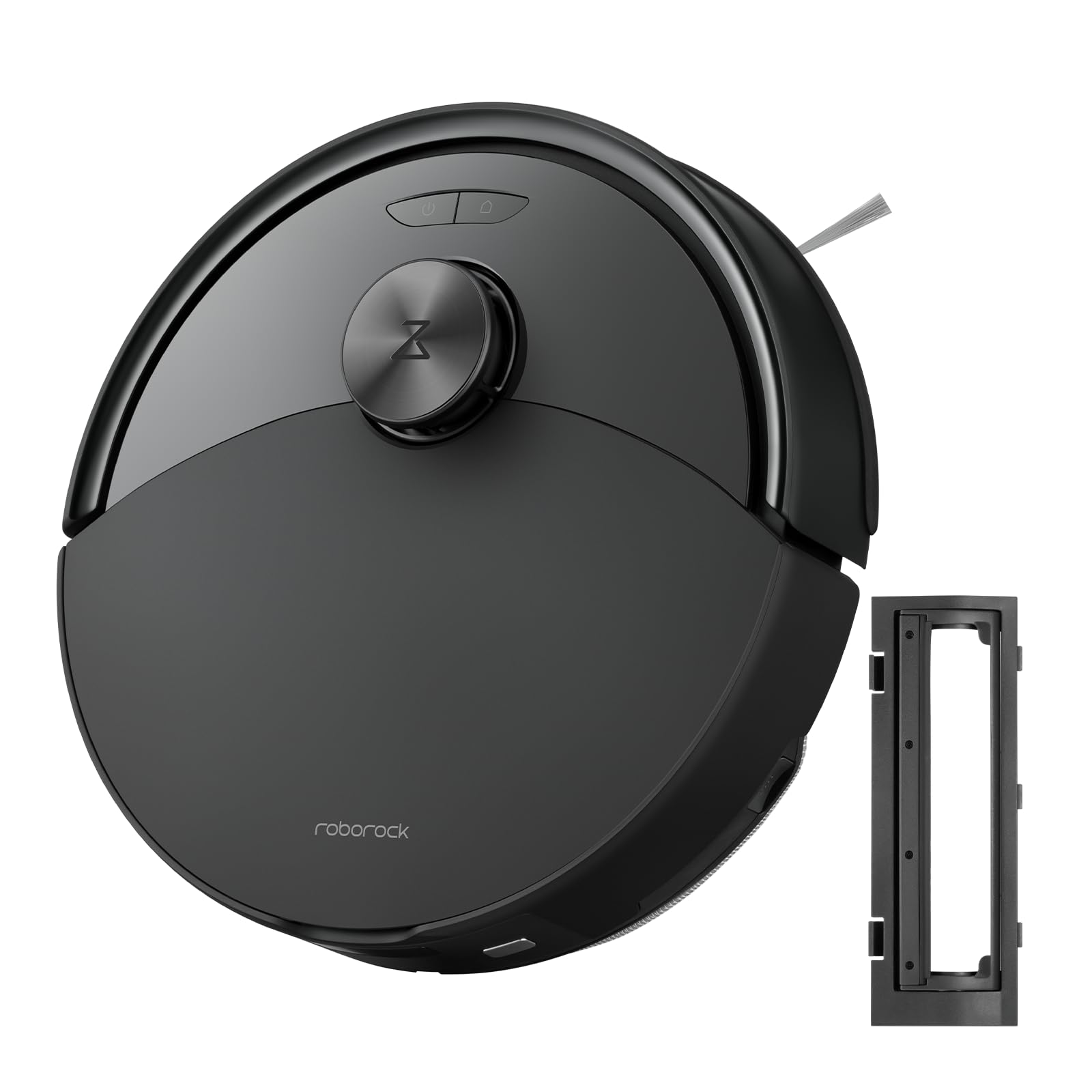
1 paveikslas: The roborock Q10 S5 Robot Vacuum and Mop Cleaner. This image shows the top view of the robot, highlighting its sleek black design and main control buttons.
Roboto komponentai:
- Viršutinis viršelis: Lifts to reveal the dustbin and Wi-Fi indicator.
- Maitinimo / valymo mygtukas: Press to start/pause cleaning, hold to turn on/off.
- Dock/Spot Clean Button: Press to send the robot back to the dock, hold for spot cleaning.
- LDS jutiklis: Navigacijai ir žemėlapių sudarymui.
- Buferis: Aptinka kliūtis.
- Šoninis šepetys: Šluoja šiukšles nuo kraštų ir kampų.
- Pagrindinis šepetys: Collects dirt and debris from floors. Features a floating design for better contact.
- Visakryptis ratas: Dėl judėjimo.
- Įkrovimo kontaktai: Jungiamasi su įkrovimo stotele.
- Skardžio jutikliai: Apsaugo robotą nuo kritimo nuo laiptų.
- Vandens bakas ir šluostės padas: For mopping functionality.
Įkrovimo dokas:
- Dock Location Beacon: Helps the robot locate the dock.
- Įkrovimo kontaktai: Perduoda energiją robotui.
- Maitinimo kabelio prievadas: Prijungia maitinimo adapterį.
4. Sąranka
- Išpakuokite robotą: Carefully remove the robot and all accessories from the packaging. Remove any protective films or shipping materials.
- Šoninio šepečio montavimas: Press the side brush onto its post until it clicks into place.
- Įkrovimo stotelės įdėjimas:
- Padėkite įkrovimo stotelę ant kieto, lygaus paviršiaus prie sienos.
- Įsitikinkite, kad iš abiejų pusių ir priešais doką yra bent 0.5 metro (1.6 pėdos) laisvos vietos.
- Prijunkite maitinimo laidą prie įkrovimo stotelės ir įjunkite jį į sieninį lizdą.
- Pradinis mokestis: Place the robot on the charging dock. The robot will automatically turn on and begin charging. For first-time use, fully charge the robot before operation (approximately 4-6 hours). The power indicator light will breathe white during charging and turn solid white when fully charged.
- Atsisiųskite programą: Ieškokite "Roborock" in the App Store or Google Play Store, or scan the QR code on the packaging to download and install the app.
- Prisijunkite prie „Wi-Fi“:
- Open the Roborock app and follow the on-screen instructions to add your device.
- Įsitikinkite, kad telefonas prijungtas prie 2.4 GHz Wi-Fi tinklo.
- Paspauskite ir palaikykite Dokas ir Galia buttons simultaneously for 3 seconds until you hear the "Resetting Wi-Fi" voice alert.
- Follow the app's instructions to complete the connection.
5. Naudojimo instrukcijos
Pradėti valymą:
- Iš roboto: Paspauskite Galia button once. The robot will start cleaning.
- Iš programėlės: Open the Roborock app and tap the "Clean" button.
Pausing/Resuming/Stopping:
- Pristabdyti: Paspauskite bet kurį roboto mygtuką arba programėlėje palieskite „Pauzė“.
- Tęsti: Paspauskite Galia button or tap "Resume" in the app.
- Sustabdyti: To stop a cleaning cycle, press the Dokas button to send the robot back to the charging dock, or tap "Stop" in the app.
Šluostymo funkcija:
- Užpildykite vandens baką: Open the water tank cover, fill with clean water, and close securely.
- Pritvirtinkite šluostės pagalvėlę: Wet the mop pad and wring it out. Slide it into the mop pad slot until it is securely attached.
- Pradėkite šluostyti: The robot will automatically detect the mop module and switch to mopping mode. You can adjust water flow levels in the app.
Programos funkcijos:
- Žemėlapio valdymas: Create and save maps, set no-go zones, virtual walls, and invisible barriers.
- Atrankinis kambarių valymas: Choose specific rooms to clean.
- Planinis valymas: Nustatykite valymo grafikus skirtingam laikui ir dienoms.
- Individualūs valymo režimai: Sureguliuokite siurbimo galią ir vandens srauto lygį.
- Nuotolinio valdymo pultas: Rankiniu būdu valdykite roboto judėjimą.
6. Priežiūra
Regular maintenance ensures your roborock Q10 S5 operates efficiently. Always turn off the robot and unplug the charging dock before performing any maintenance.
Dustbin and Filter (Weekly):
- Pakelkite roboto viršutinį dangtį.
- Išimkite šiukšliadėžę.
- Atidarykite šiukšliadėžės dangtelį ir išpilkite jos turinį į šiukšliadėžę.
- Remove the filter. Tap it gently to remove dust. The filter can be rinsed with water; ensure it is completely dry before reinstallation (allow 24 hours).
- Rinse the dustbin with water if necessary and allow it to dry completely.
- Reinstall the dry filter and dustbin.
Main Brush (Weekly):
- Apverskite robotą.
- Press the tabs to remove the main brush cover.
- Iškelkite pagrindinį šepetį.
- Valymo įrankiu (jei yra) arba žirklėmis nukirpkite ir pašalinkite aplink šepetį susivėlusius plaukus ar šiukšles.
- Reinstall the main brush and cover, ensuring it clicks into place.
Side Brush (Monthly):
- Atsukite šoninį šepetį.
- Pašalinkite visus plaukus ar šiukšles.
- Reattach and tighten the screw.
Sensors and Charging Contacts (Monthly):
- Nuvalykite visus jutiklius (siauros jutiklius, sienos jutiklį, LDS jutiklio langą) ir įkrovimo kontaktus tiek ant roboto, tiek ant doko minkštu, sausu skudurėliu.
Mop Pad (After Each Use):
- Išimkite šluostės pagalvėlę iš vandens rezervuaro.
- Rinse thoroughly with water and allow it to air dry completely before next use.
7. Problemų sprendimas
If you encounter issues with your robot, please refer to the following table before contacting support.
| Problema | Galima priežastis | Sprendimas |
|---|---|---|
| Robotas neįsijungia. | Žema akumuliatoriaus įtampa arba jis neįkrautas. | Padėkite robotą ant įkrovimo stotelės ir įsitikinkite, kad jis kraunasi. |
| Robotas negali prisijungti prie „Wi-Fi“. | Neteisingas „Wi-Fi“ slaptažodis, 5 GHz tinklas arba silpnas signalas. | Ensure correct 2.4GHz Wi-Fi, reset Wi-Fi on robot, move closer to router. |
| Robotas dažnai užstringa. | Obstacles, tangled cables, or dirty sensors. | Clear floor, clean sensors, use no-go zones in app. |
| Prastas valymo našumas. | Full dustbin, dirty filter, tangled brushes. | Empty dustbin, clean/replace filter, clean main/side brushes. |
| Robotas skleidžia neįprastą triukšmą. | Debris in main brush, side brush, or wheels. | Inspect and clean all brushes and wheels for obstructions. |
If the problem persists, please refer to the Roborock app for more detailed error messages or contact customer support.
8. Specifikacijos
| Funkcija | Detalė |
|---|---|
| Modelis | Q10 S5 |
| Matmenys | Apytiksliai 353 x 350 x 96.5 mm (13.9 x 13.8 x 3.8 colio) |
| Svoris | apytiksliai 3.7 kg (8.16 svaro) |
| Baterija | Lithium-Ion (Capacity not specified, typical for robot vacuums) |
| Nominali galia | Approx. 60W (Typical for robot vacuums) |
| Šiukšlių dėžės talpa | Approx. 470 ml (Typical for robot vacuums) |
| Vandens rezervuaro talpa | Approx. 300 ml (Typical for robot vacuums) |
| Siurbimo galia | Up to 10,000 Pa (HyperForce Suction Power from feature bullets) |
| Wi-Fi ryšys | 2.4 GHz |
Pastaba: Specifikacijos gali būti keičiamos be išankstinio įspėjimo.
9. Garantija ir palaikymas
roborock products are manufactured to the highest quality standards. For detailed warranty information, please refer to the warranty card included in your product packaging or visit the official roborock website. For technical support, troubleshooting assistance, or to purchase replacement parts, please contact roborock customer service through the app or their official websvetainę.
Oficialus Websvetainė: www.roborock.com