
Svarbios saugos instrukcijos
Prieš montuodami ir naudodami atidžiai perskaitykite visas instrukcijas. Išsaugokite šį vadovą ateičiai.
- Prieš montuodami ar atlikdami techninę priežiūrą, įsitikinkite, kad maitinimas yra išjungtas grandinės pertraukikliu.
- Visa instaliacija turi atitikti nacionalinius ir vietinius elektros kodeksus. Jei nesate susipažinę su instaliacija, pasitarkite su kvalifikuotu elektriku.
- The ceiling fan must be mounted to a structurally sound ceiling joist or outlet box capable of supporting the fan's weight (approximately 4 kg).
- Palaikykite bent 7 pėdų atstumą nuo grindų iki ventiliatoriaus menčių.
- Nekiškite jokių daiktų į ventiliatoriaus menčių kelią.
- Do not attempt to repair or replace parts unless specifically instructed in this manual. Contact customer support for assistance.
Pakuotės turinys
Prieš pradėdami diegti, patikrinkite, ar yra visi komponentai:
- Ceiling Fan Unit (Motor Housing, Blades, Light Kit)
- Nuotolinio valdymo pultas
- Montavimo įranga
- Vartotojo vadovas
Specifikacijos
| Funkcija | Detalė |
|---|---|
| Prekės ženklas | Ohniyou |
| Modelio pavadinimas | GLX078B-X |
| Gaminio matmenys | 31.89 "D x 31.89" P x 11.42" A |
| Prekės svoris | 4 kilogramo |
| Maitinimo šaltinis | DC |
| Valdiklio tipas | Nuotolinio valdymo pultas |
| Triukšmo lygis | 35 decibelų |
| Naudojimas viduje / lauke | Vidinis |
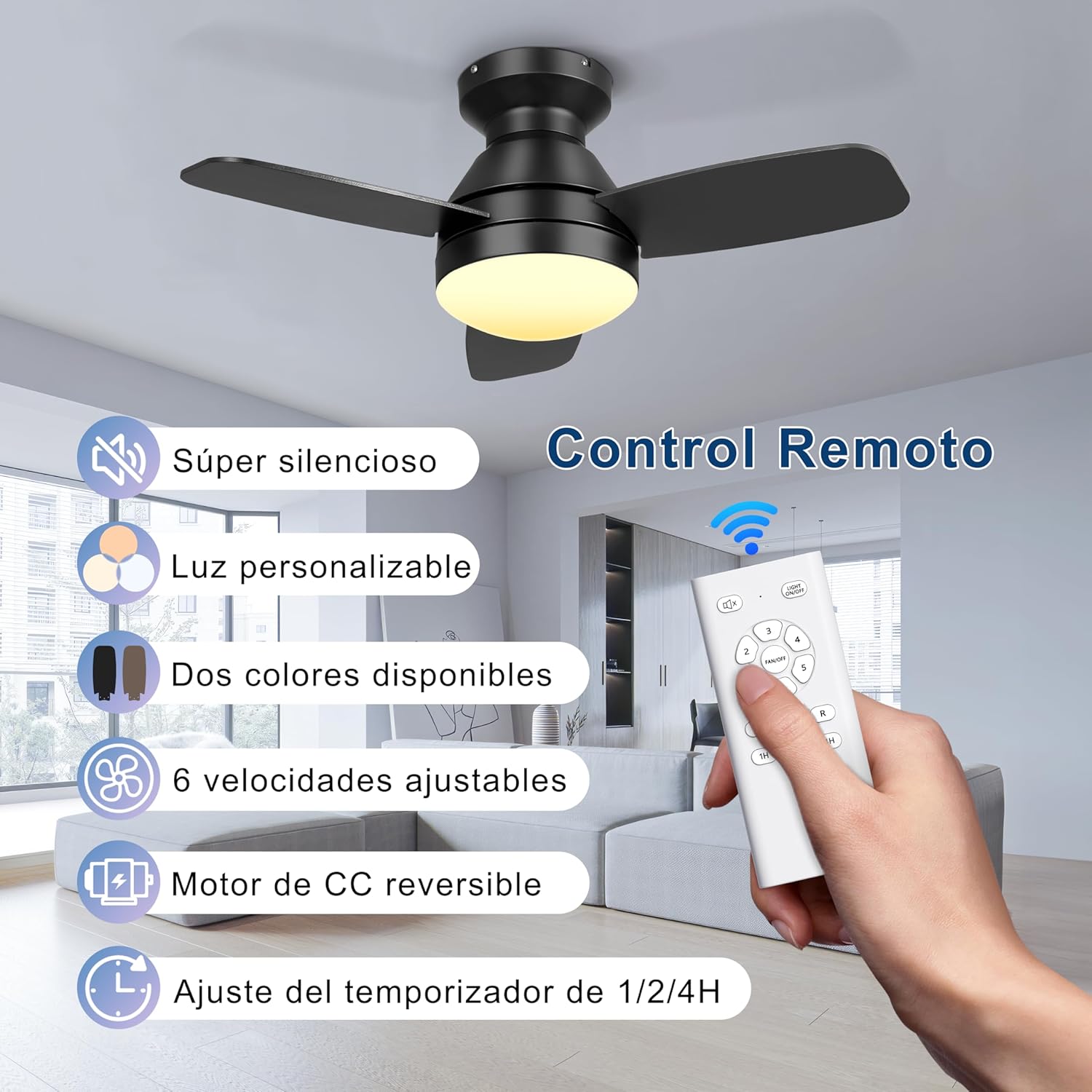
| Ypatingos savybės | LED Light, Reversible Motor, 6 Speeds, 3 Color Light, Timer Function |
Sąranka ir diegimas
This section provides general guidance. Refer to the detailed installation diagram included in your package for specific wiring and mounting instructions.
- Pasiruoškite montavimui: Išjunkite maitinimą pagrindiniu grandinės pertraukikliu. Įsitikinkite, kad tvirtinimo vieta yra tvirta ir gali atlaikyti ventiliatoriaus svorį.
- Įdiekite montavimo laikiklį: Secure the mounting bracket to the ceiling outlet box or a structural joist using the provided hardware.
- Ventiliatoriaus prijungimas: Connect the fan's electrical wires to the household wiring according to the wiring diagram. Ensure all connections are secure.
- Pritvirtinkite ventiliatoriaus korpusą: Carefully lift the fan body and attach it to the mounting bracket.
- Ventiliatoriaus mentes montavimas: Attach the fan blades to the motor housing. Note that the blades are double-finished, with one side black and the other wood grain. Choose your preferred finish during installation.
- Įdiekite šviesos rinkinį: Connect the light kit wiring and secure the light kit to the fan body.
- Atkurti maitinimą: Kai įrengimas baigtas ir visos jungtys pritvirtintos, atkurkite elektros tiekimą automatiniu jungikliu.

Naudojimo instrukcijos
Your Ohniyou ceiling fan is controlled by the included remote control. Ensure batteries are installed correctly in the remote.
Ventiliatoriaus greičio valdymas
The remote allows you to select from 6 different wind speeds to suit your comfort level.
- Naudokite "VENTILIATORIAUS GREITIS" buttons (1-6) to adjust the fan speed.
- Speeds 1-2 provide a comfortable, gentle breeze.
- Speeds 3-4 offer a medium, natural wind.
- Speeds 5-6 deliver a strong, high-cooling airflow.

Dimmable LED Light Control
The integrated LED light offers 3 color temperatures and is dimmable.
- Paspauskite "ŠVIESA" button to cycle through the 3 color temperatures: Warm Light (3000K), Natural Light (4000K), and Cold Light (6000K).
- Naudokite "PRITEMPĖJAS" buttons (usually +/- or up/down arrows) to adjust the brightness of the light.

Grįžtamasis nuolatinės srovės variklis
The fan features a reversible DC motor for year-round comfort.
- Paspauskite "REVERSE" button on the remote to change the direction of the fan blades.
- Vasaros režimas (žemyn nukreiptas oro srautas): Blades rotate counter-clockwise, pushing air down to create a cooling effect.
- Žiemos režimas (oro srautas aukštyn): Blades rotate clockwise, drawing air up to circulate warm air trapped near the ceiling, balancing indoor heating.

Laikmačio funkcija
Nustatykite ventiliatorių taip, kad jis automatiškai išsijungtų po nustatyto laiko.
- Paspauskite "LAIKMATIS" button (1H, 2H, 4H) to set the fan to turn off after 1, 2, or 4 hours.
Natūralaus vėjo režimas
Activate the natural wind mode for a varying breeze that simulates outdoor conditions.
- Paspauskite "NATURAL WIND" button (if available on your remote) to engage this mode.
Priežiūra
Reguliarus valymas užtikrina optimalų veikimą ir prailgina lubų ventiliatoriaus tarnavimo laiką.
- Valymas: Turn off power before cleaning. Use a soft, damp Šluoste nuvalykite ventiliatoriaus mentes ir variklio korpusą. Nenaudokite abrazyvinių valiklių ar tirpiklių.
- Ašmenų tvirtumas: Periodically check that all blade screws are tight. Over time, they may loosen due to vibration.
- Šviesos rinkinys: Ensure the light cover is securely fastened. If the LED light fails, contact customer support for replacement options. Do not attempt to replace individual LED components.
- Nuotolinio valdymo pultas: Pakeiskite baterijas, kai sumažėja nuotolinio valdymo pulto veikimo nuotolis arba jis nereaguoja.
Trikčių šalinimas
Prieš kreipdamiesi į klientų aptarnavimo tarnybą, išbandykite šiuos įprastus trikčių šalinimo veiksmus:
| Problema | Galima priežastis | Sprendimas |
|---|---|---|
| Ventiliatorius neįsijungia | No power; Loose wire connections; Remote control issues. | Check circuit breaker; Ensure all wires are securely connected; Replace remote batteries or re-pair remote if necessary. |
| Šviesa neveikia | Loose wire connections; LED failure. | Check light kit wiring; Contact customer support for LED replacement. |
| Ventiliatoriaus virpėjimas | Atsilaisvinę peiliai arba tvirtinimo detalės; nesubalansuoti peiliai. | Įsitikinkite, kad visi peilio ir tvirtinimo varžtai yra gerai priveržti; jei reikia, naudokite balansavimo rinkinį (nepridedamas). |
| Nuotolinis neveikia | Išsikrovusios baterijos; nuotolinio valdymo pultas nesuporuotas. | Replace batteries; Refer to remote pairing instructions (usually involves pressing a button within a few seconds of turning on power). |
Garantijos ir palaikymo informacija
Ohniyou products are designed for quality and reliability. For specific warranty details, please refer to the warranty card included with your purchase or visit the official Ohniyou websvetainę.
If you encounter any issues or have questions not covered in this manual, please contact Ohniyou customer support:
- Websvetainė: Visit the Ohniyou Store on Amazon
- El. paštas: Kontaktinį el. pašto adresą rasite ant gaminio pakuotės arba garantijos kortelės.
- Telefonas: Refer to your product packaging or warranty card for contact phone number.
Please have your model number (GLX078B-X) and purchase date ready when contacting support.