
BOTSLAB G980H 3 Channel Dashcam
BOTSLAB G980H 3 kanalų 4K vaizdo registratoriaus naudotojo vadovas
Model: G980H 3 Channel Dashcam
1. Įvadas
This manual provides detailed instructions for the installation, operation, and maintenance of your BOTSLAB G980H 3-Channel 4K Dash Cam. Please read this manual thoroughly before using the device to ensure proper functionality and safety. Keep this manual for future reference.
2. Pakuotės turinys
Patikrinkite, ar pakuotėje yra visi toliau išvardyti daiktai. Jei kurių nors daiktų trūksta arba jie pažeisti, susisiekite su klientų aptarnavimo tarnyba.

Image: Contents of the BOTSLAB G980H Dash Cam package, including the main unit, rear camera, cables, and accessories.
- BOTSLAB G980H Multi-Channel Dash Cam Unit
- Rear Camera (6.5M cable)
- 128GB MicroSD kortelė
- Car Charger (3.5M cable)
- Installation Pry Bar
- Electrostatic Film (x2)
- 3M Tapes (x2)
- Vartotojo vadovas
- Įspėjamoji kortelė
3. Produktas baigtasview
The BOTSLAB G980H is a 3-channel dash camera system designed to record video from the front, rear, and interior of your vehicle. It features 4K front recording, 1080P for rear and cabin cameras, a 3.18-inch touch screen, voice control, built-in GPS, and 5.8GHz Wi-Fi for fast file pervedimai.
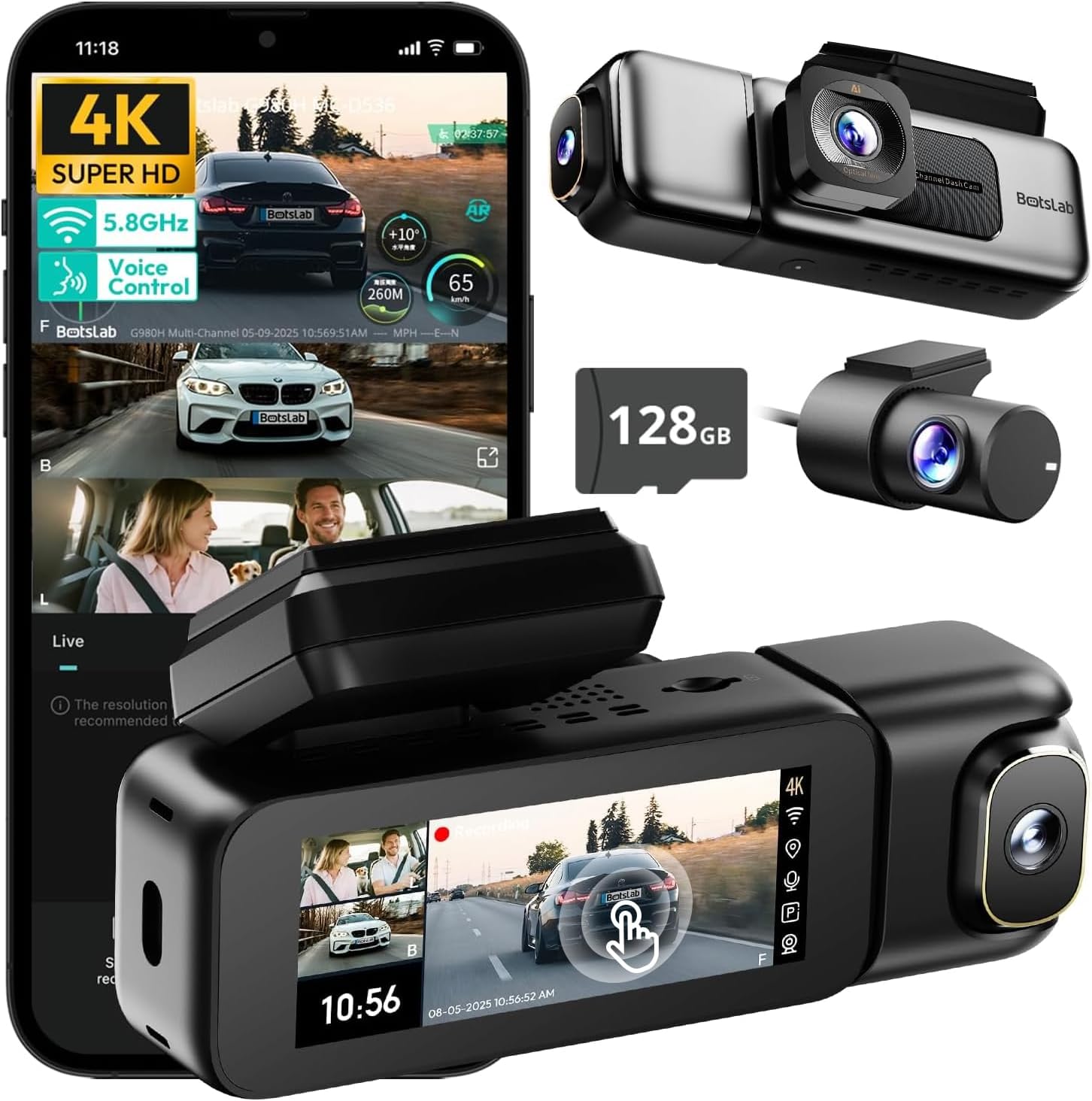
Image: The BOTSLAB G980H 3-Channel Dash Cam, showing the main unit, detachable cabin camera, rear camera, and a 128GB MicroSD card.

Image: Visual representation of the dash cam's wide viewing angles: 170° for the front camera (4K), 120° for the cabin camera (1080P), and 150° for the rear camera (1080P).

Image: Diagram illustrating the dash cam's low-light performance features, including F1.8 aperture, 940nm infrared lights, WDR technology, and a 6-lens system for clear footage.

Image: Illustration highlighting the supercapacitor's role in maintaining data safety during sudden power loss and its resistance to extreme temperatures (-20°C to 70°C).
Pagrindinės funkcijos:
- 3 kanalų įrašymas: Simultaneous 4K front, 1080P rear, and 1080P cabin recording.
- Platus View Kampai: 170° front, 150° rear, and 120° cabin for comprehensive coverage.
- 3.18 colio jutiklinis ekranas: Intuitive interface for settings adjustment and playback.
- Valdymas balsu: Hands-free operation for common functions.
- Integruotas GPS: Records speed, location, and routes.
- 5.8 GHz Wi-Fi: Greitai file perkėlimas ir programėlių ryšys.
- Parkavimo monitorius: Three modes (Sentry, Time-Lapse, Collision Detection) for 24/7 surveillance (requires hardwire kit).
- Superkondensatorius: Enhanced durability and safety in extreme temperatures.
- WDR & HDR: Optimized imaging in varying light conditions.
- Ciklo įrašymas: Continuous recording, overwriting oldest files kai kortelė pilna.
- G jutiklis: Automatiškai užrakina maistątage susidūrimų metu.
4. Sąranka ir diegimas
Follow these steps to properly install your BOTSLAB G980H Dash Cam in your vehicle.

Image: The dash cam's adjustable design, featuring a magnetic snap-on mechanism for the cabin camera and 90-degree vertical and 360-degree horizontal rotation for optimal view pritaikymas.

Image: A simplified diagram showing the typical installation points for the G980H Multi-Channel Dash Cam, including the main unit on the windshield, the rear camera, and the car charger connection.
- Paruoškite „MicroSD“ kortelę: Insert the provided 128GB MicroSD card into the dash cam's card slot. Ensure the card is correctly oriented.
- Priekinės kameros montavimas:
- Nuvalykite priekinio stiklo vietą, kurioje ketinate montuoti vaizdo registratorių.
- Apply the electrostatic film to the chosen area on the windshield.
- Attach the dash cam mount to the electrostatic film using the 3M adhesive tape. Ensure a secure fit.
- Slide the main dash cam unit onto the mounted bracket.
- Įdiekite galinę kamerą:
- Identify a suitable location on your rear windshield for the rear camera. Clean the area.
- Attach the rear camera using its adhesive.
- Route the rear camera cable to the main dash cam unit, tucking it along the vehicle's headliner and pillars using the pry bar.
- Prijunkite galinio vaizdo kameros laidą prie tam skirto prievado pagrindiniame vaizdo registratoriaus bloke.
- Prijunkite maitinimą:
- Connect the car charger cable to the main dash cam unit.
- Prijunkite automobilio įkroviklį prie automobilio 12 V maitinimo lizdo (cigarečių degiklio lizdo).
- Maitinimo laidą išdėstykite tvarkingai, kad jis netrukdytų.
- Adjust Camera Angles: Power on the dash cam and adjust the front, cabin (if detachable), and rear camera angles to ensure optimal coverage. The cabin camera features a magnetic snap-on design and can be rotated 90 degrees vertically, while the main unit allows 360-degree rotation for the front lens.
5. Pagrindinė operacija
Learn how to use the primary functions of your dash cam.
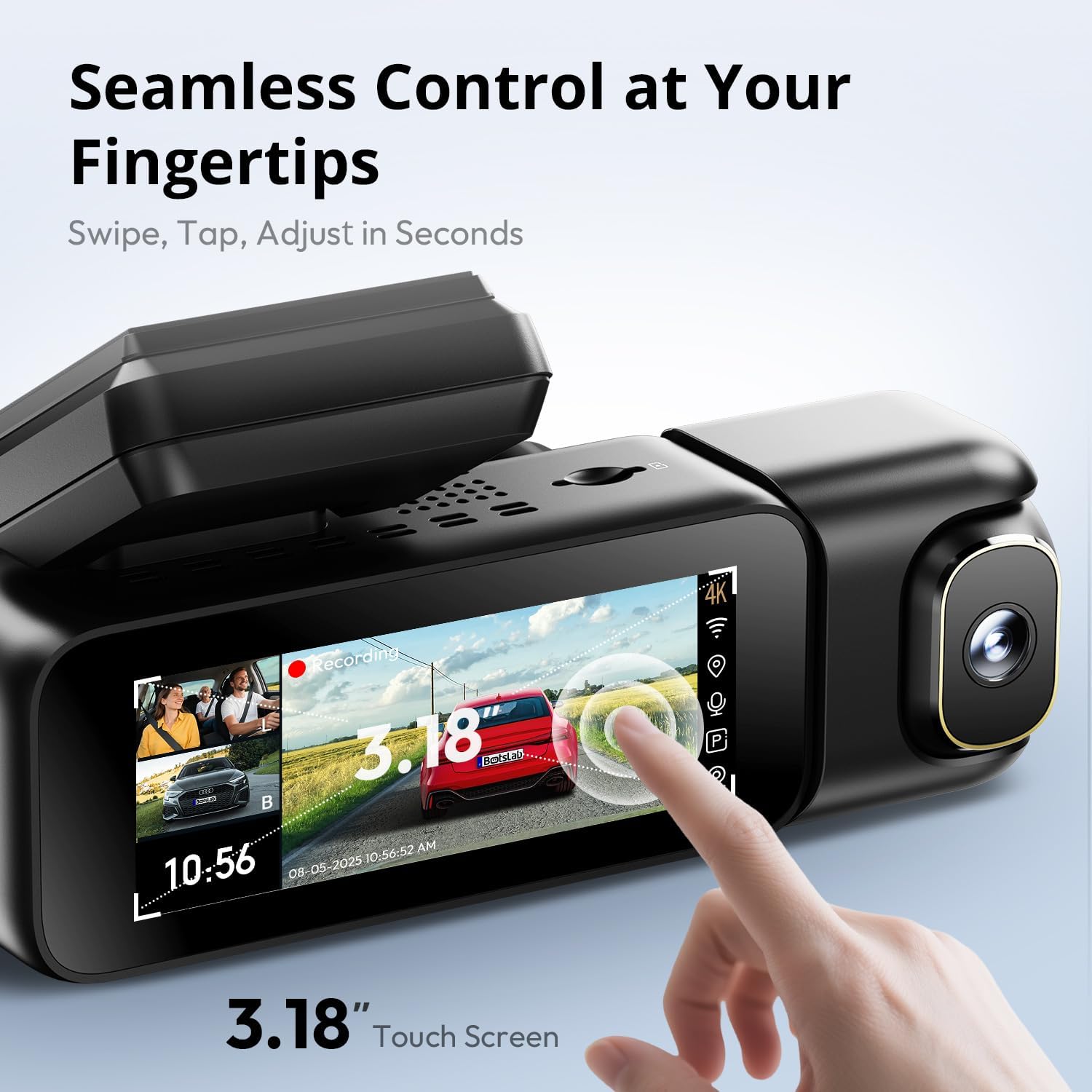
Image: A close-up of the dash cam's 3.18-inch touch screen, showing the live view from multiple cameras and on-screen controls for recording and settings.
Maitinimo įjungimas/išjungimas:
- Vaizdo registratorius automatiškai įsijungs ir pradės įrašinėti, kai įjungsite automobilio degimą.
- It will automatically power off shortly after the ignition is turned off.
Įrašas:
- Įprastas įrašymas: The dash cam continuously records in a loop. When the MicroSD card is full, the oldest unlocked files yra perrašomi.
- Avarinis įrašymas (G jutiklis): In the event of a sudden impact or collision, the built-in G-sensor will automatically detect the event and lock the current video segment (including 8 seconds prior to the event) to prevent it from being overwritten.
Ekrano veikimas:
- The 3.18-inch touch screen allows you to navigate menus, adjust settings, and view gyvas kvailystage or recorded videos.
- Swipe and tap gestures are used for control.
6. Išplėstinės funkcijos
Valdymas balsu:
Operate your dash cam hands-free using voice commands for safer driving. The dash cam responds to specific phrases.
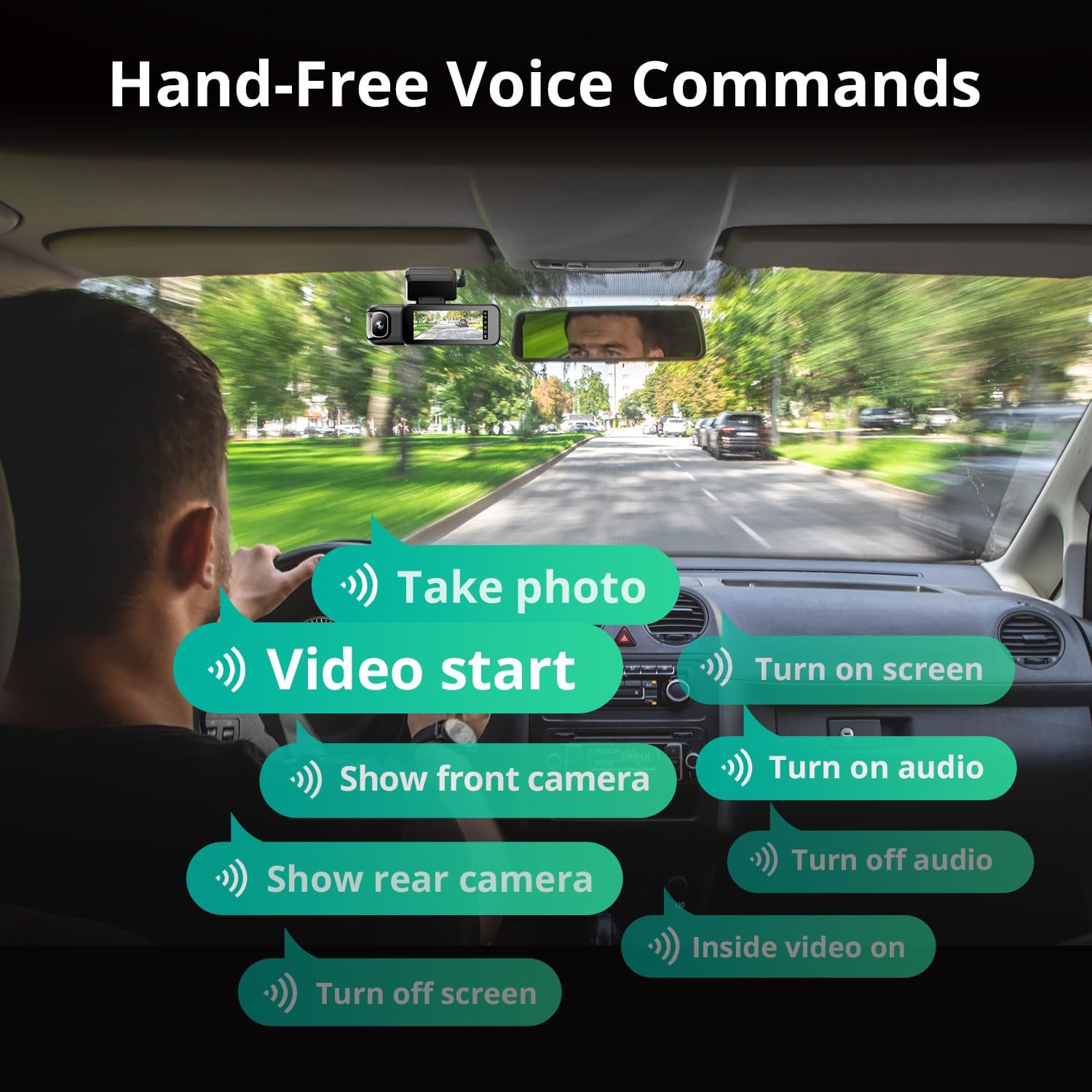
Image: A visual guide to the available voice commands, such as "Take photo," "Video start," "Turn on screen," "Show front camera," "Show rear camera," "Turn on audio," "Turn off audio," "Inside video on," and "Turn off screen."
Įprastos balso komandos apima:
- "Nufotografuokite"
- „Vaizdo įrašo pradžia“
- „Įjungti ekraną“
- „Rodyti priekinę kamerą“
- „Rodyti galinio vaizdo kamerą“
- „Įjungti garsą“
- „Išjungti garsą“
- "Inside video on"
- „Išjungti ekraną“
Visą parą veikiantis parkavimo monitorius:
The dash cam offers continuous surveillance when your vehicle is parked. A hardwire kit (ASIN: B0FH2H9DDB) is required for this functionality.
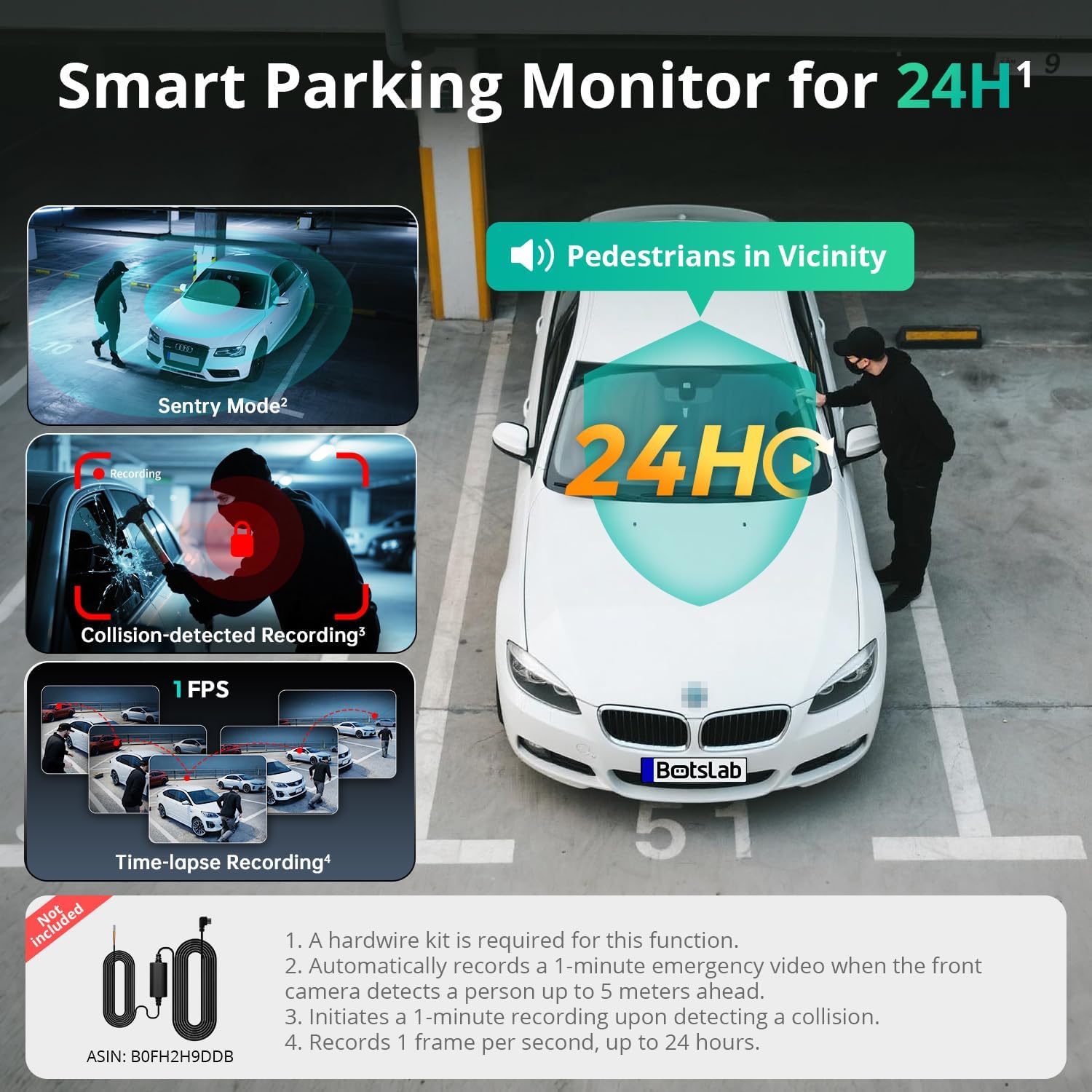
Image: An illustration of the three parking monitor modes: Sentry Mode (detects people within 5 meters), Collision-detected Recording (locks footage on impact), and Time-lapse Recording (1 frame per second for extended surveillance).
Galimi režimai:
- Sargybinis režimas: Automatically records a 1-minute emergency video when the front camera detects a person within 5 meters.
- Laikas: Records at 1 frame per second for extended surveillance, up to 24 hours.
- Susidūrimo aptikimas: Locks 1-minute footage aptikus smūgį.
Integruotas GPS:
The integrated GPS module records your vehicle's speed, location, and driving routes. This data can be viewed via Google Maps integration through the BOTSLAB App or a dedicated PC player.

Image: A visual showing the dash cam's built-in GPS functionality, displaying recorded routes, speed, and location data integrated with Google Maps on a smartphone and computer.
5.8GHz Wi-Fi & BOTSLAB App:
Connect your dash cam to the BOTSLAB App on your smartphone via 5.8GHz (or 2.4GHz) Wi-Fi for fast file transfers, live view, settings configuration, video editing, and sharing.

Image: An illustration demonstrating the 5.8GHz Wi-Fi capability for 5X faster file transfer speeds, enabling quick preview and playback of recorded videos on a smartphone.

Image: Screenshots of the Botslab App interface on a smartphone, showing options to capture, edit, and share video footage, as well as a timeline for video playback and management.
Image: A smartphone displaying the Botslab App icon, with logos for Google Play and the App Store, indicating where to download the application.
To use the app:
- Download the BOTSLAB App from the Google Play Store or Apple App Store.
- Užsiregistruokite ir prisijunkite prie savo paskyros.
- Follow the in-app instructions to connect your dash cam via Wi-Fi.
7. Priežiūra
- Nuvalykite lęšius: Regularly clean the camera lenses with a soft, lint-free cloth to ensure clear video quality.
- „MicroSD“ kortelė: Format the MicroSD card periodically (e.g., once a month) through the dash cam's settings to maintain optimal performance and prevent data corruption. Back up any important files prieš formatavimą.
- Firmware atnaujinimai: Check for firmware updates via the BOTSLAB App to ensure your dash cam has the latest features and improvements.
- Temperatūra: Avoid exposing the dash cam to extreme temperatures for prolonged periods when not in use. The supercapacitor design supports a wide operating temperature range of -20°C to 70°C.
8. Problemų sprendimas
| Problema | Galima priežastis | Sprendimas |
|---|---|---|
| Vaizdo registratorius neįsijungia. | Nėra maitinimo šaltinio; sugedęs automobilinis įkroviklis; atsilaisvinęs prijungimas. | Check car charger connection; try a different 12V outlet; ensure vehicle ignition is on. |
| Įrašymas sustoja arba užstringa. | „MicroSD“ kortelės klaida; kortelė pilna; nesuderinama kortelė. | Format the MicroSD card; replace with a high-quality U3 or higher speed card; ensure card capacity is supported (up to 512GB). |
| Prasta vaizdo kokybė. | Nešvarus objektyvas; apsauginė plėvelė vis dar ant objektyvo; neteisingi raiškos nustatymai. | Clean lenses; remove any protective films; check video resolution settings in the menu. |
| „Wi-Fi“ ryšio problemos. | Incorrect password; distance from phone; app issues. | Ensure correct Wi-Fi password; keep phone close to dash cam; restart app and dash cam. |
| Balso valdymas nereaguoja. | Loud environment; incorrect commands; microphone obstructed. | Speak clearly and directly to the dash cam; ensure correct commands are used; check for obstructions near the microphone. |
| Parkavimo stebėjimo sistema neveikia. | Hardwire kit not installed; incorrect settings. | Ensure the hardwire kit (ASIN: B0FH2H9DDB) is correctly installed; verify parking monitor settings are enabled. |
9. Specifikacijos
| Funkcija | Detalė |
|---|---|
| Modelio pavadinimas | G980H 3 Channel Dashcam |
| Priekinės kameros skiriamoji geba | 4K (2160p) |
| Rear/Cabin Camera Resolution | 1080P |
| Laukas View | Front: 170°, Rear: 150°, Cabin: 120° |
| Ekranas | 3.18 colio jutiklinis ekranas |
| Ryšys | 2.4/5.8GHz Wi-Fi |
| GPS | Integruotas GPS |
| Sandėliavimas | Palaiko iki 512 GB talpos „MicroSD“ korteles (įskaitant 128 GB) |
| Maitinimo šaltinis | Superkondensatorius |
| Darbinė temperatūra | -20°C iki 70°C (nuo -4°F iki 158°F) |
| Matmenys | 3.5 x 3.5 x 1.18 colio |
| Prekės svoris | 1.78 svaro |
10. Garantija ir palaikymas
BOTSLAB is committed to providing excellent customer service and support for your product.

Paveikslėlis: Viršview of Botslab Care services, including 365-day professional service, lifetime technical help, 30-day free returns, and 24/7 customer support.

Image: Contact information for Botslab support, including the Botslab APP, global.botslab.com, service@botslab.com, and Botslab Users Group on Facebook.
- Garantija: Your BOTSLAB G980H Dash Cam comes with a comprehensive 12-month warranty.
- Techninė pagalba: Lifetime technical support is available for all BOTSLAB products.
- Susisiekite su palaikymo komanda: If you encounter any issues or have questions, please contact us through the Amazon Message Center or via the following channels:
- BOTSLAB App: Download the app, then navigate to Me > Support.
- Websvetainė: Apsilankykite global.botslab.com
- El. paštas: service@botslab.com
- Bendruomenė: Join the Botslab Users Group on Facebook.
Ask a question about this manual
Ask about setup, troubleshooting, compatibility, parts, safety, or missing instructions. Manuals+ will review the question and use this page’s manual context to help answer it.