
INQMEGA ST-637-6M-20X-4G-US
INQMEGA 20X Zoom Dual View Solar Battery PTZ Camera User Manual
Model: ST-637-6M-20X-4G-US
1. Įvadas
Thank you for choosing the INQMEGA 20X Zoom Dual View Solar Battery PTZ Camera. This manual provides detailed instructions for the setup, operation, and maintenance of your camera. Please read this manual thoroughly before use to ensure proper functionality and safety.
This camera is designed for outdoor surveillance, featuring a 20X optical zoom, dual-lens system, solar power, and 4G cellular connectivity for remote monitoring.

Image 1.1: The INQMEGA 20X Zoom Dual View Solar Battery PTZ Camera with its accompanying solar panel.
2. Saugos informacija
- Ensure the camera is installed in a secure location, out of reach of unauthorized individuals.
- Use only the provided power cable and solar panel for charging.
- Nelaikykite fotoaparato ekstremaliose temperatūrose ar korozinėje aplinkoje.
- Avoid direct exposure of the solar panel to shade for optimal charging.
- Nebandykite ardyti ar modifikuoti fotoaparato, nes tai panaikins garantiją.
3. Pakuotės turinys
Patikrinkite, ar pakuotėje yra visi toliau išvardyti daiktai:
- Kamera * 1
- Saulės skydas * 1
- Vartotojo vadovas*1
- Camera Bracket * 1
- Solar Panel Bracket * 1
- Maitinimo kabelis * 1

3.1 pav.: Vizualinis gaminio pakuotėje esančių elementų vaizdas.
4. Produktas baigtasview
Familiarize yourself with the components of your INQMEGA camera and solar panel:

Image 4.1: Labeled diagram of the camera and solar panel components with dimensions.
- Saulės skydas: 6W panel for continuous power.
- Plataus kampo objektyvas: Suteikia platų lauką view.
- Priartinimo objektyvas: Offers 20X optical zoom for detailed viewing.
- Balti ir IR šviesos diodai: For effective night vision up to 50m.
- PIR jutiklis: Passive Infrared sensor for human detection.
- Mikrofonas: Garso įvesties ir dvipusio ryšio palaikymui.
- Šviesos jutiklis: Aptinka aplinkos šviesą, kad automatiškai įjungtų naktinio matymo režimą.
- Antenos: For 4G cellular connectivity.
- LED indikatorius: Rodo fotoaparato būseną.
5. Sąranka
5.1 Powering the Camera (Solar Panel Connection)
The camera is equipped with a 10050mAh built-in battery and a 6W solar panel for continuous power. Connect the solar panel to the camera to ensure uninterrupted operation.
- Saulės bateriją montuokite ten, kur visą dieną būtų kuo daugiau tiesioginių saulės spindulių.
- Connect the solar panel's cable to the designated power input port on the camera.
- Ensure the connection is secure and waterproof.

Image 5.1: Illustration of the solar panel providing power to the camera.
5.2 SIM ir TF kortelių įdėjimas
This camera supports 4G cellular connectivity and local storage via a TF card (up to 128GB, not included).
- Locate the SIM card slot and TF card slot on the camera (refer to Product Overview diagrama).
- Insert a valid 4G SIM card into the SIM card slot with the metal contacts facing down.
- Insert a formatted TF card (Class 10 or higher recommended) into the TF card slot.
- Ensure both cards are inserted correctly and securely.
5.3 Programėlės diegimas ir pradinis susiejimas
The camera uses the UBOX application for remote control and monitoring.
- Download the "UBOX" app from your smartphone's app store (iOS App Store or Google Play Store).
- Užsiregistruokite paskyrai ir prisijunkite.
- Norėdami pridėti kamerą, vadovaukitės programėlėje pateiktomis instrukcijomis. Paprastai tai reiškia, kad reikia nuskaityti QR kodą kameroje arba rankiniu būdu įvesti jos ID.
- Įsitikinkite, kad susiejimo proceso metu jūsų išmanusis telefonas turi aktyvų interneto ryšį.
6. Naudojimo instrukcijos
6.1 Dvigubas View Stebėjimas
The camera features a dual-lens system, providing both a wide-angle view and a zoom view simultaneously within the UBOX app.

Image 6.1: Dual video screens in the UBOX app, displaying wide-angle and zoom lens views.
- Open the UBOX app and select your camera.
- You will see two live video feeds. The top feed is typically the wide-angle lens, and the bottom feed is the zoom lens.
- Double-click on either view to switch between them or to make one full screen.
- Drag the screen of the wide-angle view to reposition the zoom lens's focus area. The zoom lens will follow the selected position.
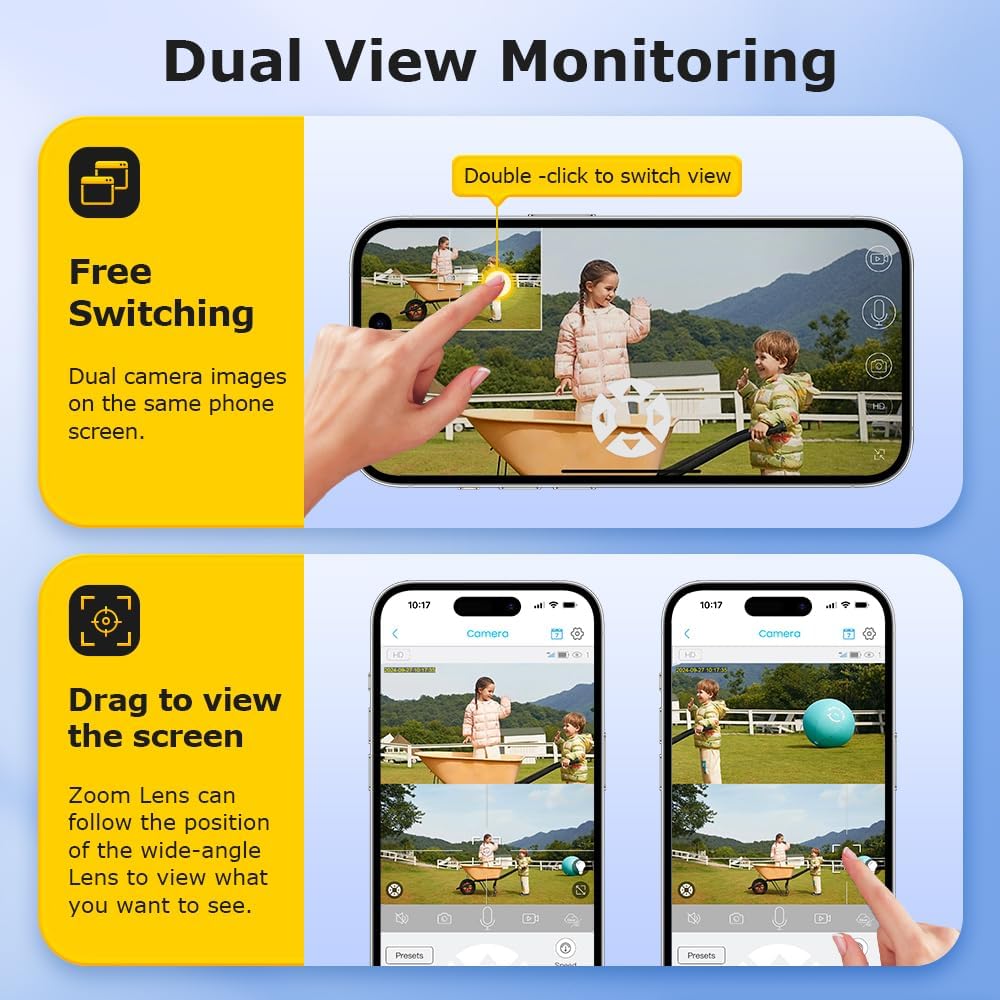
Image 6.2: Demonstrating free switching and drag-to-view functionality in the app.
6.2 PTZ Control and 20X Optical Zoom
The camera supports Pan-Tilt-Zoom (PTZ) functionality and a powerful 20X optical zoom.
- Gyvai view interface of the UBOX app, use the directional controls to pan (move horizontally) and tilt (move vertically) the camera.
- Utilize the zoom controls (e.g., a slider or +/- buttons) to activate the 20X optical zoom for detailed inspection of distant objects.
6.3 Naktinis matymas
The camera provides clear visibility in low-light conditions with its infrared (IR) and white LED lights, offering an effective night vision range of up to 50 meters.
- The camera automatically switches to night vision mode when ambient light is low.
- You can typically configure night vision settings (e.g., IR only, white light only, or smart mode) within the UBOX app.
6.4 PIR žmonių aptikimas
The Passive Infrared (PIR) sensor detects human movement, triggering recordings and alerts.
- Enable PIR detection in the UBOX app settings.
- Adjust sensitivity levels to minimize false alarms.
- When motion is detected, the camera will record and send notifications to your smartphone.
6.5 Dvipusis garsas
Communicate with visitors or deter intruders using the camera's built-in microphone and speaker.
- Gyvai view, palieskite mikrofono piktogramą, kad kalbėtumėte per kameros garsiakalbį.
- Ensure your phone's microphone is enabled for the UBOX app.
6.6 Įrašymas ir saugojimas
The camera supports both local TF card storage and cloud storage for recorded footage.

Image 6.3: The camera provides 6MP Super HD video quality for clear and smooth recordings.

Image 6.4: Multiple storage methods available: TF Card and Cloud Storage.
- TF kortelės saugykla: Recordings are saved directly to the inserted TF card. The app allows you to view and download these recordings.
- Saugykla debesyje: Subscribe to a cloud storage plan through the UBOX app for secure, remote backup of your footage.
- Configure recording settings (e.g., continuous recording, event-triggered recording) within the app.
7. Priežiūra
- Valymas: Reguliariai valykite kameros objektyvus ir saulės bateriją minkšta,amp šluoste dulkėms ir šiukšlėms pašalinti. Nenaudokite stiprių cheminių medžiagų.
- Saulės baterijos efektyvumas: Ensure the solar panel remains free from obstructions (leaves, snow, dirt) to maintain optimal charging efficiency.
- Baterijos būklė: While the camera is designed for continuous solar power, avoid prolonged periods of complete discharge in environments without sunlight to preserve battery life.
- Firmware atnaujinimai: Check the UBOX app periodically for firmware updates to ensure your camera has the latest features and security enhancements.
8. Problemų sprendimas
| Problema | Galimas sprendimas |
|---|---|
| Kamera neįsijungia. |
|
| No 4G signal or offline. |
|
| PIR detection not working. |
|
| Prasta naktinio matymo kokybė. |
|
9. Specifikacijos
| Funkcija | Detalė |
|---|---|
| Modelio pavadinimas | ST-637-6M-20X-4G-US |
| Naudojimas viduje / lauke | Lauke |
| Maitinimo šaltinis | Solar Powered (6W Solar Panel), Built-in 10050mAh Battery |
| Ryšio protokolas | Mobilusis ryšys (4G) |
| Valdiklio tipas | UBOX App |
| Vaizdo įrašymo raiška | 6 MP |
| Optinis priartinimas | 20X |
| Naktinio matymo diapazonas | Up to 50m (230 Feet) |
| PIR aptikimo diapazonas | Maksimalus 12 mln |
| Saugojimo parinktys | Amazon Cloud & TF Card (MAX 128GB, Not Included) |
| Atsparumo vandeniui lygis | Neperšlampamas (IP66) |
| Ypatingos savybės | 2-Way Audio, Dual View, Judesio jutiklis |
| Medžiaga | Plastikiniai |
| Prekės svoris | 5.5 svaro |
10. Garantija ir palaikymas
Your INQMEGA camera comes with a standard manufacturer's warranty. Please refer to the warranty card included in your package or visit the official INQMEGA websvetainėje, kurioje pateikiamos išsamios garantijos sąlygos.
For technical support, troubleshooting assistance, or further inquiries, please contact INQMEGA customer service through the UBOX app or visit the INQMEGA Store on Amazon.
Ask a question about this manual
Ask about setup, troubleshooting, compatibility, parts, safety, or missing instructions. Manuals+ will review the question and use this page’s manual context to help answer it.