
Įvadas
This user manual provides detailed instructions for setting up, operating, and maintaining your FIFINE AmpliGame H13BP Wired USB Gaming Headset. Please read this manual thoroughly before using the product to ensure optimal performance and longevity.
Kas yra dėžutėje
- GERAI AmpliGame H13BP Gaming Headset
- Nuimamas mikrofonas
- Vartotojo vadovas

Image: The FIFINE AmpliGame H13BP headset, its detachable microphone, and the user manual as packaged.
Produktas baigtasview
FIFINE AmpliGame H13BP headset features a robust design with comfortable earcups and an adjustable headband for extended gaming sessions. It includes a versatile USB control box for easy audio management.
Pagrindiniai komponentai:
- laisvų rankų įranga: Equipped with 50mm dynamic drivers for clear audio across all frequencies.
- Nuimamas mikrofonas: Features noise-canceling technology for clear communication.
- USB Control Box: In-line controls for volume, mic mute, 7.1 surround sound, EQ modes, and game/chat balance.
- RGB apšvietimas: Customizable RGB effects on the earcups.
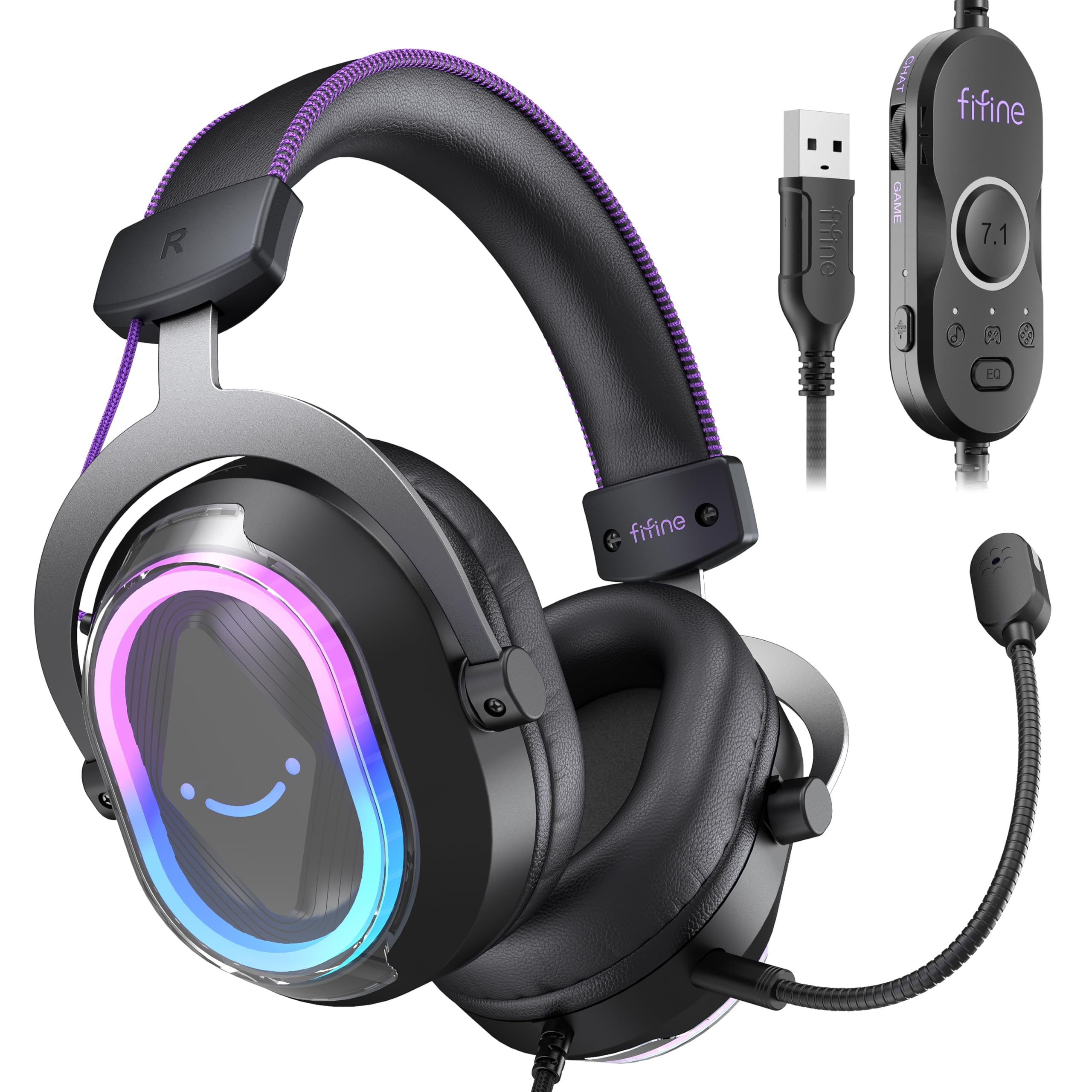
Paveikslėlis: detalus view FIFINE AmpliGame H13BP Gaming Headset.

Image: Close-up diagram of the USB Control Box with labeled functions.
Sąranka
- Prijunkite ausines: Plug the USB-A connector of the headset into an available USB port on your PC, Mac, PS5, or PS4. No additional software is required for basic functionality.
- Prijunkite mikrofoną: Insert the detachable microphone into the designated port on the left earcup until it clicks into place.
- Pritaikyti: Adjust the headband and earcup positions for a comfortable and secure fit. The protein skin ear pads and memory foam cushions are designed for long-term comfort.

Image: Headset connected to various compatible devices.
Naudojimo instrukcijos
USB Control Box Functions:
- Headset Volume Control: Use the volume wheel on the side of the control box to adjust the overall headset volume.
- Mikrofono nutildymas: Press the mic mute button on the control box to toggle the microphone on/off. The mic indicator light on the microphone will glow red when muted.
- Žaidimo / pokalbių balansas: Use the dedicated slider on the control box to prioritize game audio or chat audio. Slide towards 'CHAT' to increase chat volume relative to game volume, or towards 'GAME' to increase game volume.
- 7.1 erdvinis garsas: Press the 7.1 button on the control box to activate or deactivate 7.1 virtual surround sound.
- EQ režimai: Press the EQ button to cycle through four pre-set equalizer modes: Default (Balanced Audio), Music (Clear Vocal), Game (Powerful Bass), and Movie (Dynamic Enhancement). Long press the EQ button to return to default mode.

Image: Demonstrating the game/chat balancing feature.

Vaizdas: Viršview of the different EQ modes available.
RGB apšvietimo valdymas:
- RGB režimų keitimas: Press the dedicated button on the earcup to cycle through 11 different RGB lighting modes.
- Įjungti / išjungti RGB: Long press the RGB button to turn the lighting on or off.

Image: Headset displaying various RGB lighting effects.
Mikrofono savybės
The detachable microphone is designed for clear voice pickup and features noise-canceling capabilities to reduce background distractions, ensuring your teammates hear you clearly.

Image: The microphone with its noise-canceling indicator.
Patogumas ir ilgaamžiškumas
The H13BP headset is built for comfort during long gaming sessions. It features protein skin ear pads and soft memory foam cushions that conform to your ears. The adjustable headband ensures a snug fit for various head sizes. The durable construction includes metal and plastic components, and the braided cable enhances longevity.

Image: Close-up of the headset's comfortable earcups and adjustable headband.
Specifikacijos
| Funkcija | Detalė |
|---|---|
| Prekės ženklas | GERAI |
| Modelio numeris | H13BP |
| Ryšio technologija | Laidinis (USB-A) |
| Ausų išdėstymas | Virš ausies |
| Garso tvarkyklės dydis | 50 milimetrų |
| Garso tvarkyklės tipas | Dinaminis vairuotojas |
| Dažnių diapazonas | 20Hz - 20,000Hz |
| Varža | 32 omai |
| Triukšmo valdymas | Pasyvus triukšmo slopinimas |
| Papildomos funkcijos | 7.1 Surround Sound, Noise Canceling Mic, RGB Lighting |
| Suderinami įrenginiai | PC, Mac, PS5/PS4 (Not compatible with Xbox) |
| Kabelio savybės | Braided material cable (7.55ft) |
| Valdymo tipas | Volume Control, Mic Mute, EQ Modes, 7.1 On/Off, Game/Chat Balance |
| Medžiaga | Oda, metalas, plastikas |
Trikčių šalinimas
Nėra garso / neveikia mikrofonas:
- Patikrinkite jungtis: Ensure the USB-A connector is fully inserted into the port.
- Verify Mute Status: Check the mic mute button on the control box and the mic indicator light. Ensure the headset volume is not at minimum.
- Sistemos nustatymai: Confirm that the FIFINE H13BP headset is selected as the default audio input and output device in your computer's or console's sound settings.
- Suderinamumas: Remember that the headset is not compatible with Xbox consoles.
RGB lemputės neveikia:
- Patikrinkite ryšį: Įsitikinkite, kad ausinės tinkamai prijungtos per USB.
- Perjungti RGB: Long press the RGB button on the earcup to ensure the lighting is not simply turned off.
Garantija ir palaikymas
For warranty information and detailed support, please refer to the official FIFINE website or contact their customer service. FIFINE offers product specialists assistance and free technical support for their products.
You can visit the FIFINE Store for more information: FIFINE parduotuvė „Amazon“ platformoje
Oficialūs produktų vaizdo įrašai
FIFINE H13 USB Gaming Headset Review
Vaizdo įrašas: išsamus perrašymasview of the FIFINE H13 USB Gaming Headset, demonstrating its features and performance.
Testing This Colorful Headset Immersive High-Quality Sound!
Video: A demonstration of the headset's immersive sound quality and vibrant RGB lighting.