
1. Įvadas
This manual provides detailed instructions for the COLORROOM A30L1 Android 16 Tablet. Please read this manual carefully before using your device to ensure proper operation and to maximize its performance and lifespan. Keep this manual for future reference.

Image: The COLORROOM A30L1 Android 16 Tablet, showcasing savo elegantišku dizainu.
2. Kas yra dėžutėje
Upon unboxing your COLORROOM A30L1 tablet, verify that all the following items are included:
- COLORROOM A30L1 Android 16 Tablet
- C tipo USB įkrovimo laidas
- Maitinimo adapteris
- Vartotojo vadovas
- Apsauginis dėklas
- Ekrano apsauga (iš anksto užklijuota arba pridedama atskirai)

Image: The COLORROOM A30L1 Tablet shown with its included accessories, including a protective case.
Vaizdo įrašas: išpakavimas ir apžvalgaview of the Android 16 Tablet, demonstrating its components and capabilities.
3. Produktas baigtasview
The COLORROOM A30L1 is a high-performance Android 16 tablet designed for both productivity and entertainment. It combines advanced features with a user-friendly interface.
3.1. Pagrindinės savybės
- Ekranas: 10-inch Full HD IPS display with 1280x800 resolution, 300 nits brightness, and 178-degree ultra-wide viewing angle. Widevine L1 certified for 1080P streaming.
- Našumas: Android 16 OS, Unisoc T7200 Octa-core processor (1.6 GHz), 12nm process for improved power efficiency.
- Atmintis ir saugojimas: 24 GB RAM (4 GB fizinės + 20 GB virtualios) ir 64 GB vidinės atminties, kurią galima išplėsti iki 2 TB naudojant „microSD“ kortelę.
- Baterija: High-capacity 6,000mAh battery with 18W PD fast charging support.
- Ryšys: Dual-band 2.4GHz/5GHz Wi-Fi 5 (802.11ac) for high-speed internet, Bluetooth 5.0, and GPS.
- Kameros: 5MP front camera and 8MP rear camera.
- Saugumas: Facial recognition unlock and enhanced data privacy protection.
- Garsas: Dual speakers and a 3.5mm headphone jack.

Image: The tablet displaying the Android 16 interface with various application icons.

Image: A visual summary of the COLORROOM A30L1's key features, including battery, OS, CPU, cameras, and connectivity.
3.2. Ekranas ir vaizdinė medžiaga
Experience vibrant colors and sharp details on the 10.1-inch IPS display. Widevine L1 certification ensures you can enjoy your favorite streaming content in full 1080P HD quality.

Image: A comparison demonstrating the superior 1080P quality with Widevine L1 versus 720P with Widevine L2.
3.3. Našumas ir apdorojimas
The Unisoc T7200 octa-core processor, built on a 12nm process, delivers efficient and powerful performance for smooth app usage and multitasking. Android 16 enhances security and user experience.

Image: Diagram illustrating the Unisoc T7200 Octa-core processor, highlighting its architecture and capabilities.
3.4. Atmintis ir saugykla
With 24GB of combined RAM (4GB physical + 20GB virtual) and 64GB of internal storage, the tablet handles multiple applications with ease. Expand storage up to 2TB using a microSD card for all your files ir žiniasklaida.

Image: The tablet with a microSD card, illustrating its expandable storage capability.

Image: Visual representation of the tablet's 24GB RAM and 64GB internal storage, with up to 2TB microSD expansion.

Image: Illustrates the vast storage potential for videos and music on the tablet.
3.5. Baterija ir įkrovimas
The 6,000mAh battery provides extended usage times. With 18W PD fast charging via the Type-C port, you can quickly recharge and get back to your activities.

Image: The tablet connected to a Type-C charger, indicating fast charging.

Image: Details on the 6000mAh battery capacity and 18W PD fast charging, showing extended usage time.
3.6. Ryšys
Enjoy stable and fast internet with dual-band 2.4GHz/5GHz Wi-Fi 5. Bluetooth 5.0 allows seamless connection to wireless accessories, and built-in GPS provides accurate location services.

Image: The tablet displaying Wi-Fi and Bluetooth connection indicators.
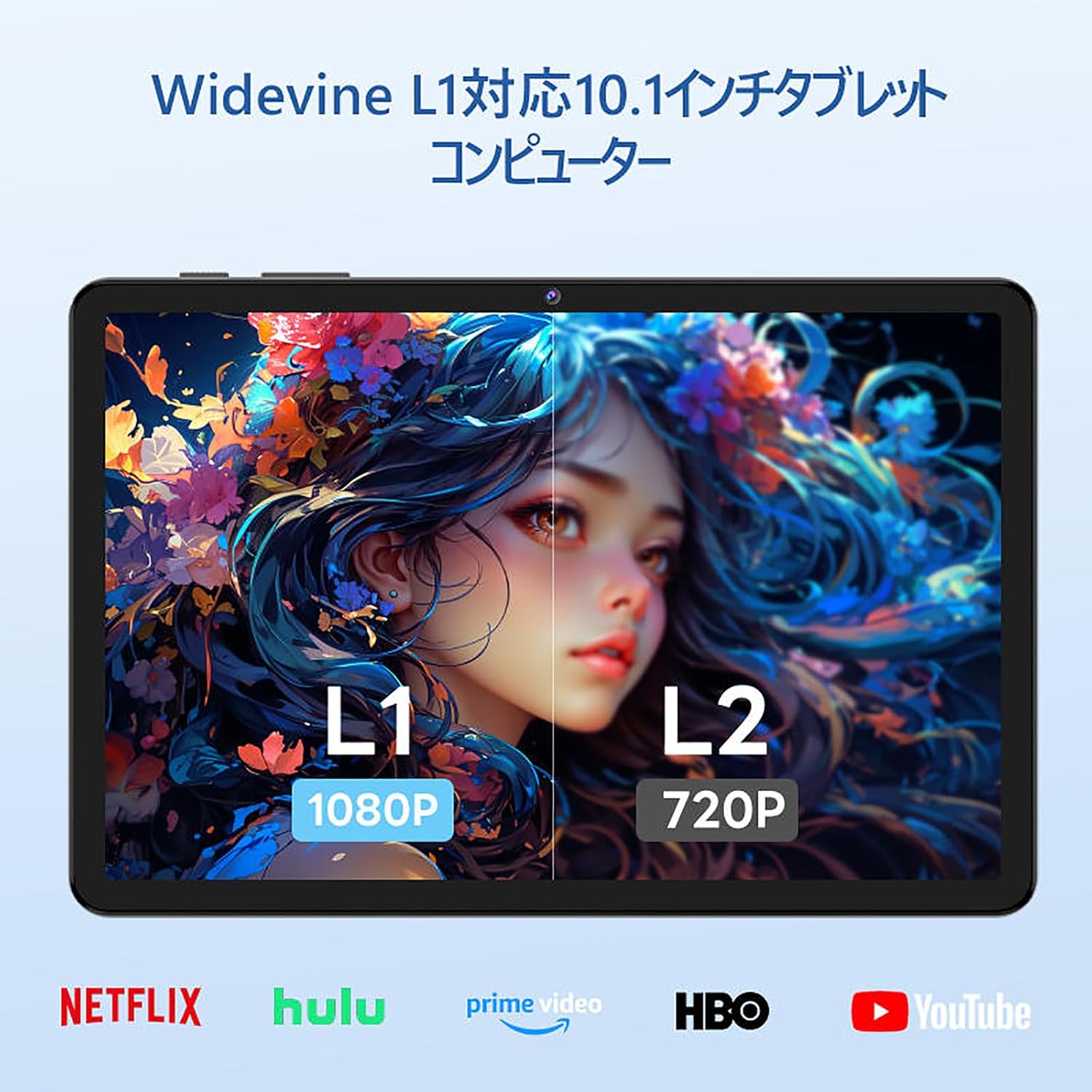
Image: The tablet showing a GPS map, indicating its navigation capabilities.
4. Sąranka
Follow these steps for the initial setup of your COLORROOM A30L1 tablet:
4.1. Pradinis įjungimas ir kalbos pasirinkimas
- Paspauskite ir palaikykite maitinimo mygtuką, kol ekranas įsijungs.
- On the welcome screen, select your preferred language. For English, choose "English (United States)".
- Click "Start" to proceed.
4.2. Wi-Fi and Data Transfer
It is recommended to skip Wi-Fi connection during initial setup to avoid interruptions, especially if your Wi-Fi environment is unstable. You can connect to Wi-Fi later.
- When prompted to set up your device, click "Skip".
- If asked to connect to Wi-Fi, click "Set up offline" or "Skip". Confirm by clicking "Continue" if prompted.
4.3. Datos ir laiko nustatymai
- Select your time zone (e.g., "Japan Standard Time").
- Adjust the date and time if necessary, then click "Next".
4.4. Screen Lock (PIN)
Setting a PIN or screen lock is recommended for security. You can skip this step and set it up later if desired.
- To set a PIN, enter your desired PIN (4 digits or more) and confirm.
- To skip, click "Skip" and confirm the skip action.
4.5. Google paslaugos
- Review the Google Services information.
- Click "See more" multiple times until the "Agree" button appears.
- Click "Agree" to accept the terms and complete the setup.
Your tablet is now set up and ready for use.
Video: A step-by-step guide on the initial setup process for the tablet, including language selection and basic configurations.
5. Naudojimo instrukcijos
5.1. Pagrindinė navigacija ir gestai
- Palieskite: Palieskite piktogramą, kad atidarytumėte programėlę arba pasirinktumėte elementą.
- Perbraukimas: Slide your finger across the screen to scroll through pages or content.
- Žiupsnelis, norint priartinti: Norėdami priartinti arba atitolinti vaizdus, naudokite du pirštus ir web puslapių.
- Padalintas ekranas: Android 16 supports split-screen multitasking. Drag an app to one side of the screen to use two apps simultaneously.
- Ekrano kopija: Use a three-finger swipe down gesture to capture a screenshot.

Image: The tablet screen showing various applications, demonstrating its multitasking capabilities.

Image: Various scenarios of using the tablet for entertainment, such as watching videos, reading, and video calls.

Image: More examples of the tablet being used in daily life, including during holidays and for cooking.
5.2. Media Playback and Streaming
With Widevine L1 support, you can stream high-definition content from popular services like Amazon Prime Video, Netflix, YouTube, and Hulu.

Image: The tablet displaying a high-definition video from a streaming service.
5.3. Belaidis projektavimas
The tablet supports wireless projection, allowing you to mirror your screen to a larger display for an enhanced viewpatirtį.
5.4. GPS funkcionalumas
Utilize the built-in GPS for navigation, location-based services, and finding points of interest. The tablet supports multiple satellite systems for accurate positioning.
6. Priežiūra
To ensure the longevity and optimal performance of your COLORROOM A30L1 tablet, follow these maintenance guidelines:
- Ekrano valymas: Švelniai nuvalykite ekraną minkštu, nepūkuotu audiniu. Jei dėmės sunkiai įveikiamos, šiek tiek pamirkykite.ampNuvalykite šluostę vandeniu arba ekrano valikliu. Venkite stiprių cheminių medžiagų.
- Programinės įrangos atnaujinimai: Reguliariai tikrinkite, ar yra sistemos naujinimų, ir juos įdiekite, kad užtikrintumėte naujausias funkcijas, saugos pataisas ir našumo patobulinimus.
- Akumuliatoriaus priežiūra: Venkite ekstremalių temperatūrų. Neleiskite akumuliatoriui dažnai visiškai išsikrauti. Ilgalaikiam laikymui įkraukite akumuliatorių maždaug iki 50–60 %.
- Saugyklos valdymas: Periodiškai valykite nereikalingus files, apps, and cache to free up storage space and maintain performance.
- Fizinė apsauga: Use the provided protective case and screen protector to guard against scratches, drops, and impacts.
Video: Instructions on how to apply a screen protector to the tablet, ensuring a bubble-free installation.
7. Problemų sprendimas
Jei kyla problemų dėl planšetinio kompiuterio, žr. šiuos dažniausiai pasitaikančius sprendimus:
- Planšetinis kompiuteris neįsijungia: Įsitikinkite, kad akumuliatorius įkrautas. Prijunkite planšetinį kompiuterį prie įkroviklio ir palaukite kelias minutes, prieš bandydami jį vėl įjungti.
- Ekranas nereaguoja: Try restarting the tablet by holding down the power button for about 10-15 seconds until it powers off, then turn it back on.
- Programėlių strigimas / užstrigimas: Close the problematic app and reopen it. If the issue persists, clear the app's cache or reinstall it. Ensure your tablet's software is up to date.
- „Wi-Fi“ ryšio problemos: Restart your Wi-Fi router and the tablet. Forget the Wi-Fi network on your tablet and reconnect. Ensure you are within range of the Wi-Fi signal.
- Lėtas našumas: Uždarykite nenaudojamas fone veikiančias programas. Išvalykite talpyklą ir laikinuosius nustatymus. files. Jei atlikus kitus trikčių šalinimo veiksmus našumo problemos išlieka, apsvarstykite galimybę atlikti gamyklinių parametrų atkūrimą (pirmiausia sukurkite atsarginę duomenų kopiją).
- Įkrovimo problemos: Ensure the charging cable and adapter are securely connected and undamaged. Try using a different compatible charger and cable.
If the problem cannot be resolved using these steps, please contact customer support.
8. Specifikacijos
| Funkcija | Detalė |
|---|---|
| Prekės ženklas | SPALVOS KAMBARYS |
| Modelio pavadinimas | A30L1 |
| Operacinė sistema | Android 16 |
| Ekrano dydis | 10.1 colių |
| Ekrano raiška | 1280x800 Pixels (IPS) |
| Procesoriaus prekės ženklas | Unisoc |
| CPU greitis | 1.6 GHz (Octa-core T7200) |
| RAM | 24 GB (4 GB fizinės + 20 GB virtualios) |
| Vidinė saugykla | 64 GB |
| Išplečiama saugykla | Iki 2 TB per „microSD“ kortelę |
| Baterijos talpa | 6,000 mAh |
| Įkrovimas | 18W PD Fast Charging (Type-C) |
| Belaidis tipas | 802.11ac (2.4GHz/5GHz Dual-band) |
| Bluetooth | Bluetooth 5.0 |
| GPS | Taip |
| Priekinė kamera | 5 MP |
| Galinė kamera | 8 MP |
| Prekės svoris | 1.07 kilogramo |
| Pakuotės matmenys | 32.4 x 19.8 x 3.7 cm |
9. Garantija ir palaikymas
COLORROOM offers a 1 metų garantinis aptarnavimas for all tablets purchased from official COLORROOM brand direct stores. This warranty covers manufacturing defects and ensures your product is free from material and workmanship flaws under normal use.
For warranty claims, technical support, or any inquiries regarding your COLORROOM A30L1 tablet, please contact COLORROOM customer service through the retailer where you purchased the product or visit the official COLORROOM websvetainė, kurioje rasite pagalbos kontaktinę informaciją.
Prašome išsaugoti pirkimo įrodymą garantijos galiojimui.