
Oakcastle IR200
„Oakcastle IR200“ internetinio radijo naudotojo vadovas
Modelis: IR200
1. Įvadas
Thank you for choosing the Oakcastle IR200 Internet Radio. This manual provides essential information for the safe and efficient operation of your device. Please read it thoroughly before use and retain it for future reference.
The Oakcastle IR200 is a versatile audio system offering multiple listening options, including Internet Radio, DAB+, FM, Bluetooth 5.3, and AUX input. It features a color display, remote control, and podcast support for a comprehensive audio experience.
2. Pakuotės turinys
Atsargiai išpakuokite dėžę ir įsitikinkite, kad visi toliau išvardyti daiktai yra ir yra geros būklės:
- Oakcastle IR200 Internet Radio Unit
- Maitinimo kabelis
- Nuotolinio valdymo pultas
- Vartotojo vadovas (šis dokumentas)
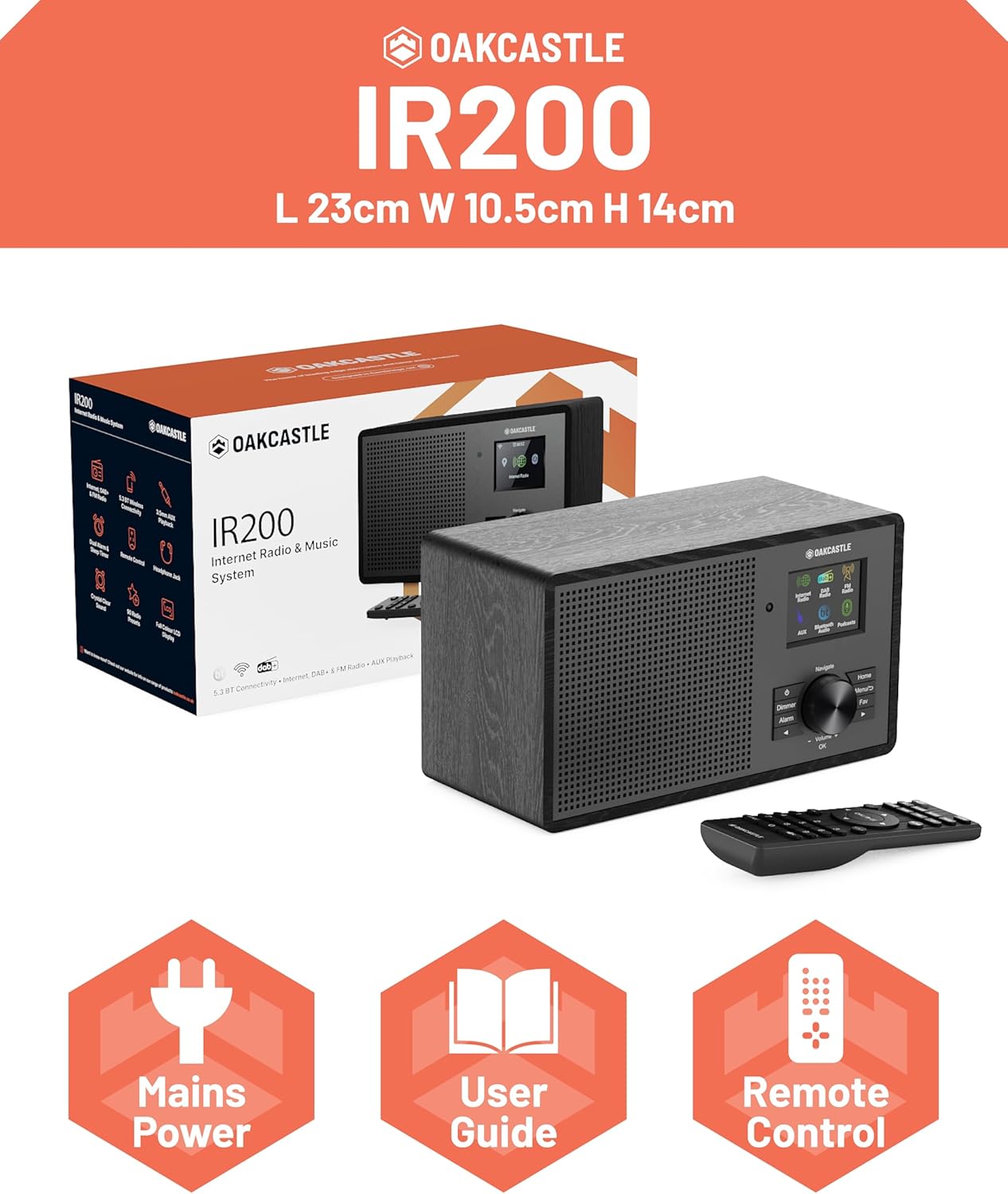
Image 2.1: Contents of the Oakcastle IR200 package, including the radio unit, its box, power cable, remote control, and user manual.
3. Produktas baigtasview
Familiarize yourself with the main components and controls of your Oakcastle IR200 radio.
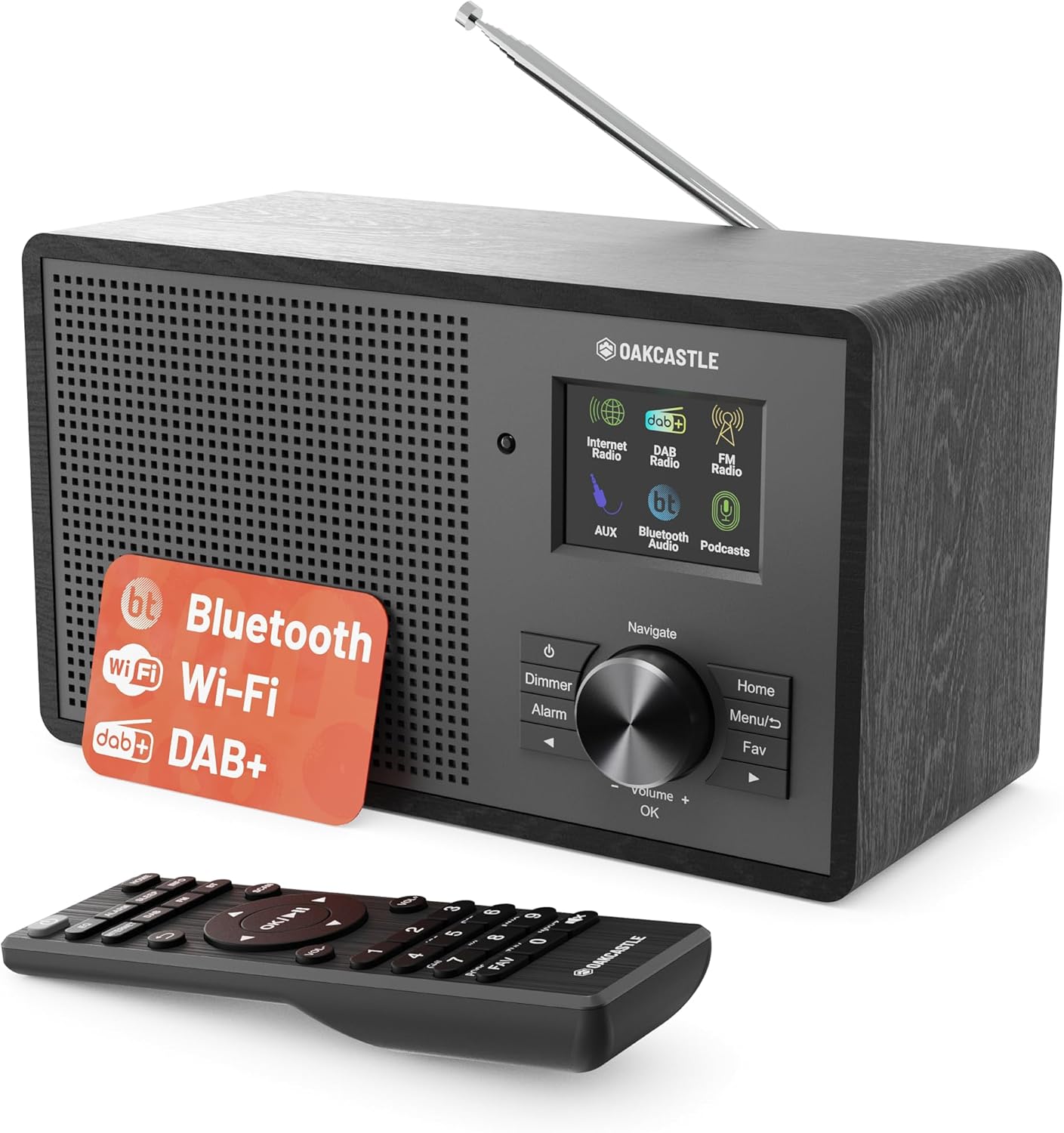
3.1 vaizdas: priekis view of the Oakcastle IR200 radio, showcasing the display, control knob, buttons, and the included remote control.
3.1 Priekinio skydelio valdikliai
- Ekranas: Rodo stoties informaciją, laiką ir meniu parinktis.
- Navigate/Volume/OK Knob: Rotate to navigate menus or adjust volume; press to confirm selections.
- Maitinimo mygtukas: Įjungia / išjungia įrenginį arba perjungia jį į budėjimo režimą.
- Pritemdymo mygtukas: Reguliuoja ekrano ryškumą.
- Signalizacijos mygtukas: Pasiekia žadintuvo nustatymus.
- Namų mygtukas: Grįžta į pagrindinį meniu.
- Meniu mygtukas: Accesses mode-specific menus.
- Mėgstamiausias mygtukas: Accesses favorite station presets.
3.2 Galinio skydelio jungtys

3.2 vaizdas: galinis view of the Oakcastle IR200, highlighting the headphone output and AUX input ports.
- Teleskopinė antena: DAB+ ir FM priėmimui.
- AUX įvestis: Prijunkite išorinius garso įrenginius.
- Ausinių išvestis: Prijunkite ausines privačiam klausymuisi.
- DC in: Maitinimo adapterio jungtis.
4. Pradinė sąranka
4.1 Maitinimo jungtis
- Insert the power cable into the DC IN port on the rear of the radio.
- Kitą maitinimo laido galą prijunkite prie sieninio lizdo.
- Press the Power button on the front panel or remote control to turn on the radio.
4.2 Antenos reguliavimas
For optimal DAB+ and FM reception, fully extend the telescopic antenna located at the rear of the unit.
4.3 Network Connection (for Internet Radio)
- Upon first power-on, the radio will guide you through the network setup.
- Select "Network Wizard" or "Wi-Fi Setup" from the menu.
- Radijas ieškos galimų „Wi-Fi“ tinklų. Pasirinkite savo tinklą iš sąrašo.
- Enter your Wi-Fi password using the navigation knob and OK button.
- Prijungus radiją, bus rodomas patvirtinimo pranešimas.
5. Veikimo režimai
The Oakcastle IR200 offers several listening modes. Press the "Home" button to access the main menu and select your desired mode.
5.1 Interneto radijas
Access thousands of global radio stations via your Wi-Fi connection.

Image 5.1: The radio's display screen in Internet Radio mode, showing station information.
- Pagrindiniame meniu pasirinkite „Interneto radijas“.
- You can browse stations by location, genre, or search by name.
- Rotate the Navigate knob to scroll through options and press OK to select.
- To save a station as a favorite, press the "Fav" button during playback.
5.2 DAB+ radijas
Mėgaukitės aukštos kokybės skaitmeninio radijo transliacijomis.

Image 5.2: The radio's display screen in DAB+ Radio mode, showing the current station.
- Pagrindiniame meniu pasirinkite „DAB+ radijas“.
- Radijas automatiškai ieškos prieinamų DAB+ stočių.
- Use the Navigate knob to select a station from the list.
- To save a station as a favorite, press the "Fav" button during playback.
5.3 FM radijas
Įsijunkite tradicines analogines FM transliacijas.
- Pagrindiniame meniu pasirinkite „FM radijas“.
- To auto-scan for stations, press and hold the OK button or use the scan function via the menu.
- To manually tune, rotate the Navigate knob.
- To save a station as a favorite, press the "Fav" button during playback.
5.4 „Bluetooth“ ryšys
Belaidžiu būdu transliuokite garsą iš savo „Bluetooth“ įrenginių.

Image 5.3: The radio's display screen in Bluetooth mode, indicating readiness for pairing.
- From the main menu, select "Bluetooth". The radio will enter pairing mode.
- On your external device (e.g., smartphone), enable Bluetooth and search for "Oakcastle IR200".
- Select "Oakcastle IR200" to pair. Once connected, you can stream audio.
5.5 AUX įvestis
Prijunkite išorinius garso šaltinius naudodami 3.5 mm garso kabelį.
- Prijunkite vieną 3.5 mm garso kabelio galą prie AUX IN prievado, esančio radijo imtuvo gale.
- Kitą galą prijunkite prie išorinio įrenginio ausinių lizdo arba garso išvesties.
- From the main menu, select "AUX".
- Valdykite atkūrimą iš išorinio įrenginio.
5.6 Tinklalaidės
Browse and listen to a wide range of podcasts.
- From the main menu, select "Podcasts".
- Browse podcasts by category or search for specific titles.
- Select a podcast to start listening.
6. Nustatymai ir funkcijos
6.1 Sistemos nustatymai
Access general system settings via the main menu to configure time, language, display, and more.
- Laikas / data: Set time format, synchronize time.
- Kalba: Select your preferred language for the menu.
- Ekranas: Adjust backlight, color scheme.
- Tinklas: Reconfigure Wi-Fi settings.
- Programinės įrangos naujinimas: Check for and install firmware updates.
6.2 Ekvalaizeris (EQ)
Customize the audio output to your preference using the equalizer settings, accessible via the remote control or system menu.
6.3 išankstiniai nustatymai
The radio supports over 90 presets for your favorite Internet, DAB+, and FM stations. To recall a preset, press the "Fav" button and select from the list.
6.4 Signalizacija
Set alarms to wake up to your favorite radio station or a buzzer sound. Access alarm settings via the "Alarm" button on the front panel or remote.
7. Nuotolinio valdymo pultas
The included remote control provides convenient access to all radio functions from a distance.
Ensure batteries are correctly inserted. Point the remote control towards the front of the radio for optimal response.
7.1 Nuotolinio valdymo pulto funkcijos
- Galia: On/Off/Standby.
- Tūris +/-: Sureguliuokite garsumo lygį.
- Naršymo mygtukai (aukštyn / žemyn / kairėn / dešinėn): Naršyti meniu.
- GERAI: Patvirtinkite pasirinkimą.
- Mode Buttons (Internet, DAB, FM, Bluetooth, AUX): Perjungti režimus.
- Iš anksto nustatytų stočių mygtukai (1–90+): Directly select saved favorite stations.
- EQ: Pasiekite ekvalaizerio nustatymus.
- Meniu: Access mode-specific menus.
- Mėgstamiausia: Access favorite station list.
8. Priežiūra
8.1 Valymas
To clean the radio, use a soft, dry cloth. Do not use abrasive cleaners, waxes, or solvents as these may damage the finish.
8.2 Bendroji priežiūra
- Laikykite įrenginį atokiau nuo tiesioginių saulės spindulių, šilumos šaltinių ir drėgmės.
- Venkite įrenginio numetimo ir stiprių smūgių.
- Užtikrinkite tinkamą vėdinimą aplink įrenginį.
9. Problemų sprendimas
| Problema | Galima priežastis | Sprendimas |
|---|---|---|
| Nėra galios | Maitinimo laidas neprijungtas; sieninis lizdas neveikia. | Check power cable connection; try a different wall socket. |
| Nėra garso | Per mažas garsumas; įjungtas nutildymas; pasirinktas neteisingas šaltinis. | Increase volume; Check mute status; Select correct input mode. |
| Internet Radio not connecting | Incorrect Wi-Fi password; Weak Wi-Fi signal; Router issue. | Re-enter Wi-Fi password; Move radio closer to router; Restart router. |
| Prastas DAB+/FM priėmimas | Antenna not extended; Poor signal area. | Fully extend antenna; Reposition radio for better signal. |
| „Bluetooth“ nesusieja | Radio not in pairing mode; Device too far; Device already paired. | Ensure radio is in Bluetooth mode; Move device closer; Unpair from other devices. |
10. Specifikacijos
| Funkcija | Detalė |
|---|---|
| Prekės ženklas | Ąžuolas |
| Modelis | 200 IR |
| Spalva | Juoda |
| Ryšio technologija | Wi-Fi, Bluetooth 5.3, AUX |
| Tiuningo technologija | Internetinis radijas, DAB+, FM |
| Ypatingos savybės | Bluetooth, EQ, Podcasts, Internet Radio, Remote Control |
| Maitinimo šaltinis | Electric Cable (Mains) |
| Gaminio matmenys (A x P x G) | 14 cm x 10.5 cm x 23 cm (apytiksliai) |
| Produkto svoris | 0.94 kg |
| Suderinami įrenginiai | MP3 grotuvas, išmanusis telefonas, planšetinis kompiuteris |
11. Garantija ir palaikymas
11.1 Informacija apie garantiją
The Oakcastle IR200 comes with a standard warranty. An extended 3-year warranty is available upon product registration on the manufacturer's website. Please refer to the warranty card included in your package or visit the official Oakcastle websvetainėje, kur rasite išsamią informaciją.
11.2 Pagalba klientams
For technical assistance, troubleshooting, or further inquiries, please contact Oakcastle customer support. Contact details can typically be found on the official Oakcastle websvetainėje arba garantijos kortelėje.
Ask a question about this manual
Ask about setup, troubleshooting, compatibility, parts, safety, or missing instructions. Manuals+ will review the question and use this page’s manual context to help answer it.