
Įvadas
This manual provides detailed instructions for the operation and maintenance of your CYBORIS YGS-S18 2-in-1 Magnetic Split Bluetooth Speaker. Designed for versatility, this speaker system offers both combined and separated stereo sound experiences, magnetic attachment capabilities, and robust waterproofing for various environments.
Kas yra dėžutėje
- CYBORIS YGS-S18 2-in-1 Magnetic Split Bluetooth Speaker (2 units)
- Instrukcijų vadovas (šis dokumentas)
- C TIPO įkrovimo laidas
- 3.5 mm garso laidas

Image: The CYBORIS YGS-S18 speaker in its combined form, along with its charging and audio cables.
Produktas baigtasview
The CYBORIS YGS-S18 consists of two individual speaker units that can be magnetically joined or separated for a wider stereo sound field. Each unit features intuitive controls and a vibrant LED light display.
Valdikliai ir prievadai

Image: Close-up of the speaker showing the control buttons: Power On/Off/Play/Pause, Switch Playback Mode/Turn Light On/Off, Volume -/Previous track, and Volume +/Next track.
- Įjungimo / išjungimo / atkūrimo / pauzės mygtukas: Controls power and music playback.
- Režimo mygtukas (M): Switches between Bluetooth, TF card, AUX, and USB playback modes. Also controls the LED lights.
- Garsumo / ankstesnio takelio mygtukas: Trumpai paspaudus, garsumas sumažinamas, o ilgai paspaudus – peršokama į ankstesnį takelį.
- Garsumo didinimo / kito takelio mygtukas: Trumpai paspaudus, garsumas padidėja, o ilgai paspaudus – peršoka prie kito takelio.
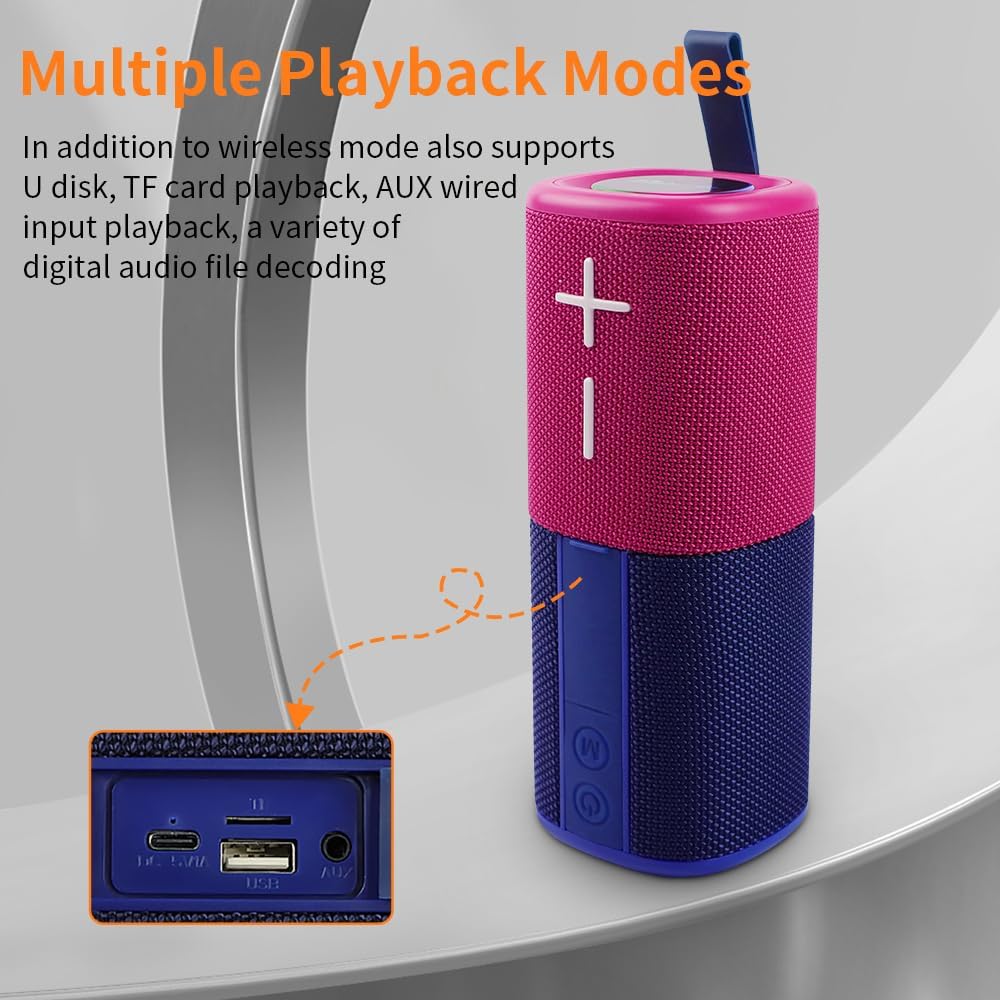
Image: The side panel of the speaker revealing the input ports: DC 5V/A (Type-C charging), TF card slot, USB port, and AUX port.
- DC 5V/A Port (Type-C): Garsiakalbio įkrovimui.
- TF kortelės lizdas: Skirta muzikai leisti tiesiai iš TF (MicroSD) kortelės.
- USB prievadas: Skirta muzikai leisti tiesiai iš USB atmintinės.
- AUX prievadas: For wired audio input using the 3.5mm audio cable.
Sąranka
1. Garsiakalbių įkrovimas
Before first use, fully charge both speaker units. Connect the provided Type-C charging cable to the DC 5V/A port on each speaker and to a compatible USB power adapter (not included). The LED indicator will show charging status.
2. Įjungimas/išjungimas
Press and hold the Power On/Off button on each speaker unit to power them on or off. A sound prompt will indicate the power status.
3. Bluetooth Pairing (Single Speaker Mode)
- Įsitikinkite, kad garsiakalbis įjungtas ir veikia „Bluetooth“ režimu (tai rodo mirksintis mėlynas LED indikatorius).
- Savo įrenginyje (išmaniajame telefone, planšetiniame kompiuteryje, nešiojamajame kompiuteryje) įjunkite „Bluetooth“ ir ieškokite galimų įrenginių.
- Select "YGS-S18" from the list. A sound prompt will confirm successful pairing.
4. True Wireless Stereo (TWS) Pairing (Splittable Mode)
To achieve a wider stereo sound, you can pair both speaker units together:
- Ensure both speaker units are powered on and not connected to any other Bluetooth device.
- Press the Power On/Off button on one speaker unit twice quickly. It will enter TWS pairing mode.
- The two speakers will automatically connect to each other. A sound prompt will confirm successful TWS pairing.
- Once TWS paired, connect your device to one of the speakers via Bluetooth (as described in step 3). Both speakers will now play audio in stereo.

Image: Two CYBORIS YGS-S18 speakers, separated and placed on either side of a laptop, demonstrating True Wireless Stereo (TWS) connectivity for an immersive sound experience.
Naudojimo instrukcijos
Muzikos atkūrimas
- Leisti / pristabdyti: Trumpai paspauskite maitinimo įjungimo/išjungimo mygtuką.
- Garso reguliavimas: Short press the Volume + or Volume - buttons.
- Kitas / ankstesnis takelis: Long press the Volume + for next track, or Volume - for previous track.
Switching Playback Modes
Press the 'M' (Mode) button to cycle through available playback modes: Bluetooth, TF Card, AUX, and USB. Insert the respective media (TF card, USB drive) or connect the 3.5mm audio cable for these modes to become active.
Skambinimas laisvų rankų įranga
When connected via Bluetooth, the speaker's built-in microphone allows for hands-free calls:
- Atsiliepti į skambutį: Trumpai paspauskite maitinimo įjungimo/išjungimo mygtuką.
- Baigti skambutį: Short press the Power On/Off button during a call.
- Atmesti skambutį: Ilgai paspauskite maitinimo įjungimo / išjungimo mygtuką.
LED šviesos efektai
The speaker features colorful breathing lights that can be controlled:
- Įjungti/išjungti šviesas: Long press the 'M' (Mode) button.

Image: The base of the CYBORIS YGS-S18 speaker unit illuminated with colorful LED lights, indicating active light effects.
Magnetinis tvirtinimas
Each speaker unit is equipped with strong magnets, allowing it to attach to metallic surfaces such as refrigerators, metal shelves, or vehicle panels. This feature provides flexible placement options for your audio experience.

Image: Two CYBORIS YGS-S18 speakers, one red and one blue, magnetically attached to the side of a refrigerator, demonstrating their versatile placement.
Priežiūra
- Valymas: Use a soft, dry cloth to clean the speaker's exterior. Do not use harsh chemicals or abrasive materials.
- Atsparumas vandeniui: The speaker has an IPX6 waterproof rating, meaning it can withstand strong jets of water. However, it is not designed for submersion. Ensure all port covers are securely closed before exposure to water.
- Saugykla: Kai garsiakalbio nenaudojate ilgesnį laiką, laikykite jį vėsioje, sausoje vietoje, toliau nuo tiesioginių saulės spindulių ir ekstremalių temperatūrų.

Image: The CYBORIS YGS-S18 speaker, in its combined form, being splashed with water, highlighting its IPX6 waterproof capability.
Trikčių šalinimas
| Problema | Galima priežastis | Sprendimas |
|---|---|---|
| Garsiakalbis neįsijungia. | Žemas akumuliatoriaus įkrovos lygis arba jo visai nėra. | Įkraukite garsiakalbį naudodami pridedamą C tipo laidą. |
| Nepavyksta susieti per „Bluetooth“. | Speaker is already connected to another device, or not in pairing mode. | Ensure the speaker is in Bluetooth pairing mode (flashing blue LED). Disconnect from other devices if necessary. Restart both the speaker and your device. |
| TWS susiejimas nepavyko. | Speakers are too far apart, or one is already paired to a device. | Ensure both speakers are close to each other and not connected to any other Bluetooth device. Follow TWS pairing steps carefully. |
| No sound from TF card/USB/AUX. | Incorrect mode selected, or media not properly inserted/connected. | Press the 'M' button to select the correct input mode. Ensure the TF card/USB drive is inserted correctly or the AUX cable is fully plugged in. |
| Garso kokybė prasta. | Low battery, interference, or source audio quality. | Charge the speaker. Move closer to the connected device. Try different audio sources. |
Specifikacijos
| Funkcija | Detalė |
|---|---|
| Prekės ženklas | KIBORIS |
| Modelio pavadinimas | S18 (YGS-S18) |
| Garsiakalbio tipas | Outdoor, Portable, Splittable |
| Ryšio technologija | Bluetooth V5.3 |
| Belaidžio ryšio diapazonas | Iki 18 metrų (59 pėdų) |
| Garso išvesties režimas | Stereo (when TWS paired) |
| Didžiausia garsiakalbio išėjimo galia | 20 vatų (iš viso) |
| Dažnio atsakas | 20 KHz |
| Baterijos talpa | 2 x 2000mAh (Total 4000mAh) Polymer Lithium Battery |
| Žaidimo laikas | Iki 24 valandų |
| Atsparumo vandeniui lygis | IPX6 (atsparus vandeniui) |
| Kontrolės metodas | Palieskite mygtukus |
| Gaminio matmenys | 3"D x 3"W x 8"H (combined) |
| Prekės svoris | 0.8 kilogramų (1.76 svarai) |
| Palaikomi atkūrimo režimai | Bluetooth, TF Card, AUX, USB |
Oficialūs produktų vaizdo įrašai
CYBORIS YGS-S18 Speaker Overview
Vaizdo įrašas: šiame vaizdo įraše pateikiama bendra informacijaview of the CYBORIS YGS-S18 speaker, demonstrating its split functionality and portability. It highlights how the two units can be separated for a wider sound experience.
Garantija ir palaikymas
The CYBORIS YGS-S18 speaker comes with a limited warranty. For specific warranty details, please refer to the warranty card included with your product or contact CYBORIS customer support. For further assistance, visit the official CYBORIS store or contact their support channels.