
1. Įvadas
This manual provides detailed instructions for the installation, operation, and maintenance of your Roinvou 4G+64G Android 15 Autoradio. This unit is designed for specific vehicle models: Fiat Ducato, Peugeot Boxer, and Citroen Jumper manufactured between 2006 and 2023. Please read this manual thoroughly before installation and use to ensure proper functionality and safety.
2. Pakuotės turinys
Before beginning installation, verify that all components listed below are present in your package. Refer to the 'Package List' image for visual confirmation of the included items.
- Autoradio Unit (9-inch Incell Touchscreen)
- Double Power Cable
- Originalus USB laidas
- Radijo antena
- CANBUS dekoderis
- RCA kabelis
- Galinės kameros įvesties kabelis
- GPS antena
- Double USB Cable
- Galinis View Fotoaparatas
- Išorinis mikrofonas
- Diegimo įrankis
- Vartotojo vadovas (šis dokumentas)

3. Sąranka ir diegimas
3.1. Vehicle Compatibility Check
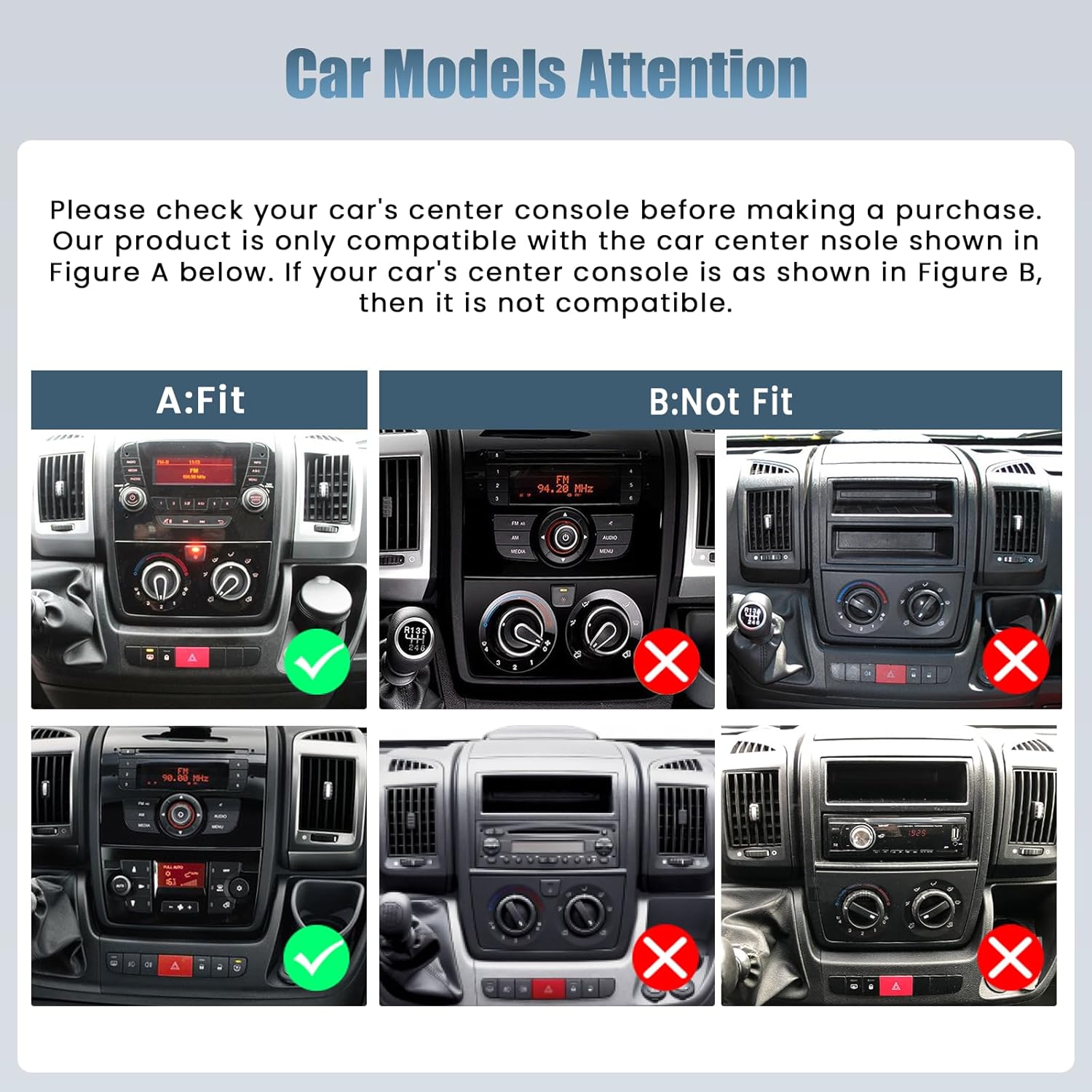
It is crucial to verify your vehicle's center console design before installation. This autoradio is specifically designed for Fiat Ducato, Peugeot Boxer, and Citroen Jumper models from 2006-2023. Compare your vehicle's dashboard with the provided images to ensure compatibility.

3.2. Veiksmai prieš įdiegimą
- Atjunkite akumuliatorių: Prieš pradėdami bet kokius elektros darbus, visada atjunkite automobilio akumuliatoriaus neigiamą gnybtą, kad išvengtumėte trumpojo jungimo.
- Pašalinti seną įrenginį: Carefully remove your existing car radio or blank panel using the provided installation tool.
- Testo atitikimas: Temporarily place the new autoradio unit into the dashboard opening to ensure a proper fit.
3.3. Laidų jungtys
Prijunkite laidus taip:
- Maitinimo kabelis: Connect the double power cable to the vehicle's wiring harness. Ensure all connections are secure.
- USB kabeliai: Connect the original USB cable and the additional double USB cable for data transfer and charging.
- Radijo antena: Prijunkite radijo anteną FM/RDS priėmimui.
- KANBUSAS: Connect the CANBUS decoder. This is essential for integrating with vehicle features like steering wheel controls.
- RCA kabelis: Connect the RCA cable for audio output to external amplifiers or subwoofers, if applicable.
- Galinė kamera: Connect the rear camera input cable and the rear view Kamera parkavimo pagalbai.
- GPS antena: GPS anteną montuokite vietoje, kur nėra šviesos. view dangaus optimaliam signalo priėmimui.
- Išorinis mikrofonas: Prijunkite išorinį mikrofoną, kad pagerintumėte skambučių kokybę.
3.4. Patikrinimas po montavimo
After making all connections, reconnect the vehicle's battery. Turn on the ignition and test the unit's basic functions: power on/off, audio, touchscreen response, and radio reception. Ensure the unit is securely mounted in the dashboard.
4. Naudojimo instrukcijos
4.1. Jutiklinio ekrano sąsaja
The unit features a 9-inch Incell touchscreen with a 1280x720 resolution. This technology provides a fast response, true color reproduction, and high saturation for a clear and responsive user experience.

4.2. Belaidis „CarPlay“ ir „Android Auto“
Connect your iPhone or Android smartphone wirelessly to access navigation, make calls, send messages, and play music directly on the autoradio screen. The unit also supports wired and wireless Mirror Link functionality.

4.3. System Performance and Connectivity
The autoradio runs on Android 15, powered by a 4-core processor with 4GB RAM and 64GB of internal storage. It supports 5G WiFi for fast internet access and a wide range of applications. Bluetooth and GPS functionalities are integrated for seamless connectivity and navigation.

4.4. Audio and Customization
Utilize the equalization (EQ) settings to fine-tune your audio experience. The FM/RDS radio ensures clear sound and easy access to your preferred stations. The user-friendly interface supports split-screen functionality, allowing you to run navigation and music simultaneously. Multiple UI options are available for personalization.

4.5. Saugos funkcijos
The included rear camera provides a clear, wide-angle view for safer parking and reversing. The unit also supports steering wheel controls (SWC), allowing you to manage audio and other functions without taking your hands off the wheel. Ensure SWC is configured correctly via the CANBUS settings.

5. Priežiūra
To ensure the longevity and optimal performance of your Roinvou Autoradio, follow these maintenance guidelines:
- Ekrano valymas: Jutiklinį ekraną švelniai nuvalykite minkšta, nepūkuota šluoste. Įsisenėjusias dėmes šiek tiek nuvalykiteampNuvalykite šluostę vandeniu arba ekranui saugiu valikliu. Venkite stiprių cheminių medžiagų ar abrazyvinių medžiagų.
- Bendras valymas: Laikykite įrenginį švarų nuo dulkių ir šiukšlių. Ventiliacijos angas ir plyšius valykite minkštu šepečiu arba suslėgtu oru.
- Temperatūros valdymas: Venkite ilgą laiką laikyti įrenginį itin aukštoje temperatūroje – tiek karštyje, tiek šaltyje.
- Programinės įrangos atnaujinimai: Periodically check for available software updates to ensure you have the latest features and bug fixes. Follow the on-screen prompts or consult the manufacturer's websvetainė, kurioje pateikiamos atnaujinimo procedūros.
- Kabelių jungtys: Occasionally check all cable connections to ensure they remain secure and free from damage.
6. Problemų sprendimas
If you encounter issues with your Roinvou Autoradio, refer to the following troubleshooting steps:
- Įrenginys neįsijungia:
- Check the power cable connections to ensure they are securely attached.
- Verify the vehicle's fuse box for any blown fuses related to the radio.
- Įsitikinkite, kad automobilio akumuliatorius tinkamai prijungtas ir įkrautas.
- Jutiklinis ekranas nereaguoja:
- Restart the autoradio unit.
- Įsitikinkite, kad ekranas yra švarus ir be jokių kliūčių.
- If the issue persists, a factory reset might be necessary (consult the settings menu).
- Nėra garso išvesties:
- Patikrinkite garsiakalbių laidų jungtis.
- Verify volume levels and mute settings on the unit.
- Ensure EQ settings are not configured to an extreme that might cause silence.
- Vairo valdikliai neveikia:
- Confirm the CANBUS decoder is correctly installed and configured for your specific vehicle model (e.g., Fiat Ducato).
- Įrenginio nustatymuose pasiekite vairo valdymo mokymosi funkciją ir perprogramuokite mygtukus.
- GPS signalo problemos:
- Ensure the GPS antenna is mounted in a location with a clear, unobstructed view dangaus.
- Patikrinkite GPS antenos jungtį su įrenginiu.
- Incompatibility with Vehicle:
- Double-check the vehicle's make, model, and year against the product's compatibility list.
- Re-examine the center console design against the compatibility images provided in Section 3.1.
7. Specifikacijos
| Funkcija | Specifikacija |
|---|---|
| Prekės ženklas | Roinvou |
| Modelio numeris | 23920b85-757e-46af-a079-f66fe345e532 |
| Operacinė sistema | Android 15 |
| RAM | 4 GB |
| Sandėliavimas | 64 GB |
| Ekrano tipas | 9-inch Incell Touchscreen |
| Ekrano raiška | 1280x720 |
| Ryšio technologija | RCA, USB, Bluetooth, WiFi |
| Belaidė technologija | Bluetooth, WiFi (5G) |
| Ypatingos savybės | CarPlay, Android Auto, Mirror Link, EQ, FM/RDS, GPS, UI, SWC, Rear Camera Support |
| Suderinami įrenginiai | Išmanusis telefonas |
| Garso išvesties režimas | Stereo |
| Erdvinio garso kanalai | 4 |
| Išėjimo galia | 45 vatų |
| Digital Media Format Support | AVI, WAV, WMA, MKV, RMVB, MP4, MDV |
| Kilmės šalis | Kinija |
8. Garantija ir palaikymas
8.1. Informacija apie garantiją
This Roinvou Autoradio comes with a 24 mėnesių garantija nuo įsigijimo datos. Ši garantija taikoma gamybos defektams ir gedimams įprasto naudojimo metu. Išsaugokite pirkimo įrodymą, jei galėtumėte pateikti pretenzijas dėl garantijos.
8.2. Pagalba klientams
For any inquiries, technical assistance, or warranty claims, Roinvou offers lifetime online support. Our support team aims to respond to all inquiries within 24 hours. Please refer to the contact information provided with your purchase or visit the official Roinvou websvetainėje, kur rasite išsamios pagalbos.