
Įvadas
Thank you for choosing the Greadio CD03P Portable Bluetooth CD Player. This manual provides essential information for the safe and efficient operation of your device. Please read it thoroughly before use and retain it for future reference.
The Greadio CD03P is a versatile audio device featuring CD playback, Bluetooth 5.3 connectivity, dual wireless karaoke microphones, dynamic LED lights, and multiple input options including USB, TF card, and AUX. It is powered by a 4000mAh rechargeable battery, offering portability for various environments.
Produktas baigtasview
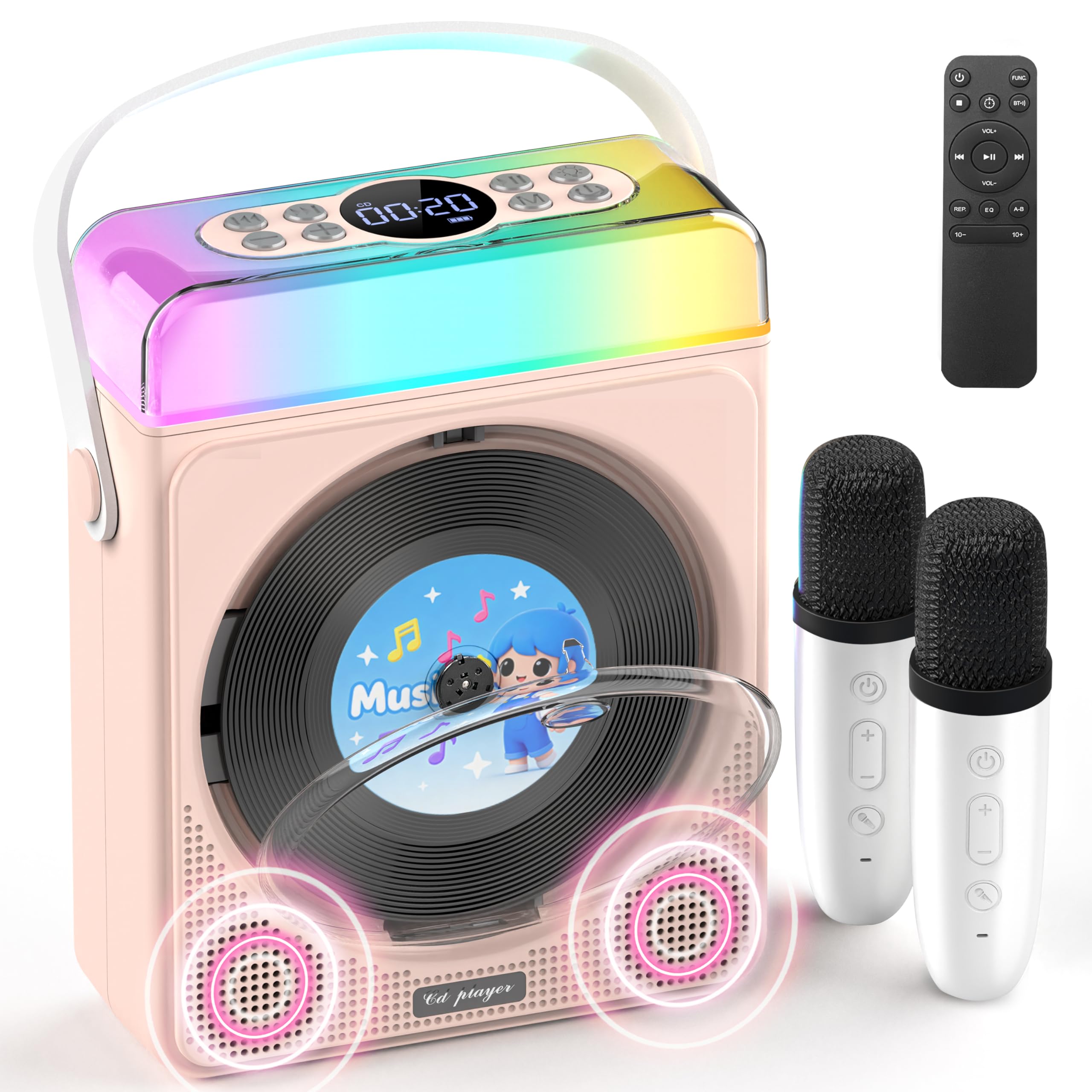
1 paveikslas: Greadio CD03P Portable Bluetooth CD Player with two microphones and LED lights.

2 paveikslas: Į viršų view of the CD03P showing control buttons and LED light bar.
Pakuotės turinys:
- Nešiojamasis CD grotuvas x 1
- Karaoke mikrofonas x 2
- C tipo įkrovimo laidas x 1
- Nuotolinio valdymo pultas x 1
- AUX kabelis x 1
Sąranka
Įrenginio įkrovimas:
Before first use, fully charge the CD player using the provided Type-C charging cable. Connect the cable to the Type-C port on the device and a compatible 5V/2A power adapter (not included). The battery indicator on the display will show charging status.
Charging the Microphones:
The two wireless microphones are rechargeable. Connect them to a power source using their respective charging cables (if provided, or compatible USB cables). Each microphone offers over 30 hours of playtime on a full charge.
Naudojimo instrukcijos
1. Maitinimo įjungimas/išjungimas:
Ilgai paspauskite maitinimo mygtuką (⏻) on the device or remote control to turn the unit on or off.
2. Režimo pasirinkimas:
Paspauskite M (Mode) button on the device or the FUNC. button on the remote control to cycle through available modes: CD, Bluetooth, USB, TF Card, and AUX.
3. CD grojimas:
- Press the release button to open the CD compartment cover.
- Carefully insert a CD (compatible with CD/CD-R/CD-RW/MP3/WMA formats) with the label side facing up.
- Tvirtai uždarykite CD skyriaus dangtelį.
- Select "CD" mode using the Mode/FUNC. button. The device will begin loading and playing the CD.
- Naudokite |< ir >| buttons for track navigation (short press) or fast forward/rewind (long press).
- Paspauskite ▶|| mygtuką, norėdami paleisti arba pristabdyti.
Vaizdo įrašo aprašymas: This video demonstrates how to play CDs, USB, and TF cards on the Greadio CD03P. It shows inserting a CD, selecting the CD mode, and using playback controls.
4. Bluetooth Connectivity (Receiving Mode):
- Paspauskite M (Mode) button until "Bluetooth" mode is selected. The display will show "BLUE" and a blinking Bluetooth icon.
- On your mobile device, enable Bluetooth and search for "CD03P".
- Select "CD03P" to pair. A confirmation tone will sound upon successful connection.
- Play audio from your mobile device, and it will stream through the Greadio CD03P speakers.
Vaizdo įrašo aprašymas: This video illustrates the Bluetooth receiving mode, showing how to connect a mobile phone to the Greadio CD03P for audio playback.
5. Bluetooth Connectivity (Transmitting Mode):
The CD03P can transmit audio to external Bluetooth speakers or headphones when in CD, USB, TF, or AUX mode (not in Bluetooth receiving mode).
- Ensure the CD03P is in CD, USB, TF, or AUX mode.
- Trumpai paspauskite BT button on the remote control. The Bluetooth icon on the display will blink.
- Įjunkite išorinį „Bluetooth“ garsiakalbį arba ausines į susiejimo režimą.
- Once connected, the Bluetooth icon on the CD03P will stop blinking. Audio will now play through the external Bluetooth device.
- To disconnect, short press the BT mygtuką dar kartą.
Vaizdo įrašo aprašymas: This video demonstrates the Bluetooth transmitting mode, showing how to connect the Greadio CD03P to external Bluetooth speakers or headphones.
6. USB/TF kortelių atkūrimas:
- Insert a USB flash drive into the USB port or a TF card into the TF card slot on the back of the device.
- Paspauskite M (Režimas) mygtukas arba FUNC. button on the remote to select "USB" or "TF" mode.
- The device will automatically detect and play compatible audio files (MP3 / WMA / WAV / APE / FLAC).
- Naudokite |< ir >| buttons for track navigation (short press) or fast forward/rewind (long press).
- Paspauskite ▶|| mygtuką, norėdami paleisti arba pristabdyti.
Note: For best performance with USB/TF cards, use 64GB or less. Reformat 128GB cards to FAT32 if needed.
7. AUX įvestis:
- Connect an external audio device (e.g., smartphone, MP3 player) to the AUX port on the back of the CD03P using the provided AUX cable.
- Paspauskite M (Režimas) mygtukas arba FUNC. button on the remote to select "AUX" mode.
- Play audio from your external device. The sound will be output through the CD03P speakers.
8. Karaoke Microphones:
- Turn on the microphones by pressing their power buttons. They will automatically connect to the CD03P.
- Naudokite +/- buttons on the microphone to adjust microphone volume.
- Paspauskite MIC button on the microphone to cycle through five voice effects: Female, Monster, Baby, Original, and KTV mode.
- Paspauskite Galia button on the microphone to switch between microphone modes (e.g., adjust background music, microphone volume, reverb).
Vaizdo įrašo aprašymas: This video demonstrates how to connect and use the wireless microphones with the Greadio CD03P, including switching voice effects and adjusting settings.
9. LED lemputės:
- The RGB light (LED1) turns on automatically when the device is powered on.
- Trumpai paspauskite Šviesa button on the device or remote to cycle through various light effects: breathing light (red, purple, blue, cyan, green, yellow, orange) and solid colors.
- Ilgai paspauskite mygtuką Šviesa mygtuką, kad išjungtumėte LED lemputes.
Vaizdo įrašo aprašymas: This video showcases the dynamic LED light features of the Greadio CD03P, demonstrating how to cycle through different light modes and colors.
10. Garsumo valdymas:
Naudokite VOL+ ir VOL- buttons on the device or remote control to adjust the main speaker volume.
11. Ekvalaizerio režimai:
Trumpai paspauskite EQ button on the remote control to switch between different equalizer modes (e.g., Pop, Jazz, Classic, Bass, Flat, Rock).
12. Miego laikmatis:
The CD03P can function as a night light with a sleep timer. Refer to the full user manual for detailed instructions on setting the sleep timer.
Priežiūra
- Saugokite prietaisą nuo vandens ir drėgmės.
- Prietaisą valykite minkštu, sausu skudurėliu. Nenaudokite abrazyvinių valiklių ar tirpiklių.
- Saugokite, kad prietaisas nepatektų į ekstremalias temperatūras ar tiesioginius saulės spindulius.
- Do not press the CD base directly.
- Kai prietaisas ilgesnį laiką nenaudojamas, laikykite jį vėsioje, sausoje vietoje.
Trikčių šalinimas
| Problema | Galima priežastis | Sprendimas |
|---|---|---|
| Įrenginys neįsijungia. | Išsikrovusi baterija arba maitinimo problema. | Visiškai įkraukite įrenginį. Įsitikinkite, kad įkrovimo laidas tinkamai prijungtas. |
| Kompaktinis diskas negrojamas arba praleidžia garsą. | Kompaktinis diskas yra nešvarus, subraižytas arba neteisingai įdėtas. | Clean the CD with a soft cloth. Ensure the CD is inserted correctly with the label side up. Try a different CD. |
| „Bluetooth“ susiejimas nepavyksta. | Device is not in Bluetooth mode or too far from the paired device. | Ensure the CD03P is in Bluetooth receiving mode. Move devices closer. Disconnect from other Bluetooth devices. |
| Mikrofonas neveikia. | Microphone is off, uncharged, or out of range. | Turn on the microphone. Charge the microphone. Ensure it is within range of the CD03P. |
| Nėra garso. | Garsumas per mažas arba nutildytas. Pasirinktas neteisingas režimas. | Increase volume. Check if the device is muted. Ensure the correct input mode (CD, Bluetooth, USB, TF, AUX) is selected. |
| Įrenginys nereaguoja. | Laikinas programinės įrangos triktis. | Use a thin object to press the RESET button on the back of the device. |
Specifikacijos
| Funkcija | Detalė |
|---|---|
| Modelio numeris | CD03P |
| Gaminio matmenys | 6.81 x 2.52 x 8.15 colio |
| Prekės svoris | 1.97 svaro |
| Baterijos talpa | 4000 mAh (įkraunamas) |
| Ryšys | „Bluetooth 5.3“, USB, TF kortelė, AUX |
| CD suderinamumas | CD/CD-R/CD-RW/MP3/WMA |
| Įtraukti komponentai | Portable CD Player, 2 Karaoke Microphones, Type-C Charging Cable, Remote Control, AUX Cable |
Garantija ir palaikymas
Greadio products come with a full year of coverage. For any issues or support needs, please contact Greadio customer service. Refer to the official Greadio webkontaktinę informaciją rasite svetainėje arba pirkimo dokumentuose.
Note: This device is designed for personal and recreational use. Any unauthorized modifications or misuse may void the warranty.