
1. Įvadas
Thank you for choosing the THOMSON WS902DUO Cosy Bookshelf Speakers. These active stereo speakers deliver a powerful 150W audio experience with deep bass from two 10 cm woofers. They offer versatile connectivity options including Bluetooth 5.3, Optical, HDMI (ARC), RCA, and USB playback. The included remote control and side panel adjustments provide precise control over your audio. Please read this manual carefully before use to ensure proper operation and to maximize your listening experience.

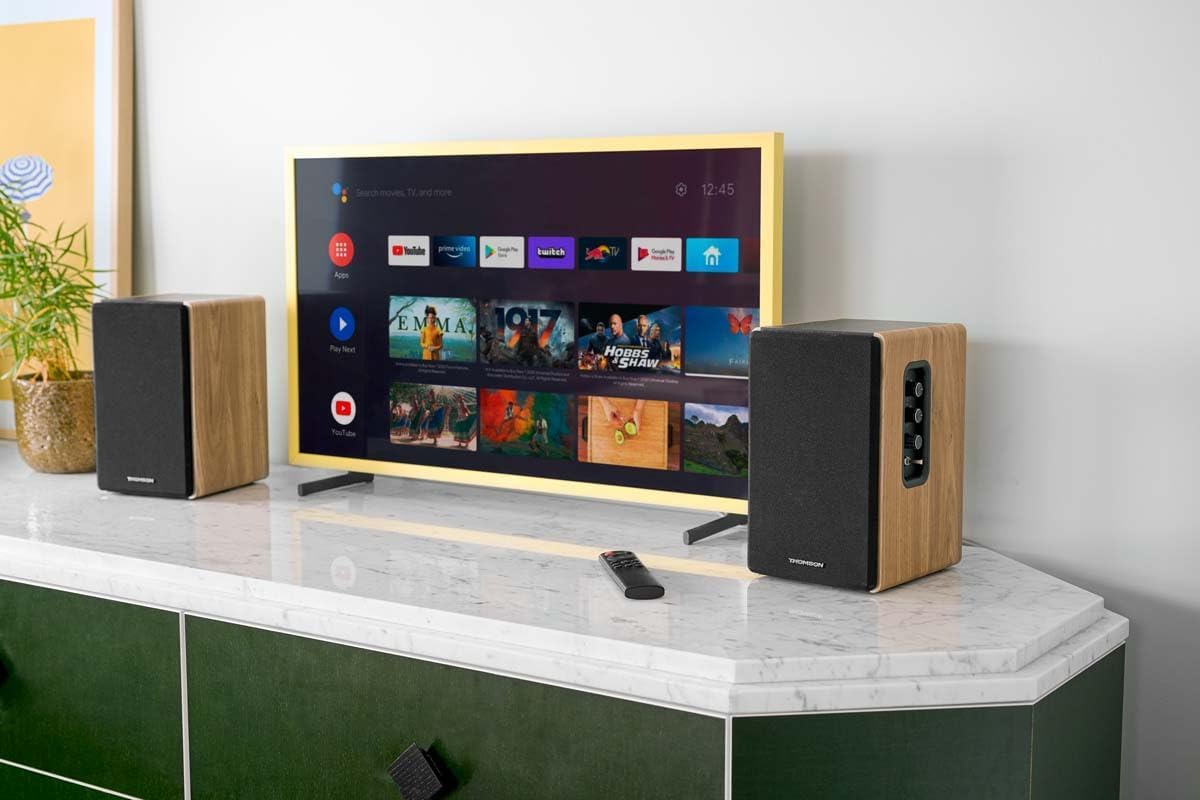
Image 1.1: THOMSON WS902DUO Bookshelf Speakers in a living space, showcasing their elegant wood finish.
2. Svarbios saugos instrukcijos
- Read these instructions thoroughly before operating the product.
- Išsaugokite šias instrukcijas, kad galėtumėte pasinaudoti ateityje.
- Atkreipkite dėmesį į visus įspėjimus ant gaminio ir naudojimo instrukcijose.
- Vykdykite visas instrukcijas.
- Nenaudokite šio prietaiso šalia vandens.
- Valykite tik sausa šluoste.
- Neužblokuokite jokių ventiliacijos angų. Montuokite pagal gamintojo instrukcijas.
- Nemontuokite šalia jokių šilumos šaltinių, pvz., radiatorių, šilumokaičių, viryklių ar kitų įrenginių (įskaitant ampkeltuvai), kurie gamina šilumą.
- Nepažeiskite poliarizuoto arba įžeminto kištuko saugos tikslo. Poliarizuotas kištukas turi du ašmenis, kurių vienas platesnis už kitą. Įžeminimo tipo kištukas turi dvi mentes ir trečią įžeminimo šakelę. Platus ašmenys arba trečioji šakelė yra jūsų saugumui. Jei pateiktas kištukas netelpa į jūsų elektros lizdą, kreipkitės į elektriką, kad pakeistų pasenusį lizdą.
- Saugokite maitinimo laidą, kad ant jo neužeitų ar nesuspaustų, ypač prie kištukų, patogių lizdų ir toje vietoje, kur jie išeina iš aparato.
- Naudokite tik gamintojo nurodytus priedus/priedus.
- Naudokite tik su gamintojo nurodytu arba kartu su aparatu parduodamu vežimėliu, stovu, trikoju, laikikliu ar stalu. Kai naudojate vežimėlį, būkite atsargūs perkeldami vežimėlio ir aparato derinį, kad išvengtumėte sužeidimų dėl apvirtimo.
- Atjunkite šį įrenginį žaibuojant arba kai nenaudojate ilgą laiką.
- Visus techninės priežiūros darbus patikėkite kvalifikuotam techninės priežiūros personalui. Techninė priežiūra reikalinga, kai aparatas buvo kaip nors pažeistas, pvz., pažeistas maitinimo laidas arba kištukas, į aparatą išsiliejo skystis ar įkrito daiktai, aparatas buvo paveiktas lietaus ar drėgmės, neveikia normaliai. , arba buvo numestas.
3. Pakuotės turinys
Patikrinkite, ar jūsų pakuotėje yra visi toliau išvardyti daiktai:
- THOMSON WS902DUO Bookshelf Speakers (2 units)
- Nuotolinio valdymo pultas
- Maitinimo kabelis
- Garsiakalbio prijungimo laidas
- 3.5mm Jack to RCA Adapter Cable
- Vartotojo vadovas (šis dokumentas)

Image 3.1: Packaging of the THOMSON WS902DUO Bookshelf Speakers.
4. Produktas baigtasview
4.1. Side Control Panel (Active Speaker)
The active speaker features a side control panel for easy access to essential functions.

Image 4.1: Side control panel.
- Žemųjų dažnių valdymas: Reguliuoja žemo dažnio išvestį.
- Aukštųjų dažnių valdymas: Reguliuoja aukšto dažnio išvestį.
- Garsumo valdymas: Reguliuoja bendrą garso stiprumą.
- Maitinimo jungiklis: Įjungia arba išjungia garsiakalbius.
- LED indikatorius: Shows the current status or selected input.
4.2. Rear Panel (Active Speaker)
The rear panel of the active speaker provides all necessary input and output connections.
4.2 pav.: Galinio skydelio jungtys.
- Optinė įvestis: For connecting digital audio sources like TVs, game consoles, or Blu-ray players.
- Aux įvestis (RCA): For connecting analog audio sources such as turntables, CD players, or PCs. A 3.5mm jack adapter is provided.
- TV Audio (HDMI ARC): For connecting to a TV's HDMI ARC port, allowing TV remote control of the speaker volume.
- USB grojimas: MP3 grojimui files tiesiai iš USB atmintinės.
- Sub Out: For connecting an external active subwoofer for enhanced bass.
- Garsiakalbio išvestis: Jungiamas prie pasyvaus garsiakalbio.
- Maitinimo įvestis: Jungiamas prie pagrindinio maitinimo šaltinio.
4.3. Nuotolinio valdymo pultas
The remote control provides convenient access to all speaker functions from a distance.

Image 4.3: Remote control.
- Maitinimo mygtukas: Turns the speakers on/off.
- Nutildymo mygtukas: Nutildo / išjungia garsą.
- Tūris +/-: Reguliuoja garsumo lygį.
- Atkūrimo valdikliai (leisti / pristabdyti, praleisti): USB atkūrimui.
- Source Selection Buttons (OPT, BT, ARC, USB, LINE): Pasirenka garso įvesties šaltinį.
- EQ Mode Buttons (MOVIE, MUSIC, DIALOG): Selects preset equalization modes.
5. Sąranka
5.1. Garsiakalbio išdėstymas
Place the speakers on a stable, flat surface such as a bookshelf, desk, or speaker stands. For optimal stereo imaging, position the speakers equidistant from your listening position and at ear level. Ensure there is adequate space around the speakers for ventilation.
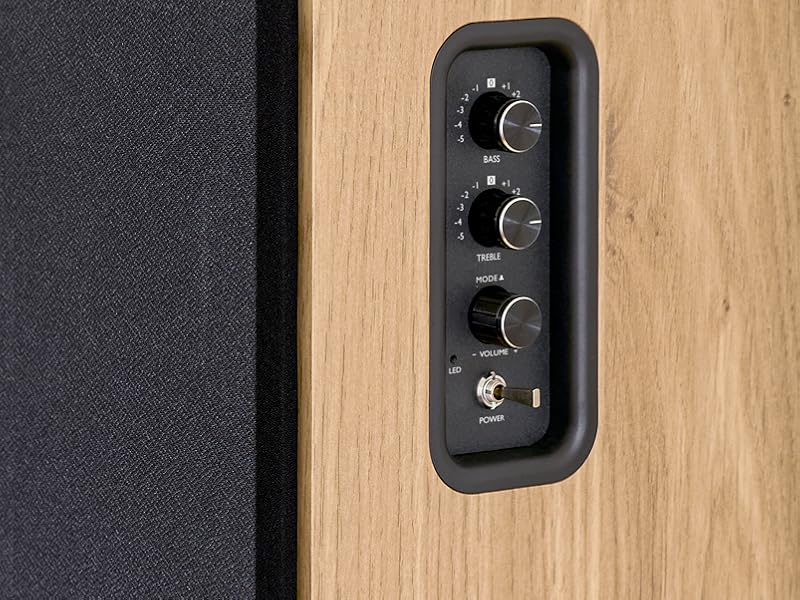
Image 5.1: Recommended speaker placement on a desk.
5.2. Garsiakalbių prijungimas
- Identify the active speaker (with controls and inputs) and the passive speaker.
- Connect the included speaker cable from the speaker output terminals on the active speaker to the input terminals on the passive speaker. Ensure correct polarity (+ to + and - to -).
5.3. Garso šaltinių prijungimas
Connect your desired audio sources to the active speaker using the appropriate cables.
- Optinė įvestis: Use an optical cable to connect your TV, game console, or Blu-ray player to the OPTICAL IN port.
- HDMI (ARC) įvestis: Use an HDMI cable to connect your TV's HDMI ARC port to the TV AUDIO (HDMI) port on the speaker. This allows your TV remote to control the speaker volume.
- RCA (AUX) įvestis: Use an RCA cable (or the provided 3.5mm jack to RCA adapter) to connect devices like a turntable, CD player, or PC to the AUX IN (RCA) ports.
- USB įvestis: Įdėkite USB atmintinę su MP3 files into the USB PLAY port.

Image 5.2: Speakers connected to a television via HDMI ARC.
5.4. „Bluetooth“ poravimas
- Įsitikinkite, kad garsiakalbiai įjungti.
- Press the 'BT' button on the remote control or the side panel to select Bluetooth input. The LED indicator will flash, indicating pairing mode.
- Išmaniajame telefone, planšetiniame kompiuteryje arba kompiuteryje įjunkite „Bluetooth“ ir ieškokite galimų įrenginių.
- Select "THOMSON WS902DUO" from the list of devices.
- Once paired, the LED indicator will stop flashing and remain solid. You can now stream audio wirelessly.
5.5. Subwoofer Connection (Optional)
If you wish to enhance bass further, connect an active subwoofer to the 'Sub Out' port on the rear panel of the active speaker using an RCA cable.
6. Naudojimo instrukcijos
6.1. Maitinimo įjungimas/išjungimas
Use the power switch on the side control panel or the power button on the remote control to turn the speakers on or off.
6.2. Šaltinio pasirinkimas
Press the corresponding source button on the remote control (OPT, BT, ARC, USB, LINE) to switch between connected audio inputs. The LED indicator will change to reflect the selected source.
6.3. Garsumo valdymas
Adjust the volume using the 'Volume' knob on the side control panel or the 'VOL+/-' buttons on the remote control.
6.4. Garso reguliavimas
Fine-tune the sound to your preference:
- Žemieji / aukštieji dažniai: Use the 'Bass' and 'Treble' knobs on the side control panel to adjust the low and high frequencies.
- EQ režimai: Press the 'MOVIE', 'MUSIC', or 'DIALOG' buttons on the remote control to select preset equalization settings optimized for different content types.
6.5. USB atkūrimas
When a USB flash drive with MP3 files is inserted and USB source is selected, the speakers will automatically begin playing. Use the playback control buttons on the remote control (Play/Pause, Skip) to manage your music.
6.6. Bluetooth veikimas
After successful pairing (see Section 5.4), you can stream audio from your Bluetooth device. Use your device's controls or the speaker's remote control for playback and volume adjustments.
7. Priežiūra
Tinkama priežiūra užtikrina garsiakalbių ilgaamžiškumą ir našumą.
- Valymas: Wipe the speaker surfaces with a soft, dry cloth. Do not use liquid cleaners or abrasive materials.
- Vėdinimas: Įsitikinkite, kad ventiliacijos angos nėra užblokuotos, kad išvengtumėte perkaitimo.
- Saugykla: If storing the speakers for an extended period, unplug them from the power outlet and store them in a cool, dry place.
- Venkite drėgmės: Keep the speakers away from water and high humidity.
8. Problemų sprendimas
Jei kyla problemų, žr. šį trikčių šalinimo vadovą:
| Problema | Galima priežastis | Sprendimas |
|---|---|---|
| Nėra galios | Power cable not connected; Power switch off; Wall outlet not working. | Ensure power cable is securely connected. Turn on the power switch. Test the wall outlet with another device. |
| Nėra garso | Incorrect input source selected; Volume too low; Mute function active; Audio cable not connected properly. | Select the correct input source. Increase volume. Press Mute button on remote. Check all audio cable connections. |
| „Bluetooth“ susiejimas nepavyksta | Speakers not in pairing mode; Device too far; Bluetooth disabled on source device. | Ensure speakers are in Bluetooth pairing mode (flashing LED). Move device closer to speakers. Enable Bluetooth on your source device. |
| USB atkūrimas neveikia | USB drive not formatted correctly; Files not MP3; USB drive not inserted properly. | Ensure USB drive is FAT32 formatted. Verify files are in MP3 format. Re-insert USB drive firmly. |
| Garso iškraipymas | Volume too high; Source audio quality poor; Bass/Treble settings too extreme. | Lower the volume. Test with a different audio source. Adjust Bass and Treble controls. |
9. Specifikacijos
| Funkcija | Specifikacija |
|---|---|
| Prekės ženklas | THOMSONAS |
| Modelio numeris | WS902DUO |
| Maksimali garsiakalbio išvesties galia | 150 vatų |
| Dažnio atsakas | 60 Hz |
| Ryšio technologija | Bluetooth, HDMI (ARC), Optical, RCA, USB |
| Bluetooth versija | 5.3 |
| Garso išvesties režimas | Stereo (2.0 kanalai) |
| Įvesties tomastage | 230 voltai (kintamoji srovė) |
| Montavimo tipas | Lentynos kalnas |
| Garsiakalbio tipas | Multimedia Bookshelf |
| Ypatingos savybės | Stereo Pairing, USB Port, Sub-Out, Remote Control, EQ Modes |
| Rekomenduojami naudojimo būdai | Smartphone, Tablet, PC, TV, Game Console, DVD Player, Turntable |
| Spalva | Natūralaus medžio apdaila |
| Kontrolės metodas | Remote Control, Side Panel Knobs |
| Žemų dažnių garsiakalbio dydis | 10 centimetras |
| Matmenys (A x P x G) | 28 cm x 24 cm x 47 cm (approximate, per speaker) |
| Svoris | 5048 Grams (total for pair) |
| Prekių skaičius | 2 |
| Kilmės šalis | Kinija |
10. Informacija apie garantiją
This THOMSON WS902DUO product comes with a 1 metų ribota garantija nuo įsigijimo datos. Ši garantija taikoma gamybos defektams ir gedimams įprasto naudojimo sąlygomis. Ji netaikoma žalai, atsiradusiai dėl netinkamo naudojimo, nelaimingų atsitikimų, neleistinų modifikacijų ar įprasto nusidėvėjimo. Išsaugokite pirkimo įrodymą, jei galėtumėte pateikti pretenzijas dėl garantijos.
11. Pagalba klientams
For technical assistance, warranty claims, or any questions regarding your THOMSON WS902DUO speakers, please contact your retailer or visit the official THOMSON support website. Please have your model number (WS902DUO) and proof of purchase ready when contacting support.
Palaikymas internetu: www.thomsonconsumer.com (Prašome patikrinti regioninės pagalbos kontaktus)