
1. Įvadas
This manual provides essential instructions for the safe and efficient use of your Oticon Intent Desktop Charger. This device is specifically engineered for Oticon Intent miniRITE R hearing aid models (1, 2, 3, 4) to provide fast and reliable charging. Its compact design makes it suitable for various environments, from your desk to a travel bag.
Svarbi pastaba: Šis įkroviklis yra nesuderinamas with Oticon BTE or other hearing aid models. Please verify your hearing aid model before use.
2. Kas yra dėžutėje
- Oticon Intent Desktop Charger
- Integruotas USB įkrovimo laidas
- Vartotojo vadovas (šis dokumentas)
3. Sąranka ir pirmasis naudojimas
3.1 Įkroviklio prijungimas
- Connect the integrated USB cable from the charger to a compatible power source (e.g., a USB wall adapter, computer USB port).
- Ensure the power source is active. A small LED indicator on the charger may light up to confirm power connection.

Figure 1: The Oticon Intent Desktop Charger with its integrated USB cable.
3.2 Placing Hearing Aids for Charging
- Gently place your Oticon Intent miniRITE R hearing aids into the designated charging ports on the desktop charger. The ports are shaped to fit the hearing aids correctly.
- The LED indicators on your hearing aids will light up (typically orange) to confirm that charging has begun.

Figure 2: Hearing aids correctly placed in the desktop charger.
Video 1: Demonstrates the process of connecting the charger and placing the hearing aids for charging.
4. Naudojimo instrukcijos
4.1 Įkrovimo procesas ir indikatoriai
- The advanced charging technology ensures your hearing aids are quickly and fully charged.
- Įkrovimas paprastai trunka maždaug 3 valandas.
- The LED indicators on the hearing aids will change color (e.g., from orange to green) when fully charged.
- Hearing aids automatically turn on when removed from the charger.

Figure 3: LED lights on the charger indicate the charging status of the hearing aids.
Video 2: Quick and easy guide to using the Oticon Intent Desktop Charger.
Video 3: Detailed instructions on how to use the Oticon Intent Desktop Charger for miniRITE R.
5. Suderinamumas
This desktop charger is specifically designed for the following Oticon Intent miniRITE R hearing aid models:
- Oticon Intent miniRITE R 1
- Oticon Intent miniRITE R 2
- Oticon Intent miniRITE R 3
- Oticon Intent miniRITE R 4
Nesuderinami modeliai: Šis įkroviklis yra nesuderinamas with Oticon BTE (Behind-The-Ear) models or any other Oticon hearing aid models not listed above.
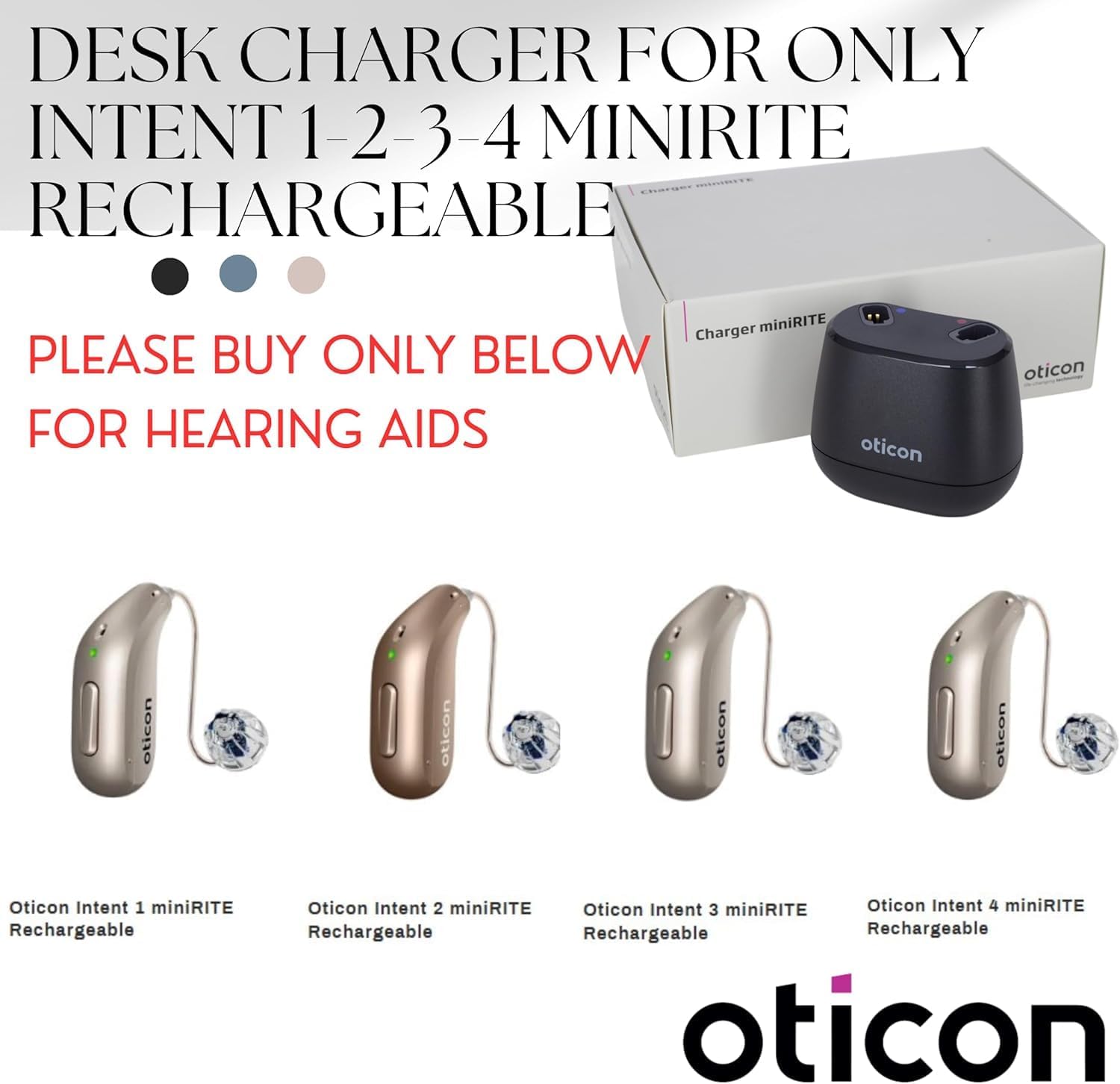
Figure 4: Visual guide to compatible Oticon Intent miniRITE R hearing aid models.

5 pav. Pvzamples of hearing aid models that are not compatible with this charger.
6. Priežiūra
6.1 Įkroviklio valymas
- Always disconnect the charger from the power source before cleaning.
- Wipe the charger with a soft, dry cloth. Do not use water or cleaning solutions, as this may damage the device.
- Ensure the charging ports are free from dust or debris. Use a soft brush if necessary.
6.2 Saugykla
Store the charger in a cool, dry place away from direct sunlight and extreme temperatures. When traveling, its compact size allows for easy storage in a travel bag.
7. Problemų sprendimas
| Problema | Galima priežastis | Sprendimas |
|---|---|---|
| Klausos aparatai neįkraunami. | Charger not connected to power, or hearing aids not correctly seated. | Ensure the USB cable is securely plugged into a working power source. Re-seat the hearing aids firmly into the charging ports. |
| Nešviečia LED indikatoriai. | No power to the charger, or a fault with the charger/hearing aid. | Check power connection. Try a different USB port or power adapter. If the issue persists, contact customer support. |
| Hearing aids not turning on after charging. | Temporary software glitch or battery issue. | Remove and re-insert the hearing aids. If they still do not turn on, consult your hearing care professional. |
8. Specifikacijos
- Gaminio matmenys: 2.5 x 4.4 x 7.1 colio
- Prekės svoris: 1 svaras
- Jungties tipas: 2-Pin
- Suderinami įrenginiai: Oticon Intent miniRITE R hearing aid models (1, 2, 3, 4)
- Ypatinga funkcija: Automatinis išjungimas
- Spalva: Raudona/Juoda
- Iš viso USB prievadų: 1
- Medžiaga: Plastikiniai
- Gamintojas: OTIKONAS
9. Garantija ir palaikymas
For warranty information, technical support, or any questions regarding your Oticon Intent Desktop Charger, please contact your authorized Oticon dealer or the MSTORE INTL customer service. Refer to the product packaging or original purchase documentation for specific warranty terms and contact details.