
1. Įvadas
The PEICHENG Q2SPRO is a 7-inch tablet designed for a smooth and responsive user experience, powered by the Android 15.0 operating system. It features an IPS display, ample memory and storage, and dual cameras, making it suitable for various daily tasks from browsing to media consumption. This manual provides essential information for setting up, operating, maintaining, and troubleshooting your device.
2. Pakuotės turinys
Išpakuodami patikrinkite pakuotės turinį. Jei trūksta kokių nors daiktų arba jie pažeisti, susisiekite su klientų aptarnavimo tarnyba.
- PEICHENG Q2SPRO 7-inch Android 15.0 Tablet
- Protective Case with Foldable Stand
- USB-C įkrovimo laidas
- Maitinimo adapteris (gali skirtis priklausomai nuo regiono)
- Vartotojo vadovas (šis dokumentas)
3. Įrenginio išdėstymas
Familiarize yourself with the physical components of your PEICHENG Q2SPRO tablet.
This image shows the PEICHENG Q2SPRO tablet from both the front, displaying its screen, and the rear, highlighting the camera and overall design.

A pusė view of the PEICHENG Q2SPRO tablet, illustrating the placement of its various ports and buttons, such as the USB-C port, power button, and volume controls.
- Priekinė kamera: Located above the screen.
- Galinė kamera: Įsikūręs galiniame skydelyje.
- Maitinimo mygtukas: Paprastai šone, naudojamas įrenginiui įjungti / išjungti arba pažadinti / miegoti.
- Garsumo mygtukai: Sureguliuokite garso lygius.
- USB-C prievadas: Įkrovimui ir duomenų perdavimui.
- Pranešėjas: Dėl garso išvesties.
- MicroSD kortelės lizdas: Išplečiamai saugyklai.
4. Sąranka
4.1 Pradinis įkrovimas
Before first use, fully charge your tablet. Connect the USB-C cable to the tablet's charging port and the other end to the power adapter. Plug the adapter into a wall outlet. The charging indicator will show the charging status.
4.2 Maitinimo įjungimas/išjungimas
- Norėdami įjungti: Press and hold the Power button until the PEICHENG logo appears on the screen.
- Norėdami išjungti: Press and hold the Power button until the power options appear, then select "Power Off."
- Miegui / pabudimui: Trumpai paspauskite maitinimo mygtuką.
4.3 Pradinio nustatymo vedlys
Pirmą kartą įjungus, „Android 15.0“ sąrankos vedlys padės atlikti pagrindinius nustatymus:
- Kalbos pasirinkimas: Pasirinkite pageidaujamą kalbą.
- „Wi-Fi“ ryšys: Connect to a wireless network to access the internet. The tablet supports WiFi6 (2.4G+5G).
- Google paskyra: Sign in with your Google account or create a new one to access Google services like the Play Store, Gmail, and Google Drive.
- Data ir laikas: Nustatykite teisingą datą ir laiką.
- Saugumas: Nustatykite ekrano užraktą (PIN kodą, šabloną arba slaptažodį) įrenginio saugumui.

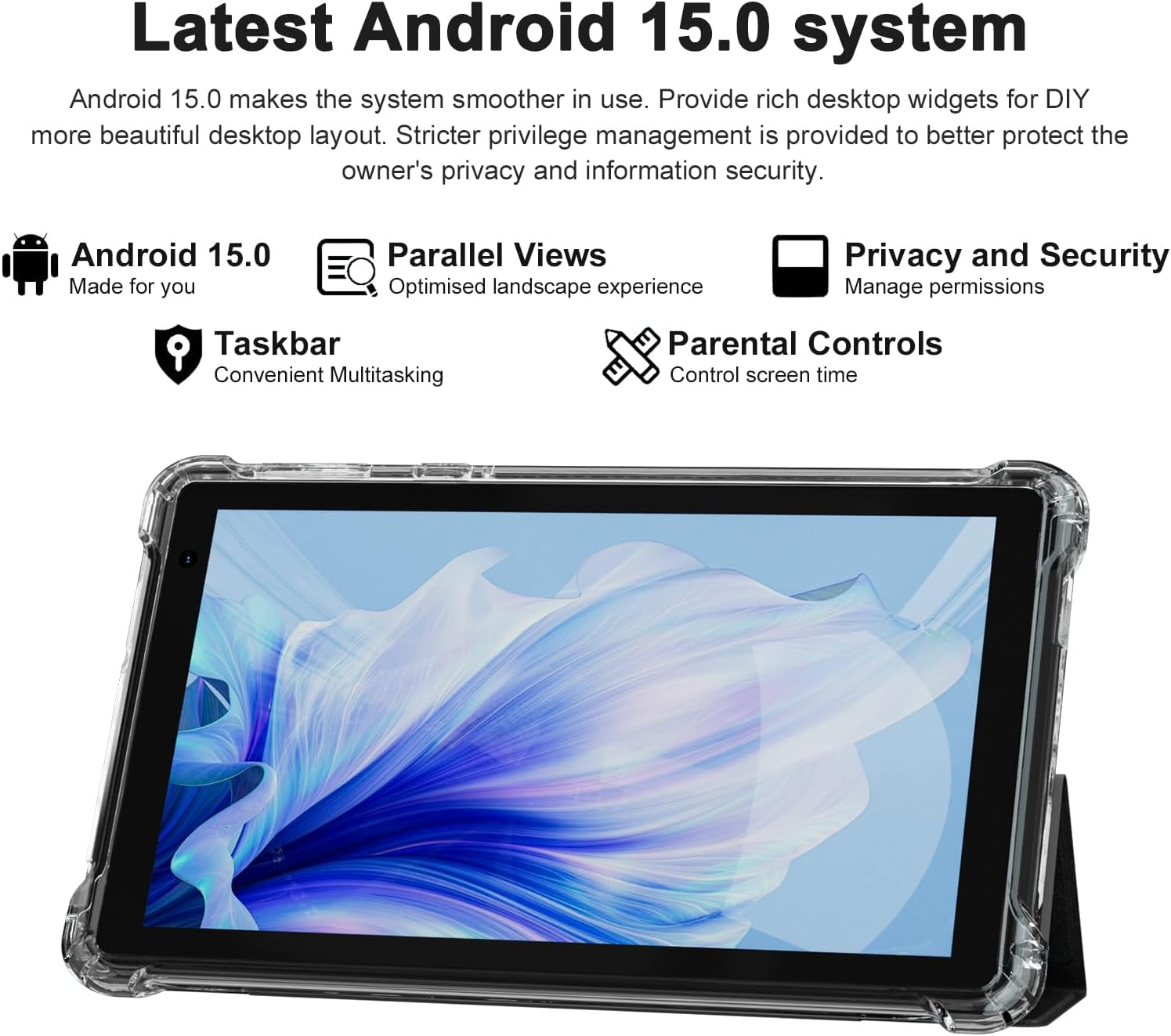
The PEICHENG Q2SPRO tablet screen displaying the Android 15.0 operating system interface, highlighting features like desktop widgets and privacy controls.
5. Naudojimo instrukcijos
5.1 Pagrindinė navigacija
- Jutiklinis ekranas: Norėdami sąveikauti, palieskite, braukite, suspauskite, kad priartintumėte.
- Pagrindinis ekranas: Access apps, widgets, and notifications. Android 15.0 offers rich desktop widgets for customization.
- Pranešimų skydelis: Braukite žemyn nuo ekrano viršaus iki view pranešimai ir greitieji nustatymai.
- Užduočių juosta: Android 15.0 includes a taskbar for convenient multitasking and optimized landscape mode.
5.2 „Wi-Fi“ ryšys
- Eikite į Nustatymai > Tinklas ir internetas > Internetas.
- Įjunkite „Wi-Fi“.
- Iš sąrašo pasirinkite norimą „Wi-Fi“ tinklą.
- Jei būsite paraginti, įveskite slaptažodį, tada palieskite Prisijunkite.
5.3 Bluetooth poravimas
- Eikite į Nustatymai > Prijungti įrenginiai > Ryšio nuostatos > Bluetooth.
- Įjunkite Bluetooth.
- Įsitikinkite, kad įrenginys, kurį norite susieti, yra susiejimo režime.
- Select the device from the list of available devices and follow on-screen instructions to complete pairing.
5.4 Kameros naudojimas
Planšetinis kompiuteris turi 2.0 MP priekinę kamerą ir 5.0 MP galinę kamerą.
- Atidarykite Fotoaparatas taikymas.
- Palieskite kameros piktogramą, kad perjungtumėte priekinę ir galinę kameras.
- Palieskite užrakto mygtuką, kad nufotografuotumėte arba pradėtumėte / sustabdytumėte vaizdo įrašymą.

This image illustrates the 5MP rear camera and 2MP front camera specifications of the PEICHENG Q2SPRO tablet, alongside exampnuotraukos, padarytos šiuo įrenginiu.
5.5 Programos diegimas
Access millions of applications through the Google Play Store.
- Atidarykite Play parduotuvė programėlė.
- Ieškokite norimą programėlę.
- Bakstelėkite Įdiegti ir vykdykite ekrane pateikiamus nurodymus.
5.6 Protective Case and Stand
The included transparent, shock-absorbing protective case helps protect your tablet. It features a built-in foldable stand, allowing you to prop the tablet at a comfortable viewing angle for hands-free use.

The PEICHENG Q2SPRO tablet enclosed in its transparent protective case, demonstrating the integrated foldable stand propping the device at a comfortable viewing kampas.
6. Priežiūra
6.1 Planšetinio kompiuterio valymas
- Ekranui ir korpusui valyti naudokite minkštą, nepūkuotą šluostę.
- Do not use liquid cleaners or aerosols directly on the tablet.
- Įsisenėjusioms dėmėms šiek tiek pamirkykiteampNuvalykite šluostę vandeniu arba ekranui saugiu valikliu.
6.2 Programinės įrangos naujiniai
Reguliariai tikrinkite, ar yra programinės įrangos atnaujinimų, ir juos įdiekite, kad užtikrintumėte optimalų našumą, saugumą ir prieigą prie naujų funkcijų. Eikite į Nustatymai > Sistema > Sistemos atnaujinimas.
6.3 Akumuliatoriaus priežiūra
- Venkite ekstremalių temperatūrų, kurios gali pabloginti akumuliatoriaus veikimo laiką.
- Neleiskite baterijai dažnai visiškai išsikrauti.
- Optimaliam įkrovimui naudokite pridedamą įkroviklį.
- The tablet emphasizes low power consumption for better battery efficiency.
7. Problemų sprendimas
Šiame skyriuje aptariamos dažniausiai pasitaikančios problemos, su kuriomis galite susidurti naudodami planšetinį kompiuterį.
| Problema | Galima priežastis / sprendimas |
|---|---|
| Planšetinis kompiuteris neįsijungia | Įsitikinkite, kad akumuliatorius įkrautas. Prijunkite prie įkroviklio ir palaukite kelias minutes, prieš bandydami vėl įjungti. |
| Planšetinis kompiuteris užstringa arba nereaguoja | Press and hold the Power button for about 10-15 seconds to force a restart. Close unnecessary background applications. |
| Wi-Fi ryšio problemos | Ensure Wi-Fi is enabled. Restart your router and the tablet. Check if the Wi-Fi password is correct. Try connecting to a different network if available. |
| Baterija greitai išsikrauna | Reduce screen brightness. Close unused apps. Disable Wi-Fi/Bluetooth when not in use. Check for power-intensive apps in battery settings. |
| Planšetė perkaista | Avoid using the tablet in direct sunlight or hot environments. Close demanding applications. Allow the tablet to cool down before continued use. |
| Lėtas veikimas | Clear cache and data of frequently used apps. Uninstall unused apps. Ensure sufficient free storage space. Restart the tablet regularly. |
8. Specifikacijos
Technical specifications for the PEICHENG Q2SPRO tablet.
| Funkcija | Detalė |
|---|---|
| Prekės ženklas | PEICENGAS |
| Modelio pavadinimas | Q2SPRO |
| Operacinė sistema | Android 15.0 |
| Ekrano dydis | 7 colių |
| Ekrano tipas | IPS LED Touchscreen |
| Ekrano raiška | 1024 x 600 pikselių |
| RAM atmintis | 8GB (3GB installed + 5GB expandable) |
| Atminties talpa | 32 GB (išplečiama iki 1 TB naudojant „MicroSD“ kortelę) |
| Procesoriaus prekės ženklas | Rockchip |
| Galinė kamera | 5.0 MP |
| Priekinė kamera | 2.0 MP |
| Vaizdo įrašymo raiška | HD 720p |
| Belaidė technologija | Wi-Fi (802.11ax, 802.11g, 2.4G+5G) |
| Bluetooth | Bluetooth 5.0 |
| Ryšio technologija | USB 3.0 Type C |
| Baterijos elemento tipas | Ličio polimeras |
| Baterijos energijos kiekis | 3000 milijonųampprieš valandą (mAh) |
| Prekės svoris | 0.49 kilogramo |
| Prekės matmenys (ilgis x plotis x storis) | 8 cm ilgio x 5 cm pločio x 0.4 cm storio |
9. Informacija apie garantiją
The PEICHENG Q2SPRO tablet comes with a 1 metų ribota garantija from the date of purchase. This warranty covers manufacturing defects and malfunctions under normal use. It does not cover damage caused by misuse, accidents, unauthorized repairs, or normal wear and tear. Please retain your proof of purchase for warranty claims.
10. Pagalba klientams
For further assistance, technical support, or warranty inquiries, please refer to the contact information provided with your product packaging or visit the official PEICHENG website. When contacting support, please have your model number (Q2SPRO) and proof of purchase readily available.