
1. Įvadas
The Unihertz Jelly Star is a compact 3-inch mini smartphone designed for portability and functionality. It operates on Android 13 and features a MediaTek Helio G99 processor, 8GB RAM, and 256GB ROM. This manual provides essential information for the safe and efficient use of your device.

1.1 vaizdas: Priekyje ir šone view of the Unihertz Jelly Star Mini Smartphone. This image displays the compact size and design of the device, highlighting its screen and side buttons.
2. Kas yra dėžutėje
Upon unpacking your Unihertz Jelly Star, please verify that all the following items are included:
- Unihertz Jelly Star Smartphone
- Telefono dėklas
- Maitinimo adapteris
- SIM dėklo išstūmiklis
- Screen Protector (one pre-applied, one extra)
- USB kabelis (C tipo)
- Vartotojo vadovas (šis dokumentas)
- Garantijos kortelė
- Telefono dirželis

2.1 vaizdas: Diagram illustrating the contents of the Unihertz Jelly Star retail box, including the phone, case, charger, cables, and documentation.
3. Sąranka
3.1 SIM kortelės įdėjimas
- Locate the SIM tray on the side of your Jelly Star.
- Įkiškite SIM kortelės dėklo išstūmimo įrankį į mažą skylutę šalia dėklo ir švelniai stumkite, kol dėklas iššoks.
- Place your Nano SIM card(s) into the tray, ensuring proper orientation. The Jelly Star supports dual Nano SIMs.
- Atsargiai įdėkite SIM kortelės dėklą atgal į telefoną.
3.2 Pradinis įjungimas ir sąranka
- Press and hold the power button (located on the right side) until the Unihertz logo appears.
- Vykdykite ekrane pateikiamus nurodymus, kad pasirinktumėte kalbą, prisijungtumėte prie „Wi-Fi“ ir nustatytumėte „Google“ paskyrą.
- Configure security settings, including fingerprint unlock, for enhanced device protection.
3.3 Verizon Network Activation (Important)
For Verizon users, please note the following specific activation procedure:
- Unihertz phones are unlocked.
- Local Verizon stores may not be able to assist with activation as these phones are not in Verizon's local database.
- Activate your SIM card with another Verizon-certified phone first, then transfer the activated SIM card to your Jelly Star.

3.1 vaizdas: Important instructions for Verizon users regarding SIM card activation with the Unihertz Jelly Star.
4. Naudojimo instrukcijos
4.1 Pagrindinė navigacija
The Jelly Star runs on Android 13. Navigate the interface using touch gestures on the 3-inch display. Swipe up from the bottom for the app drawer, swipe down from the top for notifications and quick settings.
4.2 programuojamas mygtukas
The device features a customizable programmable button. You can assign various functions to this button through the phone's settings, such as launching an app, activating the flashlight, or taking a screenshot.
4.3 LED Notification Light
The transparent back design incorporates a dynamic LED notification light. This light provides visual alerts for incoming calls, messages, and other notifications. Settings for the LED light can be adjusted in the phone's display or notification settings.

4.1 vaizdas: Nugara ir šonas view of the Unihertz Jelly Star, showcasing its transparent design and LED notification light.
4.4 Kameros naudojimas
The Jelly Star is equipped with a 48MP camera. Open the camera application from the home screen or app drawer. Tap to focus, and press the shutter button to capture photos or videos. Explore the camera settings for various modes and adjustments.
4.5 Atrakinimas piršto atspaudu
To set up fingerprint unlock, go to Nustatymai > Saugumas ir privatumas > Įrenginio atrakinimas > Piršto atspaudas. Follow the on-screen instructions to register your fingerprint(s). Once set up, you can unlock your phone by placing your registered finger on the fingerprint sensor.
4.6 Audio Jack and FM Radio
The device includes a 3.5mm audio jack for connecting headphones or external speakers. To use the FM radio, plug in wired headphones (which act as an antenna) and open the FM Radio application.
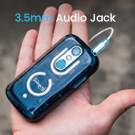
4.2 vaizdas: Close-up of the Unihertz Jelly Star highlighting the 3.5mm audio jack.
4.7 USB On-The-Go (OTG)
The Jelly Star supports USB OTG, allowing you to connect USB devices such as flash drives, keyboards, or mice directly to your phone using a compatible OTG adapter (sold separately).
5. Connectivity & Compatibility
The Unihertz Jelly Star offers versatile connectivity options and broad network compatibility.
- Tinklo suderinamumas: Compatible with T-Mobile and Verizon networks only. (Refer to Section 3.3 for Verizon activation details). Note: Not compatible with AT&T.
- Belaidis ryšys: Supports Wi-Fi, Bluetooth, NFC, and Infrared.
- Navigacija: Integruotas GPS vietos nustatymo paslaugoms.
- SIM lizdai: Dual Nano SIM slots for managing two phone numbers or different carriers.
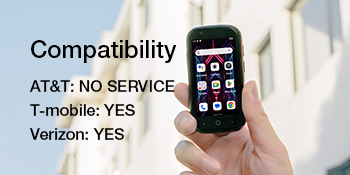
5.1 vaizdas: Visual representation of the Unihertz Jelly Star's network compatibility, indicating support for T-Mobile and Verizon.
„5.1“ vaizdo įrašas: An official product video demonstrating the compact size and various features of the Unihertz Jelly Star Mini Phone. This video highlights the phone's design and portability.
6. Priežiūra
6.1 Akumuliatoriaus priežiūra
The Jelly Star is equipped with a 2000mAh battery. To maximize battery life:
- Venkite ekstremalių temperatūrų.
- Use the provided power adapter and USB cable for charging.
- Venkite dažnai visiškai iškrauti akumuliatorių.
- Optimize screen brightness and close unused background applications.
6.2 Įrenginio valymas
Use a soft, lint-free cloth to clean the screen and body of your phone. Avoid using harsh chemicals or abrasive materials, which can damage the device.
6.3 Programinės įrangos naujiniai
Reguliariai tikrinkite, ar yra programinės įrangos atnaujinimų, ir juos įdiekite, kad jūsų įrenginyje būtų naujausios funkcijos, saugos pataisymai ir našumo patobulinimai. Paprastai šią parinktį galite rasti Nustatymai > Sistema > Sistemos naujinimas.
7. Problemų sprendimas
If you encounter issues with your Unihertz Jelly Star, refer to the following common troubleshooting steps:
- Įrenginys neįsijungia: Įsitikinkite, kad akumuliatorius įkrautas. Prijunkite telefoną prie įkroviklio ir palaukite kelias minutes, prieš bandydami jį vėl įjungti.
- Tinklo ryšio problemos:
- Patikrinkite, ar SIM kortelė tinkamai įdėta (žr. 3.1 skyrių).
- Verify that your mobile data or Wi-Fi is enabled.
- Iš naujo paleiskite įrenginį.
- For Verizon users, confirm SIM activation as per Section 3.3.
- Programėlės stringa arba užstringa:
- Close and restart the problematic app.
- Išvalykite programos talpyklą ir duomenis Nustatymai > Programos > [Programos pavadinimas] > Saugykla ir talpykla.
- Įsitikinkite, kad programa atnaujinta į naujausią versiją.
- Trumpas baterijos veikimo laikas:
- Sumažinkite ekrano ryškumą.
- Išjunkite nenaudojamas funkcijas, tokias kaip „Bluetooth“, GPS arba „Wi-Fi“, kai jų nereikia.
- Identify and close power-consuming background apps.
If these steps do not resolve your issue, please contact Unihertz customer support for further assistance.
8. Specifikacijos
Below are the key technical specifications for the Unihertz Jelly Star Mini Smartphone:
| Modelio pavadinimas | Jelly Star |
| Operacinė sistema | Android 13.0 |
| CPU modelis | „MediaTek Helio G99“. |
| CPU greitis | 2200 MHz |
| Įdiegtos RAM atminties dydis | 8 GB |
| Atminties talpa | 256 GB |
| Stovinčio ekrano dydis | 3 colių |
| Rezoliucija | 480 x 854 |
| Atnaujinimo dažnis | 60 Hz |
| Baterijos talpa | 2000 milijonųamp Valandos |
| Gaminio matmenys | 3.75 x 1.95 x 0.74 colio |
| Prekės svoris | 4.3 uncijos |
| Ryšio technologijos | „Bluetooth“, infraraudonųjų spindulių, NFC, USB, „Wi-Fi“ |
| Garso lizdas | 3.5 mm |
| GPS | Tiesa |
9. Garantija ir palaikymas
9.1 Gaminio garantija
The Unihertz Jelly Star comes with a one-year warranty from the date of purchase. This warranty covers manufacturing defects and malfunctions under normal use. Please retain your proof of purchase for warranty claims.
9.2 Techninė pagalba
Unihertz provides long-term technical support and efficient online customer service. For any technical issues, questions, or support needs not covered in this manual, please visit the official Unihertz websvetainėje arba susisiekite su klientų aptarnavimo komanda.
Daugiau informacijos ir palaikymo išteklių galite rasti adresu Unihertz Store on Amazon.