
1. Įvadas
Welcome to your new Tibuta Smartpad A10_M 10.1-inch Android 15 Tablet. This manual provides essential information for setting up, operating, maintaining, and troubleshooting your device. Please read this guide thoroughly to ensure optimal performance and a satisfying user experience.

Image 1.1: Tibuta Smartpad A10_M Tablet showcasing its multitasking features with 8GB RAM, 64GB ROM, and 1TB expandable storage.
2. Kas yra dėžutėje
Upon unpacking your Tibuta Smartpad A10_M, please verify that all the following items are included:
- Tibuta Smartpad A10_M Tablet
- Apsauginis dėklas
- USB-C įkrovimo laidas
- Maitinimo adapteris
- Vartotojo vadovas (šis dokumentas)

Image 2.1: The Tibuta Smartpad A10_M Tablet, charger, USB cable, and manual, as typically found in the product box.
3. Produktas baigtasview
The Tibuta Smartpad A10_M is designed for versatile use, offering a balance of performance and portability. Key features include:
- Ekranas: 10.1-inch IPS HD (1280x800 pixels) with eye protection technology.
- Operacinė sistema: Android 15 for optimized performance and user experience.
- Našumas: Quad-Core processor with 8GB RAM (3GB + 5GB expandable) for smooth multitasking.
- Saugykla: 64 GB vidinės atminties, galima išplėsti iki 1 TB naudojant „Micro SD“ kortelę.
- Kameros: 5 MP galinė kamera ir 8 MP priekinė kamera nuotraukoms ir vaizdo skambučiams.
- Ryšys: Dual-band Wi-Fi (2.4G+5G) and Bluetooth 5.4 for fast and stable wireless connections.
- Baterija: 5000mAh high-capacity battery for extended use.
- Garsas: Dual speakers and a 3.5mm headphone jack.
3.1 Ekrano funkcijos
Experience clear and vibrant visuals on the 10.1-inch IPS HD screen. The display incorporates low blue light technology to reduce eye strain during prolonged use.

Image 3.1: The tablet's HD Eyes Protection Display, featuring 1280x800 resolution, IPS technology, and a 16:10 aspect ratio.
3.2 Našumas ir saugykla
Powered by Android 15 and a Quad-Core processor, the tablet offers smooth performance for various applications. With 64GB of internal storage and support for up to 1TB via a Micro SD card, you have amplekia vietos tavo files.

Image 3.2: The tablet displaying multiple applications, illustrating its large storage capacity and expandability for media and documents.
3.3 Ryšys
Stay connected with dual-band Wi-Fi (2.4G+5G) and Bluetooth 5.4. The USB-C port allows for quick charging and data transfer.

Image 3.3: The tablet highlighting its 5G/2.4G Wi-Fi and Bluetooth 5.0 capabilities, demonstrating compatibility with various peripherals like game controllers, headphones, and keyboards.
3.4 Baterijos veikimo laikas
The 5000mAh battery provides up to 8 hours of average use, ensuring you can enjoy your content for longer periods.

Image 3.4: The tablet emphasizing its 5000mAh battery, USB-C interface, and estimated usage times for gaming, video watching, and standby.
3.5 Fiziniai matmenys
The tablet's compact design makes it easy to handle and carry.
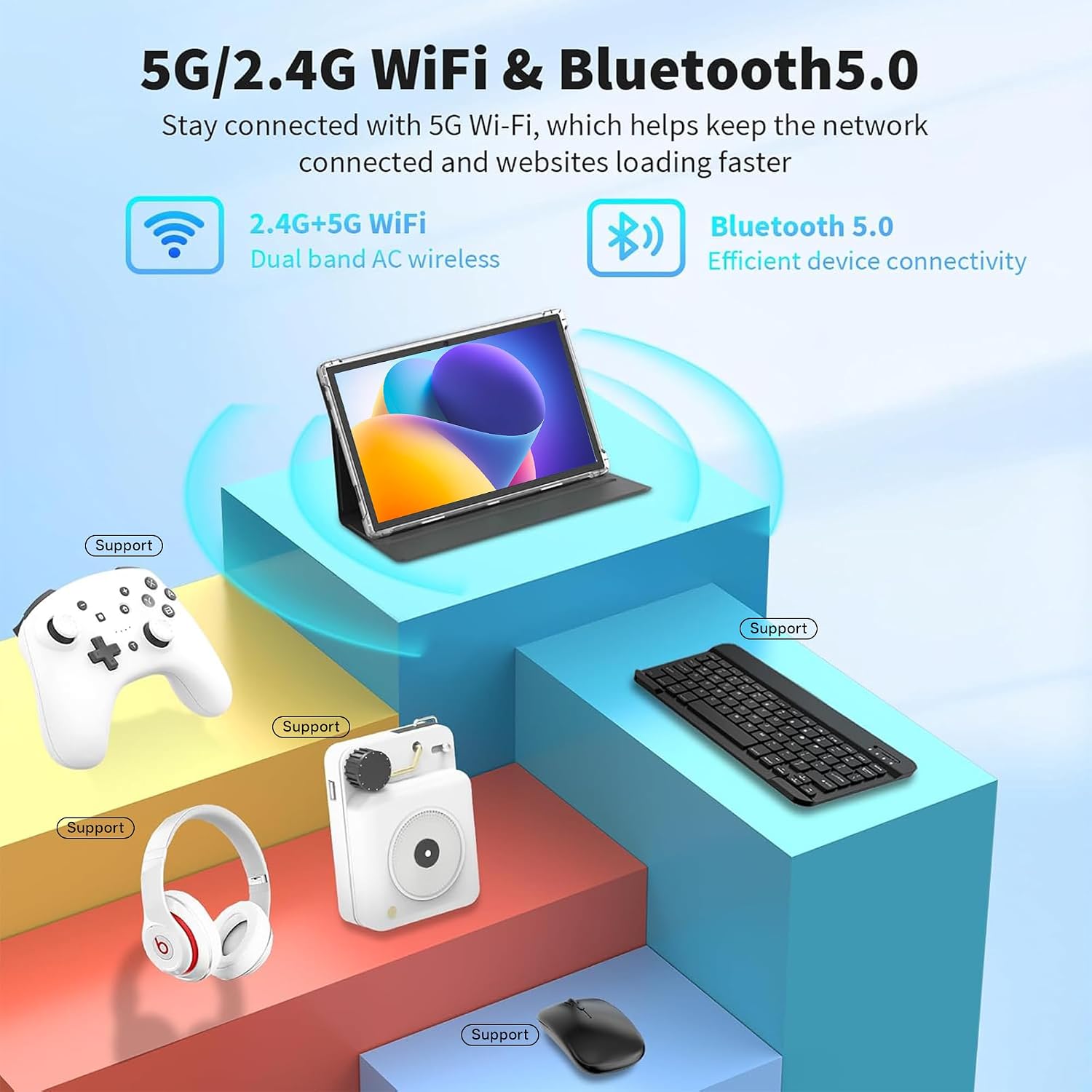
Image 3.5: Detailed diagram illustrating the length (24.39cm/9.60inch), width (16.25cm/6.39inch), and thickness (0.82cm/0.32inch) of the tablet.
4. Sąranka
4.1 Pradinis įkrovimas
Before first use, fully charge your tablet. Connect the USB-C cable to the tablet's charging port and the power adapter to a wall outlet. The charging indicator will show the charging status.
4.2 Įjungimas / išjungimas
- Norėdami įjungti: Press and hold the Power button (usually located on the side or top edge) until the Tibuta logo appears on the screen.
- Norėdami išjungti: Paspauskite ir palaikykite maitinimo mygtuką, kol pasirodys maitinimo meniu. Iš parinkčių pasirinkite „Išjungti“.
- Norėdami paleisti iš naujo: Maitinimo meniu pasirinkite „Paleisti iš naujo“.
4.3 Pradinio nustatymo vedlys
The first time you power on the tablet, you will be guided through an initial setup process. This includes selecting your language, connecting to a Wi-Fi network, setting up your Google account, and configuring basic security settings. Follow the on-screen prompts to complete the setup.
5. Naudojimo instrukcijos
5.1 Basic Touchscreen Gestures
- Bakstelėkite: Norėdami atidaryti programėlę, pasirinkti elementą arba paspausti mygtuką, vieną kartą palieskite ekraną.
- Palieskite ir palaikykite: Paspauskite ir palaikykite elementą, kad pasiektumėte kontekstinius meniu arba vilktumėte elementus.
- Perbraukimas: Drag your finger across the screen to scroll through pages, lists, or switch between home screens.
- Žiupsnelis, norint priartinti: Uždėkite du pirštus ant ekrano ir išskleiskite juos, kad priartintumėte, arba suglauskite, kad atitolintumėte.
5.2 Prisijungimas prie „Wi-Fi“.
- Eikite į Nustatymai > Tinklas ir internetas > Wi-Fi.
- Perjungti „Wi-Fi“ On.
- Iš sąrašo pasirinkite norimą „Wi-Fi“ tinklą.
- Jei būsite paraginti, įveskite tinklo slaptažodį, tada palieskite Prisijunkite.
5.3 „Bluetooth“ įrenginių susiejimas
- Eikite į Nustatymai > Prijungti įrenginiai > Bluetooth.
- Perjungti Bluetooth On.
- Įsitikinkite, kad jūsų „Bluetooth“ įrenginys veikia susiejimo režimu.
- Pasirinkite įrenginį iš galimų įrenginių sąrašo ir vykdykite visus ekrane pateikiamus nurodymus, kad užbaigtumėte susiejimą.
5.4 Installing and Managing Applications
- Įdiegti programas: Atidarykite Google Play parduotuvė programėlę, suraskite norimą programėlę ir palieskite Įdiegti.
- Pašalinti programas: Touch and hold the app icon on the home screen or app drawer, then drag it to "Uninstall" or select "App info" and choose "Uninstall". Alternatively, go to Nustatymai > Programėlės > Žr. visas programas, pasirinkite programėlę ir bakstelėkite Pašalinkite.
5.5 Fotoaparatų naudojimas
The tablet features a 5MP rear camera and an 8MP front camera. Open the Fotoaparatas app to take photos or record videos. You can switch between front and rear cameras within the app interface.
5.6 Saugyklos išplėtimas
To expand storage, insert a Micro SD card (up to 1TB, not included) into the designated slot on the tablet. The tablet will prompt you to format the card for use as portable or internal storage.

Image 5.1: The tablet being used for various activities including work, entertainment, and creative tasks.
6. Priežiūra
- Valymas: Planšetinio kompiuterio ekraną ir korpusą valykite minkštu, nepūkuotu audiniu. Venkite naudoti stiprias chemines medžiagas ar abrazyvines medžiagas.
- Programinės įrangos atnaujinimai: Regularly check for and install system updates to ensure your tablet has the latest features and security patches. Go to Nustatymai > Sistema > Sistemos atnaujinimas.
- Saugyklos valdymas: Periodiškai valykite nereikalingus fileir pašalinkite nenaudojamas programas, kad atlaisvintumėte vietos saugykloje ir išlaikytumėte optimalų našumą.
- Akumuliatoriaus priežiūra: Avoid extreme temperatures and do not let the battery fully discharge frequently. For long-term storage, charge the battery to about 50%.
7. Problemų sprendimas
| Problema | Sprendimas |
|---|---|
| Planšetinis kompiuteris neįsijungia. | Įsitikinkite, kad akumuliatorius įkrautas. Prijunkite įkroviklį ir palaukite kelias minutes, prieš bandydami vėl įjungti. Jei įrenginys nereaguoja, paspauskite ir 10–15 sekundžių palaikykite nuspaudę maitinimo mygtuką, kad priverstumėte įrenginį paleisti iš naujo. |
| „Wi-Fi“ ryšio problemos. | Check if Wi-Fi is enabled in Settings. Restart your Wi-Fi router. Forget the network and reconnect. Ensure you are within range of the Wi-Fi signal. |
| Lėtas veikimas arba programų gedimai. | Close unused apps. Clear app caches (Settings > Apps > [App Name] > Storage & cache > Clear cache). Restart the tablet. Ensure sufficient free storage space. |
| Baterija greitai išsikrauna. | Reduce screen brightness. Turn off Wi-Fi, Bluetooth, and GPS when not in use. Close background apps. Check battery usage in Settings to identify power-hungry apps. |
If you encounter issues not listed here or require further assistance, please contact Tibuta customer support.
8. Specifikacijos
| Funkcija | Detalė |
|---|---|
| Prekės ženklas | Tibuta |
| Modelio pavadinimas | A10_M-EU |
| Operacinė sistema | Android 15 |
| Ekrano dydis | 10.1 colių |
| Ekrano raiška | 1280 x 800 pikselių (IPS HD) |
| Procesorius | Quad-Core (Intel Integrated) |
| RAM | 8 GB (3GB + 5GB expandable) |
| Vidinė saugykla | 64 GB |
| Išplečiama saugykla | Iki 1 TB per „Micro SD“ kortelę |
| Galinė kamera | 5 MP |
| Priekinė kamera | 8 MP |
| Baterijos talpa | 5000 mAh (ličio jonų) |
| Vidutinis baterijos veikimo laikas | 8 valandos |
| Ryšys | Wi-Fi (802.11n, 2.4G+5G), Bluetooth 5.4 |
| Uostai | USB-C, 3.5 mm ausinių lizdas |
| Matmenys (I x P x A) | 33L x 26W x 5H cm (Package) |
| Prekės svoris | 1.01 kilogramo (pakuotė) |
| Spalva | Pilka |
| Modelio metai | 2025 |
9. Garantija ir palaikymas
Tibuta Android tablets come with a 2 metų garantija. We also provide Klientų aptarnavimas visą parą to assist you with any technical issues or questions regarding the installation and use of your device.
For warranty claims, technical assistance, or general inquiries, please refer to the contact information provided on the Tibuta official websvetainėje arba garantijos kortelėje, pridėtoje prie jūsų gaminio.
Note: Video content for this product was not available or did not meet embedding criteria.