
1. Įvadas
This manual provides essential information for the safe and efficient operation of your Tornado 65UA5300E 65-inch 4K Frameless Android Smart TV. Please read it thoroughly before using the product and retain it for future reference.

1.1 vaizdas: priekis view of the Tornado 65UA5300E Smart TV, showcasing its frameless design and included stand.
2. Saugos informacija
Naudodami šį televizorių, visada laikykitės pagrindinių saugos atsargumo priemonių, kad sumažintumėte gaisro, elektros smūgio ir sužalojimų riziką.
- Saugokite televizorių nuo lietaus ar drėgmės.
- Užtikrinkite tinkamą vėdinimą; neužblokuokite ventiliacijos angų.
- Nestatykite televizoriaus ant nestabilaus vežimėlio, stovo, trikojo, laikiklio ar stalo.
- Atjunkite televizorių nuo elektros tinklo žaibuojant arba kai jis ilgą laiką nenaudojamas.
- Visus techninės priežiūros darbus patikėkite kvalifikuotam techninės priežiūros personalui.
3. Pakuotės turinys
Patikrinkite, ar pakuotėje yra visi reikalingi daiktai:
- Tornado 65UA5300E 65-inch 4K Frameless Android Smart TV
- Nuotolinio valdymo pultas
- Maitinimo kabelis
- TV stovas (2 vnt.)
- Stovo surinkimo varžtai
- Vartotojo vadovas (šis dokumentas)
4. Sąranka
4.1 Išpakavimas
Atsargiai išimkite televizorių iš pakuotės. Rekomenduojama išsaugoti originalią pakuotę galimam būsimam transportavimui ar techninei priežiūrai.
4.2 Stovo tvirtinimas
If you are not wall-mounting the TV, attach the included stand pieces. Place the TV face down on a soft, flat surface to prevent screen damage. Align each stand piece with the corresponding slots on the bottom of the TV and secure them with the provided screws.
4.1 pav.: Apačia view of the TV, illustrating the designated areas for stand attachment.
4.3 Tvirtinimas prie sienos
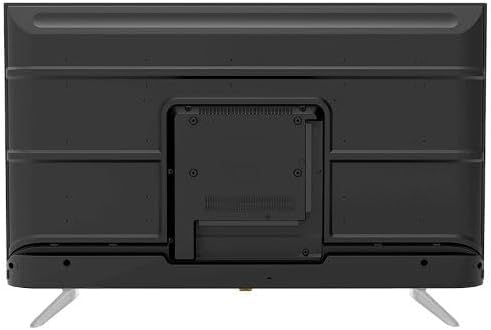
For wall mounting, remove the stand (if attached). Use a VESA-compatible wall mount (not included) that supports the TV's weight and dimensions. Consult a professional for wall mounting to ensure safety and proper installation.

4.2 vaizdas: galinis view of the TV, highlighting the VESA mounting pattern and various input/output ports.
4.4 Išorinių įrenginių prijungimas
Prijunkite išorinius įrenginius prie televizoriaus naudodami atitinkamus prievadus:
- HDMI: For high-definition devices like Blu-ray players, gaming consoles, or set-top boxes. The TV has 3 HDMI ports, one with ARC support.
- USB: For connecting USB storage devices to play media (video, photos, music). The TV has 2 USB ports.
- LAN: Laidiniam interneto ryšiui.
- RF įvestis: For connecting an antenna or satellite dish for the built-in digital receiver.
- Skaitmeninė garso išvestis (optinė): Skirta prijungti prie išorinės garso sistemos.
- Ausinių lizdas (3.5 mm): Ausinėms prijungti.

4.3 paveikslėlis: Šonas view of the TV, illustrating the accessible side input ports.
4.5 Pradinis įjungimo ir sąrankos vedlys
After connecting the power cable, press the power button on the remote control or TV. The TV will guide you through an initial setup wizard, including language selection, network connection (Wi-Fi or LAN), channel scanning, and Google account setup for Android TV features.
5. Televizoriaus valdymas
5.1 Nuotolinio valdymo pultasview
The included remote control allows you to navigate the TV's functions. It features dedicated buttons for power, volume, channel, input selection, smart TV apps (Netflix, YouTube, Prime Video, Disney+), Google Assistant voice search, and menu navigation.
5.2 Pagrindinės funkcijos
- Maitinimo įjungimas/išjungimas: Paspauskite maitinimo mygtuką.
- Garsumo valdymas: Naudokite garsumo didinimo / mažinimo mygtukus.
- Kanalo pasirinkimas: Naudokite kanalų perjungimo aukštyn / žemyn mygtukus arba skaitmeninę klaviatūrą.
- Įvesties šaltinis: Press the 'Input' button to select between HDMI, AV, TV, etc.
5.3 Smart TV Features (Android 11)
Your TV runs on Android 11, providing access to a wide range of smart features:
- Programos: Access pre-installed apps like Netflix, YouTube, Prime Video, Disney+, Shahid VIP, and download more from the Google Play Store.
- „Google“ padėjėjas: Balso komandas naudokite nuotolinio valdymo pulte paieškai, valdymui ir informacijai.
- Įtaisytasis „Chromecast“: Transliuokite turinį iš savo išmaniojo telefono ar planšetinio kompiuterio tiesiai į televizorių.
- Web Naršyklė: Naršykite internete tiesiai savo televizoriuje.
- "Bluetooth 5.0": Prijunkite belaidės ausines, garsiakalbius ar kitus „Bluetooth“ įrenginius.
5.4 Vaizdo ir garso nustatymai
Tinkinkite savo viewklausymosi patirtį per televizoriaus nustatymų meniu:
- Vaizdo režimai: Select from Dynamic, Game, Sports, Cinema, or User-defined modes.
- Spalvos temperatūra: Adjust to Normal, Cool, or Warm.
- Garso režimai: Choose from Smart, User, Game, Movie, Music, or News.
- Dolby Digital Plus: Enhanced audio processing for compatible content.
6. Priežiūra
6.1 Televizoriaus valymas
- Ekranas: Švelniai nuvalykite ekraną minkšta, nepūkuota šluoste. Įsisenėjusioms dėmėms valyti naudokite specialiai televizoriams skirtą ekrano valiklį, užtepkite ant šluostės, o ne tiesiai ant ekrano.
- Korpusas: Wipe the TV's frame and back panel with a soft, dry cloth. Do not use abrasive cleaners or solvents.
6.2 Programinės įrangos naujiniai
Ensure your TV's software is up to date for optimal performance and security. Connect the TV to the internet and check for updates periodically through the settings menu.
7. Problemų sprendimas
Jei kyla problemų, žr. šiuos įprastus sprendimus:
| Problema | Galimas sprendimas |
|---|---|
| Nėra galios | Patikrinkite, ar maitinimo laidas tvirtai prijungtas prie televizoriaus ir sieninio lizdo. Įsitikinkite, kad lizdas veikia. |
| Nėra vaizdo, bet yra garsas | Patikrinkite įvesties šaltinį. Įsitikinkite, kad išoriniai įrenginiai yra įjungti ir tinkamai prijungti. |
| Nėra garso, bet vaizdas yra | Check the volume level and mute status. Verify audio settings and external audio connections. |
| Nuotolinio valdymo pultas neveikia | Pakeiskite baterijas. Įsitikinkite, kad tarp nuotolinio valdymo pulto ir televizoriaus IR jutiklio nėra jokių kliūčių. |
| Nepavyksta prisijungti prie „Wi-Fi“. | Patikrinkite maršrutizatorių ir modemą. Iš naujo įveskite „Wi-Fi“ slaptažodį. Pabandykite iš naujo paleisti televizorių ir maršrutizatorių. |
Jei problema išlieka, susisiekite su klientų aptarnavimo tarnyba.
8. Specifikacijos
| Funkcija | Detalė |
|---|---|
| Modelio numeris | 65UA5300E |
| Ekrano dydis | 65 colių |
| Ekrano technologija | LED |
| Rezoliucija | 4K UHD (3840 2160 x XNUMX XNUMX) |
| Krašto santykis | 16:9 |
| Viewing kampas | 178 laipsnių |
| Ryškumas | 250 cd/m² |
| Atnaujinimo dažnis | 50/60 Hz |
| HDR palaikymas | HDR10, HLG |
| Garso technologija | Dolby Digital Plus, Surround Sound |
| Garso išvesties galia | 10W x 2 |
| Operacinė sistema | Android 11 |
| Vidinė atmintis | 16 GB |
| Ryšys | „Wi-Fi“, „Bluetooth 5.0“, LAN |
| Įėjimai | RF Input (Digital) x1, Video Input x1, HDMI x3 (ARC), USB x2, LAN x1 |
| Išėjimai | Digital Audio Output (Optical) x1, Headphone Jack (3.5mm) x1 |
| Maitinimo šaltinis | AC 90-240V / 50Hz |
| Maitinimas budėjimo režimu | 0.5W |
| Matmenys (P x A x G) be stovo | 1446 x 832 x 84 mm |
| Matmenys (P x A x G) su stovu | 1446 x 892 x 305 mm |
| Grynasis svoris | 15.32 kg |
| Bendras svoris | 21.32 kg |
| Kilmės šalis | Egiptas |
9. Garantija
This Tornado TV comes with a 3 metų nemokama garantija. Please retain your proof of purchase for warranty claims. For specific terms and conditions, refer to the warranty card included with your product or contact Tornado customer service.
10. Parama
For further assistance, technical support, or service inquiries, please contact Tornado customer service. Contact details can typically be found on the manufacturer's official websvetainėje arba garantijos kortelėje.