
1. Įvadas
Thank you for choosing the ieGeek 3K (5MP) Wireless Solar PTZ Outdoor Security Camera. This manual provides essential information for the proper installation, operation, and maintenance of your device. Please read it thoroughly before use and retain it for future reference.
2. Produktas baigtasview
The ieGeek ZS GX4S is a high-performance outdoor security camera designed for comprehensive surveillance. It features 3K (5MP) resolution, solar power for continuous operation, 360° pan/tilt/zoom capabilities, intelligent PIR human detection, color night vision, and two-way audio communication.
2.1 Pagrindinės savybės
- 3K (5MP) Ultra HD Resolution: Provides clearer images than 1080p and 3MP cameras.
- 100 % belaidis ir maitinamas saulės energija: Easy installation with a 5200mAh rechargeable battery and efficient solar panel.
- 360° PTZ aprėptis: 355° horizontal pan and 120° vertical tilt via the ieGeek Cam app.
- Intelligent PIR Human Detection: Advanced AI algorithms reduce false alarms from insects or leaves.
- Spalvotas naktinis matymas: Clear color images up to 15 meters, day and night.
- Dvipusis garsas: Built-in speaker and microphone for remote communication.
- Išmanioji signalizacijos sistema: Triggers sound, white light, or both upon detection to deter intruders.
- IP65 atsparumas oro sąlygoms: Sukurta atlaikyti įvairias lauko sąlygas.
- Vietinė ir debesies saugykla: Supports Micro SD cards up to 128GB and optional cloud storage.
- „Alexa“ suderinamumas: Integrate with your smart home system.
2.2 Pakuotės turinys
Patikrinkite pakuotę, ar joje yra šie daiktai:
- ieGeek ZS GX4S Security Camera
- Saulės skydas
- Mounting Bracket
- Tvirtinimo varžtai ir sieniniai kaiščiai
- USB įkrovimo laidas
- Vartotojo vadovas
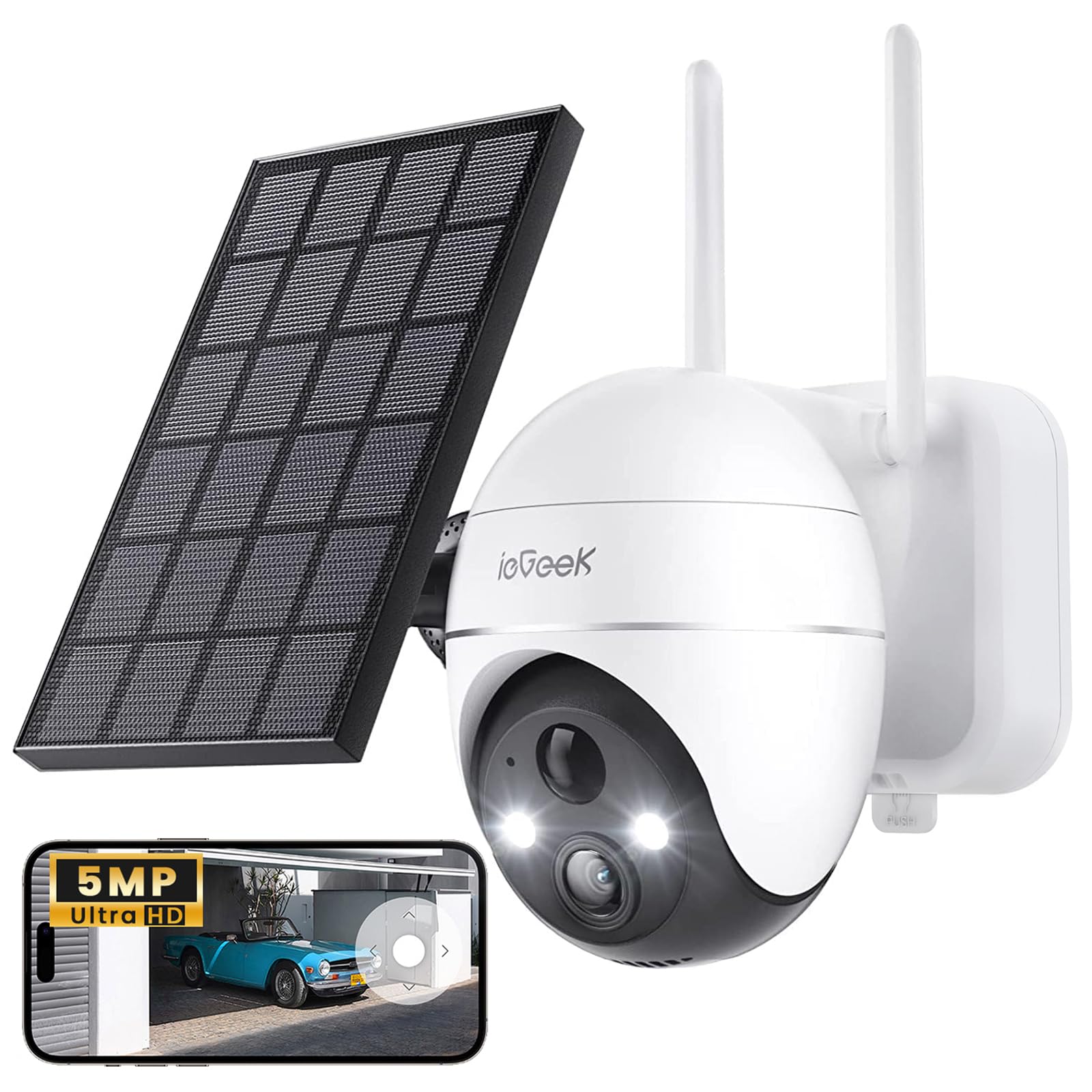
Image: ieGeek ZS GX4S Security Camera with its solar panel.

Vaizdas: Stambus planas view of the camera lens, infrared LEDs, and light sensors.
3. Sąranka
3.1 Pradinis įkrovimas
Before first use, fully charge the camera's built-in battery using the provided USB cable and a 5V/2A power adapter (not included). The charging indicator light will turn solid blue when fully charged.
3.2 Programos diegimas
Atsisiųskite ieGeek kamera app from the Google Play Store (for Android) or the Apple App Store (for iOS). Alternatively, scan the QR code below to download the app.

Image: A woman using the ieGeek Cam app on her smartphone, demonstrating app usage.
3.3 Kameros susiejimas
- Open the ieGeek Cam app and create an account or log in.
- Norėdami pridėti naują įrenginį, palieskite piktogramą „+“.
- Follow the on-screen instructions to power on the camera and reset it if necessary.
- Select your 2.4GHz Wi-Fi network and enter the password. (Note: 5GHz Wi-Fi is not supported).
- Nuskaitykite telefone rodomą QR kodą kameros objektyvu.
- Prijungę, pavadinkite kamerą ir užbaikite sąranką.
3.4 Kameros ir saulės baterijos montavimas
Choose a suitable location for installation, ensuring good Wi-Fi signal strength and adequate sunlight exposure for the solar panel. The camera is IP65 weatherproof, suitable for outdoor use.

Image: The ieGeek camera connected to its solar panel, illustrating the wireless setup with a single power line.
- Fotoaparato vieta: Mount the camera at a height of 2-3 meters (6.5-10 feet) for optimal detection range and field of view.
- Saulės kolektorių išdėstymas: Position the solar panel in a location that receives direct sunlight for several hours each day to ensure continuous charging. Connect the solar panel cable to the camera's charging port.
- Use the provided screws and wall plugs to securely attach the mounting bracket to a wall or other stable surface.
- Attach the camera to the mounting bracket and adjust its angle as needed.

Image: The ieGeek camera and solar panel mounted on the exterior of a house, demonstrating solar charging efficiency.
4. Fotoaparato valdymas
4.1 Tiesiogiai View ir Atkūrimas
Access the ieGeek Cam app to view the live feed from your camera. You can also review įrašytas footage stored on the Micro SD card or cloud service.
4.2 Pasukimo, pakreipimo ir priartinimo (PTZ) valdymas
Use the controls within the ieGeek Cam app to remotely adjust the camera's viewing angle. The camera supports 355° horizontal pan and 120° vertical tilt, allowing you to cover a wide area.

Image: The ieGeek camera illustrating its 360-degree pan and tilt rotation capabilities.
The camera also features 4x digital zoom, accessible through the app, to view details more closely.

Image: The camera demonstrating its 5x automatic zoom feature on a swimming pool, maintaining clarity.
4.3 Dvipusis garsas
Use the microphone and speaker functions in the app to communicate with visitors or deter unwanted guests. Tap the microphone icon in the live view to speak, and release to listen.

Image: A delivery person interacting with the camera, showcasing the two-way audio feature for package instructions.
4.4 Judesio aptikimas ir signalizacijos
The camera utilizes advanced PIR human detection to minimize false alarms. You can customize detection zones and sensitivity settings within the app.

Image: The ieGeek camera demonstrating 99% accurate smart human detection as a person approaches a doorstep.
Upon detection, the camera can trigger a siren, white light, or both, and send instant notifications to your smartphone (within 1.5 seconds).

Image: The ieGeek camera activating its siren and white light alarm to deter a potential intruder at night.

Image: A smartphone and smartwatch displaying a motion detection alert from the ieGeek Cam app.
4.5 Naktinis matymas
The camera provides clear color night vision up to 15 meters, ensuring detailed surveillance even in low-light conditions.

Image: The ieGeek camera providing clear color night vision up to 15 meters, capturing details in the dark.

Image: A comparison showing the difference between traditional black and white night vision and the camera's clearer color night vision.
4.6 Saugojimo parinktys
The camera supports local storage via a Micro SD card (up to 128GB, not included) and offers optional cloud storage services for secure backup of your recordings.

Image: The ieGeek Cloud icon alongside a smartphone displaying a video album, indicating cloud storage functionality.
5. Priežiūra
5.1 Akumuliatoriaus valdymas
The camera is powered by a 5200mAh rechargeable battery, continuously charged by the solar panel. Ensure the solar panel is clean and receives adequate sunlight for optimal performance. In periods of low sunlight, the battery may require occasional manual charging via the USB port.
5.2 Valymas
- Reguliariai valykite kameros objektyvą ir saulės bateriją minkšta,amp cloth to ensure clear image quality and efficient solar charging.
- Nenaudokite stiprių chemikalų ar abrazyvinių valiklių.
5.3 Firmware atnaujinimai
Periodically check the ieGeek Cam app for available firmware updates. Keeping your camera's firmware up-to-date ensures optimal performance, security, and access to new features.
6. Problemų sprendimas
If you encounter issues with your ieGeek camera, please refer to the following common problems and solutions:
| Problema | Galimas sprendimas |
|---|---|
| Kamera neįsijungia | Ensure the battery is charged. Connect to a USB power source to confirm. Check solar panel connection. |
| Nepavyko prisijungti prie „Wi-Fi“. | Ensure you are using a 2.4GHz Wi-Fi network. Check Wi-Fi password. Move camera closer to the router. Reset the camera and try pairing again. |
| Prasta vaizdo kokybė | Clean the camera lens. Ensure there is sufficient lighting. Check Wi-Fi signal strength. |
| Dažni klaidingi aliarmai | Adjust PIR sensitivity settings in the app. Define specific detection zones to exclude irrelevant areas. |
| Į SD kortelę įrašymas negalimas | Ensure the Micro SD card is inserted correctly and formatted within the app. Check if the card is full or corrupted. |
| Neveikia dvipusis garsas | Check microphone and speaker permissions for the app on your phone. Ensure camera's speaker volume is not muted in the app. |
7. Specifikacijos
| Funkcija | Detalė |
|---|---|
| Modelio pavadinimas | ZS GX4S |
| Rezoliucija | 5 megapikselių (3K) |
| Ryšio technologija | Belaidis ryšys (2.4 GHz „Wi-Fi“) |
| Maitinimo šaltinis | Battery Powered (5200mAh) with Solar Panel |
| Kreipimo / pakreipimo kampas | 355° Pan, 120° pakreipimas |
| Naktinio matymo diapazonas | 15 metrų (spalvotas naktinis matymas) |
| Atsparumo vandeniui lygis | IP65 (atsparus vandeniui) |
| Sandėliavimas | „Micro SD“ (iki 128 GB), debesies saugykla |
| Kontrolės metodas | Application (ieGeek Cam) |
| Suderinami įrenginiai | Smartphone, Computer, Laptop |
| Vaizdo įrašų kodavimas | H.265 |
| Matmenys | 17 x 16 x 12.6 centimetro |
8. Garantija ir palaikymas
ieGeek provides dedicated customer support for its products. If you encounter any issues or have questions regarding your ieGeek 3K (5MP) Wireless Solar PTZ Outdoor Security Camera, please contact our support team.
8.1 Informacija apie garantiją
Please refer to the warranty card included in your product packaging or visit the official ieGeek webIšsamias garantijos sąlygas ir nuostatas rasite svetainėje. Išsaugokite pirkimo kvitą kaip pirkimo įrodymą.
8.2 Pagalba klientams
Our support team is available to assist you with any technical issues or inquiries. You can typically reach us through the contact information provided on the ieGeek official website or within the ieGeek Cam application.

Image: Icons representing ieGeek customer support services including contact, 24/7 service, maintenance, and product returns.