
1. Įvadas
The Qubo X-247 4G is a user-friendly mobile phone designed for ease of use, particularly suitable for seniors. It features a dual-screen design, large buttons, and essential functions like an SOS button and quick dial keys. This manual provides detailed instructions for setting up, operating, and maintaining your device.
2. Pakuotės turinys
Pažymėkite langelį prie šių elementų:
- Qubo X-247 4G Mobile Phone
- Instrukcijų vadovas
- Įkrovimo laidas (USB-C)
3. Įrenginio išdėstymas
Familiarize yourself with the key components and buttons of your Qubo X-247 4G phone.

3.1 vaizdas: priekis View of Qubo X-247 4G. This image displays the phone in its open position, revealing the internal display and the large, clearly labeled keypad. Key features include the call and end call buttons, navigation keys, and dedicated M1, M2, M3 quick dial buttons.
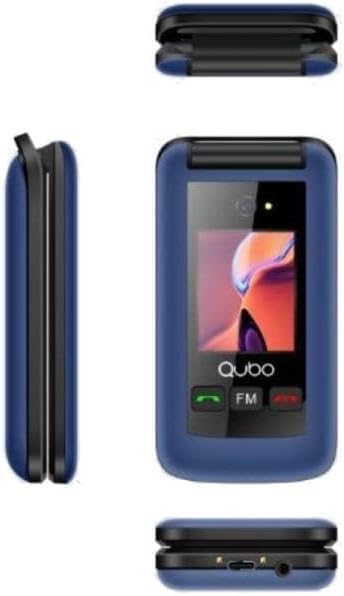
Image 3.2: Multi-angle View of Qubo X-247 4G. This composite image shows the phone from various angles. The top-left shows the phone closed, highlighting the external screen. The middle-left shows the side profile, while the bottom-right provides a view of the phone's base, indicating the USB-C charging port and the 3.5mm audio jack.
Pagrindiniai komponentai:
- Vidinis ekranas: Main screen for menus, contacts, and messages.
- Išorinis ekranas: Shows time, date, and incoming call information when the phone is closed.
- Klaviatūra: Large, backlit buttons for dialing and navigation.
- M1, M2, M3 Buttons: Dedicated quick dial keys for important contacts.
- SOS mygtukas: Located on the back, for emergency calls.
- USB-C prievadas: Prietaiso įkrovimui.
- 3.5 mm garso lizdas: Ausinėms prijungti.
4. Sąranka
4.1. SIM kortelės (-ių) ir akumuliatoriaus įdėjimas
- Atsargiai atidarykite telefono galinį dangtelį.
- Jei yra, išimkite bateriją.
- Insert your SIM card(s) into the designated slot(s). The Qubo X-247 4G supports Dual SIM. Ensure the gold contacts face downwards and the card is correctly oriented.
- Įdėkite bateriją, užtikrindami, kad kontaktai būtų tinkamai sulygiuoti.
- Uždėkite galinį dangtelį, kol jis spragtelėdamas tvirtai užsifiksuos.
4.2. Telefono įkrovimas
- Connect the USB-C charging cable to the port at the bottom of the phone.
- Kitą laido galą prijunkite prie suderinamo USB maitinimo adapterio (nepridedamas) arba kompiuterio USB prievado.
- The phone will indicate that it is charging. A full charge typically takes approximately 3 hours.
5. Naudojimo instrukcijos
5.1. Maitinimo įjungimas/išjungimas
- Norėdami įjungti: Paspauskite ir palaikykite raudoną mygtuką „Baigti skambutį“, kol ekranas užsidegs.
- Norėdami išjungti: Press and hold the red 'End Call' button until the 'Power Off' option appears on the screen, then confirm.
5.2. Skambinimas ir skambučių priėmimas
- Norėdami paskambinti: Surinkite numerį naudodami klaviatūrą ir paspauskite žalią mygtuką „Skambinti“.
- Norėdami gauti skambutį: When the phone rings, press the green 'Call' button to answer.
- Norėdami baigti skambutį: Press the red 'End Call' button.
5.3. SOS mygtuko naudojimas
The dedicated SOS button on the back of the phone is for emergencies. When pressed and held, it will automatically dial pre-set emergency contacts and can send emergency messages.
- SOS kontaktų nustatymas: Navigate to the 'SOS Settings' in the phone's menu to add up to 5 emergency numbers.
- SOS aktyvinimas: Press and hold the SOS button for a few seconds. The phone will initiate calls to the emergency contacts in sequence until one answers.
5.4. Quick Dial Keys (M1, M2)
Mygtukai M1 ir M2 leidžia greitai surinkti dažnai naudojamų kontaktų numerius.
- Greitojo rinkimo nustatymas: Go to 'Contacts' or 'Settings' and assign a number to M1 and M2.
- Naudojant greitąjį rinkimą: Simply press and hold the M1 or M2 button to dial the assigned contact.
6. Savybės
- Dvigubas ekranas: Enjoy a 2.4-inch internal display for detailed viewing and a 1.77-inch external display for quick information at a glance.
- Kamera: Capture moments with the integrated 0.3MP digital camera.
- Bluetooth: Connect wirelessly to compatible headsets or other devices.
- FM radijas: Listen to your favorite radio stations on the go.
- Žibintuvėlis: A convenient built-in flashlight for illumination.
- Organizatoriaus įrankiai: Includes a calendar, calculator, and alarm functions for daily utility.
7. Priežiūra
To ensure the longevity and optimal performance of your Qubo X-247 4G phone, follow these maintenance guidelines:
- Laikyti sausai: Avoid exposing the phone to moisture or liquids. Although it has some water resistance, it is not fully waterproof.
- Švelniai valykite: Ekraną ir korpusą valykite minkšta, sausa šluoste. Venkite stiprių cheminių medžiagų.
- Venkite ekstremalių temperatūrų: Nelaikykite telefono labai aukštoje arba labai žemoje temperatūroje, nes tai gali paveikti akumuliatoriaus veikimo laiką ir vidinius komponentus.
- Apsaugokite nuo lašų: Handle the phone with care to prevent physical damage from drops or impacts.
8. Problemų sprendimas
Jei kyla problemų dėl telefono, žr. toliau pateiktas dažniausiai pasitaikančias problemas ir sprendimus:
| Problema | Sprendimas |
|---|---|
| Telefonas neįsijungia | Įsitikinkite, kad akumuliatorius tinkamai įdėtas ir visiškai įkrautas. Pabandykite įkrauti telefoną bent 30 minučių. |
| Negalima skambinti arba priimti skambučių | Check if the SIM card is properly inserted and activated. Ensure you have network coverage. |
| Blogas signalo priėmimas | Move to an area with better network coverage. Avoid areas with thick walls or underground locations. |
| Baterija greitai išsikrauna | Reduce screen brightness. Close unused applications. Ensure the phone is not in an area with very weak signal, which can cause it to consume more power searching for a network. |
9. Specifikacijos
| Funkcija | Detalė |
|---|---|
| Modelis | X-247 4G |
| Procesorius | MTK6261DA |
| Vidinis ekranas | 2.4 colių |
| Išorinis ekranas | 1.77 colių |
| Fotoaparatas | 0.3 MP skaitmeninė kamera |
| Atmintis | 32MB RAM + 32MB ROM |
| Tinklo juostos | GSM: 850/900/1800/1900 MHz, 4G |
| SIM kortelių palaikymas | Dvi SIM kortelės |
| Baterija | 1000 mAh ličio jonų |
| Pokalbių laikas | Iki 4 valandų |
| Budėjimo laikas | Iki 180 valandų |
| Įkrovimo prievadas | USB-C |
| Garso lizdas | 3.5 mm |
| Ryšys | Bluetooth, USB |
| Ypatingos savybės | SOS Button, Quick Dial Keys (M1, M2), FM Radio, Flashlight, Calendar, Calculator, Alarm |
| Matmenys | 10 x 150 x 15 mm (apytiksliai) |
| Svoris | 210 g (apytiksliai) |
| Atsparumas vandeniui | Resistant to water (not fully waterproof) |
10. Garantija ir palaikymas
Your Qubo X-247 4G mobile phone comes with a trejų metų garantija nuo gamybos defektų nuo įsigijimo datos. Išsaugokite pirkimo įrodymą garantiniams reikalavimams.
For technical support or warranty inquiries, please refer to the contact information provided with your purchase documentation or visit the official Qubo websvetainę.