
ARCADE1UP MSP-A-405629
„Arcade1Up“ „Ms. Pac-Man Classic SE“ žaidimų automato naudotojo vadovas
Prekinis ženklas: ARCADE1UP | Modelis: MSP-A-405629
1. Įvadas
This manual provides essential instructions for the assembly, operation, and maintenance of your Arcade1Up Ms. Pac-Man Classic SE Arcade Machine. Please read this manual thoroughly before use to ensure proper function and safety.

Image 1: The Arcade1Up Ms. Pac-Man Classic SE Arcade Machine, featuring vibrant blue and pink artwork with Ms. Pac-Man characters.
2. Saugos informacija
Prašome laikytis šių saugos priemonių:
- Keep the arcade machine away from water or excessive moisture.
- Įsitikinkite, kad maitinimo laidas nepažeistas ar nesudužęs.
- Do not attempt to open or modify the machine. Refer all servicing to qualified personnel.
- Pastatykite mašiną ant stabilaus, lygaus paviršiaus, kad ji neapvirstų.
- Naudojimo metu prižiūrėkite vaikus.
3. Pakuotės turinys
Your Arcade1Up Ms. Pac-Man Classic SE Arcade Machine package includes:
- Arkadinių mašinų spintelė
- Maitinimo adapteris
- Instrukcijų vadovas (šis dokumentas)
Note: An optional riser may be sold separately.
4. Sąranka
4.1 Surinkimas
The Arcade1Up Ms. Pac-Man Classic SE Arcade Machine requires some assembly. Follow the detailed instructions provided in the separate assembly guide included with your product. Ensure all screws and fasteners are securely tightened before use.

Image 2: Dimensions of the Arcade1Up Ms. Pac-Man Classic SE Arcade Machine, showing its height of 45.4 inches without a riser and indicating an optional riser is sold separately.
4.2 Maitinimo jungtis
- Locate the power input port on the back of the arcade machine.
- Connect the provided power adapter to the machine.
- Įjunkite maitinimo adapterį į standartinį elektros lizdą.
- Prieš prijungdami, įsitikinkite, kad maitinimo jungiklis (jei yra) yra padėtyje „OFF“ (išjungta).
1 vaizdo įrašas: metimas per sekundęview of the Arcade1Up Ms. Pac-Man Classic SE Arcade Machine, demonstrating its features and setup in a home environment. This video is provided by the seller.
5. Naudojimo instrukcijos
5.1 Įjungimas / išjungimas
Locate the power switch on the control panel. Flip the switch to 'ON' to power on the machine. Flip to 'OFF' to power off.
5.2 Žaidimo pasirinkimas
Upon powering on, you will see a game selection menu. Use the joystick to navigate through the available games. Press the 'Start Game' button to select and launch your desired game.
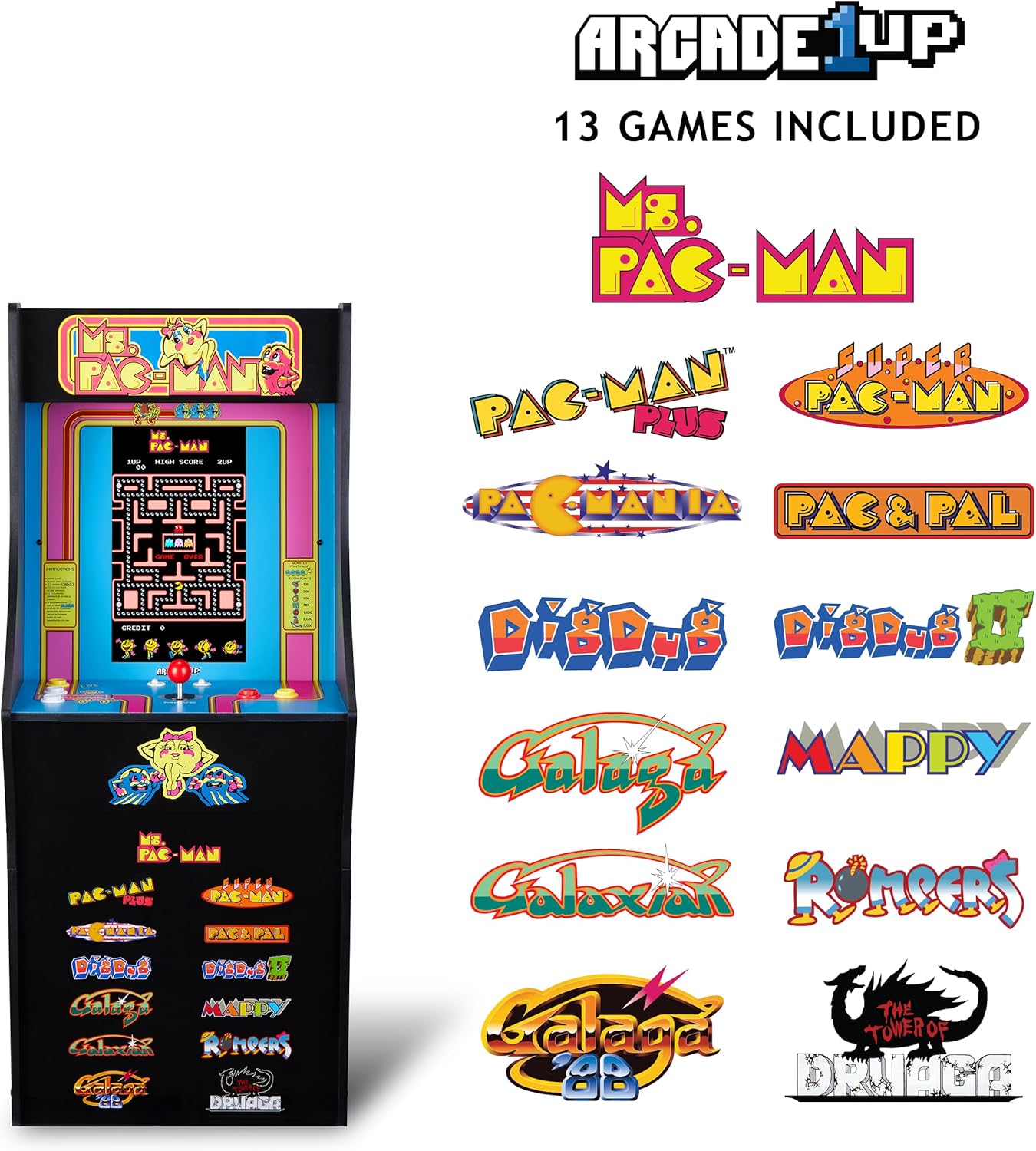
Image 3: The Arcade1Up Ms. Pac-Man Classic SE Arcade Machine displaying the list of 13 included games, such as Ms. Pac-Man, Dig Dug, and Galaga.
5.3 Valdikliai
- kreiptuką: Used for character movement in games.
- Start Game Button: Initiates a game or confirms selection.
- Veiksmų mygtukai: Used for specific in-game actions (e.g., firing, jumping).
- Garsumo valdymas: Adjust the game sound level using the dedicated volume buttons.
- To return to the game selection menu or save a high score, hold the 'Start Game' button for 5 seconds.
- To reset a game, hold the 'Start Game' button for 5 seconds.

4 paveikslėlis: Išsamus view of the control panel, highlighting the joystick, start game button, and other action buttons for gameplay.
5.4 Įtraukti žaidimai
Your Arcade1Up Ms. Pac-Man Classic SE Arcade Machine includes 13 classic games:
- Ms. PAC-MAN
- PAC-MAN PLUS
- SUPER PAC-MAN
- PAC ir PAL
- PACMANIA
- KASTI DUG
- DIG DUG 2
- GALAGA
- GALAKTINIS
- GALAGA 88
- MAPPY
- ROMPERS
- THE TOWER OF DRUAGA
5.5 WiFi Leaderboards
Connect your arcade machine to WiFi to access online leaderboards and compete for high scores globally. Refer to the on-screen prompts for WiFi setup and leaderboard access.
Video 2: Gameplay footage of the Arcade1Up Ms. Pac-Man Classic SE Arcade Machine, showcasing the classic arcade experience and the online leaderboard feature. This video is provided by the seller.
6. Priežiūra
- Valymas: Use a soft, dry cloth to wipe down the cabinet and screen. Avoid abrasive cleaners or excessive moisture.
- Saugykla: Laikykite mašiną vėsioje, sausoje vietoje, apsaugotoje nuo tiesioginių saulės spindulių ir ekstremalių temperatūrų.
- Maitinimo laidas: Reguliariai tikrinkite, ar maitinimo laidas nėra pažeistas.
7. Problemų sprendimas
| Problema | Galima priežastis | Sprendimas |
|---|---|---|
| Aparatas neįsijungia. | Neprijungtas maitinimo laidas; neveikia elektros lizdas. | Įsitikinkite, kad maitinimo laidas yra tvirtai prijungtas. Patikrinkite lizdą su kitu įrenginiu. |
| Nėra garso. | Volume turned down; speaker issue. | Check volume settings on the control panel. If problem persists, contact support. |
| Žaidimas užstringa arba užstringa. | Programinės įrangos triktis; laikina klaida. | Power off the machine, wait 10 seconds, then power back on. |
8. Specifikacijos
| Funkcija | Detalė |
|---|---|
| Modelio numeris | MSP-A-405629 |
| Matmenys (A x P x G) | 45.4" x 17.35" x 45.4" (without riser) |
| Ekrano dydis | 15.6 Inches IPS Color Monitor |
| Žaidimų skaičius | 13 |
| Valdiklio tipas | Vairasvirtė |
| Maitinimo šaltinis | Su laidu elektra |
| Medžiaga | Plastikas, akrilnitrilo butadieno stirenas (ABS) |
| Prekės svoris | 47 svaro |
| Gamintojo rekomenduojamas amžius | 10 metai ir daugiau |
| Ryšys | WiFi Leaderboards |
9. Garantija ir palaikymas
For warranty information, technical support, or service inquiries, please refer to the official Arcade1Up websvetainėje arba susisiekite su jų klientų aptarnavimo skyriumi. Išsaugokite pirkimo įrodymą garantiniams reikalavimams.
Palaikymas internetu: www.arcade1up.com
Ask a question about this manual
Ask about setup, troubleshooting, compatibility, parts, safety, or missing instructions. Manuals+ will review the question and use this page’s manual context to help answer it.