
1. Įvadas
The Infinix GT 30 5G+ is a high-performance gaming smartphone designed with a futuristic Cyber Mecha aesthetic and customizable LED lights. It features GT Shoulder Gaming Triggers, a 1.5K AMOLED display with a 144Hz refresh rate, and is certified for 90FPS BGMI gameplay. Powered by the MediaTek Dimensity 7400 processor and up to 16GB LPDDR5X RAM, it offers seamless multitasking and high-speed performance. The device includes a 5500mAh battery with Bypass Charging, enhanced vapor chamber cooling, and a 64MP Sony camera system with Infinix AI enhancements. It operates on XOS 15, based on Android 15.
2. Kas yra dėžutėje
Patikrinkite, ar prekės pakuotėje yra visi reikalingi daiktai:
- Infinix GT 30 5G+ Smartphone
- Telefono dėklas
- Maitinimo adapteris
- SIM dėklo išstūmiklis
- USB kabelis
3. Įrenginio išdėstymas
Familiarize yourself with the physical components of your Infinix GT 30 5G+ smartphone.

3.1 pav.: priekis view of the Infinix GT 30 5G+ smartphone, showing the display and front camera.

3.2 pav.: šonas view of the Infinix GT 30 5G+ smartphone, highlighting the power and volume buttons.
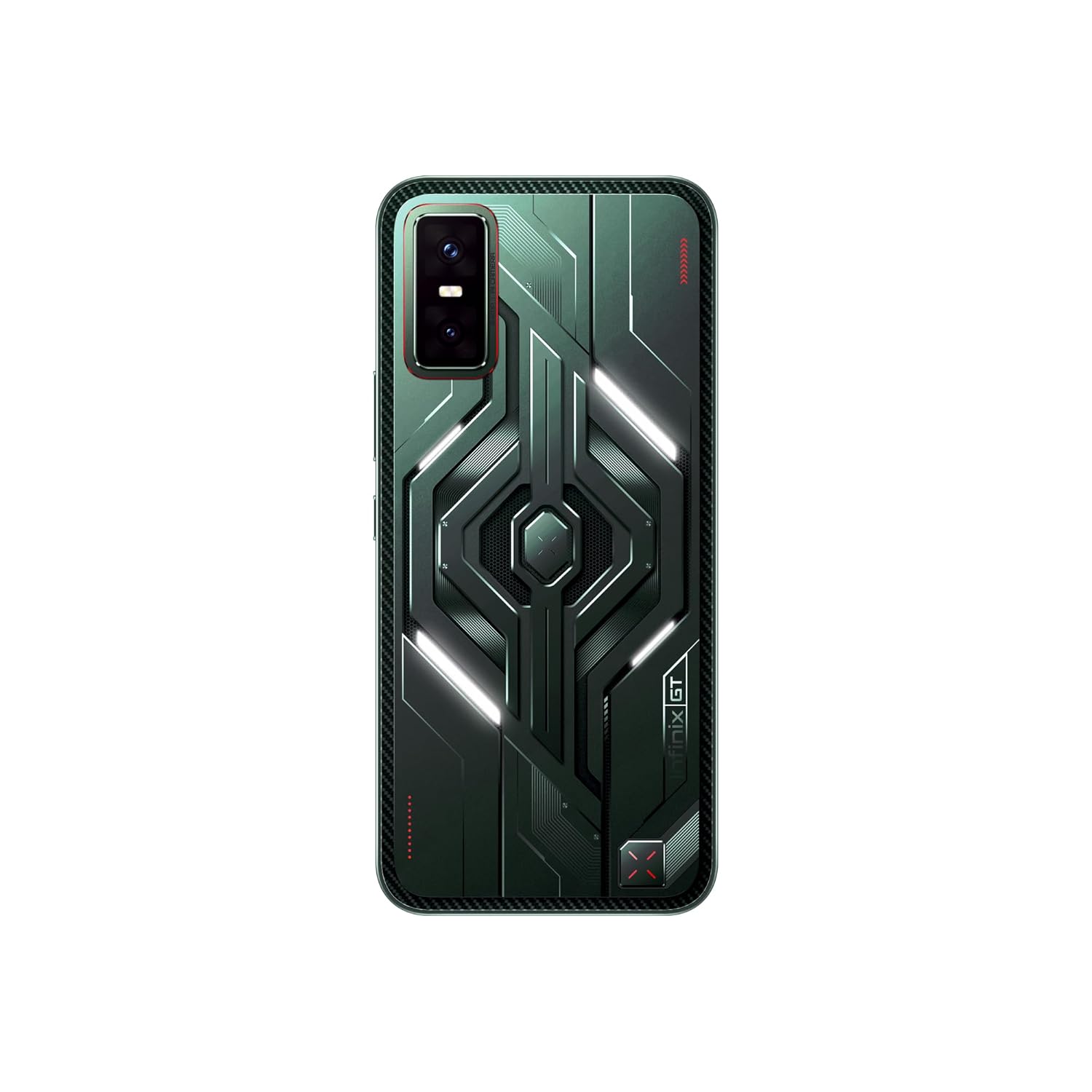
3.3 pav.: Nugara view of the Infinix GT 30 5G+ smartphone, showcasing the Cyber Mecha design, LED lights, and camera module.
The device features a Cyber Mecha 2.0 design on the back with customizable white LED lights that activate for various scenarios like charging and music playback. It includes GT Shoulder Triggers for enhanced gaming control.
4. Sąranka
4.1. SIM kortelės montavimas
- Suraskite SIM kortelės dėklą savo įrenginio šone.
- Įkiškite SIM kortelės dėklo išstūmimo įrankį į mažą skylutę šalia dėklo ir tvirtai spauskite, kol dėklas iššoks.
- Place your Nano-SIM cards (up to two) into the designated slots on the tray. Ensure the gold contacts face downwards.
- Atsargiai įstatykite SIM kortelės dėklą į telefoną, kol jis spragtelės ir užsifiksuos.
4.2. Pradinis įjungimas ir konfigūracija
- Paspauskite ir palaikykite maitinimo mygtuką, kol pasirodys „Infinix“ logotipas.
- Vykdykite ekrane pateikiamus nurodymus, kad pasirinktumėte kalbą, prisijunkite prie „Wi-Fi“ tinklo ir sukonfigūruotumėte „Google“ paskyrą.
- Jums bus pateikti nurodymai, kaip nustatyti saugos funkcijas, pvz., PIN kodą, atrakinimo piešinį arba piršto atspaudą.
5. Naudojimo instrukcijos
5.1. Ekrano funkcijos
The Infinix GT 30 5G+ features a 1.5K AMOLED display with a 144Hz refresh rate for smooth visuals and a 2160Hz touch sampling rate for responsive interaction. It offers 4500 nits peak brightness and 2304Hz PWM dimming for eye comfort. The display is protected by Gorilla Glass 7i and is TÜV Rheinland certified.

Figure 5.1: Visual representation of the 1.5K AMOLED display with 10-bit color depth, Corning Gorilla Glass 7i protection, and 4500 nits peak brightness.
5.2. Žaidimų funkcijos
The device is optimized for gaming with several dedicated features:
- GT Shoulder Triggers: These physical triggers provide console-like input for mobile gaming, reducing screen clutter and enhancing control. They are customizable for quick access to in-game functions or other applications.
- 90FPS BGMI Gaming: Officially certified by Krafton, the GT 30 5G+ supports 90 FPS gaming on BGMI for a smoother, more responsive, and accurate gameplay experience.
- „MediaTek Dimensity 7400“ procesorius: Provides powerful performance for demanding games and applications.
- 6-Layer 3D Vapor Chamber Cooling: Ensures efficient heat dissipation during extended gaming sessions.
- X-Axis Linear Motor & 6-Axis Gyroscope: Deliver immersive haptics and improved tilt control.

Figure 5.2: User holding the Infinix GT 30 5G+ and utilizing the GT Shoulder Gaming Triggers for enhanced control.

Figure 5.3: Diagram illustrating additional functions of the GT Triggers, including Double-Tap to Launch, Easy In-Camera Controls, and Video Playback Options.

Figure 5.4: Screenshot of BGMI gameplay on the Infinix GT 30 5G+, demonstrating 90FPS performance.
5.3. Kameros naudojimas
The device is equipped with a 64MP Sony rear camera and an 8MP ultra-wide camera. It supports 4K video recording from both front and rear cameras. The camera system includes One-Tap Infinix AI enhancements for improved photography.

5.5 pav. Baigtaview of the camera system, detailing the 8MP Ultra-Wide, 64MP Sony Dual Camera (IMX682 sensor), 4K Video Recording, and 13MP Selfie camera.
5.4. Infinix AI Features
The Infinix GT 30 5G+ integrates advanced AI features to enhance user experience:
- DI trintukas: Remove unwanted objects from your photos with a single tap.
- AI Extender: Expand your image to a desired perspective.
- DI išpjova: Instantly extract subjects from images.
- Folax (AI Voice Assistant): Provides voice-activated assistance.
- Apibraukite, kad ieškotumėte: Greitai ieškokite informacijos apibraukdami objektus ekrane.
- Dirbtinio intelekto skambučių asistentas: Manages calls with automatic answering and message relay.
- Dirbtinio intelekto rašymo asistentas: Helps generate summaries, translate, and refine text for various tones (friendly, professional, concise).
- Gaming AI: Includes Esports Mode, Network Acceleration, ZoneTouch Master, and AI Magic Voice Changer for optimized gaming.

Figure 5.6: Before and after comparison demonstrating the AI Eraser feature removing an object from an image.

Figure 5.7: Demonstration of the AI Extender feature expanding an image's perspective.

5.8 pav. Pvzample of the AI Cutout feature extracting a subject from an image.

5.9 pav. Baigtaview of Infinix AI features for gaming, including Esports Mode, Network Acceleration, ZoneTouch Master, and AI Magic Voice Changer.

Figure 5.10: Demonstration of Folax AI Voice Assistant and Circle to Search functionality.

5.11 pav. Pvzamples of AI Call Assistant managing calls and AI Writing Assistant refining text.
5.5. Ryšys
The device supports 5G cellular technology for high-speed network connectivity. It also features UltraLink, a walkie-talkie function that allows calls without network coverage, exclusively supported on Infinix-to-Infinix smartphones.

Figure 5.12: Illustration of the UltraLink feature, enabling communication without network or Wi-Fi, exclusively between Infinix smartphones.
5.6. Baterija ir įkrovimas
The Infinix GT 30 5G+ is powered by a 5500mAh battery. It supports Bypass Charging, which allows the device to draw power directly from the charger during gaming, reducing battery degradation and heat. It also supports Reverse Wired Charging.

Figure 5.13: Information on battery endurance and charging features like Bypass Charging and Reverse Wired Charging.
5.7. Operacinė sistema
The smartphone runs on XOS 15, which is based on Android 15. XOS 15 offers a customizable, clean, and secure user experience, with features like Dynamic Bar, Floating Windows, Split-screen Apps, Smart Panel, and Outdoor Booster. It is designed to receive 2 major OS upgrades and 3 years of security patches.

Figure 5.14: Screenshots showcasing XOS 15 interface, special functions, personalized aesthetic, and AI-powered assistants.
6. Priežiūra
6.1. Bendroji priežiūra
- Keep the device clean using a soft, dry cloth. Avoid abrasive materials or harsh chemicals.
- Apsaugokite ekraną apsaugine plėvele ir naudokite pridedamą telefono dėklą, kad išvengtumėte įbrėžimų ir pažeidimų.
- Saugokite, kad prietaisas nepatektų į ekstremalias temperatūras, tiesioginius saulės spindulius ar didelę drėgmę.
6.2. Atsparumas vandeniui ir dulkėms
The Infinix GT 30 5G+ features IP64 water and dust resistance. This rating indicates protection against dust ingress and splashing water from any direction. It is not designed for submersion in water. Avoid intentional exposure to water or dust to prevent damage.

Figure 6.1: Visual highlighting IP64 Water & Dust Resistance and Dual Speakers with Hi-Res Audio.
7. Problemų sprendimas
This section addresses common issues you might encounter with your Infinix GT 30 5G+.
| problema | Galima priežastis | Sprendimas |
|---|---|---|
| Įrenginys neįsijungia | Žema akumuliatoriaus įkrova arba programinės įrangos problema. | Charge the device for at least 30 minutes. If it still doesn't turn on, perform a force restart by holding the Power button for 10-15 seconds. |
| Ekranas nereaguoja | Temporary software glitch or display issue. | Paleiskite įrenginį iš naujo. Jei problema išlieka, apsvarstykite galimybę atkurti gamyklinius nustatymus (pirmiausia sukurkite atsarginę duomenų kopiją) arba susisiekite su palaikymo tarnyba. |
| LED lights on the back are not changing color | The LED lights on the Cyber Mecha design are primarily white and are customizable for specific scenarios (e.g., charging, music, notifications) but not for color changes. | This is expected behavior. The lights are designed to be white and respond to specific system events, not to offer a full RGB color palette. |
| Poor network connectivity (5G) | Weak signal, incorrect SIM settings, or network provider issue. | Check your location for 5G coverage. Ensure SIM card is correctly inserted. Go to Settings > Network & internet > SIMs and verify preferred network type is 5G. Contact your network provider if issues persist. |
| Baterija greitai išsikrauna | Background apps, high screen brightness, or intensive usage. | Close unused apps, reduce screen brightness, enable battery saver mode, or check battery usage in settings to identify power-hungry apps. |
8. Specifikacijos
Detailed technical specifications for the Infinix GT 30 5G+ smartphone.
| Funkcija | Detalė |
|---|---|
| Prekės ženklas | Infinix |
| Operacinė sistema | „Android 15“ || XOS 15 (pagrįsta „Android 15“) |
| RAM | 8 GB |
| Atminties talpa | 128 GB |
| Spalva | Pulsas žalias |
| SIM kortelių lizdų skaičius | Dvi SIM kortelės |
| Jungties tipas | C tipo USB |
| Formos faktorius | Baras |
| Atsparumo vandeniui lygis | IP64 (Not Water Resistant for submersion) |
| Produkto savybės | Visada rodomas ekranas, integruotas GPS, dvi SIM kortelės, greito įkrovimo palaikymas, mobiliojo interneto prieigos taško galimybė |
| Rear Facing Camera Photo Sensor Resolution | 64 MP (Dual Camera with 8MP Ultra-wide) |
| Fotografavimo režimai | Film, Video, AI Cam, Portrait, Super Night, AR Shot, Short Video, Pro, Slow Motion, Dual Video, Panorama, Super Macro, Documents, Timelapse, Sky Shop |
| Number of Rear Facing Cameras | 2 |
| Number of Front Cameras | 1 (13MP Selfie) |
| Baterijos galia | 5500 mAh |
| Svoris | 187 gramų |
| Prekės matmenys | 16.4x7.6x0.8 cm |
| Vaizdo įrašymo raiška | 3840 x 2160 (4K) |
| Gaming Frame Rate (BGMI) | 90 FPS |
| GPS Geotagging Functionality | Tiesa |
| Ekrano tipas | AMOLED |
| Ekrano atnaujinimo dažnis | 144 Hz |
| Maksimali ekrano skiriamoji geba | 2700 x 1560 (1.5K) |
| Belaidžio ryšio paslaugų teikėjas | Atrakinta visiems vežėjams |
| Korinio ryšio technologija | 5G |
| Tinklo ryšio technologija | 5G |
| Specifinis produkto naudojimas | Business, Entertainment, Photography |
9. Garantija ir palaikymas
9.1. Informacija apie garantiją
The Infinix GT 30 5G+ comes with a 1 Year Warranty on the Handset ir 6 mėnesių garantija priedams nuo pirkimo datos.
9.2. Gamintojo kontaktinė informacija
For support, service, or warranty claims, please contact the manufacturer:
Gamintojas: PADGET ELECTRONICS PRIVATE LIMITED
Adresas: PLOT NO D-199, Sector-63, Noida, Gautam Buddha Nagar, Uttar Pradesh- 201301
Please refer to the official Infinix website or your purchase documentation for the most up-to-date contact information and support resources.

9.1 pav. Baigtaview of Infinix's global presence, service quality, and service network in India.