
1. Įvadas
This manual provides detailed instructions for the installation, operation, and maintenance of your UNITOPSCI 8 Core 4G+64G Android 15 Car Stereo. Please read this manual thoroughly before using the product to ensure proper function and safety. Keep this manual for future reference.
2. Saugos informacija
- Profesionalus montavimas rekomenduojamas: Installation of this car stereo requires technical knowledge and experience. It is highly recommended to have it installed by a qualified professional.
- Suderinamumas su transporto priemone: This unit is designed specifically for Honda Civic models from 2013 to 2017. Verify compatibility with your vehicle's center console before installation.
- Maitinimas: Ensure the vehicle's power supply is disconnected before beginning installation to prevent electrical shock or damage.
- Laidai: Follow the provided wiring diagram carefully. Incorrect wiring can cause damage to the unit or vehicle.
- Operation While Driving: Nenaudokite įrenginio taip, kad tai atitrauktų jūsų dėmesį nuo vairavimo. Visada teikite pirmenybę eismo saugumui.
- Temperatūra: Venkite ilgą laiką laikyti įrenginį tiesioginiuose saulės spinduliuose arba itin aukštose temperatūrose.
3. Pakuotės turinys
Patikrinkite, ar pakuotėje yra visi reikalingi daiktai:
- 1 x automobilio radijas
- 1x maitinimo laidas
- 1x automobilio galinis View Fotoaparatas
- 1 x montavimo įrankių rinkinys
- 1x GPS antena
- 1 x galinio kameros įvesties kabelis
- 1 x RCA kabelis
- 2x USB laidas
- 1 x Vartotojo vadovas
- 1x mikrofonas
- 1 x Original Car USB & Radio Adapter Cable
- 1 x „Canbus“ dekoderis

4. Produktas baigtasview
4.1 Pagrindinės savybės
- Operacinė sistema: Android 15
- Procesorius: Qualcomm 8-Core Chip
- Atmintis: 4 GB RAM + 64 GB ROM
- Ekranas: 9-inch 1280x720P IPS Capacitive Touchscreen
- Ryšys: Bluetooth 5.1, Dual-Band WiFi (2.4GHz & 5GHz)
- Išmaniojo telefono integracija: Wireless/Wired Apple CarPlay, Wireless/Wired Android Auto, Mirror Link
- Garsas: Integruotas DSP (skaitmeninis garso procesorius)
- Navigacija: GPS Navigation (supports online and offline maps)
- Radijas: FM/RDS radijas
- Fotoaparato palaikymas: AHD galinio vaizdo kamera (į komplektą įeina)
- Papildomos funkcijos: Steering Wheel Control (SWC), Built-in Cooling Fan, Picture-in-Picture, Customizable UI.


5. Diegimo vadovas
5.1 Patikra prieš montavimą
Before proceeding with installation, ensure your Honda Civic's center console matches the compatible design. Refer to the image below for guidance.
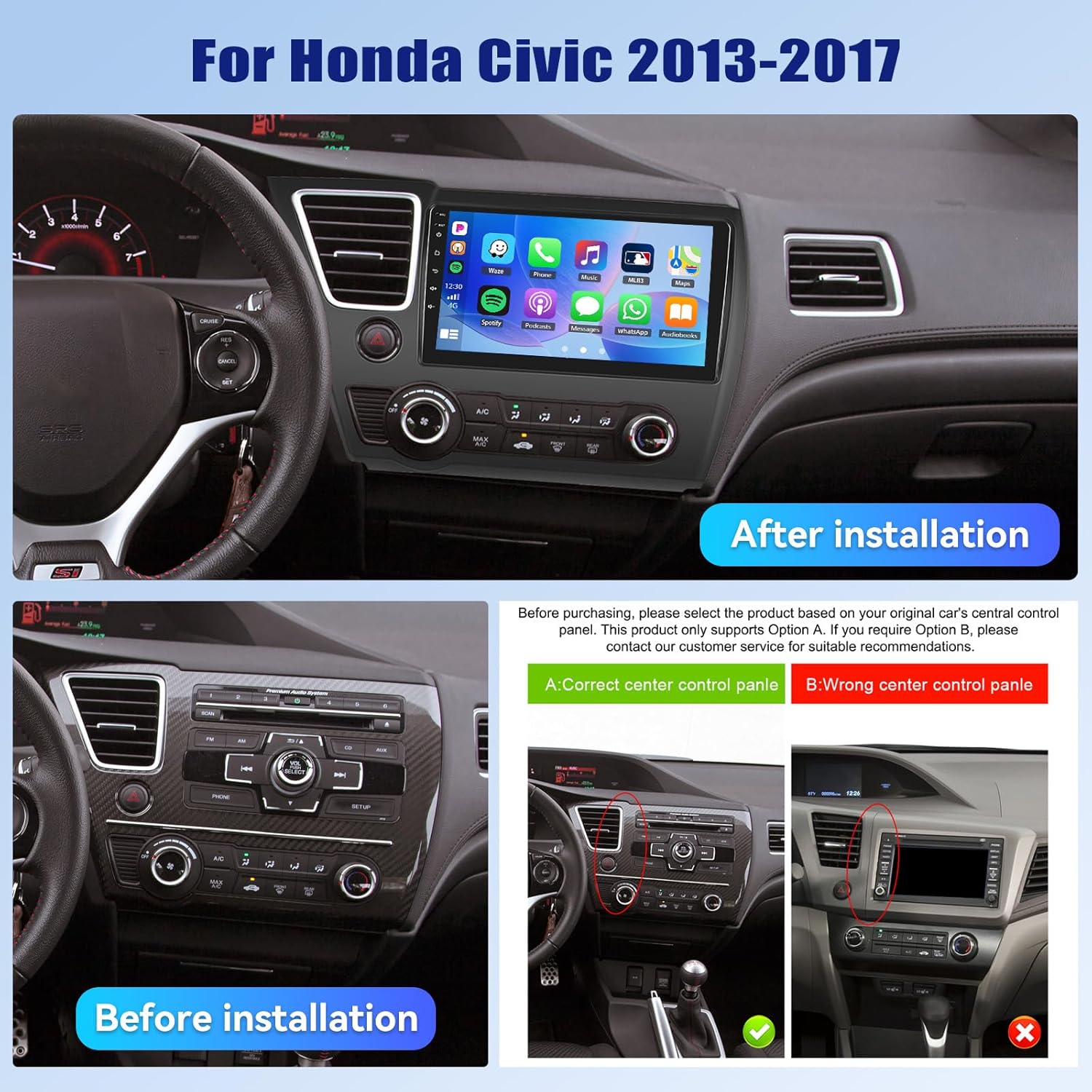
5.2 Sujungimo schema
A detailed wiring diagram is typically included with your product. Connect the power cable, speaker wires, GPS antenna, USB cables, rear camera input, and other accessories according to the diagram. Ensure all connections are secure to prevent malfunctions.
5.3 Fizinis įrengimas
- Atsargiai nuimkite originalią automobilio garso sistemą ir apdailos plokštes.
- Connect the new car stereo's wiring harness to the vehicle's existing harness, matching colors and connectors.
- GPS anteną sumontuokite vietoje, kur nėra view dangaus.
- Route the rear camera cable and install the camera (if applicable).
- Tvirtai pritvirtinkite naują automobilio stereo sistemą prie prietaisų skydelio angos.
- Vėl sumontuokite visas apdailos plokštes.
- Reconnect the vehicle's power supply.
6. Pradinė sąranka
Upon first power-on, the system may guide you through an initial setup process. This typically includes:
- Kalbos pasirinkimas: Pasirinkite pageidaujamą kalbą.
- Laikas ir data: Nustatykite teisingą laiko juostą, datą ir laiką.
- „WiFi“ ryšys: Connect to a stable Wi-Fi network to enable online features and app downloads.
- GPS kalibravimas: Allow the GPS system to acquire satellite signals for accurate positioning.
7. Naudojimo instrukcijos
7.1 Vartotojo sąsajos pritaikymas
The car stereo offers various customization options for its user interface.
- Shaderlab Topics: Adjust the UI color and font color to your preference.
- Window Design: Select from different themes (Card, SplitView, Wallpaper) and layouts for easy operation.
- 3D Car Dynamic Effects: Customize the displayed 3D car model, including its color and type (Car, MPV, SUV).


7.2 „Bluetooth“ ryšys 5.1
Connect your smartphone via Bluetooth for hands-free calling, music playback, and access to your phone's contacts and call history. Bluetooth 5.1 offers improved range and stability.

7.3 FM/RDS radijas
Tune into your favorite radio stations. The RDS (Radio Data System) feature provides additional information such as station name, song title, and traffic updates where available.

7.4 belaidis „CarPlay“ ir „Android Auto“
Connect your iPhone or Android smartphone wirelessly or via USB to access CarPlay or Android Auto. This allows for hands-free calls, navigation, music streaming, and voice commands (Siri or Google Assistant).

Video 7.1: Wireless CarPlay Radio Operation Guide with Qualcomm Chips. This video demonstrates the setup and usage of the Wireless CarPlay feature on the UNITOPSCI car stereo, highlighting its responsiveness and ease of use.
7.5 Veidrodinis ryšys
Mirror Link allows you to display your smartphone screen directly onto the car stereo. Android users can also control their phone applications directly from the car's touchscreen.
7.6 GPS navigacija
The unit supports both online and offline navigation. Connect to Wi-Fi for real-time traffic updates and precise route guidance. Pre-installed maps or downloadable map applications can be used.

7.7 DSP Audio Processing
The built-in Digital Sound Processor (DSP) allows for advanced audio tuning. Adjust equalization, sound field modes, and speaker settings to achieve strong bass, soft midrange, and clear treble for a personalized audio experience.

7.8 Cooling Fan Settings
The integrated cooling fan system helps maintain optimal operating temperature for the radio. You can monitor the temperature and adjust fan settings (e.g., Auto/On) to ensure stable performance.
7.9 Vaizdas vaizde (PIP)
The Picture-in-Picture feature allows you to view video content simultaneously while performing other operations, such as navigation or music playback.
7.10 AHD galinio vaizdo kamera
The included AHD wide-angle backup camera provides clear night vision and is waterproof. It assists with parking by displaying a real-time view už jūsų transporto priemonės esančios erdvės su parkavimo gairėmis. Note: Does not support original car camera.

7.11 Vairo valdymas (SWC)
Utilize your vehicle's existing steering wheel buttons to control various functions of the car stereo, such as adjusting volume, changing tracks, and answering calls. This enhances convenience and safety while driving.

7.12 Padalytas ekranas
The split-screen function allows for simultaneous display of two applications, such as navigation and music, for convenient multitasking.
8. Problemų sprendimas
| Problema | Galima priežastis | Sprendimas |
|---|---|---|
| Įrenginys neįsijungia | Neteisingas laidų prijungimas; Perdegęs saugiklis; Nepakankamas maitinimo šaltinis. | Check power connections and fuses. Ensure proper voltage. Consult a professional if unsure. |
| Nėra garso | Atjungti garsiakalbio laidai; per mažas garsumas; įjungta nutildymo funkcija. | Verify speaker connections. Increase volume. Deactivate mute. Check DSP settings. |
| Bluetooth neprisijungia | „Bluetooth“ išjungtas telefone / įrenginyje; įrenginys neporavimo režime; trukdžiai. | Ensure Bluetooth is enabled on both devices. Put unit in pairing mode. Try pairing in a different location. |
| GPS signalas prarastas / netikslus | GPS antenna obstructed; Antenna faulty; Software issue. | Relocate GPS antenna to a clear area. Check antenna connection. Update navigation software. |
| Jutiklinis ekranas nereaguoja | System frozen; Screen calibration needed. | Paleiskite įrenginį iš naujo. Jei problema išlieka, atlikite gamyklinių parametrų atkūrimą (žr. nustatymų meniu). |
| Galinė kamera nerodo | Camera cable disconnected; Camera faulty; Incorrect settings. | Check camera input cable connection. Verify camera power. Ensure reverse gear signal is connected. |
9. Specifikacijos
- Prekės svoris: 4.36 svaro
- Pakuotės matmenys: 15.35 x 9.65 x 3.35 colio
- Ekrano dydis: 9 colių
- Ekrano dydis: 9 colių
- Operacinė sistema: Android
- Atminties saugojimo talpa: 64 GB
- Jutiklinio ekrano tipas: Talpinis
- Ryšio technologija: „Bluetooth“, „Wi-Fi“
- Žemėlapio tipas: Šiaurės Amerika, visame pasaulyje
- Garso išvesties režimas: Stereo
10. Garantija ir palaikymas
UNITOPSCI offers the following support for this product:
- Garantija: 1-Year Manufacturer's Warranty.
- Pinigų grąžinimo garantija: 30 dienų pinigų grąžinimo paslauga.
- Pakeitimo paslauga: 12-month replacement service.
- Pagalba po pardavimo: Dedicated 24/7 professional after-sales team available to assist with installation or usage inquiries.
For online support, please contact: UNITOPSCI@126.com


