
1. Įvadas
This manual provides essential information for the proper use and maintenance of your ZWP GK-001 Replacement Remote Control. Please read these instructions carefully before operating the device to ensure optimal performance and longevity. This remote is designed for specific Bifanuo Walking Pad Treadmill models.
2. Produktas baigtasview
The ZWP GK-001 is a high-quality replacement remote control crafted from durable ABS material, offering a comfortable grip and wear-resistant properties. It features a stable signal, quick response, smart chip technology, and power-saving capabilities for an enhanced user experience.

1 pav.: priekis view of the ZWP GK-001 Replacement Remote Control.

Figure 2: Key features of the remote control, including stable link, quick response, smart chip, and power saving.

Figure 3: Design aspects emphasizing comfortable feel, use of environmentally friendly ABS, and quality assurance.
3. Sąranka
3.1 Akumuliatoriaus įdėjimas
The ZWP GK-001 remote control requires one CR2025 3V Lithium Button Battery (not included). Follow these steps to install the battery:
- Nuotolinio valdymo pulto gale raskite baterijų skyrių.
- Švelniai atidarykite akumuliatoriaus dangtelį.
- Įdėkite CR2025 bateriją teigiama (+) puse į viršų, kaip nurodyta skyriaus viduje.
- Tvirtai uždarykite akumuliatoriaus dangtelį, kol jis spragtelėdamas užsifiksuos.
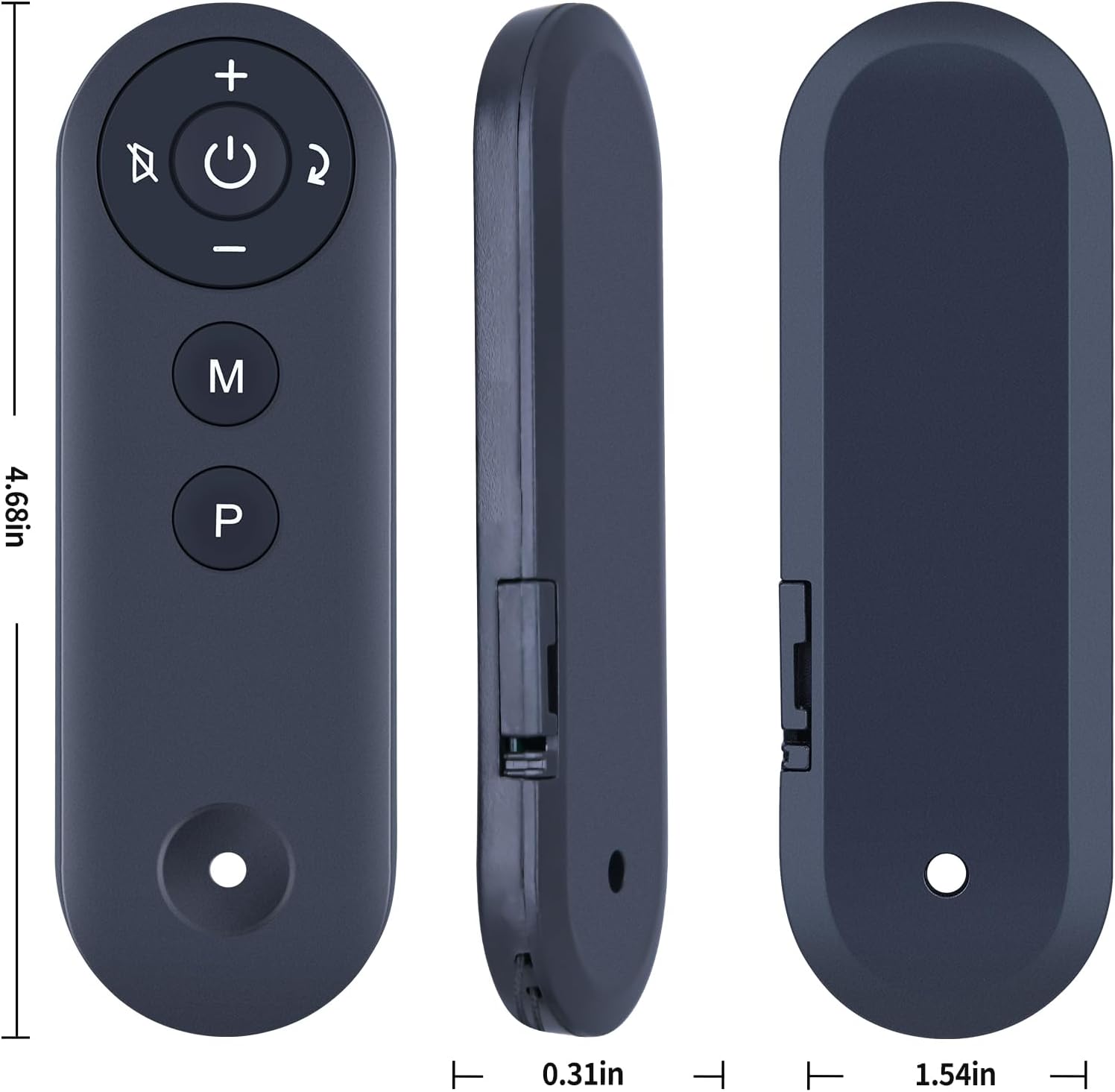
4 paveikslas: View of the battery compartment on the remote control.

Figure 5: Illustration of the CR2025 3V Lithium Battery required for operation.
4. Naudojimo instrukcijos
4.1 Nuotolinio valdymo pulto suporavimas
To ensure proper communication between the remote control and your Bifanuo Walking Pad Treadmill, pairing is required. Follow these steps:
- Power on your Bifanuo Walking Pad Treadmill.
- Wait for the treadmill's display to complete its power-on sequence (typically within 20 seconds).
- On the remote control, long press the "—" (minus) key.
- Continue holding the "—" key until the treadmill's display panel begins to blink.
- Release the "—" key. The display panel will blink twice, and the treadmill's buzzer will sound twice, indicating successful pairing.
If the remote control is unresponsive after battery installation, repeat this pairing process once.

Figure 6: The remote control operating a treadmill, demonstrating an effective operational distance of up to 8 meters.

Figure 7: The remote control in hand, illustrating enhanced signal strength and extended service life.
5. Priežiūra
To maintain your remote control in optimal condition:
- Nuotolinio valdymo pultą laikykite švarų, nuvalydami jį minkšta, sausa šluoste.
- Saugokite nuotolinio valdymo pultą nuo ekstremalių temperatūrų, tiesioginių saulės spindulių ar drėgmės.
- If the remote will not be used for an extended period, remove the battery to prevent leakage.
6. Problemų sprendimas
6.1 Nuotolinio valdymo pultas nereaguoja
- Patikrinkite akumuliatorių: Ensure the CR2025 battery is correctly installed with the correct polarity and is not depleted. Replace if necessary.
- Pakartotinis susiejimas: If the remote becomes unresponsive, repeat the pairing procedure described in Section 4.1.
- Kliūtys: Ensure there are no physical obstructions between the remote control and the treadmill's receiver.
- Atstumas: Confirm you are within the operational range (approximately 8 meters) of the treadmill.
7. Specifikacijos
| Funkcija | Specifikacija |
|---|---|
| Modelis | GK-001 |
| Prekės ženklas | ZWP |
| Suderinami įrenginiai | Bifanuo Walking Pad Treadmills (TM008, TM008BK, TM008CK, TM006-BK, TM002, TM001, TM008SL, TM009) |
| Maitinimo šaltinis | 1 x CR2025 3V ličio baterija (nepridedama) |
| Medžiaga | Aukštos kokybės ABS |
| Spalva | Juoda |
| Prekės svoris | 2.08 uncijos |
| Pakuotės matmenys | 7.4 x 2.5 x 1.1 colio |
Figure 8: Detailed dimensions of the ZWP GK-001 remote control.
8. Garantija ir palaikymas
For any questions, concerns, or issues regarding your ZWP GK-001 Replacement Remote Control, please contact the seller or manufacturer directly. Refer to your purchase documentation for specific warranty details and customer support contact information. We are committed to assisting you with any difficulties you may encounter.