
1. Įvadas
Thank you for choosing the EWEADN V80 Wired TKL RGB Gaming Keyboard. This manual provides essential information for setting up, operating, maintaining, and troubleshooting your new keyboard. The V80 keyboard features an 80% Tenkeyless (TKL) layout, PBT keycaps, quiet membrane switches, 26-key anti-ghosting, and dynamic RGB backlighting, designed for an ergonomic and efficient user experience.
2. Pakuotės turinys
- EWEADN V80 klaviatūra
- USB kabelis
- Vartotojo vadovas
- 2 Year Manufacturer Warranty Information
3. Sąrankos instrukcijos
The EWEADN V80 keyboard is designed for plug-and-play convenience, requiring no driver installation for basic functionality.
- Prijunkite USB kabelį: Locate the USB-C port on the keyboard (typically on the top edge). Connect one end of the provided USB cable to this port.
- Prisijunkite prie savo įrenginio: Plug the other end of the USB cable into an available USB-A port on your computer (Laptop, PC, etc.).
- Sistemos atpažinimas: Your operating system (Windows, macOS) should automatically detect and configure the keyboard. A setup assistant may appear on macOS to identify the keyboard type; follow the on-screen prompts.
- Klaviatūros kojelių reguliavimas: For optimal typing comfort, extend the two-stage adjustable kickstands located on the underside of the keyboard to achieve your preferred typing angle.
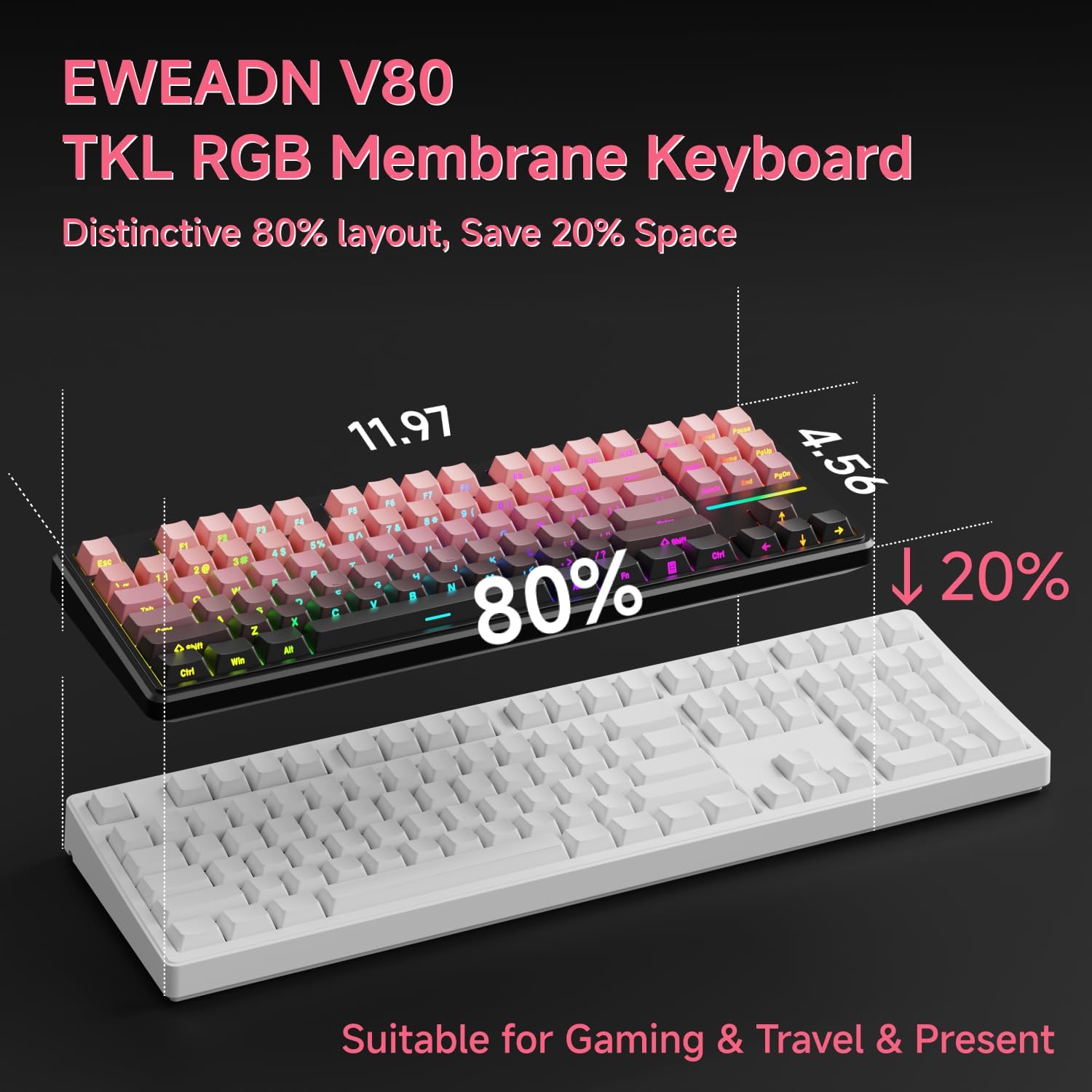
Image: Connecting the USB-C cable to the EWEADN V80 keyboard.

Image: The underside of the EWEADN V80 keyboard with its two-stage adjustable kickstands extended for ergonomic typing.
4. Naudojimo instrukcijos
4.1 RGB foninio apšvietimo valdymas
The EWEADN V80 features dynamic RGB backlighting with multiple modes and adjustable settings.
- Toggle Backlight On/Off: Paspauskite Fn + Backspace.
- Keisti apšvietimo režimą: Paspauskite Fn + Įterpti to cycle through 12 dynamic lighting effects.
- Sureguliuokite ryškumą: Paspauskite Fn + PU (Page Up) to increase brightness, and Fn + PD (Page Down) to decrease brightness.
- Adjust Lighting Speed: Paspauskite Fn + -= sumažinti greitį ir =+ padidinti greitį.
- Light Strip Control: Paspauskite Fn + P to control the side light strip.

Image: The EWEADN V80 keyboard showcasing various RGB backlight modes, including static colors, rainbow wave, and cycling ripple effects.
Video: Demonstrates the dynamic RGB lighting effects of the EWEADN V80 keyboard, cycling through different colors and patterns.
4.2 Funkcinių klavišų deriniai
The V80 keyboard utilizes the Fn key for various multimedia and system functions.
| Kombinuotas mygtukas | Funkcija |
|---|---|
| Fn + F1 | Ekrano ryškumas - |
| Fn + F2 | Ekrano ryškumas+ |
| Fn + F3 | Konvertuoti langą |
| Fn + F4 | Mikrofonas |
| Fn + F5 | Daugialypė terpė |
| Fn + F6 | Ankstesnė daina |
| Fn + F7 | Kita daina |
| Fn + F8 | Tomas- |
| Fn + F9 | Apimtis+ |
| Fn + F10 | Nutildyti |
| Fn + F11 | Mano kompiuteris |
| Fn + F12 | Skaičiuoklė |
| Kombinuotas mygtukas | Funkcija |
|---|---|
| Fn + F1 | Ekrano ryškumas - |
| Fn + F2 | Ekrano ryškumas+ |
| Fn + F3 | Multitasking Control |
| Fn + F4 | Paleidimo pultas |
| Fn + F5 | Ankstesnė daina |
| Fn + F6 | Kita daina |
| Fn + F7 | Leisti / pristabdyti |
| Fn + F8 | Tomas- |
| Fn + F9 | Apimtis+ |
| Fn + F10 | Nutildyti |
| Fn + F11 | Mano kompiuteris |
| Fn + F12 | Skaičiuoklė |
4.3 Apsauga nuo šešėlių
The V80 keyboard features 26-key rollover anti-ghosting, ensuring that every keypress is registered accurately, even when multiple keys are pressed simultaneously during intense gaming or fast typing. This prevents missed inputs and enhances performance.

Image: The EWEADN V80 keyboard illustrating its 26-key anti-ghosting capability, showing multiple simultaneous key presses being registered.
5. Savybės
- Wired Connectivity & Multi-System Support: The USB-C wired design provides a stable, interference-free connection with zero input lag. It is compatible with Windows and Mac operating systems, offering versatile integration for various devices.
- 80 % TKL išdėstymas: The Tenkeyless design saves significant desk space, promoting a cleaner and more efficient setup without sacrificing essential keys for gaming or productivity.
- Quiet Membrane Operation: Equipped with quiet membrane switches, the keyboard delivers tactile, mechanical-like feedback while minimizing noise, ideal for environments where quiet operation is preferred.
- Ergonomiškas reguliavimas: An integrated two-stage kickstand allows users to adjust the typing angle, providing optimal wrist support and reducing strain during prolonged use.
- PBT klavišų dangteliai: Durable double-shot injection-molded PBT keycaps feature subtle side-printed legends, crisp backlight transmission, and a matte texture that resists shine and improves grip for extended use.
- 26 klavišų apsauga nuo šešėliavimo: Ensures accurate registration of every keypress, even during rapid and simultaneous inputs, crucial for competitive gaming.

Image: The EWEADN V80 keyboard demonstrating its plug-and-play compatibility with various operating systems including Windows, Mac, iOS, and Android.

Paveikslėlis: detalus view of the EWEADN V80's upgraded side-printed PBT keycaps, emphasizing their durability, matte texture, and aesthetic appeal.

Image: A close-up of the EWEADN V80's membrane gaming switches, illustrating their smooth, silent, and strain-free operation.
Video: A short demonstration of the EWEADN V80 Wired RGB Gaming Keyboard, highlighting its compact design and RGB lighting.
Video: Showcases the EWEADN V80 Cute Pink Silent Keyboard, emphasizing its quiet typing experience and aesthetic appeal.
6. Specifikacijos
| Funkcija | Detalė |
|---|---|
| Prekės ženklas | EWEADN |
| Modelio numeris | V80 |
| Ryšio technologija | USB-C (laidinis) |
| Klaviatūros aprašymas | Membrana |
| Jungiklio tipas | Mechanical-like |
| Raktų skaičius | 87 |
| Klaviatūros išdėstymas | QWERTY |
| Klaviatūros apšvietimas | RGB (12 dynamic modes) |
| Anti-Ghosting | 26 klavišų perjungimas |
| Klaviatūros | Double-shot PBT, Side-Printed Legends |
| Ergonominės savybės | Dviejų stage adjustable kickstand |
| Suderinami įrenginiai | Laptop, PC, Smartphone, Tablet (via compatible adapters) |
| Gaminio matmenys (I x P x A) | 14.37" x 5.47" x 1.53" |
| Medžiaga | Plastikiniai |
| Spalva | BlackBerry Pink |
7. Priežiūra
To ensure the longevity and optimal performance of your EWEADN V80 keyboard, follow these maintenance guidelines:
- Reguliarus valymas: Use a soft, lint-free cloth to wipe down the keycaps and keyboard surface. For deeper cleaning, a can of compressed air can remove dust and debris from between the keys.
- Venkite skysčių: Do not spill liquids on the keyboard. If a spill occurs, immediately disconnect the keyboard from your device and allow it to dry completely before reconnecting.
- Elkitės atsargiai: Avoid dropping the keyboard or subjecting it to excessive force, which can damage internal components or keycaps.
- Kabelių valdymas: Ensure the USB cable is not kinked or strained, as this can lead to damage over time.
8. Problemų sprendimas
If you encounter any issues with your EWEADN V80 keyboard, please refer to the following common solutions:
- Klaviatūra nereaguoja:
- Įsitikinkite, kad USB laidas yra tvirtai prijungtas prie klaviatūros ir kompiuterio.
- Pabandykite prijungti klaviatūrą prie kito kompiuterio USB prievado.
- Test the keyboard on another computer to determine if the issue is with the keyboard or your device.
- RGB foninis apšvietimas neveikia:
- Įsitikinkite, kad foninis apšvietimas įjungtas, naudodami Fn + Backspace.
- Reguliuokite ryškumo lygius naudodami Fn + PU/PD.
- Keys Not Registering Correctly (Ghosting):
- The V80 has 26-key anti-ghosting. If you experience issues, ensure your operating system and any gaming software are up to date.
- Clean the affected keys to remove any debris that might be interfering with the switch mechanism.
Jei šie veiksmai neišsprendžia problemos, susisiekite su klientų aptarnavimo tarnyba.
9. Garantija ir palaikymas
The EWEADN V80 Wired TKL RGB Gaming Keyboard comes with a 2 metų gamintojo garantija. For any inquiries, technical assistance, or warranty claims, please contact our dedicated customer support team.
Pagalba el. paštu: eweadnkeyboard@outlook.com

Image: EWEADN's commitment to quality and customer support, featuring various products.


