
1. Įvadas
The Gustard R30 is a fully-discrete R2R network streamer and Digital-to-Analog Converter (DAC) designed for high-fidelity audio reproduction. It features a true 1-bit DSD decoding capability, FPGA-based clock management, a self-developed network bridge, and a discrete Class-A analog output stage. This manual provides comprehensive instructions for setting up, operating, and maintaining your R30 unit to ensure optimal performance and longevity.

1.1 pav.: priekis view of the Gustard R30 Network Streamer DAC. This image shows the sleek silver chassis with the display area and touch interface controls.
2. Pagrindinės savybės
- Discrete R2R Ladder: Utilizes a discrete R2R module for direct digital signal conversion through a resistor ladder network, providing an organic sound.
- True 1-bit DSD Decoding: Native support for DSD1024, with a DIRECT DSD mode that bypasses PCM conversion for preserving micro-details and timing integrity.
- Smart Digital Filtering: Offers three filter modes (Linear Sharp, Minimum Slow, Super Slow) based on adaptive multi-order algorithms to reduce aliasing noise and enhance resolution.
- FPGA-Powered Control: A programmable FPGA manages clocking, PLL shaping, and signal routing for low jitter and stable synchronization.
- Precision OCXO Clocking: Features an SC-cut crystal OCXO clock for imperceptible jitter and accepts an external 10MHz clock input.
- Self-Developed Network Bridge: CelWare-based system optimized for audio playback, supporting Roon Bridge, AirPlay, HQPlayer NAA, UPnP/DLNA, Spotify Connect, MConnect, BubbleUPnP, and QQMusic.
- Class-A Analog Stage: Discrete Class-A low-pass filter stage for precise control of frequency response, harmonic character, and transient handling.
- Passive Relay Preampgyvybingesnis: R2R relay-based volume control, allowing direct connection to powered monitors or power amplifiers, with a pure bypass mode.
- XMOS USB with Isolation: XMOS XU216 interface supporting PCM768k and DSD512, with independent voltage regulation and isolated channels for minimal interference.

2.1 pav. Baigtaview of the Gustard R30's core features, including R2R architecture, 1-bit DSD support, digital filtering, FPGA, OCXO, network streaming, and analog output stage.

2.2 pav. Išsamus view of the R30's all-new 27-Bit Architecture and True 1-Bit DSD Decoding capabilities, highlighting the internal components.

2.3 pav.: sprogo view illustrating the Digital Filter technology, OCXO Clock, GCLK-02 Clock Module, and FPGA Programmable Logic Chip within the R30.

Figure 2.4: Close-up of the R30's Analog LPF Circuit and the Passive Analog Preamplifier, detailing the discrete components.
3. Sąranka
3.1. Išpakavimas ir turinys
Carefully unpack your Gustard R30 unit from its packaging. Ensure all components are present and undamaged. The package should contain:
- 1 x GUSTARD R30 Unit
- Maitinimo kabelis (neįtrauktas į sąrašą, bet numanomas)
- Remote Control (implied by "Controller Support")
- Vartotojo vadovas (šis dokumentas)
3.2. Jungtys
Before connecting any cables, ensure the R30 unit is powered off. Refer to the back panel diagram for connection points.
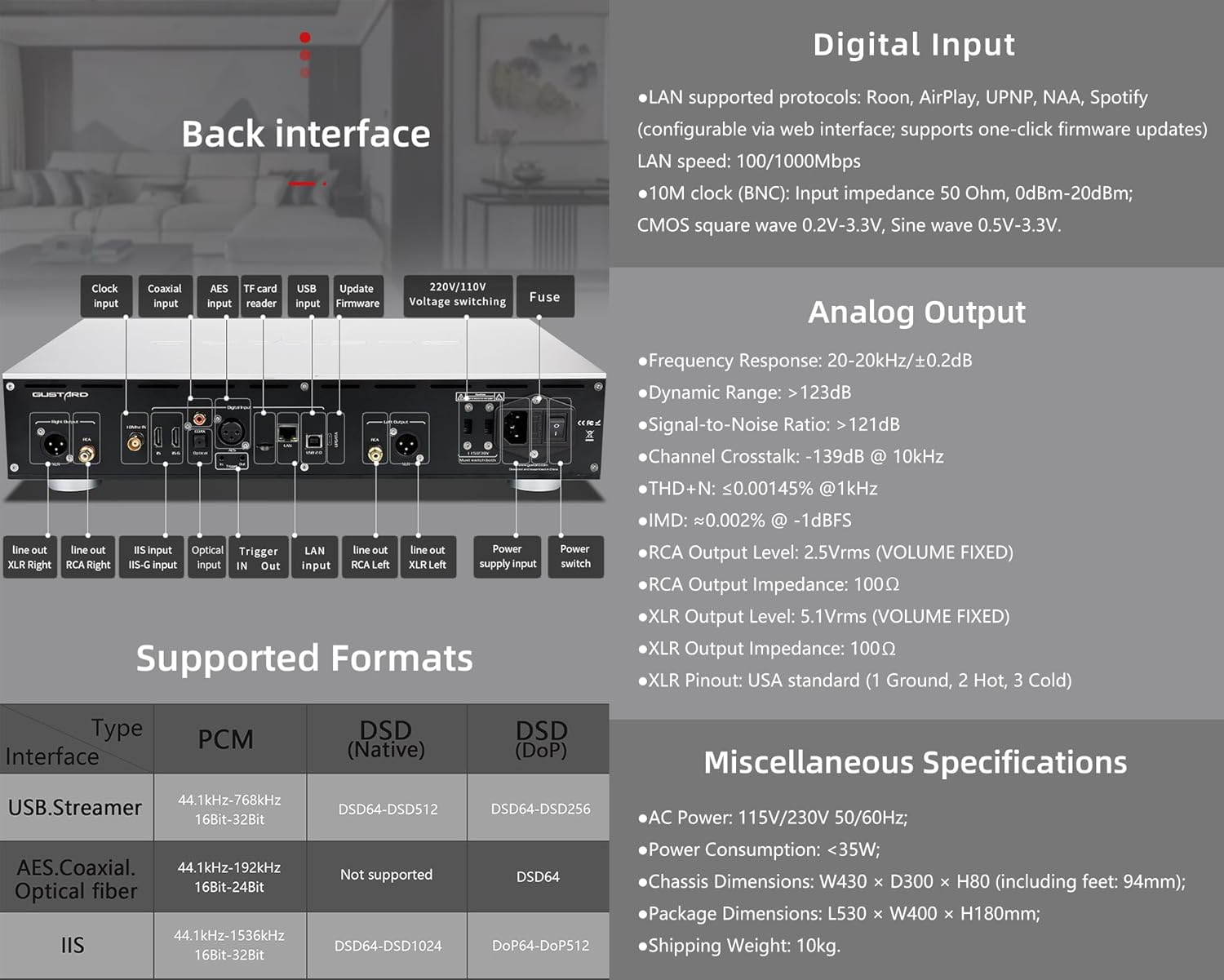
Figure 3.1: Rear panel of the Gustard R30, showing various input and output ports, along with digital input specifications.
- Analoginis išėjimas:
- Prijunkite savo amplifier or powered speakers to the RCA išėjimas (2.5Vrms) or XLR išvestis (5.1Vrms) ports. Ensure correct polarity for XLR (USA standard: 1 Ground, 2 Hot, 3 Cold).
- Skaitmeninis įėjimas:
- LAN: Connect an Ethernet cable to the LAN port for network streaming (Roon, AirPlay, UPnP, NAA, Spotify). Supports 100/1000Mbps.
- 10M laikrodis (BNC): For external clock synchronization, connect a 10MHz clock source to the BNC input. Input impedance 50 Ohm, 0dBm-20dBm. Supports CMOS square wave (0.2V-3.3V) and Sine wave (0.5V-3.3V).
- USB: Connect your computer or digital audio source via the USB input (XMOS XU216 interface).
- IIS: The R30 features two IIS inputs. Refer to Section 4.4 for IIS Pinout Configuration. Note: IIS is not standard HDMI. Do not connect to a regular HDMI port.
- Other digital inputs include AES, Koaksialinis, ir Optinis pluoštas.
- Galia: Connect the supplied power cable to the AC power input (115V/230V 50/60Hz). Ensure the voltage switch (if present) is set correctly for your region.
3.3. Įjungimas
After all connections are secure, press the power switch on the rear panel or the standby switch on the front panel to turn on the R30. The display will illuminate, indicating the unit is operational.
4. Naudojimo instrukcijos
4.1. Priekinio skydelio valdikliai

Figure 4.1: Front panel layout of the Gustard R30, showing the display area, touch interface, and controller receiver. Also illustrates the CelWare-based network bridge system.
The R30 features a fluid touch control interface on its front panel:
- Rodymo sritis: Rodo dabartinę įvestį, sample rate, volume level, and other status information.
- Lietimo sąsaja: Provides intuitive control for navigating menus, changing inputs, and adjusting settings.
- Controller Receiver: For use with the included remote control.
- Budėjimo jungiklis: Toggles the unit between active and standby modes.
4.2. Network Streaming
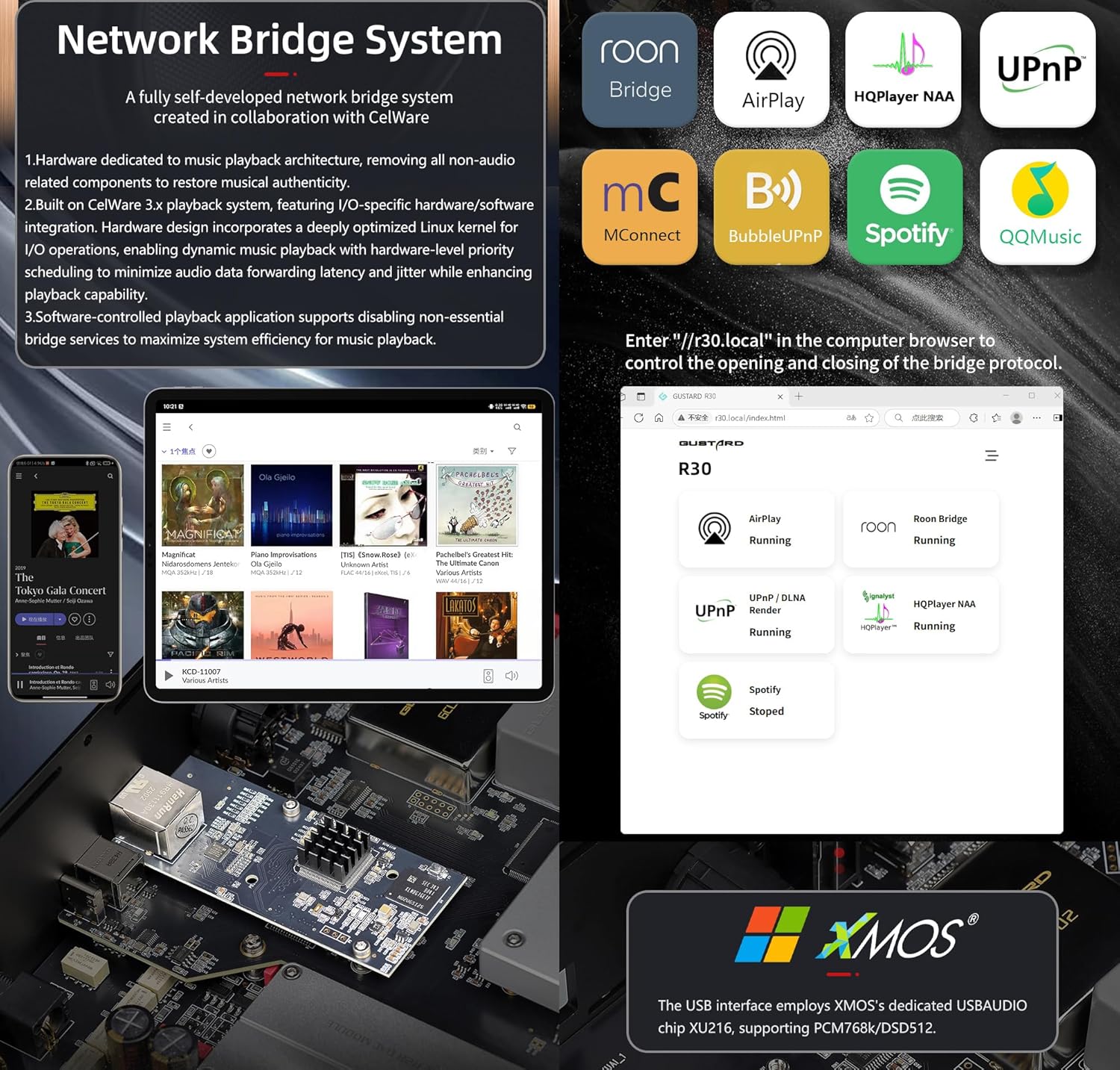
Figure 4.2: Diagram illustrating the R30's self-developed network bridge system and its supported protocols, alongside details of the XMOS USB interface.
The R30's self-developed CelWare-based network bridge system supports various streaming protocols:
- Roon Bridge
- AirPlay
- HQPlayer NAA
- UPnP / DLNA
- „Spotify Connect“.
- MConnect
- BubbleUPnP
- QQMusic
To configure network settings and update firmware, access the web interface by entering "http://r30.local" in your computer's browser.
4.3. Digital Filter Modes
The R30 offers three digital filter modes to tailor the sound to your preference:
- Linear Sharp: Provides a sharp roll-off with pre-ringing.
- Minimum Slow: Offers a slower roll-off with minimal pre-ringing.
- Super Slow: A very gentle roll-off, often preferred for a more natural sound.
These modes can be selected via the front panel controls or remote control.
4.4. Volume Control and Preamp Funkcionalumas
The R30 features a passive analog preamplifier with R2R relay-based volume control, offering a range of 0dB to -65dB. This allows you to connect the R30 directly to powered monitors or a power amplifier and control the volume remotely. You can also switch to a pure bypass mode if you prefer to use an external preampgyvesnis.
4.5. IIS Pinout Configuration
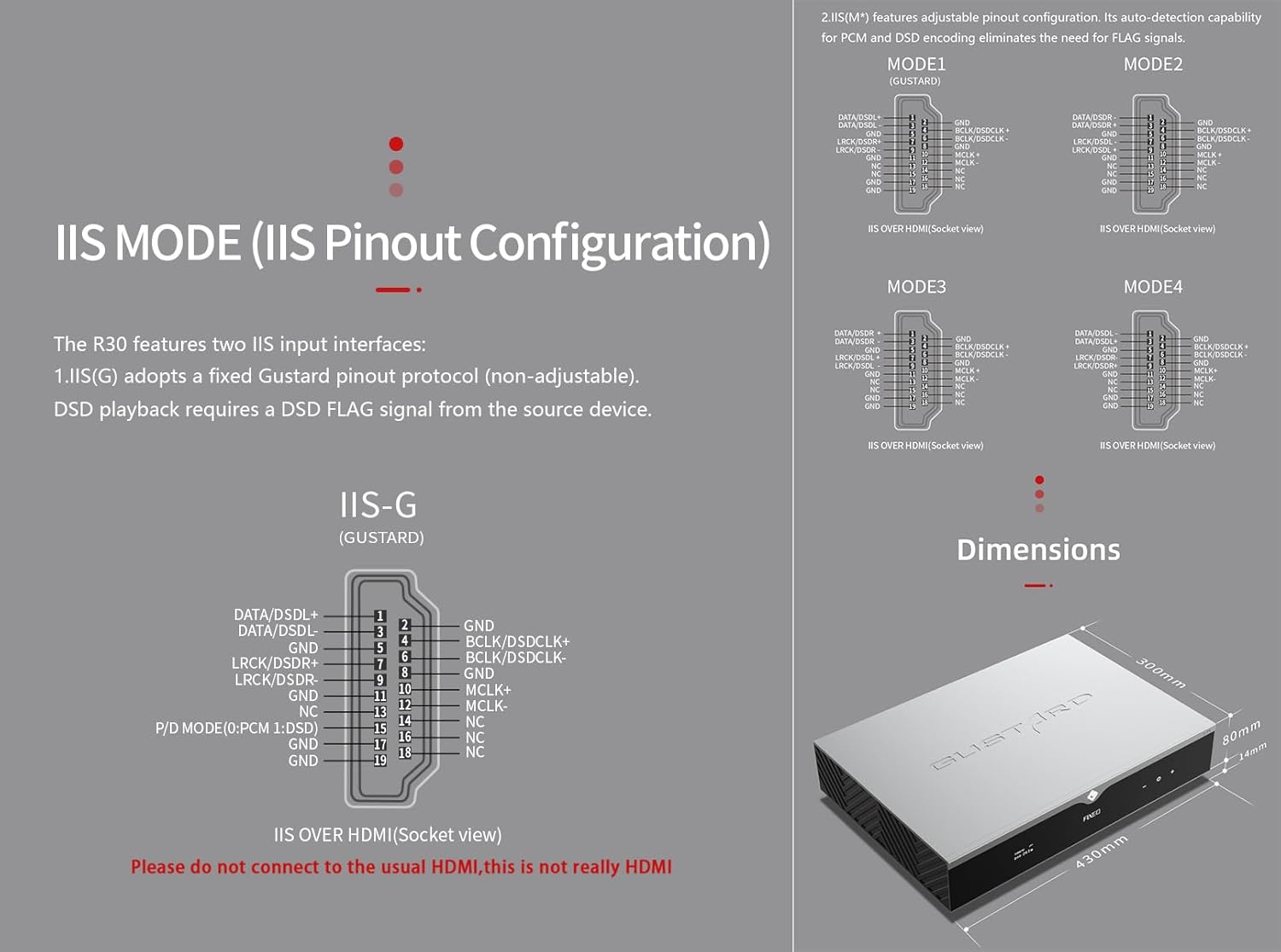
Figure 4.3: Detailed diagrams of the R30's IIS pinout configurations (IIS-G and IIS(M*)) and the overall dimensions of the unit.
The R30 includes two IIS input interfaces:
- IIS(G): Adopts a fixed Gustard pinout protocol (non-adjustable). DSD playback requires a DSD FLAG signal from the source device.
- IIS(M*): Reguliuojama kontaktų konfigūracija. Automatinio PCM ir DSD kodavimo aptikimo funkcija panaikina FLAG signalų poreikį.
Refer to Figure 4.3 for detailed pinout diagrams (MODE1, MODE2, MODE3, MODE4 for IIS(M*) and IIS-G). Svarbu: These IIS inputs are not standard HDMI. Do not connect them to regular HDMI ports on other devices.
5. Priežiūra
- Valymas: Išorinį įrenginio paviršių valykite minkštu, sausu skudurėliu. Venkite abrazyvinių valiklių ar tirpiklių.
- Vėdinimas: Ensure adequate ventilation around the unit to prevent overheating. Do not block the ventilation slots.
- Saugykla: Jei įrenginį ilgesnį laiką sandėliuosite, atjunkite jį nuo elektros tinklo ir laikykite vėsioje, sausoje vietoje.
6. Problemų sprendimas
This section addresses common issues you might encounter with your Gustard R30.
6.1. Nėra elektros
- Check if the power cable is securely connected to both the R30 and the power outlet.
- Patikrinkite, ar maitinimo lizdas veikia.
- Įsitikinkite, kad maitinimo jungiklis galiniame skydelyje yra padėtyje „Įjungta“.
- Check the fuse on the rear panel (refer to Figure 3.1). If blown, replace it with a fuse of the same rating.
6.2. Nėra garso išvesties
- Confirm that the correct input source is selected on the R30.
- Check all audio cable connections between the R30 and your ampkeltuvas/garsiakalbiai.
- Ensure the volume level on the R30 is not set to minimum or muted.
- Patikrinkite, ar jūsų ampGarsiakalbiai / garsiakalbiai įjungti ir veikia tinkamai.
6.3. Tinklo ryšio problemos
- Ensure the Ethernet cable is properly connected to the LAN port.
- Patikrinkite maršrutizatoriaus ir tinklo nustatymus.
- Access the R30's web interface (http://r30.local) to check network status and configuration.
- Restart your router, the R30, and the streaming device.
7. Specifikacijos
| Kategorija | Specifikacija |
|---|---|
| Digital Input (LAN) | Supported protocols: Roon, AirPlay, UPNP, NAA, Spotify (configurable via web interface; supports one-click firmware updates) LAN speed: 100/1000Mbps |
| Digital Input (10M Clock BNC) | Input impedance 50 Ohm, 0dBm-20dBm; CMOS square wave 0.2V-3.3V, Sine wave 0.5V-3.3V. |
| Digital Input (USB) | XMOS XU216 interface, supports PCM768k and DSD512. |
| Digital Input (IIS) | DSD1024, PCM 1536kHz (only IIS) |
| Analog Output - Frequency Response | 20-20kHz/±0.2dB |
| Analog Output - Dynamic Range | >123dB |
| Analog Output - Signal-to-Noise Ratio | >121dB |
| Analog Output - Channel Crosstalk | -139dB @ 10kHz |
| Analog Output - THD+N | ≤0.00145 % esant 1 kHz |
| Analog Output - IMD | ≈0.002% @-1dBFS |
| Analog Output - RCA Level | 2.5 Vrms (fiksuotas tūris) |
| Analog Output - RCA Impedance | 100Ω |
| Analog Output - XLR Level | 5.1 Vrms (fiksuotas tūris) |
| Analog Output - XLR Impedance | 100Ω |
| Analog Output - XLR Pinout | USA standard (1 Ground, 2 Hot, 3 Cold) |
| AC maitinimas | 115V/230V 50/60Hz |
| Energijos suvartojimas | <35W |
| Chassis Dimensions (W×D×H) | 430 × 300 × 80 mm (including feet: 94mm) |
| Pakuotės matmenys (L × P × A) | 530 × 400 × 180 mm |
| Siuntimo svoris | 10 kg (22 svaro) |
| Spalva | Sidabras |
| Prekės modelio numeris | GUSTARD R30 |
Figure 7.1: Dimensional drawing of the Gustard R30 unit.
8. Garantija ir palaikymas
For warranty information and technical support, please refer to the warranty card included with your product or visit the official KGUSS websvetainėje. Išsaugokite pirkimo kvitą kaip pirkimo įrodymą garantiniams reikalavimams.
For further assistance, you may also contact the seller, HIFI College, through the Amazon platform.


