
Bikevee SF20250929B0FN818NDK
Bikevee GPS Bike Computer Wireless Instruction Manual
Model: SF20250929B0FN818NDK
1. Įvadas
This manual provides detailed instructions for the Bikevee GPS Bike Computer. This device is designed to track various cycling data, including speed, distance, time, and altitude, with features like auto start/stop, auto backlight, and IPX7 waterproofing. Please read this manual thoroughly before using the product to ensure proper operation and maintenance.
2. Kas įskaičiuota
Įsitikinkite, kad pakuotėje yra visi komponentai:
- Bike Computer (Main Unit)
- Įkrovimo laidas (USB-C)
- Out Front Extended Mount
- Šešiakampis lizdo varžtas
- Šešiakampis veržliaraktis
- Kempinė
- Vartotojo vadovas

Image: All components included in the Bikevee GPS Bike Computer package.
3. Sąranka ir diegimas
3.1 Dviračio kompiuterio montavimas
The Bikevee GPS Bike Computer uses a wireless design for easy installation. Follow these steps to mount the device:
- Attach the Out Front Extended Mount to your bicycle's handlebar. Use the provided Hexagon Socket Screw and Hexagon Wrench to secure it firmly.
- Slide the Bike Computer onto the mount until it clicks securely into place.

Image: Simple installation of the wireless GPS bike computer on the handlebar mount.
3.2 Pradinis įjungimas ir GPS signalo gavimas
After mounting, press the power button to turn on the device. The computer will automatically search for GPS signals. It utilizes a 5-satellite system (GPS, BDS, Glonass, Galileo, QZSS) for accurate and stable positioning. The initial connection time may be longer, but subsequent connections will be faster.

Image: The bike computer's 5-satellite positioning system for enhanced accuracy.
3.3 Kalbos nustatymai
The device supports 9 languages. Refer to the user manual for specific instructions on how to navigate to the language settings and select your preferred language.

Image: The bike computer displaying data in multiple languages.
4. Naudojimo instrukcijos
4.1 Display Pages and Data Types
The Bikevee GPS Bike Computer features a 2.4" LCD screen that displays various cycling data across 6 functional pages. You can cycle through these pages using the device's buttons. The data types include:
- GPS aukštis
- Laikrodis
- Speed (MPH and KM/H)
- Kelionės laikas
- Kelionės atstumas
- Bendras laikas
- Bendras atstumas
- Vidutinis greitis
- Maksimalus greitis
- Foninio apšvietimo būsena

Vaizdas: pvzamples of the 6 functional data display pages.
4.2 Auto Start/Stop Function
The device automatically starts recording data when you begin cycling and pauses when you stop, conserving battery life and ensuring accurate trip data.
4.3 Automatinis foninis apšvietimas
To turn the backlight on or off, press both the left and right buttons simultaneously. Once activated, the backlight remains on throughout your ride. You can turn off the backlight during the day to save battery power, or keep it on for clear visibility at night.
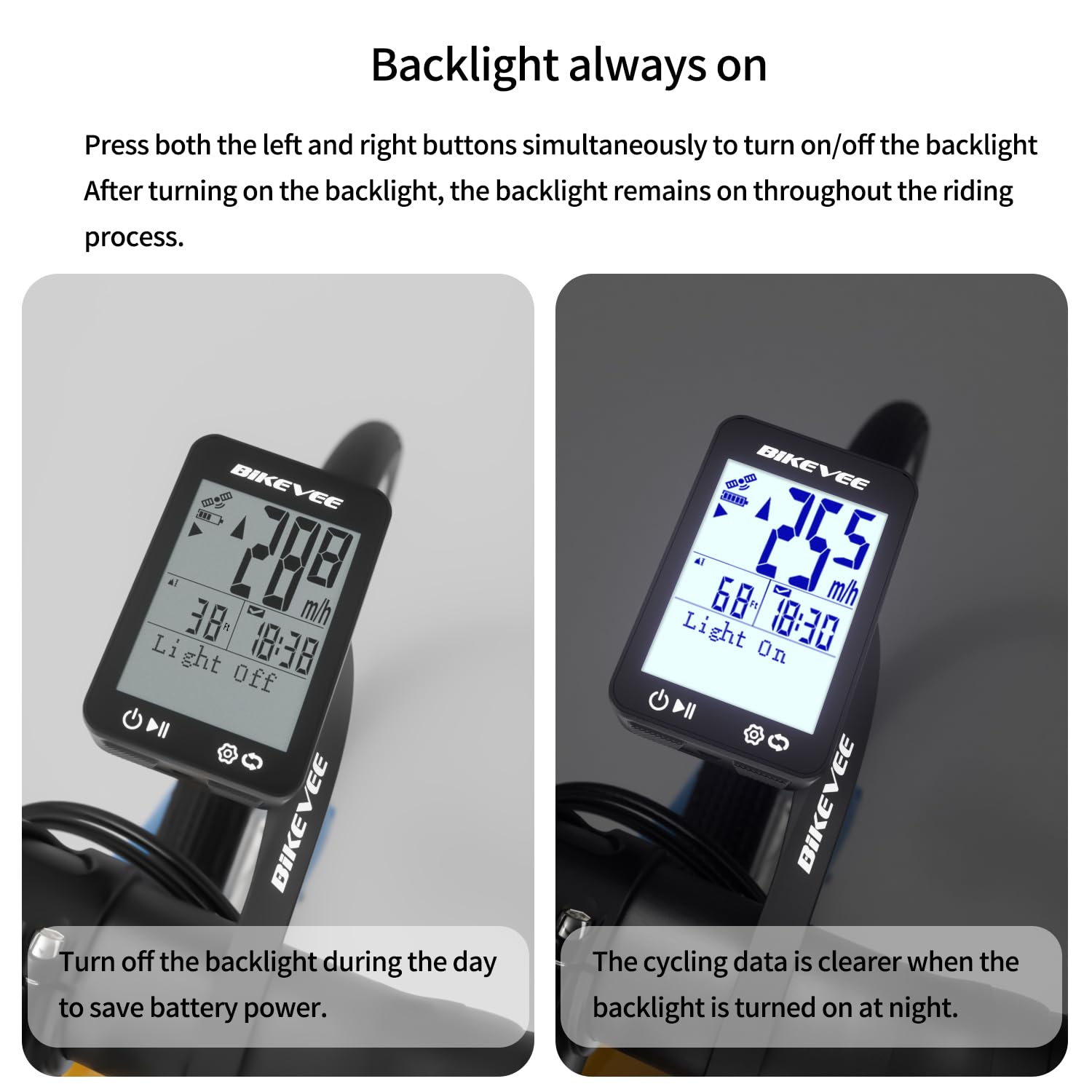
Image: Backlight functionality, showing display with backlight off and on.
5. Priežiūra ir priežiūra
5.1 Valymas
Nuvalykite prietaisą minkšta, damp cloth. Do not use abrasive cleaners or solvents, as they may damage the screen or casing.
5.2 Hidroizoliacija
The Bikevee GPS Bike Computer has an IPX7 waterproof rating, meaning it can withstand immersion in water up to 1 meter for 30 minutes. This protects it from rain and splashes during your rides. However, avoid prolonged submersion or high-pressure water jets.
5.3 Akumuliatoriaus įkrovimas
The device is equipped with a 650mAh Lithium Ion battery, providing up to 28 hours of continuous use. Charge the device using the provided USB-C charging cable when the battery indicator is low.
6. Problemų sprendimas
If you encounter issues with your Bikevee GPS Bike Computer, consider the following:
- Įrenginys neįsijungia: Ensure the battery is charged. Connect the device to the charging cable and allow it to charge for at least 30 minutes before attempting to power it on again.
- GPS signalas neužfiksuotas: Įsitikinkite, kad esate atviroje vietoje su švaria view of the sky. Initial GPS acquisition can take longer. If indoors or under heavy tree cover, signal acquisition may be difficult.
- Netikslūs duomenys: Ensure the device is securely mounted and has a clear GPS signal. Verify that the correct units (MPH/KM/H) are selected in the settings.
- Screen not visible: Check the backlight setting. If the backlight is off, press both left and right buttons simultaneously to activate it.
Dėl papildomos pagalbos žr. kontaktinę informaciją, pateiktą skyriuje „Garantija ir palaikymas“.
7. Specifikacijos
| Funkcija | Specifikacija |
|---|---|
| Prekės ženklas | Bikevee |
| Modelio numeris | SF20250929B0FN818NDK |
| Spalva | Juoda |
| Gaminio matmenys | 45L x 16W x 70H Millimeters |
| Prekės svoris | 50 gramų |
| Ekrano dydis | 2.4 colių |
| Ekrano tipas | LCD |
| Baterijos veikimo laikas | 28 valandų |
| Baterijos elementų sudėtis | Ličio jonas |
| Tarptautinis apsaugos įvertinimas | IPX7 |
| Montavimo tipas | Vairo tvirtinimas |
| Žmogaus sąsajos įvestis | Mygtukai |
| Kilmės šalis | Kinija |

Image: Summary of key product features and specifications.
8. Garantija ir palaikymas
8.1 Kokybės užtikrinimas
Bikevee is committed to providing dependable products. This GPS Bike Computer is designed for lasting satisfaction.
8.2 Pagalba klientams
For any questions, technical support, or warranty claims, please contact Bikevee customer service through the retailer where you purchased the product or visit the official Bikevee websvetainė kontaktinei informacijai.
Susiję dokumentai - SF20250929B0FN818NDK
 |
„Bikevee BKV100A“ dviračio GPS kompiuterio naudotojo vadovas Išsamus „Bikevee BKV100A“ dviračio GPS kompiuterio naudotojo vadovas. Šiame vadove išsamiai aprašomas diegimas, sąranka, mygtukų funkcijos, būsenos piktogramos, susiejimas su jutikliais ir išmaniaisiais telefonais, įkrovimas ir pagrindinės specifikacijos optimaliam naudojimui. |
 |
Bikevee BKV-1503 Bicycle Computer Instruction Manual Comprehensive user manual for the Bikevee BKV-1503 wireless bicycle computer, covering installation, setup, operation, troubleshooting, and technical specifications. |
 |
Bikevee BKV-501 Wireless Bicycle Computer User Manual Comprehensive user manual for the Bikevee BKV-501 wireless bicycle computer. Includes instructions for installation, wheel size configuration, operation, charging, and troubleshooting. |
 |
Bikevee BKV-1504 Bicycle Computer Instruction Manual Comprehensive user manual and installation guide for the Bikevee BKV-1504 wireless bicycle computer. Includes setup instructions, operation, troubleshooting, and technical specifications. |
 |
Bikevee BKV-503 Bicycle Computer Instruction Manual Comprehensive user manual for the Bikevee BKV-503 wireless bicycle computer. Includes installation, setup, troubleshooting, and specifications. |
 |
Bikevee BKV-500 GPS Bicycle Computer User Manual Comprehensive user manual for the Bikevee BKV-500 GPS wireless bicycle computer. Includes setup, installation, button functions, and troubleshooting guides. |
Ask a question about this manual
Ask about setup, troubleshooting, compatibility, parts, safety, or missing instructions. Manuals+ will review the question and use this page’s manual context to help answer it.