
Kinglucky A20
Kinglucky ClipFree A20 Open-Ear Earbuds Instruction Manual
Modelis: A20
Įvadas
Welcome to the Kinglucky ClipFree A20 Open-Ear Earbuds. These earbuds are designed for comfort and style, featuring an open-ear design and detachable crystal earrings. This manual provides essential information for setting up, operating, maintaining, and troubleshooting your new earbuds.
Kas yra dėžutėje
Upon opening your Kinglucky ClipFree A20 package, you should find the following items:
- Kinglucky ClipFree A20 Open-Ear Earbuds
- Įkrovimo dėklas
- Detachable Crystal Butterfly Earrings (if included with your model)
- USB-C įkrovimo laidas
- Vartotojo vadovas (šis dokumentas)

Image: The Kinglucky A20 earbuds, charging case, detachable butterfly earrings, and USB-C charging cable as packaged.
Sąranka
1. Ausinių ir dėklo įkrovimas
Before first use, fully charge your Kinglucky A20 earbuds and charging case. Connect the provided USB-C cable to the charging port on the case and a power source. The digital display on the case will show the battery level. A full charge provides up to 8 hours of playtime for the earbuds, with the case extending total playtime to approximately 50 hours.

Image: The Kinglucky A20 earbuds resting in their charging case, displaying the battery percentage on the front.
2. „Bluetooth“ poravimas
- Atidarykite įkrovimo dėklą. Ausinės automatiškai įsijungs susiejimo režimu.
- Savo įrenginyje (išmaniajame telefone, planšetiniame kompiuteryje ir kt.) eikite į „Bluetooth“ nustatymus.
- Select "Kinglucky A20" from the list of available devices.
- Prisijungus, išgirsite garso signalą ir pasikeis ausinių indikatoriaus lemputė.
The Kinglucky A20 supports Bluetooth 5.4 for a stable connection and multipoint pairing, allowing connection to two devices simultaneously.
3. Ausinių dėvėjimas
The A20 earbuds feature an open-ear clip design for comfort and stability. They do not enter the ear canal, resting gently on the ear.
- Gently open the ear cuff of the earbud.
- Position the earbud over your ear, ensuring the speaker is aligned with your ear canal for optimal sound.
- Pritaikykite, kad priglustų saugiai ir patogiai.
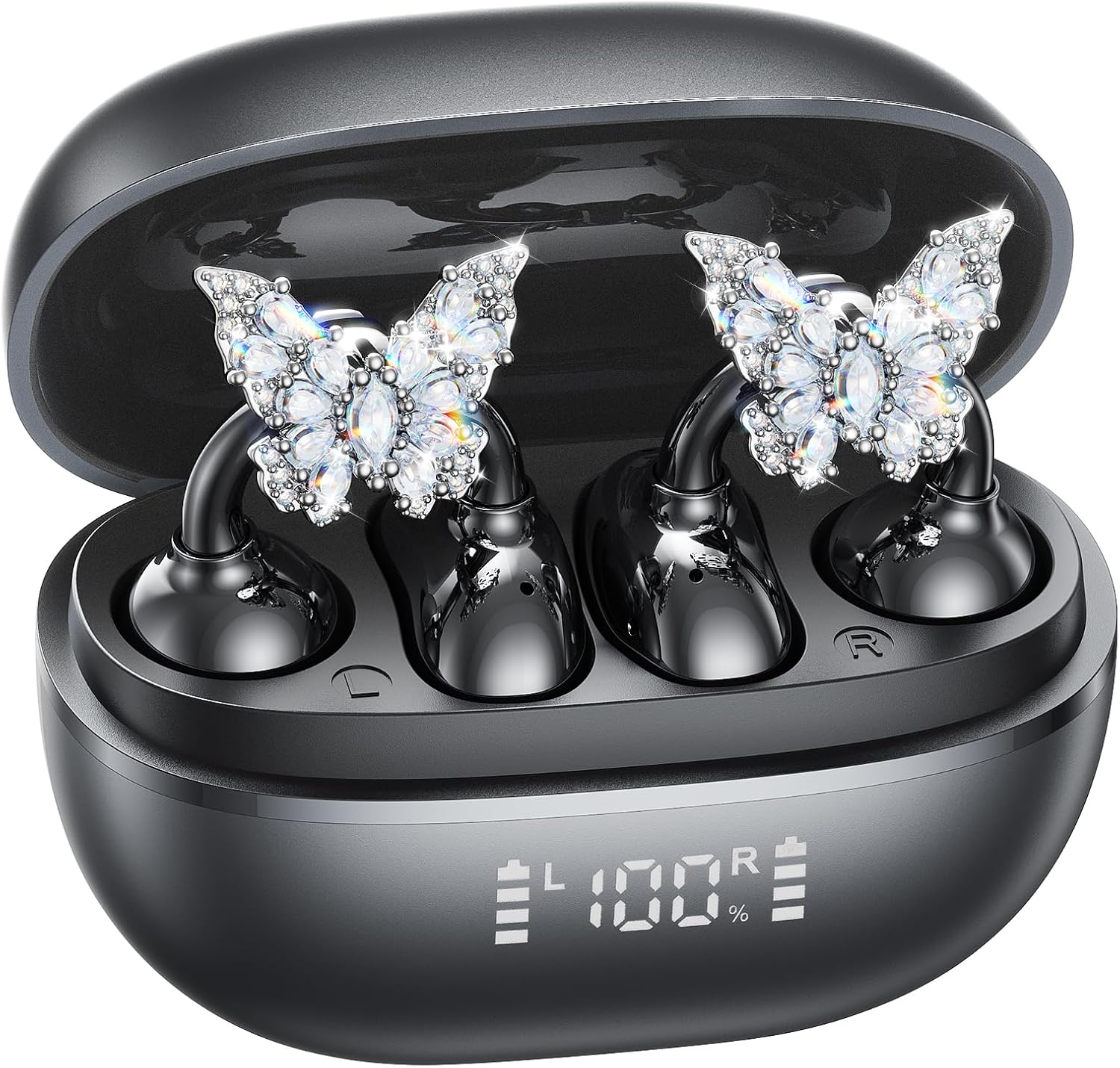
Image: A woman wearing the Kinglucky A20 earbuds with the detachable butterfly earrings, demonstrating the clip-on fit.
4. Attaching/Detaching Crystal Earrings
The crystal butterfly earrings are detachable. To attach, gently clip them onto the earphone stem. To detach, carefully unclip them. Remove the decorative earrings before storing the earbuds in the charging case to prevent damage.

Image: A visual guide illustrating the process of attaching the crystal butterfly accessory to the earbud stem.
Naudojimo instrukcijos
Palieskite valdiklius
The Kinglucky A20 earbuds feature intuitive touch controls on the outer surface of each earbud.
- Leisti / pristabdyti muziką: Dukart bakstelėkite bet kurią ausinę.
- Atsiliepti / Baigti skambutį: Double-tap either earbud during an incoming call or active call.
- Atmesti skambutį: Įeinančio skambučio metu paspauskite ir 2 sekundes palaikykite nuspaudę bet kurią ausinę.
- Suaktyvinti „Voice Assistant“: Paspauskite ir 3 sekundes palaikykite bet kurią ausinę.

Image: A visual representation of the touch control functions for music playback and call management on the earbuds.
Garso kokybė ir skambučių aiškumas
The A20 earbuds are engineered to deliver clear and balanced sound for various audio content, from podcasts to music. They feature AI-powered call clarity with 2 beamforming microphones and advanced noise-canceling technology for crisp conversations.

Image: An exploded diagram showing the internal components of the Kinglucky A20 earbud, highlighting its sound engineering.
Priežiūra
- Valymas: Use a soft, dry cloth to wipe the earbuds and charging case. Avoid using harsh chemicals or abrasive materials.
- Saugykla: Kai nenaudojate, laikykite ausines įkrovimo dėkle, kad jos būtų apsaugotos ir liktų įkrautos.
- Atsparumas vandeniui: The earbuds are IP56 water-resistant, meaning they can withstand sweat and light rain. Do not submerge them in water.
Trikčių šalinimas
| Problema | Sprendimas |
|---|---|
| Ausinės nesusiejamos | Ensure earbuds are charged. Turn off and on Bluetooth on your device. Forget "Kinglucky A20" in your device's Bluetooth settings and re-pair. |
| Nėra garso iš vienos ausinės | Place both earbuds back in the charging case, close the lid, wait a few seconds, then open and try again. Check device audio balance settings. |
| Įkrovimo dėklas neįkraunamas | Patikrinkite, ar USB-C laidas tvirtai prijungtas prie dėklo ir maitinimo šaltinio. Išbandykite kitą laidą arba maitinimo adapterį. |
| Prasta skambučio kokybė | Ensure earbuds are properly seated on your ears. Move closer to your connected device to avoid interference. |
Specifikacijos
- Modelio pavadinimas: A20
- Ryšys: Belaidis ryšys, Bluetooth 5.4
- Ausų išdėstymas: Atidarykite ausį
- Baterijos veikimo laikas: Up to 8 hours (earbuds), up to 50 hours total with charging case
- Atsparumas vandeniui: IP56
- Svoris: Maždaug 4.0 g vienai ausinei
- Įtraukti komponentai: Earbuds, Charging Case, USB-C Cable, User Manual, Detachable Crystal Earrings
Garantija ir palaikymas
Kinglucky products are manufactured to high standards and undergo rigorous quality checks. For warranty information, technical support, or customer service inquiries, please refer to the contact details provided on the Kinglucky official websvetainėje arba pirkimo dokumentuose. Išsaugokite pirkimo įrodymą garantiniams reikalavimams.
Dėl papildomos pagalbos galite apsilankyti Kinglucky Store on Amazon.
Ask a question about this manual
Ask about setup, troubleshooting, compatibility, parts, safety, or missing instructions. Manuals+ will review the question and use this page’s manual context to help answer it.