
Įvadas
Welcome to your new OSRAM SMART+ Matter Orbis Disc LED Luminaire. This manual provides essential information for the safe installation, operation, and maintenance of your smart lighting product. Please read these instructions carefully before use and retain them for future reference.
Saugos instrukcijos
- Profesionalus montavimas: Installation should only be performed by qualified electricians in accordance with local electrical codes and regulations.
- Atjunkite maitinimą: Always disconnect the main power supply before installation, maintenance, or cleaning to prevent electric shock.
- Numatytas naudojimas: This luminaire is designed for indoor use, specifically in bathrooms and damp locations, thanks to its IP44 protection rating. Do not use it in areas where it may be directly exposed to water jets.
- Nekeičiamas šviesos diodas: The LED light source in this luminaire is permanently installed and cannot be replaced. Do not attempt to open or modify the light source.
- ttage: Užtikrinkite tiekimo tūrįtage matches the luminaire's specifications (220 Volts).
- Valymas: Valymui naudokite minkštą, sausą šluostę. Nenaudokite abrazyvinių valiklių ar tirpiklių.
Kas įtraukta
Prieš pradėdami diegti, patikrinkite, ar yra visi komponentai:
- 1x OSRAM SMART+ Matter Orbis Disc IP44 300mm Tunable White Luminaire
- 1x tvirtinimo laikiklis
- Tvirtinimo varžtai
- Sieniniai kištukai

Image: Included components for the OSRAM SMART+ Matter Orbis Disc luminaire.
Techninės specifikacijos
| Funkcija | Specifikacija |
|---|---|
| Energijos suvartojimas | 18 vatų |
| Šviesos srautas | 1400 liumenų |
| Spalvos temperatūra | 3000K–6500K (reguliuojama balta spalva) |
| Spalvų perteikimo indeksas (Ra) | ≥ 80 |
| Ryšys | WiFi 2.4GHz, Matter compatible |
| Kontrolės metodai | SMART+ App, Google Assistant, Amazon Alexa |
| Apsaugos klasė | IP44 (Splash-proof, suitable for damp vietos) |
| Matmenys (skersmuo x aukštis) | 300 mm x 47 mm |
| ttage | 220 voltai (kintamoji srovė) |
| Medžiaga | Aliuminis |
| Šviesos šaltinis | Permanently installed LED (non-replaceable) |
| Energijos vartojimo efektyvumo klasė | D |
| Modelio numeris | 4099854473241 |
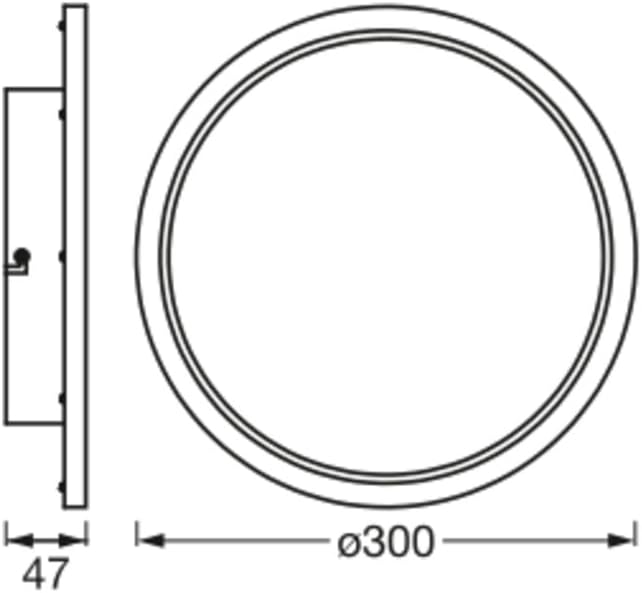
Image: Dimensional drawing of the OSRAM SMART+ Matter Orbis Disc luminaire.
Diegimo vadovas
Svarbu: Installation should only be performed by qualified professionals. Ensure the main power supply is disconnected at the circuit breaker before beginning any installation work to prevent electric shock.
- Paruoškite montavimo vietą: Choose a suitable location on the ceiling or wall in your bathroom. Ensure the surface is clean, dry, and capable of supporting the luminaire's weight.
- Gręžimo taškų žymėjimas: Naudokite tvirtinimo laikiklį kaip šabloną, kad pažymėtumėte gręžiamų skylių vietas.
- Gręžimo skylės: Drill holes at the marked positions using an appropriate drill bit for your wall/ceiling material. Insert the provided wall plugs into the drilled holes.
- Saugus tvirtinimo laikiklis: Attach the mounting bracket to the wall/ceiling using the provided screws. Ensure it is firmly secured.
- Prijunkite elektros laidus: Carefully connect the luminaire's electrical wires to your household wiring. Connect the live (L), neutral (N), and earth (ground) wires according to standard electrical practices. Ensure all connections are secure and insulated.
- Pritvirtinkite šviestuvą: Align the luminaire with the mounting bracket and secure it in place. Follow the specific locking mechanism of the luminaire to ensure it is safely attached.
- Atkurti maitinimą: Once the luminaire is securely installed and all connections are checked, restore power at the circuit breaker.

Image: OSRAM SMART+ Matter Orbis Disc luminaire installed in a bathroom.
Naudojimo instrukcijos
Pradinis nustatymas ir susiejimas
- Atsisiųskite programą: Download the OSRAM SMART+ App from the Google Play Store (for Android 8.0+ devices) or the Apple App Store (for iOS 14.0+ devices).
- Sukurti paskyrą: Atidarykite programą ir vadovaukitės ekrane pateikiamomis instrukcijomis, kad sukurtumėte paskyrą arba prisijunkite.
- Pridėti įrenginį: In the app, select the option to add a new device. Follow the in-app instructions to pair your luminaire via your 2.4GHz WiFi network. The luminaire supports Matter for easy integration.
- Balso asistento integravimas: Once paired with the SMART+ App, you can integrate your luminaire with Google Assistant or Amazon Alexa by linking your SMART+ account within their respective apps. The luminaire is also compatible with Samsung SmartThings.
Šviesos valdymas
- Įjungta/Išjungta: Turn the luminaire on or off using the SMART+ App, your linked voice assistant (Google Assistant, Amazon Alexa), or a compatible smart home hub.
- Pritemdymas: Adjust the brightness infinitely from 1% to 100% via the SMART+ App or voice commands.
- Derinamas baltas: Change the color temperature from warm white (3000K) to cool white (6500K) to suit your mood or activity. This feature is controlled through the SMART+ App or voice commands.

Vaizdas: Viršview of OSRAM SMART+ features and smart home compatibility.
Priežiūra ir priežiūra
- Valymas: Before cleaning, ensure the power supply to the luminaire is disconnected. Wipe the luminaire with a soft, dry, or slightly damp šluoste. Nenaudokite stiprių cheminių medžiagų, abrazyvinių valiklių ar tirpiklių, nes jie gali pažeisti apdailą ar elektrinius komponentus.
- Šviesos šaltinis: The LED light source is permanently installed and designed for a long lifespan. It is not user-replaceable. Do not attempt to disassemble the luminaire to access the LEDs.
- Patikra: Periodically inspect the luminaire for any signs of damage or wear. If any issues are found, disconnect power and contact a qualified electrician or customer support.
Trikčių šalinimas
If you encounter issues with your OSRAM SMART+ Matter Orbis Disc luminaire, refer to the table below for common problems and solutions.
| Problema | Galimas sprendimas |
|---|---|
| Šviestuvas neįsijungia. | Check if the main power supply is connected. Verify that the wall switch (if any) is in the 'on' position. Ensure all electrical connections are secure. |
| Nepavyksta prisijungti prie „Wi-Fi“ / programėlės. | Ensure your WiFi network is 2.4GHz. Check if your router is within range. Try resetting the luminaire (usually by cycling power off/on several times; refer to the app for specific reset procedures). Ensure your phone's Bluetooth is on during pairing. |
| Šviesa netikėtai mirksi arba pritemsta. | Check for stable power supply. Ensure all wiring connections are tight. If using a dimmer switch, ensure it is compatible with LED smart lighting (it's generally recommended to control dimming via the app). |
| Balso valdymas neveikia. | Ensure your SMART+ account is correctly linked to Google Assistant or Amazon Alexa. Check your internet connection. Verify the device name in the voice assistant app. |
If the problem persists after trying these solutions, please contact OSRAM customer support for further assistance.
Garantija ir klientų aptarnavimas
This OSRAM SMART+ Matter Orbis Disc LED Luminaire comes with a manufacturer's warranty. Please refer to the warranty card included in the product packaging for specific terms and conditions, or visit the official OSRAM websvetainėje rasite išsamią informaciją apie garantiją.
For technical support, product inquiries, or warranty claims, please visit the OSRAM Homelighting store on Amazon or the dedicated SMART+ WiFi support page:
- OSRAM Homelighting Store: https://www.amazon.com.be/stores/OSRAMHomelighting/page/C1BB5292-86C9-4FA9-9AF2-5DE03EA6DCDB
- OSRAM SMART+ WiFi Support: https://l.ead.me/SmartPlusWifi