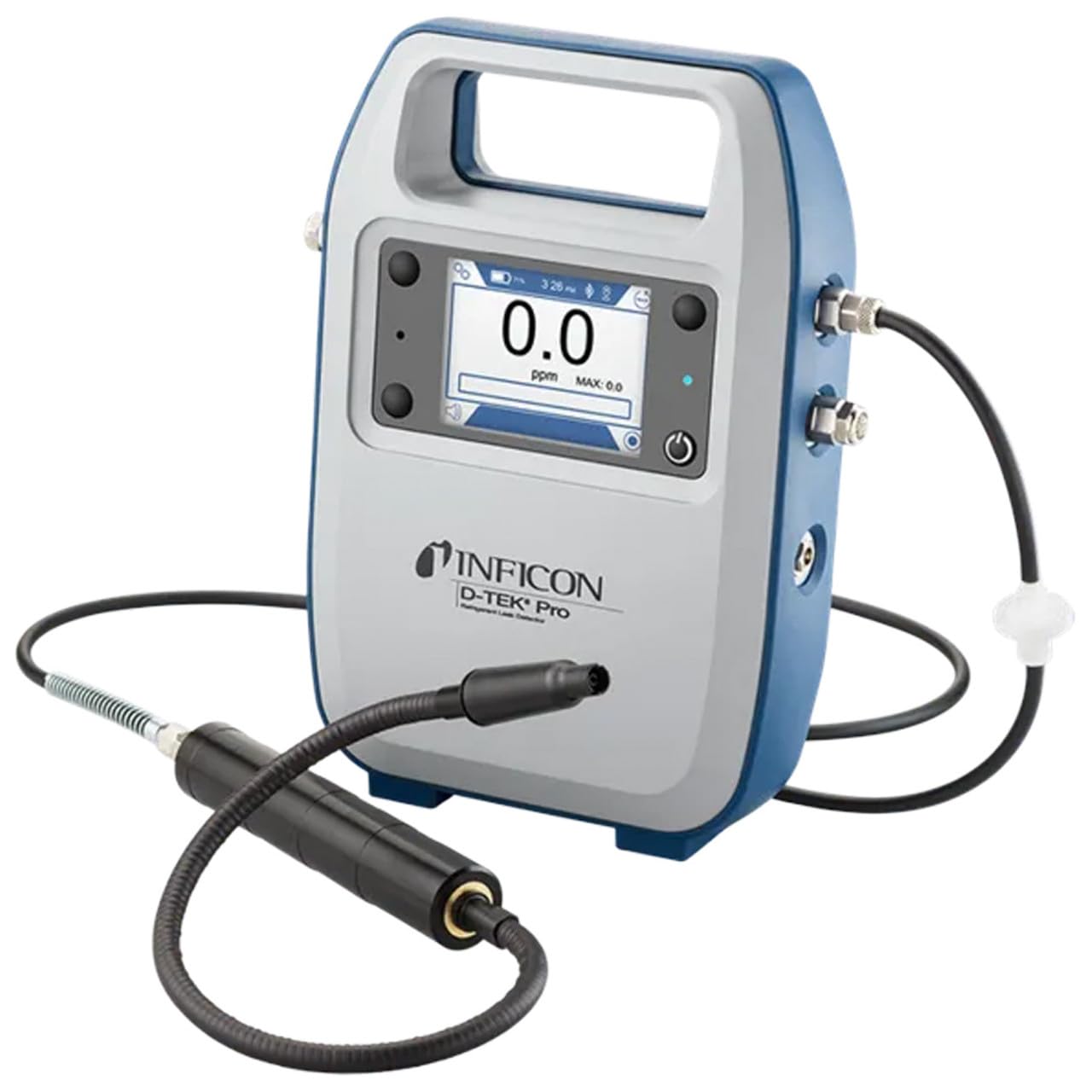
Inficon D-TEK Pro Refrigerant Leak Detector User Manual
Modelis: 508-202-G1
1. Įvadas
The Inficon D-TEK Pro Refrigerant Leak Detector is designed for precise and rapid detection of refrigerant leaks. This device offers high sensitivity and an all-in-one Pro Mode for efficient leak identification. This manual provides essential information for the proper setup, operation, and maintenance of your D-TEK Pro.
2. Saugos informacija
Visada laikykitės šių saugos priemonių, kad išvengtumėte sužalojimų ir įrenginio pažeidimų:
Prieš naudodami įrenginį, perskaitykite visas instrukcijas.
Prietaisą naudokite tik taip, kaip aprašyta šiame vadove.
Nelaikykite prietaiso nuo ekstremalių temperatūrų ar drėgmės.
Dirbant su šaldymo agentais, užtikrinkite tinkamą vėdinimą.
Dėvėkite tinkamas asmenines apsaugos priemones (AAP), tokias kaip pirštinės ir akių apsauga.
Do not attempt to service the device beyond what is described in the maintenance section. Refer all other servicing to qualified personnel.
3. Kas yra dėžutėje
Išpakuodami patikrinkite, ar yra visi daiktai:
(1) D-TEK Pro Refrigerant Leak Detector
(1) Soft case with shoulder strap
(1) Spare filters
(1) Phone holder
(1) Įkrovimo laidas
4. Sąranka
4.1 Įrenginio įkrovimas
The D-TEK Pro is powered by a rechargeable battery. Before first use, fully charge the device.
Connect the provided charging cable to the charging port on the D-TEK Pro.
Plug the other end of the charging cable into a suitable power source.
Įsižiebs įrenginio įkrovimo indikatorius. Palaukite, kol įrenginys visiškai įkraus.
4.2 Telefono laikiklio pritvirtinimas
The included phone holder allows for convenient mobile device integration.
Locate the attachment point for the phone holder on the D-TEK Pro.
Securely attach the phone holder according to its design.
Place your mobile device into the holder, ensuring it is stable.
5. Naudojimo instrukcijos
5.1 Įjungimas / išjungimas
Norėdami įjungti, paspauskite ir palaikykite maitinimo mygtuką, kol ekranas užsidegs.
Norėdami išjungti, paspauskite ir palaikykite maitinimo mygtuką, kol įrenginys išsijungs.
5.2 Using Pro Mode for Leak Detection
The D-TEK Pro features an all-in-one Pro Mode that combines cloud hunting and pinpointing capabilities, allowing for efficient leak location.
Ensure the device is powered on and in Pro Mode (refer to the display for mode indication).
Move the sensor probe slowly around suspected leak areas. The device's superior airflow allows for detection from a greater distance.
The D-TEK Pro will indicate the presence of refrigerants with high sensitivity, detecting down to 0.1 ppm.
Follow the increasing readings to pinpoint the exact leak source.
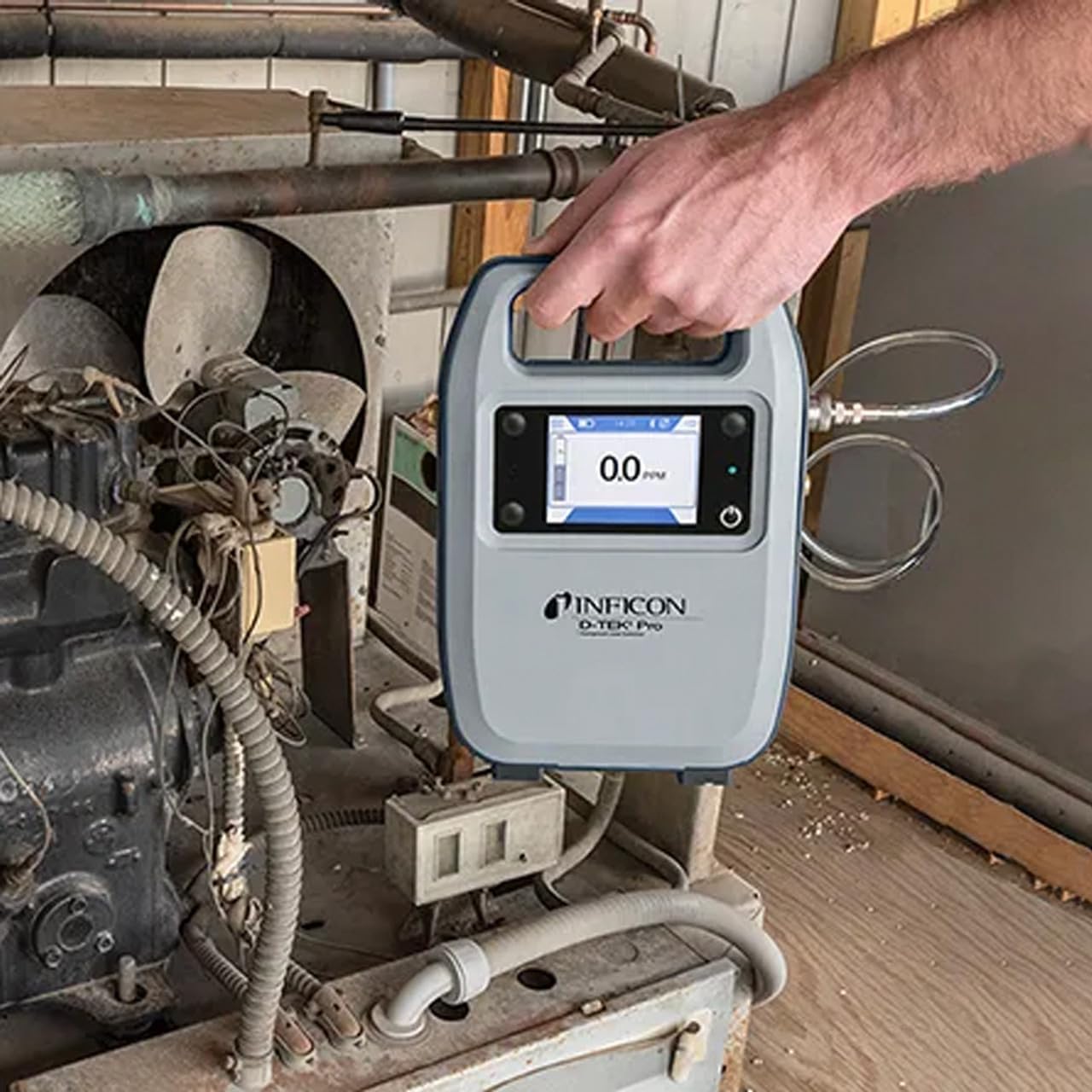
Figure 1: The Inficon D-TEK Pro being used to inspect a refrigeration unit. The display shows a 0.0 ppm reading, indicating no refrigerant detected at the current location. The device is held by a user's hand, demonstrating its portability and ease of use in an industrial setting.
5.3 Šaldymo agento suderinamumas
The D-TEK Pro is designed to detect a wide range of refrigerants, including:
CFCs (Chlorofluorocarbons)
HCFCs (Hydrochlorofluorocarbons)
HFCs (Hydrofluorocarbons)
HFOs (Hydrofluoroolefins)
Blends including A2Ls
5.4 Mobiliųjų programėlių integravimas
Download the D-TEK Pro mobile app to enhance your leak detection workflow.
Customer Reports: Generate detailed reports with photos and ppm tracking.
GPS sekimas: Confirm job location with integrated GPS functionality.
Figure 2: The Inficon D-TEK Pro connected to a smartphone, showcasing the mobile application's interface. This setup allows users to view real-time leak detection data, generate reports, and utilize GPS tracking for job site verification.
6. Priežiūra
6.1 Bendroji priežiūra ir valymas
To ensure optimal performance and longevity of your D-TEK Pro:
Nuvalykite prietaisą minkšta, damp audinys. Nenaudokite abrazyvinių valiklių ar tirpiklių.
Keep the sensor probe clean and free from debris.
Store the device in its soft case when not in use to protect it from dust and physical damage.
6.2 Filtro keitimas
The D-TEK Pro is designed for low maintenance, requiring no purging and no charcoal filters. However, spare filters are provided for specific applications or if the existing filter becomes visibly soiled or damaged.
Locate the filter housing on the device.
Atsargiai nuimkite seną filtrą.
Insert a new spare filter, ensuring it is seated correctly.
7. Problemų sprendimas
This section addresses common issues you might encounter with your D-TEK Pro.
Sensor probe is dirty or damaged; environmental interference.
Clean the sensor probe. Ensure proper environmental conditions. If issue persists, contact support.
Mobilioji programėlė neprisijungia.
Bluetooth issue; app not updated.
Ensure Bluetooth is enabled on both devices. Update the D-TEK Pro app to the latest version.
8. Specifikacijos
Funkcija
Detalė
Modelio numeris
508-202-G1
Prekės svoris
3 svaro
Pakuotės matmenys
15 x 12 x 4 colio
Ekrano tipas
LCD, LED
Maitinimo šaltinis
Įkraunama baterija
Jautrumas
0.1 ppm skiriamoji geba
Detected Refrigerants
CFCs, HCFCs, HFCs, HFOs, and blends including A2Ls
9. Informacija apie garantiją
The Inficon D-TEK Pro Refrigerant Leak Detector comes with a 2 metų garantija from the date of purchase. This warranty covers defects in materials and workmanship under normal use. For warranty claims or detailed terms and conditions, please refer to the official Inficon websvetainėje arba susisiekite su klientų aptarnavimo tarnyba.
10. Pagalba klientams
For technical assistance, troubleshooting not covered in this manual, or general inquiries, please contact Inficon customer support.
Internetiniai ištekliai: Aplankykite pareigūną Inficon Store on Amazon dėl produkto informacijos ir atnaujinimų.
Kontaktinė informacija: Refer to the Inficon official website for direct contact details (phone, email).
Ask a question about this manual
Ask about setup, troubleshooting, compatibility, parts, safety, or missing instructions. Manuals+ will review the question and use this page’s manual context to help answer it.