
1. Įvadas
The Retevis RB666S is a user-friendly, rechargeable two-way radio designed for clear and reliable communication. It is ideal for family activities, hiking, camping, and other outdoor adventures. This manual provides detailed instructions on how to set up, operate, and maintain your RB666S walkie talkie.

The Retevis RB666S walkie talkie is designed for easy communication during outdoor activities.
2. Pakuotės turinys
Atidžiai patikrinkite pakuotę, kad įsitikintumėte, jog yra visi reikalingi daiktai:
- 1 x RB666S Walkie Talkie
- 1 x Baterija
- 1 x įkrovimo laikiklis
- 1 x Type-C įkrovimo laidas
- 1x adapteris
- 1 x diržo segtukas
- 1 x dirželis
- 1 x Vartotojo vadovas

All components included in the RB666S package.
3. Produktas baigtasview
3.1 Komponentai
Familiarize yourself with the main components of your RB666S walkie talkie:

Išsamus view of the RB666S walkie talkie components.
- On/Off/Volume Knob: Pasukite, kad įjungtumėte / išjungtumėte maitinimą ir sureguliuotumėte garsumą.
- Žibintuvėlis: Integruotas LED apšvietimas.
- Įkrovimo prievadas: Type-C port for direct charging.
- Indikatoriaus lemputė: Rodo būseną (pvz., perduoda, priima, krauna).
- PTT (push-to-Talk) mygtukas: Paspauskite ir palaikykite, kad perduotumėte savo balsą.
- Šoninis mygtukas 1: Multi-function button, typically for emergency alarm.
- Šoninis mygtukas 2: Multi-function button, typically for flashlight activation.
- MIC: Mikrofonas balso įvedimui.
- Ekranas: 1.3-inch LCD for channel, battery, and signal information.
- Meniu mygtukas: Pasiekia meniu parinktis.
- Up/Channel+ Button: Navigates up or changes channel.
- Down/Channel- Button: Navigates down or changes channel.
- Atgal mygtukas: Returns to previous screen or exits menu.
4. Sąranka
4.1 Baterijos įdėjimas
- Įsitikinkite, kad racija yra išjungta.
- Įrenginio gale suraskite baterijų skyriaus dangtelį.
- Slide the cover down and remove it.
- Įdėkite bateriją, teisingai sulygiuodami kontaktus.
- Replace the battery compartment cover and slide it up until it clicks into place.
4.2 Diržo segtuko ir virvelės pritvirtinimas
- Pritvirtinkite diržo segtuką prie tam skirto lizdo radijo imtuvo gale, kad būtų patogu nešiotis.
- Thread the lanyard through the loop on the top or side of the radio for added security.
5. Įrenginio įkrovimas
Before first use, fully charge the battery. The RB666S offers two convenient charging methods:
5.1 Įkrovimo dėklo naudojimas
- Connect the adapter to the charging cradle and plug it into a power outlet.
- Place the walkie talkie into the charging cradle. Ensure the charging contacts align.
- The indicator light on the radio or cradle will show the charging status (e.g., red for charging, green for fully charged).
5.2 Using the Type-C Cable
- Connect the Type-C charging cable to the charging port on the side of the walkie talkie.
- Plug the other end of the cable into a compatible USB power source (e.g., wall adapter, car charger, power bank, PC).
- Indikatoriaus lemputė parodys įkrovimo būseną.
Pilnas įkrovimas trunka maždaug 1 valandos, suteikiant per 14 hours of autonomy ir daugiau 46 hours of standby time.
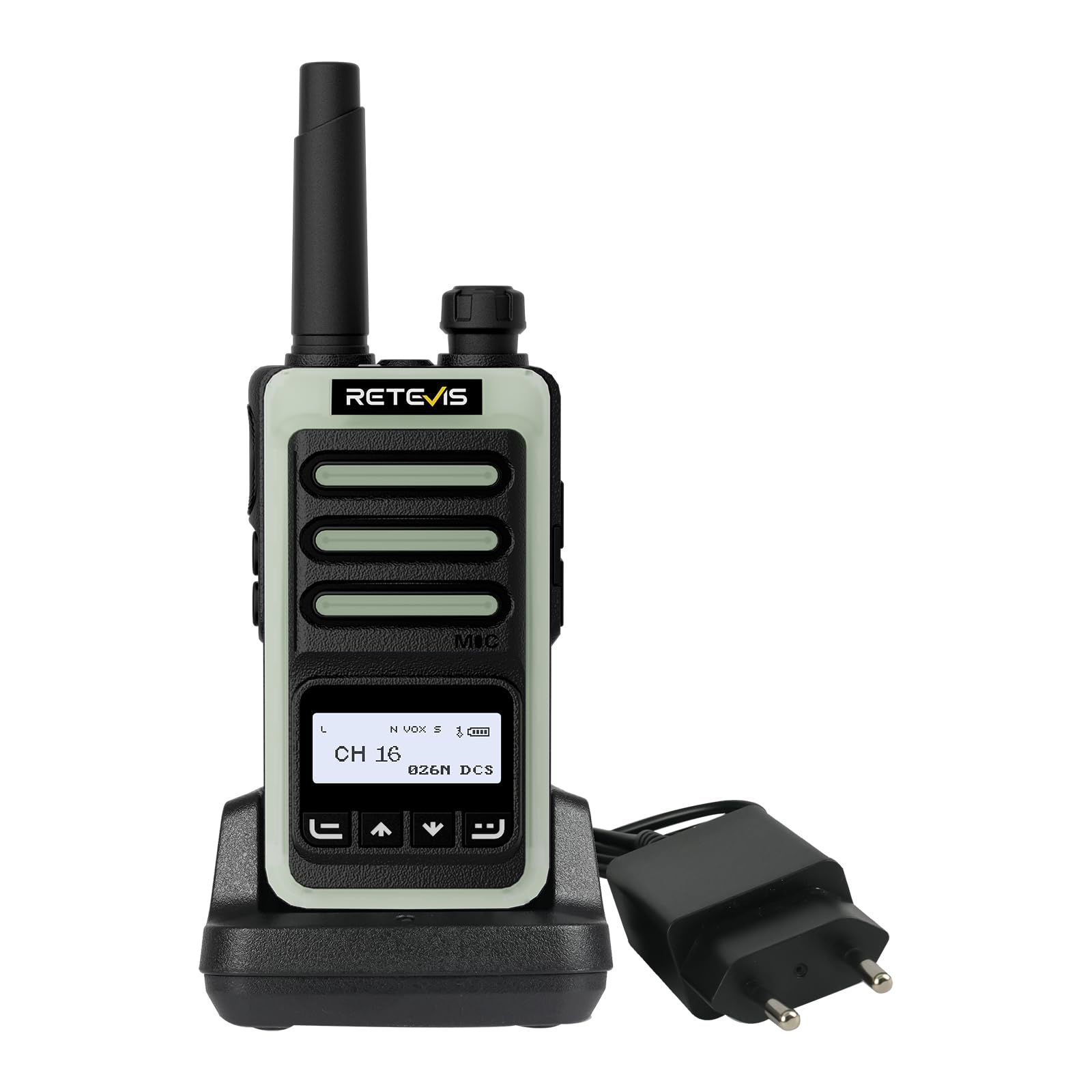
Fast charging in 1 hour using the cradle.

Versatile Type-C charging options.
6. Pagrindinė operacija
6.1 Įjungimas / išjungimas ir garsumo reguliavimas
- To power on, rotate the On/Off/Volume knob clockwise until you hear a click.
- Norėdami išjungti, sukite rankenėlę prieš laikrodžio rodyklę, kol išgirsite spragtelėjimą.
- Garsumą reguliuokite sukdami tą pačią rankenėlę.
6.2 LCD ekranas
The 1.3-inch LCD screen provides essential information at a glance:
- Kanalo numeris: Indicates the current communication channel.
- Baterijos lygis: Rodo likusį akumuliatoriaus įkrovą.
- Signalo stiprumas: Displays the strength of the received signal.

Clear 1.3-inch LCD screen for essential information.
6.3 Kanalo pasirinkimas
Use the Up/Channel+ and Down/Channel- buttons to select your desired communication channel. Ensure all radios in your group are on the same channel.
6.4 Perdavimas ir priėmimas
- Į perduoti, press and hold the PTT (Push-to-Talk) button. Speak clearly into the microphone. The indicator light will typically glow red.
- Į gauti, release the PTT button. The indicator light will typically glow green when a signal is received.

Intuitive 4-button layout for easy control.
7. Išplėstinės funkcijos
7.1 Clear Sound Quality
The RB666S is engineered to provide clear audio, ensuring every word is heard distinctly, even in noisy outdoor environments like windy trails or busy campsvetaines.

Enjoy clear sound quality for effective communication.
7.2 VOX funkcija (balsu valdomas pokalbis)
The VOX function allows for hands-free transmission. When activated, the radio will automatically transmit when it detects your voice, eliminating the need to press the PTT button.

Hands-free communication with VOX function.
7.3 One-Touch Pairing
Simplify connecting with other compatible radios using the one-touch pairing feature. Refer to the specific instructions for pairing in the full manual if available.

Effortless connection with one-touch pairing.
7.4 CTCSS/DCS (Continuous Tone-Coded Squelch System / Digital Coded Squelch)
Utilize CTCSS/DCS codes to filter out unwanted signals and ensure more private communication within your group. This feature helps to reduce interference from other users on the same channel.

Enhanced privacy with CTCSS/DCS codes.
7.5 LED žibintuvėlis
The integrated LED flashlight provides illumination for navigating in low-light conditions. Briefly press Side Button 2 to activate or deactivate the flashlight.

Illuminate your path with the built-in LED flashlight.
7.6 Fluorescent Design
The RB666S features a fluorescent design, making it highly visible and easy to locate in low-light outdoor environments, enhancing safety during nighttime activities.

High visibility in low light with fluorescent design.
7.7 Avarinis aliarmas
For added safety, the RB666S includes an emergency alarm function. Long-press Side Button 1 to activate the alarm, alerting others to your situation.

Activate the emergency alarm for enhanced safety.
7.8 Channel Lock / Keypad Lock
To prevent accidental channel changes or button presses, you can activate the channel lock or keypad lock feature. This ensures stable communication, especially during active use like climbing or cycling.

Maintain stable communication with channel lock.
8. Priežiūra
- Valymas: Naudokite minkštą, damp Radijo išorę valykite šluoste. Nenaudokite stiprių cheminių medžiagų ar abrazyvinių valiklių.
- Saugykla: Store the walkie talkie in a cool, dry place away from direct sunlight and extreme temperatures. Remove the battery if storing for extended periods.
- Akumuliatoriaus priežiūra: Avoid fully discharging the battery frequently. Recharge regularly to prolong battery life.
- Venkite vandens: While designed for outdoor use, avoid submerging the radio in water unless specified as waterproof.
9. Problemų sprendimas
| Problema | Galima priežastis | Sprendimas |
|---|---|---|
| Radijas neįsijungia | Baterija išsikrovusi arba netinkamai įdėta. | Įkraukite bateriją arba tinkamai ją įdėkite iš naujo. |
| Negalima perduoti ar priimti | Pasirinktas neteisingas kanalas; už diapazono ribų; išsikrovusi baterija. | Ensure correct channel; move closer to other radios; charge battery. |
| Prasta garso kokybė | Volume too low; interference; microphone/speaker obstructed. | Adjust volume; move away from interference sources; check microphone/speaker. |
| Klaviatūra nereaguoja | Klaviatūros užraktas įjungtas. | Deactivate keypad lock (refer to specific instructions in the full manual). |
10. Specifikacijos
- Prekinis ženklas: Retevis
- Modelio numeris: RB666S
- Kanalų skaičius: 16
- Baterija: 1 x 12 V (įtraukta)
- ttage: 7.4 voltų
- Gaminio matmenys (G x P x A): 2.5 x 5.3 x 9.5 cm (0.98 x 2.09 x 3.74 colio)
- Ekranas: 1.3 colio LCD ekranas
- Įkrovimas: Type-C Fast Charging, Charging Cradle
- Ypatingos savybės: LED Flashlight, Fluorescent Design, Emergency Alarm, VOX, CTCSS/DCS, Channel Lock
11. Garantija ir palaikymas
11.1 Informacija apie garantiją
„Retevis“ siūlo 2 metų garantija radijo korpusui ir a 1 metų garantija for accessories. We also provide a 30 dienų grąžinimo be priežasties politika. Beyond the warranty period, maintenance services are available, with buyers responsible for associated costs.
11.2 Pagalba klientams
For any questions, issues, or support needs, please contact us through Amazon. We are committed to responding to your inquiries within 12 hours.
11.3 Saugos informacija
For important safety guidelines, please refer to the official safety information document: Saugos informacija (PDF)