
1. Baigėsiview
The Element 32-inch 720p HD Xumo Smart TV offers reliable performance and smart functionality in a compact design. Ideal for smaller spaces such as kitchens, dorm rooms, guest rooms, or offices, this television combines a clear HD display with a versatile smart platform and modern connectivity options.
Key features include a 720p resolution display, a 120Hz effective refresh rate for smooth motion, and the integrated Xumo OS for access to numerous streaming applications and free live channels. Connectivity is robust with multiple HDMI ports, USB, LAN, Bluetooth, and Apple AirPlay support. The TV also comes with a voice remote for convenient navigation.
2. Kas yra dėžutėje
Upon unboxing your Element 32-inch Xumo Smart TV, please ensure all the following components are present:
- 32-inch Element Xumo TV
- Voice Remote + 2 AAA batteries
- TV Stand & Screws
- Greitos pradžios vadovas

Image: The contents of the TV box, showing the 32-inch television, its remote control, two stand feet, and a bag of screws for assembly. Dimensions of the TV are also displayed.
3. Sąranka
3.1 Televizoriaus stovo pritvirtinimas
- Atsargiai padėkite televizorių ekranu žemyn ant minkšto, švaraus paviršiaus, kad nesubraižytumėte.
- Sulygiuokite kiekvieną stovo kojelę su atitinkamomis varžtų skylėmis televizoriaus apačioje.
- Secure each stand foot using the provided screws. Ensure they are tightened firmly but do not overtighten.
- Atsargiai pakelkite televizorių ir padėkite jį ant stabilaus, lygaus paviršiaus.
Alternatively, the TV supports VESA mounting for wall installation (wall mount hardware sold separately).
3.2 Maitinimo jungtis
Connect the power cord to the TV's power input and then plug it into a standard electrical outlet. A pilot light on the TV will indicate that it is receiving power.
3.3 Initial Setup (Xumo OS)
Pirmą kartą įjungus televizorių, jis padės atlikti pradinį nustatymą. Tai apima:
- Kalbos pasirinkimas: Pasirinkite pageidaujamą kalbą.
- Tinklo prisijungimas: Connect the TV to your home Wi-Fi network or via an Ethernet cable.
- Xumo OS Account Setup: Follow on-screen prompts to set up or log in to your Xumo OS account. This is necessary to access smart features and apps.
- Kanalo nuskaitymas: If connecting an antenna, the TV will scan for available channels.

Image: The Element 32-inch Xumo Smart TV is shown on a wooden TV stand, displaying its smart interface with various streaming app icons.
4. Jungtys
The Element Xumo Smart TV provides a variety of ports for connecting external devices:
- HDMI prievadai (3): Connect high-definition devices such as Blu-ray players, gaming consoles, or cable/satellite boxes. One HDMI port supports eARC (enhanced Audio Return Channel) for simplified audio connections to compatible soundbars or AV receivers.
- USB prievadas (1): Prijunkite USB atmintines prie view nuotraukas, klausytis muzikos arba žiūrėti vaizdo įrašus.
- LAN (eterneto) prievadas: Laidiniam interneto ryšiui.
- Audio Out (Optical) / Headphone Jack: Skirta išorinėms garso sistemoms arba ausinėms prijungti.
- Composite Input / Analog Tuner: For connecting older devices or an antenna.
5. Televizoriaus valdymas
5.1 Nuotolinis valdymas
The included voice remote allows for intuitive control of your TV. It features dedicated buttons for popular streaming services and a microphone for voice commands.
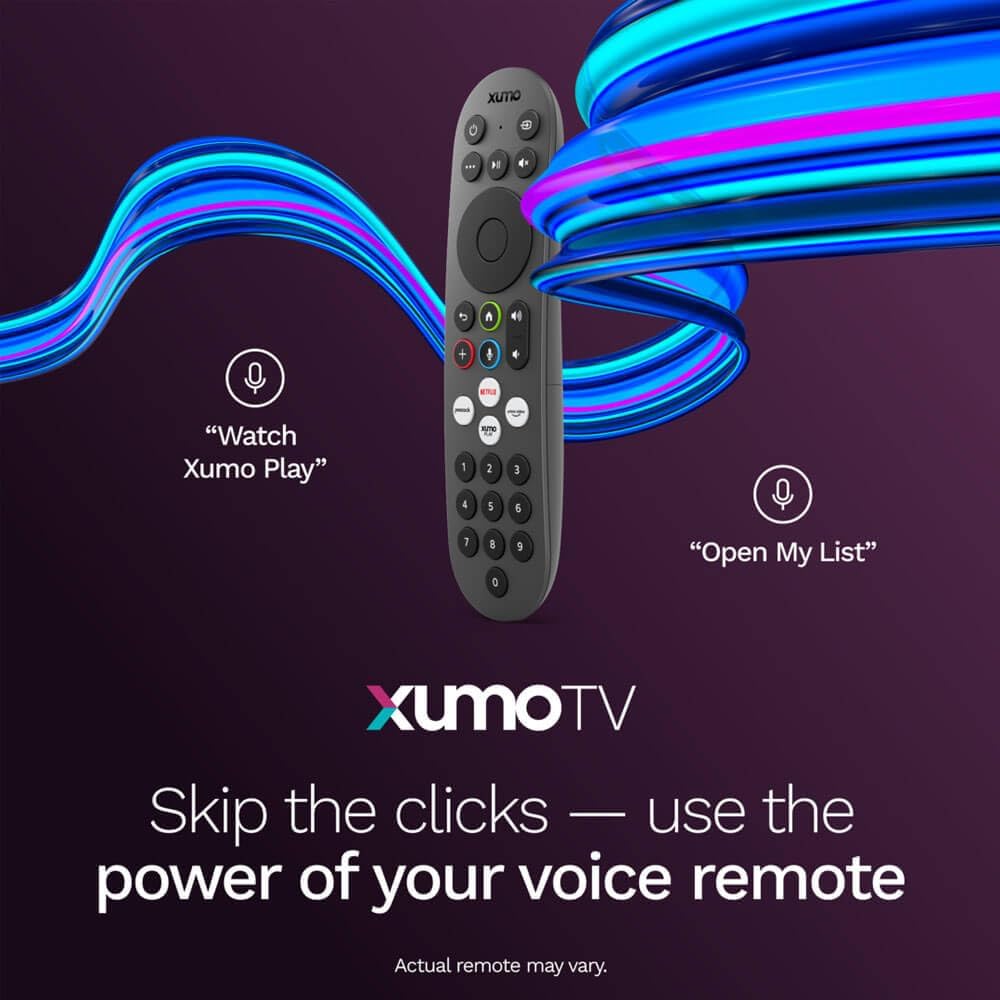
Image: A close-up of the Element Xumo Smart TV voice remote, highlighting its various buttons including a microphone for voice commands and quick access buttons for streaming services.
5.2 Smart Features & Streaming (Xumo OS)
The Xumo OS provides access to over 250 preloaded apps and more than 750 free live channels. You can:
- Ieškoti turinio: Use the unified search function to find content across all your installed apps.
- Mano sąrašas: Curate your personal watchlist for easy access to your favorite shows and movies.
- Free On-Demand Libraries: Explore a wide selection of free on-demand content.
- Valdymas balsu: Use the voice remote to navigate, search, and control your TV hands-free.

Image: The Xumo TV interface showing a selection of popular streaming applications and content recommendations.
5.3 Vaizdo ir garso nustatymai
Your TV delivers a crisp 720p HD display with a 120Hz effective refresh rate, minimizing motion blur for clear visuals. Dolby Audio processing enhances the sound experience. You can adjust picture and sound settings via the TV's menu to suit your preferences.
- Vaizdo režimai: Select from various preset picture modes (e.g., Standard, Vivid, Movie, Sports) or customize settings like brightness, contrast, and color.
- Garso režimai: Choose from different sound modes (e.g., Standard, Music, Movie, Speech) or adjust bass and treble levels.
5.4 Apple AirPlay & Home Support
Seamlessly stream content or mirror your screen from your iPhone, iPad, or Mac directly to your Element TV using Apple AirPlay. With Apple Home support, you can integrate your TV into your Apple smart home ecosystem for convenient control.
6. Priežiūra
To ensure the longevity and optimal performance of your Element Xumo Smart TV, follow these maintenance guidelines:
- Ekrano valymas: Švelniai nuvalykite ekraną minkštu, sausu, nepūkuotu skudurėliu. Jei dėmės sunkiai pašalinamos, švelniai nuvalykiteampNuvalykite šluostę vandeniu arba specialiu ekranui skirtu valymo tirpalu (niekada nepurkškite tiesiai ant ekrano).
- Spintos valymas: Televizoriaus korpusą valykite minkšta, sausa šluoste. Venkite naudoti abrazyvinius valiklius ar tirpiklius.
- Vėdinimas: Įsitikinkite, kad televizoriaus gale esančios ventiliacijos angos nėra užblokuotos, kad jis neperkaistų.
- Išjunkite, kai nenaudojate: Išjunkite televizorių, kai jo nenaudojate, kad taupytumėte energiją ir pailgintumėte jo tarnavimo laiką.
7. Problemų sprendimas
If you encounter any issues with your Element Xumo Smart TV, refer to the following common troubleshooting tips:
- Nėra galios: Patikrinkite, ar maitinimo laidas tvirtai prijungtas prie televizoriaus ir elektros lizdo. Įsitikinkite, kad lizdas veikia.
- Nėra vaizdo / garso: Verify that the correct input source is selected. Check all cable connections (HDMI, antenna, etc.) for secure fit.
- Nuotolinio valdymo pultas neveikia: Pakeiskite AAA baterijas nuotolinio valdymo pulte. Įsitikinkite, kad tarp nuotolinio valdymo pulto ir televizoriaus IR jutiklio nėra jokių kliūčių.
- Tinklo ryšio problemos: Restart your Wi-Fi router. Check the TV's network settings to ensure it's connected to the correct network and the password is entered correctly.
- Smart App Problems: Try restarting the app. If the issue persists, clear the app's cache or reinstall it. Ensure your TV's software is up to date.
For persistent issues, please contact Element customer support.
8. Specifikacijos
| Funkcija | Specifikacija |
|---|---|
| Modelio numeris | E300AE32C |
| Ekrano dydis | 32 colių |
| Ekrano raiška | 720p (1366 x 768) |
| Atnaujinimo dažnis | 60 Hz (120Hz Effective) |
| Krašto santykis | 1.78:1 |
| Operacinė sistema | Xumo OS |
| Ryšys | 3x HDMI (1x eARC), 1x USB, LAN (Ethernet), Optical Audio Out, Headphone Jack, Composite Input, Wi-Fi, Bluetooth |
| Ypatingos savybės | Bezel-Less Design, Built-In Speaker, Voice Remote, Apple AirPlay & Home Support |
| TV with Stand Dimensions (W x H x D) | 28.8" x 19.2" x 7.0" |
| TV without Stand Dimensions (W x H x D) | 28.8" x 17.0" x 2.7" |
| Prekės svoris | 8.8 svaro |
9. Garantija ir palaikymas
The Element 32-inch 720p HD Xumo Smart TV comes standard with a 2 metų gamintojo garantijaŠi garantija taikoma medžiagų ir gamybos defektams, atsiradusiems įprasto naudojimo sąlygomis. Išsaugokite pirkimo įrodymą, jei galėtumėte pateikti pretenzijas dėl garantijos.
For technical support, warranty inquiries, or further assistance, please refer to the contact information provided in your Quick Start Guide or visit the official Element Electronics websvetainę.