
1. Įvadas
Ačiū, kad pirkoteasing the VIFLYKOO Bluetooth 5.4 Turntable. This device combines classic vinyl playback with modern connectivity, featuring integrated stereo speakers, Bluetooth 5.4 for both receiving and transmitting audio, USB recording, and multiple audio outputs. This manual provides essential information for safe operation, setup, and maintenance of your turntable.

Image: The VIFLYKOO Bluetooth 5.4 Turntable, showcasing its mahogany finish and classic design.
2. Saugos instrukcijos
Please read these safety instructions carefully before using the product and retain them for future reference. Incorrect use may result in electric shock, fire, or other hazards.
- Saugokite įrenginį nuo lietaus, drėgmės ar ekstremalių temperatūrų.
- Įsitikinkite, kad maitinimo adapteris suderinamas su jūsų vietiniu maitinimo šaltiniu.
- Neatidarykite casing; visus techninės priežiūros darbus patikėkite kvalifikuotiems darbuotojams.
- Laikykite įrenginį atokiau nuo šilumos šaltinių, tiesioginių saulės spindulių ir stiprių magnetinių laukų.
- Valykite tik sausa šluoste. Nenaudokite skystų valiklių ar aerozolių.
- Place the turntable on a stable, level surface to prevent vibrations and ensure proper playback.
3. Pakuotės turinys
Patikrinkite, ar pakuotėje yra visi reikalingi daiktai:
- VIFLYKOO Bluetooth 5.4 Turntable
- Maitinimo adapteris
- Instrukcijų vadovas
- 45 RPM Adapter (for 7-inch records)
4. Produktas baigtasview
Familiarize yourself with the main components and features of your turntable.
4.1 Pagrindinės savybės
- Bluetooth 5.4 ryšys: Supports both receiving audio from external devices and transmitting audio to Bluetooth speakers or headphones.
- Integruoti stereo garsiakalbiai: Two 5W speakers provide clear and authentic sound directly from the unit.
- 3 greičių patefonas: Groja 33 1/3, 45 ir 78 aps./min. plokšteles.
- USB funkcionalumas: Allows recording vinyl to MP3/WAV files and playing digital audio from a USB drive.
- Multiple Audio Connections: RCA output for external amplifiers, 3.5mm AUX input for external audio sources, and a headphone output for private listening.
- Automatinio sustabdymo funkcija: Automatically lifts the tonearm at the end of a record to protect the stylus and vinyl.
- Removable Dust Cover: Protects the platter and stylus from dust accumulation.
- Anti-Resonance Belt Drive: Sumažina vibraciją, kad pagerintų garso kokybę.
4.2 Komponentai
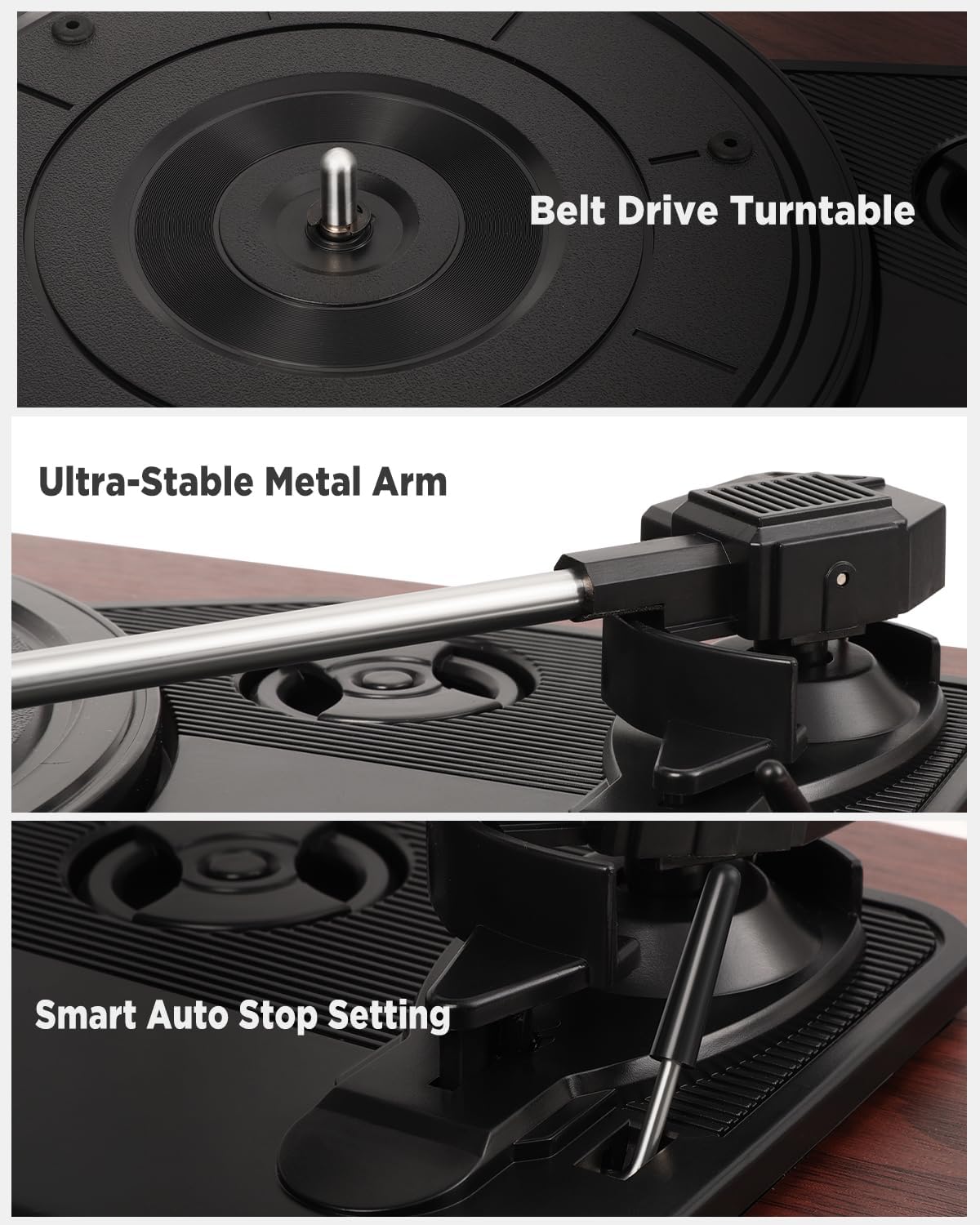
Vaizdas: Išsamus views of the belt drive system, the ultra-stable metal tonearm, and the smart auto-stop setting.

Image: An exploded diagram illustrating the internal structure of the integrated stereo speakers, highlighting the HiFi sound components.

Image: The rear panel of the turntable, showing the RCA output, AUX-in port, USB port, and headphone port, along with their respective functions.
5. Sąranka
Follow these steps to set up your turntable for the first time.
- Išpakuokite patefoną: Atsargiai išimkite visus komponentus iš pakuotės.
- Patefono padėtis: Place the unit on a flat, stable, and vibration-free surface. Ensure there is adequate ventilation around the unit.
- Uždėkite dulkių dangtelį: If not already installed, carefully attach the removable dust cover to the hinges at the back of the unit.
- Nuimkite rašiklio apsaugą: Gently remove the protective cap from the stylus (needle). Be careful not to touch the stylus itself.
- Prijunkite maitinimą: Insert the DC plug of the power adapter into the DC IN port on the back of the turntable, then plug the adapter into a wall outlet.
- Pradinis įjungimas: Turn the volume knob to power on the unit.
6. Naudojimo instrukcijos
6.1 Vinilinių plokštelių grojimas
- Atidarykite dangtelį nuo dulkių.
- Place a vinyl record on the platter. If playing a 7-inch record, use the included 45 RPM adapter.
- Pasirinkite tinkamą greitį (33, 45 arba 78 aps./min.) naudodami greičio pasirinkimo jungiklį.
- Švelniai pakelkite tonarmą naudodami tonarmo svirtį.
- Perkelkite tonarmą virš norimo plokštelės pradinio griovelio.
- Slowly lower the tonearm using the cueing lever. The record will begin to play.
- Sureguliuokite garsumą naudodami garsumo rankenėlę.
- At the end of the record, the auto-stop function will automatically lift the tonearm and stop the platter rotation. Manually return the tonearm to its rest.
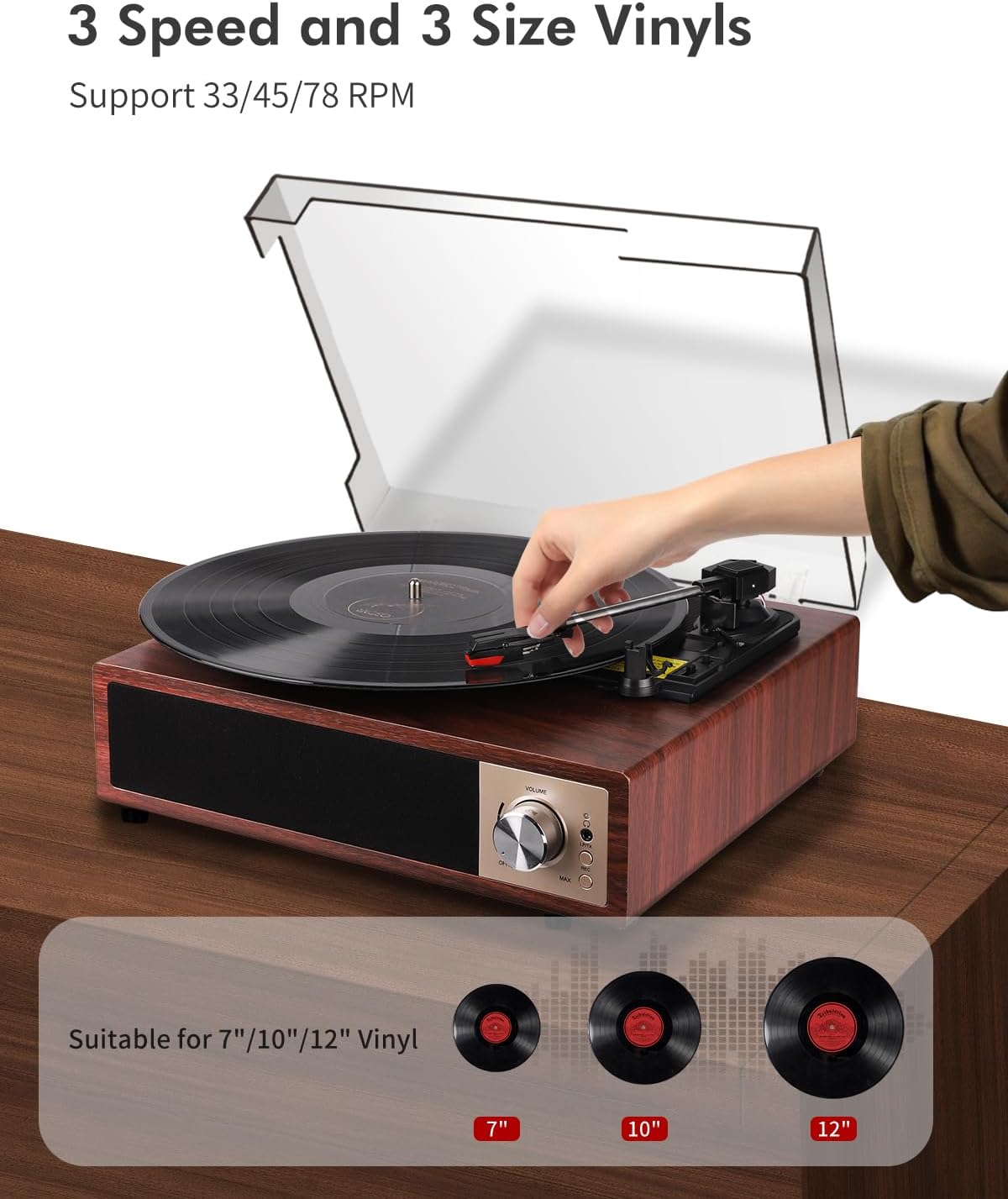
Image: A hand placing a record on the turntable, with visual representations of 7-inch, 10-inch, and 12-inch vinyl records, indicating support for all three sizes and 33/45/78 RPM speeds.
6.2 Bluetooth veikimas
The turntable supports Bluetooth 5.4 for both receiving and transmitting audio.
6.2.1 Bluetooth Receiving (Playing music from your phone)
- Įjunkite patefoną.
- Switch the function mode to Bluetooth (BT). The Bluetooth indicator light will flash.
- Enable Bluetooth on your smartphone, tablet, or other Bluetooth device.
- Ieškokite "VIFLYKOO" in the list of available devices and select it to pair.
- Once paired, the indicator light will stop flashing. You can now play music from your device through the turntable's speakers.
6.2.2 Bluetooth Transmitting (Playing vinyl through external Bluetooth speakers/headphones)
- Įsitikinkite, kad jūsų išorinis „Bluetooth“ garsiakalbis arba ausinės yra susiejimo režime.
- Turn on the turntable and select the desired input source (e.g., Phono for vinyl).
- Press and hold the Bluetooth button on the turntable to activate transmitting mode. The Bluetooth indicator will flash rapidly.
- The turntable will automatically search for and connect to nearby Bluetooth audio devices.
- Once connected, the indicator light will stop flashing, and audio from the turntable will play through your external Bluetooth device.

Image: Two scenarios demonstrating Bluetooth 5.4 functionality: a user receiving music from a smartphone to the turntable, and the turntable transmitting vinyl audio to external Bluetooth speakers and headphones.
6.3 USB Function (Recording & Playback)
The USB port allows you to convert your vinyl records to digital files or play audio files iš USB atmintinės.
6.3.1 Vinilo įrašymas į USB
- Insert a USB drive into the USB port on the back of the turntable.
- Select the Phono input mode.
- Start playing your vinyl record.
- Press the 'REC' button (usually near the USB port or control panel) to start recording. The indicator light will confirm recording is active.
- Press the 'REC' button again to stop recording. The recorded audio will be saved as an MP3 or WAV file USB atmintinėje.
6.3.2 Playing Audio from USB
- Įdėkite USB atmintinę, kurioje yra MP3 arba WAV garso įrašų files į USB prievadą.
- Switch the function mode to USB.
- The turntable will automatically detect and begin playing the audio files. Use the control buttons (if available) to skip tracks or pause playback.

Image: The turntable with a USB drive inserted, illustrating the process of recording vinyl to digital files (MP3 or WAV) and playing music files iš USB atmintinės.
6.4 AUX įvestis
Connect external audio devices like MP3 players or smartphones via the 3.5mm AUX IN port.
- Connect one end of a 3.5mm audio cable (not included) to the AUX IN port on the turntable.
- Kitą galą prijunkite prie išorinio įrenginio ausinių lizdo arba garso išvesties.
- Switch the function mode to AUX.
- Leiskite garsą iš išorinio įrenginio, ir jis bus išvedamas per patefono garsiakalbius.
6.5 RCA išvestis
Connect your turntable to an external amp„lifer“ arba maitinami garsiakalbiai, kad garsas būtų geresnis.
- Connect an RCA cable (not included) to the RCA OUT ports (Red for Right, White for Left) on the back of the turntable.
- Connect the other end of the RCA cable to the corresponding audio input on your ampkeltuvai arba maitinami garsiakalbiai.
- Užtikrinti, ampgarsiakalbiai įjungti ir nustatyti teisingą įvestį.
- Play your vinyl record, and the audio will be routed through the external system.
6.6 Ausinių išvestis
For private listening, connect headphones to the dedicated headphone jack.
- Plug your headphones into the 3.5mm headphone jack on the front or side of the turntable.
- The integrated speakers will typically mute when headphones are connected.
- Sureguliuokite garsumą iki patogaus klausymosi lygio.
7. Priežiūra
Tinkama priežiūra užtikrina patefono ilgaamžiškumą ir optimalų veikimą.
- Įrenginio valymas: Wipe the turntable's surface with a soft, dry, lint-free cloth. Avoid using abrasive cleaners, waxes, or solvents.
- Rašiklio valymas: Use a soft brush designed for stylus cleaning, brushing gently from back to front. Avoid touching the stylus with your fingers.
- Dulkių uždangalo priežiūra: The removable acrylic dust cover can be cleaned with a soft, damp cloth. Avoid harsh chemicals that may scratch or cloud the acrylic.
- Įrašų priežiūra: Keep your vinyl records clean and free of dust to prevent damage to both the records and the stylus. Store them vertically in their sleeves.
- Rašiklio keitimas: The stylus has a limited lifespan. If you notice a decrease in sound quality or increased skipping, consider replacing the stylus. Consult VIFLYKOO support for compatible replacement styli.
8. Problemų sprendimas
If you encounter any issues, refer to the following troubleshooting guide.
| Problema | Galima priežastis | Sprendimas |
|---|---|---|
| Nėra galios | Neprijungtas maitinimo adapteris arba sugedęs lizdas. | Įsitikinkite, kad maitinimo adapteris yra tvirtai prijungtas, o lizdas veikia. |
| Iš garsiakalbių nėra garso | Volume too low; headphones connected; incorrect input mode. | Increase volume; disconnect headphones; select correct input mode (Phono, BT, AUX, USB). |
| Įrašo praleidimai arba garso iškraipymas | Dirty record; dirty or worn stylus; turntable not level. | Išvalykite plokštelę; nuvalykite arba pakeiskite adatą; įsitikinkite, kad patefonas pastatytas ant lygaus paviršiaus. |
| „Bluetooth“ susiejimas nepavyksta | Device too far; incorrect mode; device not in pairing mode. | Ensure devices are close; select correct Bluetooth mode (receiving/transmitting); put external device in pairing mode. |
| USB įrašymas neveikia | USB drive full or incompatible format; incorrect recording procedure. | Use a formatted USB drive (FAT32); ensure enough space; follow recording steps carefully. |
9. Specifikacijos
Technical details of the VIFLYKOO Bluetooth 5.4 Turntable.
- Prekinis ženklas: VIFLYKOO
- Modelio numeris: 3388651
- ASIN: B0FP57JZHX
- GTIN/UPC: 774882248156
- Sukimosi greičiai: 33 1/3, 45, 78 aps./min
- Variklio tipas: Varomas diržu
- Ryšio technologija: Bluetooth 5.4 (Receive & Transmit), Auxiliary (3.5mm), USB, RCA
- Integruoti garsiakalbiai: Yes, 2 x 5W Stereo
- Garso išėjimai: RCA, 3.5mm Headphone Jack
- Garso įėjimai: 3.5mm AUX-in, Bluetooth
- USB funkcija: MP3/WAV Recording, MP3/WAV Playback
- Ypatingos savybės: Anti-resonance design, Automatic belt drive, Auto-stop function, Removable dust cover
- Medžiaga: Inžinerinė mediena, metalas
- Prekės svoris: 2.15 kilogramo
- Prekės matmenys (I x P x A): 35 cm x 29 cm x 12 cm
- Maitinimo šaltinis: Electric Cable (DC Adapter)
- Signalo formatas: Analoginis, skaitmeninis
10. Garantija ir palaikymas
Your VIFLYKOO Turntable is covered by a manufacturer's warranty and dedicated customer support.
- Garantija: This product comes with a 2-year manufacturer's warranty from the date of purchase. Please retain your proof of purchase for warranty claims.
- Klientų aptarnavimas: For technical assistance, troubleshooting not covered in this manual, or warranty inquiries, please contact VIFLYKOO customer service through the retailer's platform or the official VIFLYKOO websvetainę.