
1. Produktas baigtasview
This Ossuret car radio features the Android 14 operating system, an 8-core 1.8GHz CPU, 4GB RAM, and 32GB internal storage. It is equipped with a 9.7-inch QLED touchscreen display (768*1024 resolution) for clear visuals and responsive interaction. Key functionalities include wireless Apple CarPlay and Android Auto, integrated GPS navigation, FM/AM radio with RDS, and a built-in DSP for enhanced audio control. The unit supports 4G LTE connectivity (SIM card slot and antenna included) and WiFi, allowing for online navigation, streaming, and app usage. Steering wheel control compatibility ensures safe and convenient operation.
Pagrindinės funkcijos:
- Operacinė sistema: Android 14
- Procesorius: 8-Core 1.8GHz CPU (2*A75 + 6*A5)
- Atmintis ir saugojimas: 4 GB RAM + 32 GB „flash“ atmintis
- Ekranas: 9.7-inch QLED Touch Screen (768*1024)
- Ryšys: Wireless Apple CarPlay, Wireless/Wired Android Auto, Bluetooth, WiFi, 4G LTE (modem not included, supports external USB Dongle)
- Navigacija: Built-in GPS with offline map data, supports online navigation apps (Maps, Waze)
- Garsas: FM/AM Radio with RDS, Built-in DSP (BU32107EFV), DAB/DAB+ (optional)
- Multimedija: Music, Video (up to 1280P), Photo Viewer
- Papildomos funkcijos: Steering Wheel Control, Dual Zone, Mirror Link, APK Installer, Wallpapers, OBD2 (optional), DVR (USB Camera)
2. Suderinamumas
This car radio is specifically designed for the following vehicle models and years:
- Opel Zafira C: 2010, 2011, 2012, 2013, 2014, 2015, 2016
- Vauxhall Zafira C: 2010, 2011, 2012, 2013, 2014, 2015, 2016
Svarbi pastaba: This unit is not compatible with the original rearview camera of the vehicle. Please confirm your vehicle's center console before installation.

Image 2.1: Visual guide for compatible and incompatible vehicle console types. The image displays four different car console configurations, with checkmarks indicating compatibility for three and an 'X' for one, specifically noting incompatibility with the original rearview fotoaparatas.
3. Sąranka ir diegimas
3.1 Kas yra dėžutėje:
- USB kabelis
- RCA diržai
- GPS antena
- „4G“ antena
3.2 Diegimo gairės:
Professional installation is highly recommended to ensure correct wiring and functionality. Incorrect installation may damage the unit or vehicle electronics. Ensure the vehicle's power is disconnected before beginning installation.
- Carefully remove the original car radio or infotainment system.
- Connect the main power harness to the vehicle's wiring. Ensure all connections are secure.
- Prijunkite GPS anteną ir pastatykite ją vietoje, kur nėra view dangaus optimaliam signalo priėmimui.
- If using 4G, connect the 4G antenna and insert your 4G SIM card into the designated slot before powering on the device.
- Connect the RCA harness for audio/video output and input, if applicable.
- Connect any additional accessories such as USB cables, external cameras (DVR), or OBD2 devices.
- Mount the new Ossuret car radio securely into the dashboard.
- Prieš visiškai surinkdami prietaisų skydelį, vėl prijunkite transporto priemonės maitinimą ir patikrinkite visas funkcijas.
4. Naudojimo instrukcijos
4.1 Vartotojo sąsaja baigtaview and Key Features Demonstration:
Video 4.1: This video provides a comprehensive demonstration of the Ossuret Android 14 car radio's user interface and key functionalities. It showcases system settings, various applications including Bluetooth, Radio, Music, Navigation (Google Maps, Android Auto), DSP audio controls, CarAPP features (car info, AC settings, amplifier info), steering wheel control learning, and voice assistant interaction for music and navigation.
4.2 Apple CarPlay and Android Auto:
The unit supports both wireless Apple CarPlay and wireless/wired Android Auto. Connect your smartphone via Bluetooth or USB to access phone functions, online navigation, calls, messages, and music directly on the car radio display. This feature allows you to focus on driving while staying connected.

Image 4.2: The car radio display showing both Apple CarPlay (wireless) and Android Auto (wireless/wired) interfaces, highlighting seamless smartphone integration for navigation, communication, and entertainment.
4.3 Vairo valdymas (SWC):
Control the car radio directly from your vehicle's steering wheel buttons. This allows for easy adjustment of music, volume, and other functions, enhancing driving safety by minimizing distractions.

Image 4.3: The car radio display illustrating the steering wheel control setup, enabling users to map vehicle steering wheel buttons to various radio functions for convenient and safe operation.
4.4 4G LTE and WiFi Connectivity:
The radio supports 4G network connectivity via a dedicated SIM card slot and antenna, as well as built-in WiFi. This enables online navigation, music streaming, video playback, and access to various internet services while on the go. Ensure the SIM card is inserted before powering on the device.
4.5 Digital Sound Processor (DSP):
Equipped with a built-in DSP (BU32107EFV), this unit allows for precise sound adjustments. You can customize the sound effect, enhance bass, and reduce car noise, providing a superior audio experience.

Image 4.4: The car radio display showing the Digital Sound Processor (DSP) interface with various sound adjustment options, including equalizer presets, surround sound, bass enhancement, and sound field settings.
4.6 Picture-in-Picture (PIP) and Split Screen:
The Picture-in-Picture (PIP) feature allows you to watch video in a small, resizable window on top of other applications. The split-screen function enables you to run two applications simultaneously, such as navigation and music, for enhanced multitasking.

Image 4.5: The car radio display demonstrating the Picture-in-Picture (PIP) feature, where a video plays in a small, adjustable window while other applications are visible.
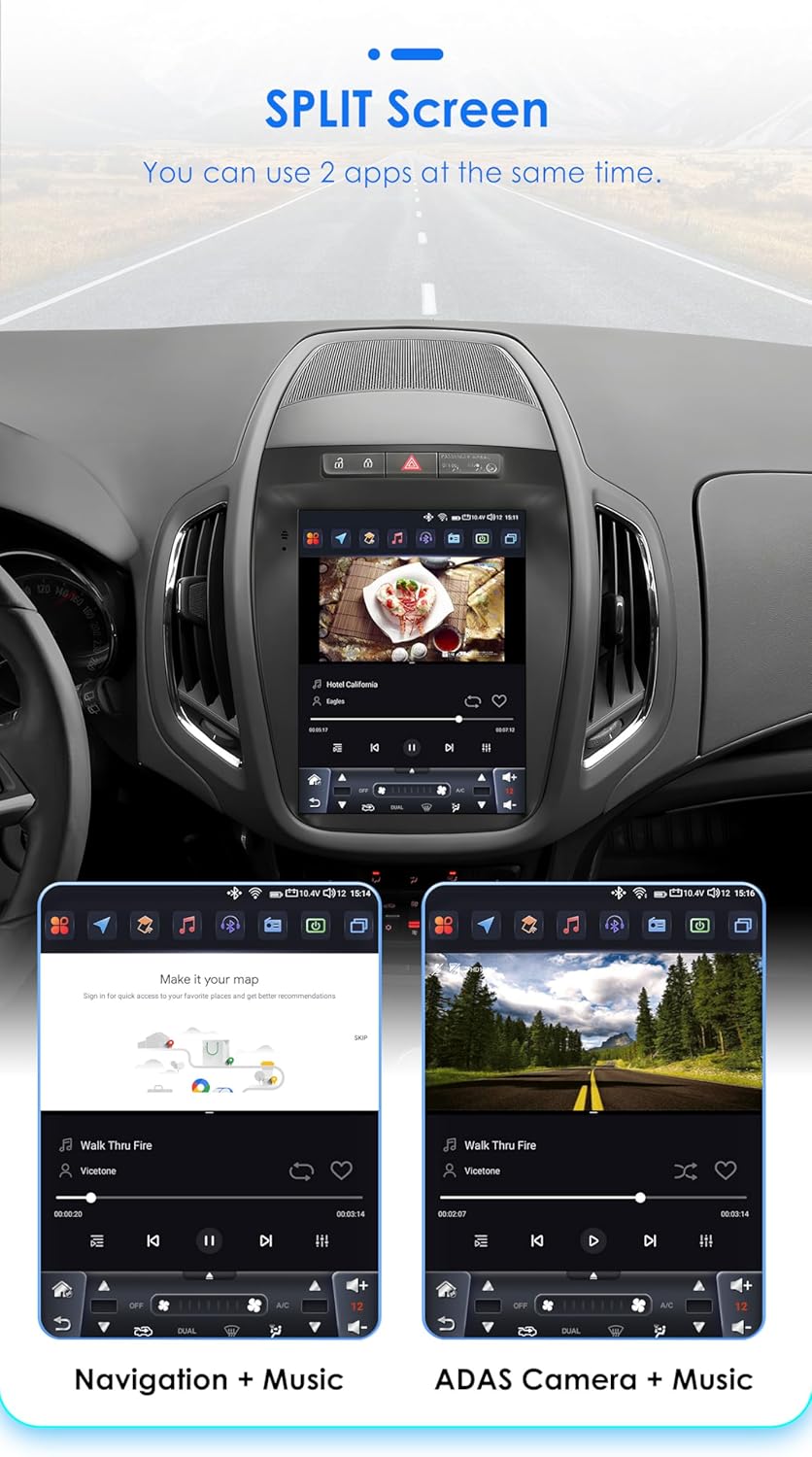
Image 4.6: The car radio display showcasing the split-screen feature, allowing two applications, such as navigation and a music player, to run side-by-side for improved user experience.
4.7 Original Car Information Display:
The unit can display original car information, integrating seamlessly with your vehicle's existing systems to provide relevant data directly on the screen.

Image 4.7: The car radio display showing the 'Original Car Information Display' interface, which provides access to various vehicle data and settings.
5. Priežiūra
To ensure the longevity and optimal performance of your Ossuret car radio, follow these maintenance guidelines:
- Valymas: Ekraną ir išorę valykite minkšta, sausa šluoste. Įsisenėjusias dėmes šiek tiek nuvalykite.ampNuvalykite šluostę vandeniu arba ekranui saugiu valikliu. Venkite abrazyvinių medžiagų ar stiprių cheminių medžiagų.
- Programinės įrangos atnaujinimai: Periodiškai tikrinkite, ar yra programinės įrangos atnaujinimų, ir įdiekite juos, kad užtikrintumėte efektyvų sistemos veikimą ir joje būtų naujausios funkcijos bei saugos pataisymai.
- Temperatūra: Venkite ilgą laiką laikyti įrenginį itin aukštoje temperatūroje – tiek karštyje, tiek šaltyje.
- Galios valdymas: Ensure the vehicle's electrical system is in good condition to prevent power fluctuations that could affect the unit.
6. Problemų sprendimas
Jei kyla problemų dėl automobilio radijo, žr. šias dažniausiai pasitaikančias problemas ir sprendimus:
- Nėra galios:
- Check the power connections and fuses.
- Įsitikinkite, kad transporto priemonės uždegimas įjungtas.
- Nėra garso:
- Patikrinkite garsiakalbių jungtis.
- Patikrinkite garsumo lygius ir nutildymo nustatymus.
- Įsitikinkite, kad pasirinktas teisingas garso šaltinis.
- GPS signalo problemos:
- Įsitikinkite, kad GPS antena tinkamai prijungta ir kad jos spindulys yra laisvas. view dangaus.
- Jei reikia, atnaujinkite žemėlapio duomenis.
- „Bluetooth“ ryšio problemos:
- Ensure Bluetooth is enabled on both the car radio and your device.
- Ištrinkite ankstesnius suporavimus ir bandykite prisijungti iš naujo.
- Iš naujo paleiskite abu įrenginius.
- Jutiklinis ekranas nereaguoja:
- Paleiskite įrenginį iš naujo.
- Įsitikinkite, kad ekranas yra švarus ir be šiukšlių.
Jei problema išlieka, kreipkitės į klientų aptarnavimo tarnybą dėl tolesnės pagalbos.
7. Specifikacijos
| Funkcija | Specifikacija |
|---|---|
| Operacinė sistema | Android 14 |
| CPU | 8-Core 1.8GHz (2*A75 6*A5) |
| RAM | 4 GB |
| „Flash“ saugykla | 32 GB |
| Ekrano dydis | 9.7 colių |
| Ekrano tipas | QLED Touchscreen |
| Rezoliucija | 768*1024 |
| CarPlay | Bevielis |
| Android Auto | Belaidis / laidinis |
| Radijo imtuvas | FM/AM, RDS (DAB/DAB+ pasirinktinai) |
| DSP | Built-in BU32107EFV |
| Ryšys | Bluetooth, USB, WiFi, 4G LTE (external dongle support) |
| GPS | Yes, with offline map data (Europe map type) |
| Garso išvesties režimas | Stereo |
| Suderinami įrenginiai | Išmanusis telefonas |
| Kontrolės metodas | Application, Buttons, Touchscreen |
| Pakuotės matmenys | 20 x 10 x 10 cm |
| Svoris | 2 kg |
| Kilmės šalis | Kinija |
8. Garantija ir palaikymas
This Ossuret car radio comes with a 1 metų garantija nuo įsigijimo datos. Ši garantija taikoma gamybos defektams ir gedimams įprasto naudojimo metu.
8.1 What is Covered:
- Medžiagų ir gamybos defektai.
- Malfunctions occurring during normal operation.
8.2 What is Not Covered:
- Damage caused by improper installation or unauthorized repairs.
- Damage due to accidents, misuse, abuse, neglect, or external causes.
- Cosmetic damage, including scratches, dents, or broken plastic on ports.
- Damage from operating the product outside the permitted or intended uses described in this manual.
8.3 Klientų aptarnavimas:
For technical assistance, warranty claims, or any questions regarding your Ossuret car radio, please contact your retailer or the manufacturer's customer service. Please have your purchase receipt and product model information ready when contacting support.