
Įvadas
This manual provides essential information for the safe and efficient use of your Google Pixel 9 Pro 5G smartphone. Please read these instructions carefully before operating your device.

1 pav.: priekis view of the Google Pixel 9 Pro 5G.
Kas yra dėžutėje
Patikrinkite, ar pakuotėje yra visi daiktai:
- „Google Pixel 9 Pro“ išmanusis telefonas
- USB-C to USB-C Cable (1m, USB 2.0)
- SIM kortelės dėklo išstūmimo įrankis
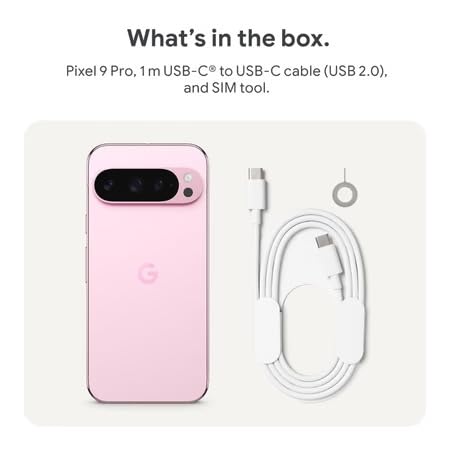
Figure 2: Included items in the Pixel 9 Pro packaging.
Sąranka
1. SIM kortelės įdėjimas
- Locate the SIM tray on the side of your Pixel 9 Pro.
- Insert the provided SIM ejector tool into the small hole on the SIM tray and press gently until the tray pops out.
- Įdėkite nano-SIM kortelę į dėklą auksiniais kontaktais žemyn. Įsitikinkite, kad ji tinkamai įstatyta.
- Carefully push the SIM tray back into the device until it is flush.
2. Pradinis įkrovimas
Prieš pirmą kartą naudojant, rekomenduojama visiškai įkrauti įrenginį.
- Prijunkite USB-C laidą prie telefono apačioje esančio įkrovimo prievado.
- Connect the other end of the cable to a compatible USB power adapter (sold separately) and plug it into a power outlet.
- Akumuliatoriaus piktograma ekrane parodys įkrovimo būseną.
3. Įjungimas/išjungimas
- Norėdami įjungti: Press and hold the Power button (located on the right side) until the Google logo appears on the screen.
- Norėdami išjungti: Paspauskite ir palaikykite maitinimo mygtuką, tada ekrane palieskite „Išjungti“.
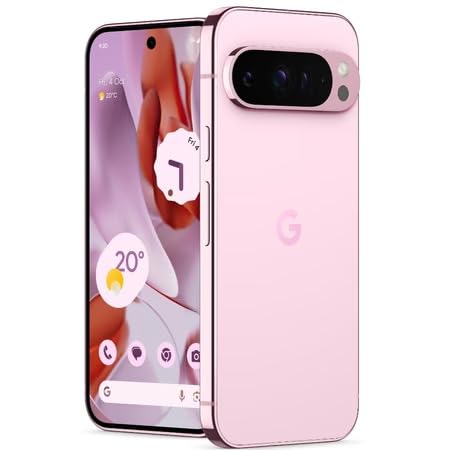
Figure 3: Power and volume buttons on the side of the device.
4. Pirmojo nustatymo vedlys
Upon powering on for the first time, follow the on-screen instructions to:
- Pasirinkite savo kalbą ir regioną.
- Prisijunkite prie „Wi-Fi“ tinklo.
- Prisijunkite naudodami „Google“ paskyrą arba sukurkite naują.
- Set up security features such as fingerprint unlock, face unlock, PIN, pattern, or password.
- Perkelkite duomenis iš seno įrenginio (nebūtina).
Naudojimo instrukcijos
Pagrindinė navigacija
- Jutiklinio ekrano gestai: Interact with the device using taps, swipes, pinches (for zoom), and long presses.
- Pagrindinis ekranas: Access your applications, widgets, and customize your layout.
- Pranešimai: Braukite žemyn nuo ekrano viršaus iki view pranešimai.
- Greiti nustatymai: Swipe down twice from the top of the screen to access quick settings toggles (Wi-Fi, Bluetooth, etc.).
Kameros veikimas
The Pixel 9 Pro features a powerful triple rear camera system.

Figure 4: Rear camera system of the Pixel 9 Pro.
- Kameros atidarymas: Tap the Camera app icon on your home screen or lock screen.
- Objektyvų keitimas: Tap the icons on the viewfinder to switch between wide, ultrawide, and 5x telephoto lenses.
- Fotografavimo režimai: Select from various modes such as Night Sight for low-light conditions, Astrofotografija for capturing stars, Makro for close-up shots, Ilga ekspozicija for creative effects, and Portretas for depth-of-field effects.
- Super Res Zoom: Pinch the screen to digitally zoom up to 30x. For video, Super Res Zoom supports up to 20x.
- Pro Controls: Access advanced camera settings like shutter speed and manual focus for greater creative control.
Akumuliatoriaus valdymas
- Baterijos lygio tikrinimas: View akumuliatoriaus proctage in the status bar or in Settings > Battery.
- Extreme Battery Saver: Enable this mode in Settings > Battery > Extreme Battery Saver to significantly extend battery life.
- Įkrovimas: Use the provided USB-C cable and a compatible power adapter for optimal charging speed.
Apsaugos funkcijos
Your Pixel 9 Pro incorporates multiple hardware security layers to protect your data.
- Piršto atspaudo atrakinimas: Register your fingerprints in Settings > Security & privacy > Device unlock.
- Atrakinimas pagal veidą: Set up facial recognition for convenient unlocking.
- PIN kodas / šablonas / slaptažodis: Always set a strong screen lock method.
- Programinės įrangos atnaujinimai: Regularly install system updates to ensure your device has the latest security patches.
Temperatūros jutiklis
The Pixel 9 Pro includes a thermometer for measuring temperature.
- Open the dedicated Thermometer app.
- Follow the on-screen instructions to measure body temperature or the temperature of objects.
- Temperature data can be saved and tracked within the Fitbit application.
Priežiūra
Įrenginio valymas
- Use a soft, lint-free cloth to clean the screen and body of your phone.
- Venkite naudoti abrazyvines medžiagas, stiprias chemines medžiagas ar aerozolinius purškalus.
- Do not submerge the device in water, despite its water-resistant rating.
Programinės įrangos atnaujinimai
Google regularly releases software updates to improve performance, add features, and enhance security.
- To check for updates, go to Settings > System > System update.
- Ensure your device is connected to Wi-Fi and has sufficient battery charge before installing updates.
Fizinė priežiūra
The Pixel 9 Pro is built with Corning Gorilla Glass Victus 2 and is water-resistant, offering durability against everyday drops and spills.
- While durable, avoid excessive impacts or drops to prevent damage.
- Consider using a screen protector and a protective case for additional safeguarding.
Trikčių šalinimas
Įrenginys nereaguoja
If your phone becomes unresponsive, perform a force restart:
- Paspauskite ir palaikykite maitinimo mygtuką maždaug 10–15 sekundžių, kol įrenginys bus paleistas iš naujo.
Programėlės stringa arba užstringa
- Uždarykite probleminę programėlę ir vėl ją atidarykite.
- Clear the app's cache: Go to Settings > Apps > See all apps > [App Name] > Storage & cache > Clear cache.
- Įsitikinkite, kad programa atnaujinta į naujausią versiją iš „Google Play“ parduotuvės.
- Iš naujo paleiskite telefoną.
Tinklo ryšio problemos („Wi-Fi“ / mobilusis ryšys)
- Toggle Wi-Fi or cellular data off and then back on.
- Iš naujo paleiskite telefoną.
- Įsitikinkite, kad SIM kortelė įdėta teisingai.
- Atkurti tinklo nustatymus: eikite į Nustatymai > Sistema > Atkurti parinktis > Atkurti „Wi-Fi“, mobilųjį ryšį ir „Bluetooth“ nustatymus.
Greitai išsikrauna baterija
- Norėdami nustatyti energiją eikvojančias programas, patikrinkite akumuliatoriaus naudojimą skiltyje „Nustatymai“ > „Akumuliatorius“.
- Sumažinkite ekrano ryškumą ir ekrano išsijungimo trukmę.
- Disable unnecessary features like GPS, Bluetooth, and Wi-Fi when not in use.
- Enable Extreme Battery Saver mode.
Gamyklinių parametrų atkūrimas (paskutinė priemonė)
Warning: A factory reset will erase all data from your phone. Back up all important data before proceeding.
- Eikite į Nustatymai > Sistema > Atstatymo parinktys > Ištrinti visus duomenis (gamyklinių parametrų atkūrimas).
- Confirm your decision when prompted.
Specifikacijos
| Funkcija | Detalė |
|---|---|
| Prekės ženklas | |
| Modelis | „Pixel 9 Pro“. |
| Operacinė sistema | Android 15 |
| Procesorius | Google Tensor G4 (3.1 GHz) |
| RAM | 16 GB |
| Vidinė saugykla | 256 GB |
| Ekranas | 6.3 Inches LTPO OLED (Actua), 1280 x 2856 Pixels, 120 Hz Refresh Rate |
| Galinė kamera | 50 MP wide + 48 MP ultrawide (Macro) + 48 MP 5x telephoto |
| Priekinė kamera | 42 MP |
| Baterijos talpa | 4700 milijonųamp Hours (up to 24 hours average life) |
| Ryšys | 5G, Wi-Fi 7, Bluetooth 5.3, NFC, UWB, USB-C |
| SIM kortelė | Single Nano SIM |
| Atsparumas vandeniui | Atsparus vandeniui |
| Matmenys | 8 x 72 x 153 milimetrai |
| Svoris | 198 gramų |
Garantija ir palaikymas
Informacija apie garantiją
Your Google Pixel 9 Pro 5G comes with a 1 metų gamintojo garantija nuo įsigijimo datos. Ši garantija taikoma gamybos defektams, atsiradusiems įprasto naudojimo metu. Išsaugokite pirkimo įrodymą, jei galėtumėte pateikti pretenzijas dėl garantijos.
Pagalba klientams
For technical assistance, warranty claims, or other support inquiries, please contact Google customer service:
- Gamintojas: Google LLC, 1600 Amphitheatre Parkway, Kalnas View, CA 94043, JAV
- Phone Support (India): +91 7718892303
- Importuotojo kontaktinis asmuo (Indija): Nexora Axis Private Limited (+91 7718892303)
For the most up-to-date support information, please visit the official Google Pixel support websvetainę.