
1. Įvadas
Thank you for choosing the BOSGAME P3 Mix Mini PC. This manual provides essential information for setting up, operating, maintaining, and troubleshooting your new mini PC. Please read it carefully before use and retain it for future reference.
2. Kas yra dėžutėje
Patikrinkite, ar pakuotėje yra visi toliau išvardyti daiktai:
- 1x P3 MIX Mini PC
- 1x HDMI laidas
- 1x VESA Mount & Screws
- 1x maitinimo adapteris
- 1x vartotojo vadovas
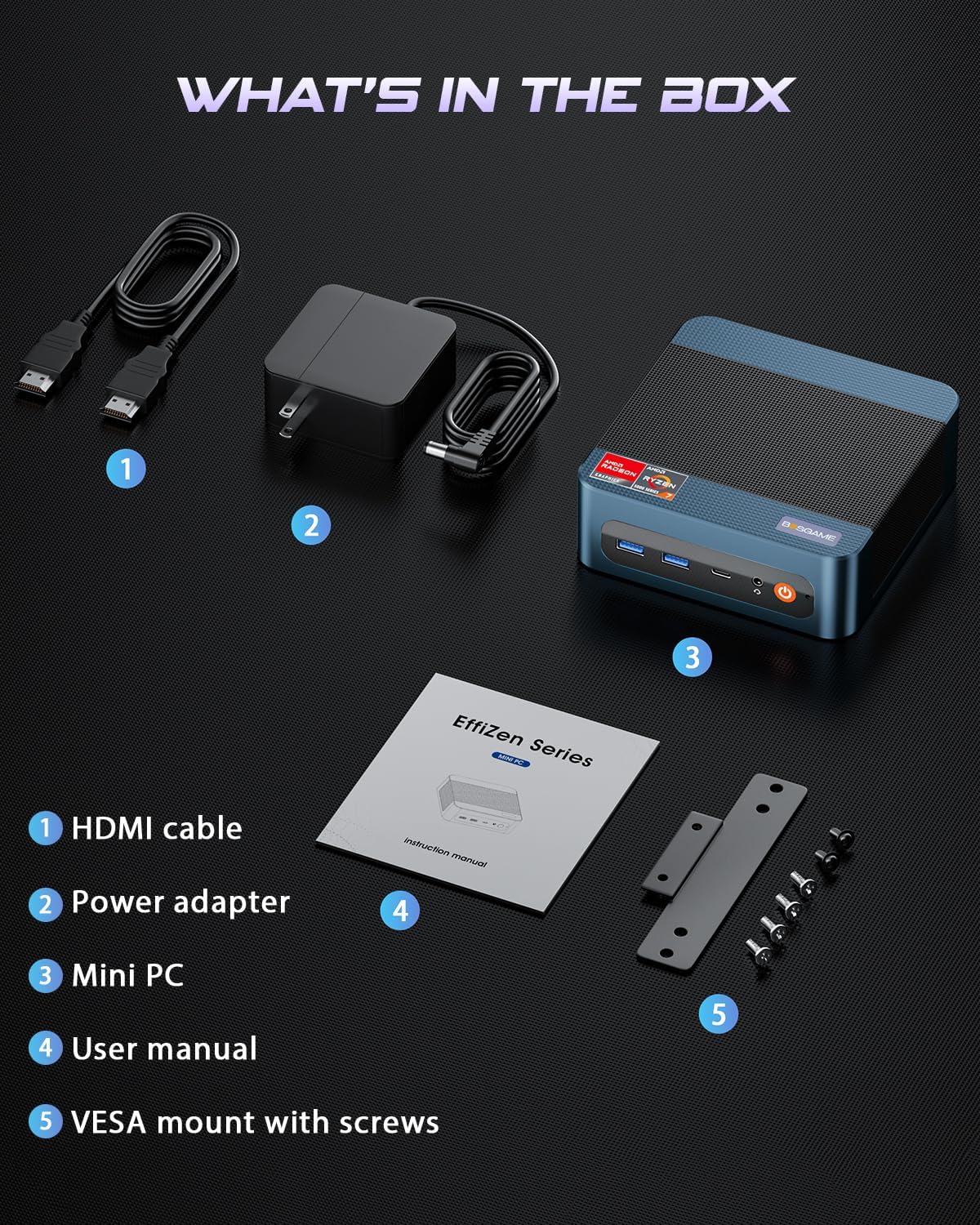
This image displays the BOSGAME P3 Mix Mini PC and its included accessories: an HDMI cable, a power adapter, the mini PC unit, a user manual, and a VESA mount with screws for installation.
3. Produktas baigtasview
The BOSGAME P3 Mix Mini PC is a compact desktop computer designed for various applications, from home office tasks to gaming and 4K video editing. It features a powerful AMD Ryzen 7640HS processor and Radeon 760M graphics.

This image highlights the core specifications of the mini PC, including its AMD Ryzen 5 7640HS processor, AMD Radeon 760M GPU, 16GB DDR5 RAM, 512GB M.2 PCIe 3.0 x4 SSD, support for 8K 60Hz display, USB-4 (40Gbps) connectivity, Wi-Fi 6E AX210, and Bluetooth 5.2.
This diagram illustrates the various input/output ports available on the mini PC, including power input, dual 2.5G LAN, HDMI, DisplayPort, USB 2.0, USB 4, USB 3.2 ports, and a 3.5mm audio jack.
Video 3.1: BOSGAME Ryzen 5 7640HS MINI PC OverviewŠiame vaizdo įraše pateikiama vaizdinė apžvalga.view of the BOSGAME P3 Mix Mini PC, showcasing its compact design, internal components, port layout, and connectivity features.
4. Sąrankos instrukcijos
4.1 Maitinimo adapterio prijungimas
- Connect the power adapter cable to the DC 19V 6.3 port on the rear of the mini PC.
- Įkiškite maitinimo adapterį į sieninį lizdą.
4.2 Prijungimas prie ekrano
The P3 Mix Mini PC supports triple display output via HDMI, DisplayPort, and USB4.
- Connect one end of an HDMI cable to the HDMI port on the mini PC and the other end to your monitor.
- For additional displays, connect a DisplayPort cable to the DP port and/or a USB4 cable to the USB4 port, then connect to your respective monitors.
- Įsitikinkite, kad jūsų monitoriai įjungti ir nustatyti teisingam įvesties šaltiniui.

This image demonstrates how to set up a triple display configuration with the mini PC, utilizing the DP 1.4, HDMI 2.0, and USB4 ports to connect to multiple monitors.
4.3 Išorinių įrenginių prijungimas
- Connect your USB keyboard and mouse to any available USB ports (USB 2.0, USB 3.2).
- For wired network access, connect an Ethernet cable to one of the 2.5G LAN ports.
- For audio output, connect speakers or headphones to the 3.5mm audio jack.
4.4 Pradinis įjungimas
- After connecting all necessary cables, press the power button located on the front of the mini PC.
- The system will boot up, and you should see the operating system on your connected display(s).
5. Naudojimo instrukcijos
5.1 Maitinimo įjungimas/išjungimas
- Norėdami įjungti: Vieną kartą paspauskite maitinimo mygtuką.
- Norėdami išjungti: From the operating system, select 'Shut Down'. Alternatively, press and hold the power button for 5 seconds to force a shutdown (use only when necessary).
- Norėdami paleisti iš naujo: Operacinėje sistemoje pasirinkite „Paleisti iš naujo“.
5.2 Tinklo ryšys
- Laidinis ryšys: Connect an Ethernet cable to one of the two 2.5G LAN ports. The system will automatically detect the connection.
- Belaidis ryšys („Wi-Fi 6E“): Navigate to your operating system's network settings, select the desired Wi-Fi network, and enter the password.
5.3 „Bluetooth“ ryšys
The mini PC supports Bluetooth 5.2 for connecting wireless peripherals.
- Įsitikinkite, kad jūsų „Bluetooth“ įrenginys veikia susiejimo režimu.
- On your mini PC, go to the operating system's Bluetooth settings.
- Ieškokite and select your device to pair.
6. Priežiūra ir atnaujinimai
6.1 RAM ir SSD atnaujinimai
The BOSGAME P3 Mix Mini PC allows for easy upgrades of its DDR5 RAM and M.2 PCIe SSD. Always power off and unplug the device before performing any internal maintenance.

This image provides a visual guide for upgrading the RAM and SSD. The process involves removing screws, carefully opening the base plate, repositioning the system fan, and then replacing the memory modules and SSD.
- Išjunkite ir atjunkite: Ensure the mini PC is completely powered off and disconnected from the power source.
- Nuimkite varžtus: Locate and remove the screws securing the bottom panel.
- Open Base Plate: Carefully open the base plate to access the internal components.
- Prieigos komponentai: You may need to gently move the system fan or other components to gain full access to the RAM and SSD slots.
- Replace RAM/SSD: Install new DDR5 SO-DIMM RAM modules into the dual channel slots (up to 64GB supported) or a new M.2 2280 NVMe PCIe 3.0 SSD (up to 4TB per slot, 8TB total capacity).
- Surinkti iš naujo: Carefully reassemble the mini PC, ensuring all connections are secure and screws are tightened.
6.2 Valymas
- Reguliariai valykite mini kompiuterio išorę minkšta, sausa šluoste.
- Use compressed air to clear dust from ventilation grilles to ensure optimal airflow and prevent overheating. Do not insert objects into the vents.
7. Problemų sprendimas
7.1 Nėra galios
- Įsitikinkite, kad maitinimo adapteris yra tvirtai prijungtas tiek prie mini kompiuterio, tiek prie veikiančio maitinimo lizdo.
- Patikrinkite, ar maitinimo lizdas veikia, prijungdami prie jo kitą įrenginį.
- Išbandykite kitą maitinimo adapterį, jei yra ir jis suderinamas.
7.2 Nėra ekrano išvesties
- Check all display cable connections (HDMI, DP, USB4) between the mini PC and the monitor(s).
- Ensure the monitor(s) are powered on and set to the correct input source.
- Try connecting to a single monitor using a different cable or port.
- If you recently reinstalled the operating system, ensure all display drivers are correctly installed. Some users have reported needing specific drivers from the manufacturer for optimal display performance.
7.3 Tinklo ryšio problemos
- Laidinis: Patikrinkite Ethernet kabelio jungtį. Įsitikinkite, kad maršrutizatorius / modemas veikia tinkamai.
- Belaidis ryšys: Ensure Wi-Fi is enabled in your operating system settings. Re-enter the Wi-Fi password. Restart your router/modem.
7.4 Našumo problemos
- Uždarykite nereikalingas programas, veikiančias fone.
- Įsitikinkite, kad mini kompiuteris yra tinkamai vėdinamas ir neperkaista.
- Check for operating system updates and driver updates.
- Verify that the RAM and SSD are properly seated if you have performed an upgrade.
8. Specifikacijos
| Funkcija | Specifikacija |
|---|---|
| Prekės ženklas | BOSGAME |
| Modelio pavadinimas | P3 |
| CPU modelis | AMD Ryzen 5 7640HS (6C/12T, up to 5.0 GHz) |
| Grafikos koprocesorius | Radeon 760M (Integrated) |
| RAM atmintis | 16 GB DDR5 4800 MHz (2 x 8 GB), maks. 64 GB |
| Atminties talpa | 512GB PCIe 3.0 SSD (M.2 2280), Max 8TB (2x4TB) |
| Operacinė sistema | OS11 Support Win/Ubuntu/Linux |
| Vaizdo išvesties sąsaja | HDMI 2.0, DisplayPort 1.4, USB4 (8K@60Hz) |
| Ryšio technologija | Dual 2.5G LAN, Wi-Fi 6E (802.11ax), Bluetooth 5.2 |
| USB prievadai | 3 x USB 3.2 (10 Gb/s), 1 x USB 4 (40 Gb/s), 2 x USB 2.0 (480 Mb/s) |
| Garso išvestis | 3.5mm garso lizdas |
| Prekės svoris | 1.26 kilogramo |
| Maitinimo kištuko tipas | A tipo – 2 kontaktų (Šiaurės Amerikos) |
9. Garantija ir palaikymas
9.1 Informacija apie garantiją
BOSGAME offers a 1-year limited warranty for the P3 Mix Mini PC. This warranty covers manufacturing defects and ensures product quality.
9.2 Pagalba klientams
For any product-related inquiries, technical assistance, or warranty claims, please contact BOSGAME customer support. You can reach out via the following methods:
- El. paštas: Qingzhuomao@163.com
- Prisijungę: Visit the BOSGAME store on Amazon or their official webDUK ir pagalbos išteklių svetainė.
A professional after-sales team is available to assist you with your needs.


