
1. Įvadas
Thank you for choosing the ZENTALITY A10 Projector. This compact and versatile projector is designed to deliver a high-quality home cinema experience with its native 1080P resolution, 4K decoding support, and integrated Android operating system. Featuring Wi-Fi 6 and Bluetooth 5.1 connectivity, automatic keystone correction, and a 360-degree adjustable stand, the A10 offers flexible entertainment options for various environments. Please read this manual carefully to ensure proper setup, operation, and maintenance of your device.
2. Saugos informacija
- Maitinimas: Naudokite tik pateiktą maitinimo adapterį. Įsitikinkite, kad įtampatage atitinka projektoriaus reikalavimus.
- Vėdinimas: Neužblokuokite ventiliacijos angų. Palikite pakankamai vietos aplink projektorių tinkamam oro cirkuliavimui ir neperkaitimui.
- Skysčio ekspozicija: Keep the projector away from water or other liquids. Do not operate in humid environments.
- Valymas: Prieš valydami atjunkite maitinimą. Naudokite minkštą, sausą šluostę. Venkite abrazyvinių valiklių.
- Vaikai: Projektorių laikykite mažiems vaikams nepasiekiamoje vietoje.
- Vieta: Projektorių pastatykite ant stabilaus, lygaus paviršiaus. Venkite jo tiesioginiuose saulės spinduliuose arba šalia šilumos šaltinių.
- Objektyvas: Nežiūrėkite tiesiai į projektoriaus objektyvą, kai lamp įjungtas, nes gali pažeisti akis.
3. Pakuotės turinys
Patikrinkite pakuotę, ar joje yra šie daiktai:
- ZENTALITY A10 Projector Unit
- Nuotolinio valdymo pultas
- Maitinimo adapteris
- HDMI kabelis
- Vartotojo vadovas (šis dokumentas)
4. Produktas baigtasview
Familiarize yourself with the main components and ports of your ZENTALITY A10 Projector.

The ZENTALITY A10 Projector, showcasindėl savo kompaktiško dizaino ir objektyvo.
Šoninė view of the ZENTALITY A10 Projector, highlighting its various input and output ports for connectivity.
Pagrindiniai komponentai:
- Projekcinis objektyvas: Išleidžia vaizdą.
- Maitinimo mygtukas: Įjungia/išjungia projektorių.
- HDMI prievadas: Prijungiamas prie išorinių įrenginių, tokių kaip nešiojamieji kompiuteriai, žaidimų konsolės ar televizoriaus prievadai.
- USB prievadas: Skirta medijos atkūrimui iš USB atmintinių.
- Garso išvestis: Prijungiama prie išorinių garsiakalbių arba ausinių.
- DC įvestis: Maitinimo įvesties prievadas.
- Reguliuojamas stovas: Allows for 360-degree rotation and flexible positioning.
5. Sąranka
5.1 Įdėjimas
Position the projector on a stable surface. The optimal projection distance for the ZENTALITY A10 is between 1.0 to 3.5 meters, which can produce screen sizes ranging from 40 to 200 inches.

A visual guide recommending optimal projection screen sizes (30, 100, 200 inches) for the ZENTALITY A10 Projector under different lighting conditions, from dim to completely dark rooms.
5.2 Maitinimo jungtis
- Connect the power adapter to the DC In port on the projector.
- Įkiškite maitinimo adapterį į sieninį lizdą.
- Paspauskite projektoriaus arba nuotolinio valdymo pulto maitinimo mygtuką, kad jį įjungtumėte.
5.3 Fokuso reguliavimas
The ZENTALITY A10 features electric focus. Use the 'F+' and 'F-' buttons on the remote control to achieve a clear and sharp image.

The ZENTALITY A10 Projector in a room setting, with its remote control demonstrating electric focus and automatic keystone correction features.
5.4 Keystone koregavimas
The projector is equipped with automatic 45° keystone correction. This feature automatically adjusts the image to be rectangular even if the projector is placed at an angle. Manual adjustments can also be made if needed through the settings menu.
5.5 Ryšys
- „Wi-Fi“ ryšys: Navigate to the 'Settings' menu on the projector's interface. Select 'Network & Internet' and connect to your desired 2.4G or 5G Wi-Fi network.
- „Bluetooth“ ryšys: For connecting external audio devices, go to 'Settings' > 'Connected Devices' > 'Bluetooth'. Enable Bluetooth and pair with your device.
- HDMI jungtis: Connect an HDMI cable from your external device (e.g., laptop, TV stick) to the HDMI port on the projector. Select the HDMI input source from the projector's main menu.

An illustration showing the ZENTALITY A10 Projector's fast Wi-Fi 6 and Bluetooth 5.1 capabilities, enabling seamless wireless connections for streaming and audio.
6. Operacinis
6.1 Android OS and Applications
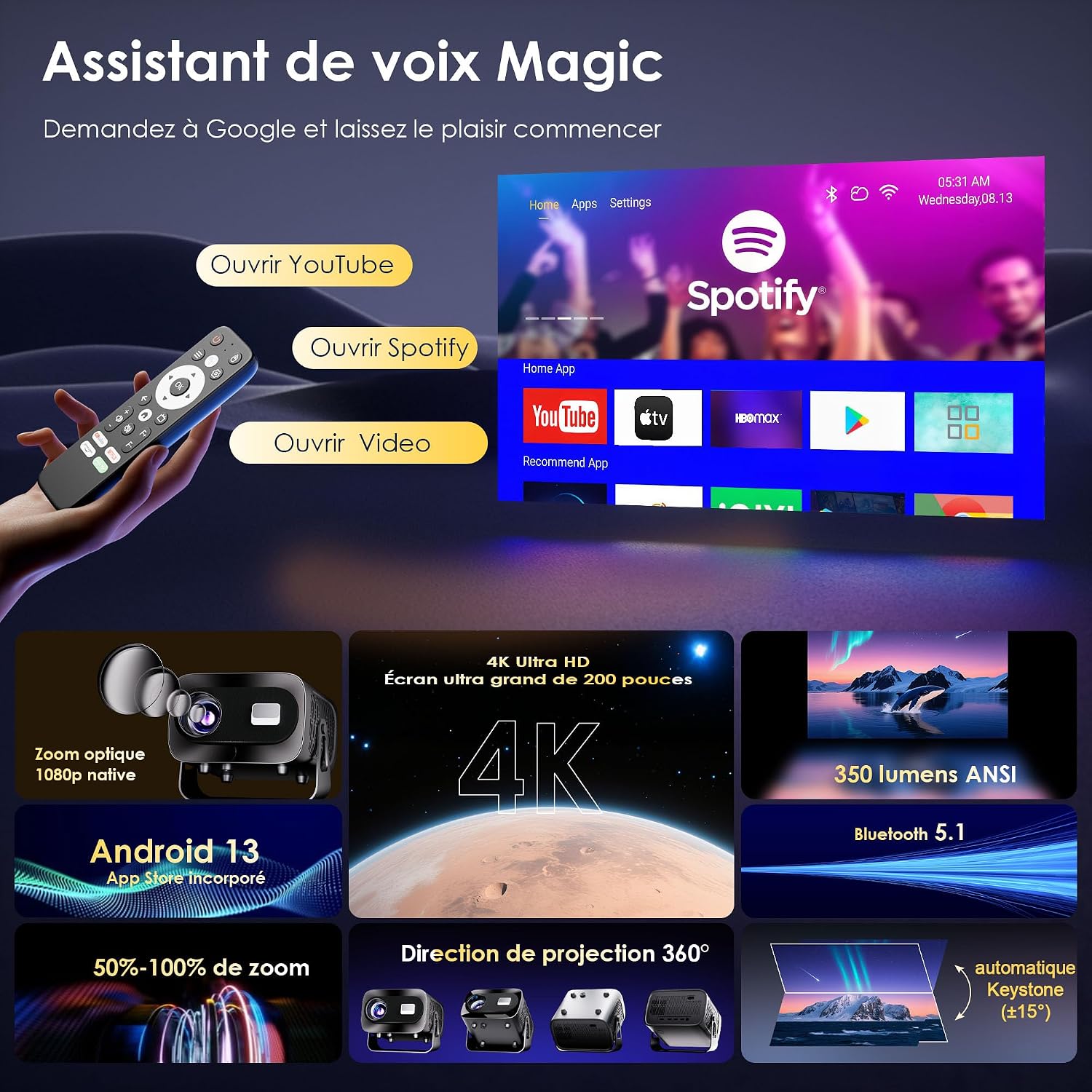
The ZENTALITY A10 runs on an integrated Android operating system, providing access to a wide range of applications. You can find pre-installed apps like YouTube and Spotify on the home screen. Additional applications can be downloaded from the Google Play Store.

A screenshot of the ZENTALITY A10 Projector's Android interface, displaying pre-installed applications like YouTube and Spotify, ready for streaming.
6.2 Garso išvestis
The projector includes built-in speakers for audio playback. For an enhanced audio experience, connect external Bluetooth speakers or headphones via Bluetooth 5.1, or use the 3.5mm audio out port.
6.3 360° sukimas
The projector's integrated stand allows for 360-degree rotation, enabling projection onto walls, ceilings, or any desired surface without needing to reposition the entire unit.

An image illustrating the ZENTALITY A10 Projector's flexible 360-degree adjustable stand, allowing for versatile projection angles.
6.4 Mastelio keitimo funkcija
Adjust the image size from 50% to 100% using the zoom function in the projector's settings menu. This allows you to fine-tune the screen size without moving the projector.
7. Priežiūra
- Objektyvo valymas: Use a soft, lint-free cloth specifically designed for optical lenses. Gently wipe the lens to remove dust or smudges. Avoid touching the lens with bare fingers.
- Išorinis valymas: Wipe the projector's exterior with a soft, dry cloth. Do not use liquid or aerosol cleaners, as they may damage the finish.
- Vėdinimas: Regularly check that the ventilation openings are clear of dust and debris to ensure proper heat dissipation.
- Saugykla: Kai projektorius ilgesnį laiką nenaudojamas, jį laikykite vėsioje, sausoje ir nuo dulkių apsaugotoje vietoje.
8. Problemų sprendimas
If you encounter issues with your ZENTALITY A10 Projector, refer to the following common problems and solutions:
| Problema | Galima priežastis | Sprendimas |
|---|---|---|
| Nėra galios | Power cable disconnected; power outlet issue; projector off. | Ensure power cable is securely connected. Try a different outlet. Press the power button. |
| Neryškus vaizdas | Incorrect focus; projector too close/far; dirty lens. | Adjust focus using 'F+'/'F-' buttons. Adjust projection distance. Clean the lens. |
| Vaizdas yra trapecijos formos / iškreiptas | Projector not perpendicular to screen; automatic keystone not engaged. | Ensure projector is facing the screen directly. Check keystone settings in the menu for manual adjustment if needed. |
| Nėra garso | Volume too low; external speakers not connected/paired; incorrect audio output selected. | Increase volume. Check Bluetooth connection for external speakers. Ensure correct audio output is selected in settings. |
| Nuotolinio valdymo pultas nereaguoja | Low batteries; obstruction; out of range. | Replace batteries. Ensure no obstructions between remote and projector. Point remote directly at the projector's IR receiver. |
| App compatibility issues (e.g., specific streaming apps) | DRM restrictions; app version incompatibility. | Ensure the app is updated to the latest version. Some apps may have specific device restrictions. Consider using an external streaming stick via HDMI if issues persist. |
| Overheating/Fan noise | Užblokuota ventiliacija; ilgalaikis naudojimas. | Ensure ventilation ports are clear. Allow the projector to cool down. Operate in a well-ventilated area. |
9. Specifikacijos
Key technical specifications for the ZENTALITY A10 Projector:
| Funkcija | Specifikacija |
|---|---|
| Prekės ženklas | ZENTALUMAS |
| Modelio pavadinimas | A10 |
| Savoji ekrano skiriamoji geba | 1920 x 1080 (1080P „Full HD“) |
| Maksimali ekrano skiriamoji geba | 3840 x 2160 (palaikoma 4K) |
| Ekrano tipas | LCD |
| Kontrasto santykis | 10000:1 |
| Ryšio technologija | Wi-Fi 6, Bluetooth 5.1, HDMI |
| Rekomenduojamas naudojimas | Namų kinas |
| Ypatingos savybės | Integrated Wireless Connection, 360° Rotation, Automatic Keystone Correction, Android OS |
| Projekcijos atstumas | Iki 3.5 metrų |
| Maksimalus vaizdo dydis | 200 colių |
| Suderinami įrenginiai | Laptop, Smartphone, Gaming Console, TV Stick, HDMI devices |
| Vaizdo gerinimo technologija | HDR10+ |
| Vaizdo įrašų kodavimas | H.265 |
10. Garantija ir palaikymas
ZENTALITY is committed to providing excellent customer service and product quality.
- Kokybės garantija: Enjoy a 360-day quality guarantee from the date of purchase.
- Nemokamas grąžinimas: Benefit from 180 days of free returns.
- Techninė pagalba: Jūsų produktui teikiama visą gyvenimą trunkanti techninė pagalba.
- Klientų aptarnavimas: Our customer service team is available 24/7 to assist you with any inquiries or issues.
For support, please refer to the contact information provided with your purchase or visit the official ZENTALITY websvetainę.