
1. Įvadas
The Radioddity X1 Walkie Talkies are designed for reliable two-way communication in various environments. Featuring an IP67 waterproof and dustproof rating, durable construction, and advanced noise reduction, these FRS radios are suitable for outdoor adventures, professional use, and emergency situations. They offer a long communication range and include essential features like NOAA weather alerts and voice-activated transmission (VOX).

Image: The Radioddity X1 Walkie Talkie, showcasindėl tvirto dizaino.
2. Kas yra dėžutėje
Upon opening your Radioddity X1 package, you should find the following items:
- 2 x Radioddity X1 Walkie Talkies
- 2 x įkraunamos baterijos
- 1 x 2 viename USB-C įkrovimo laidas
- 2 x diržo segtukai
- 2 x rankų dirželiai
- 1 adapteriai
- 1 x Naudotojo vadovas (šis dokumentas)

Image: All components included in the Radioddity X1 package, including two radios, batteries, charging cable, belt clips, hand straps, and adapters.
3. Sąranka
3.1. Akumuliatoriaus įdėjimas
- Įsitikinkite, kad racija yra išjungta.
- Suraskite akumuliatoriaus skyrių įrenginio gale.
- Align the battery with the contacts and gently push it into the compartment until it clicks into place.
3.2. Akumuliatoriaus įkrovimas
The Radioddity X1 features a 2500mAh rechargeable lithium battery. For optimal performance, fully charge the battery before first use.
- Connect the provided USB-C charging cable to the charging port on the walkie talkie.
- Connect the other end of the USB-C cable to the adapter, and then plug the adapter into a standard power outlet. Alternatively, you can connect the USB-C cable to a compatible USB power source (e.g., computer, power bank).
- Ekrane esantis akumuliatoriaus indikatorius rodys įkrovimo būseną. Visiškas įkrovimas paprastai trunka kelias valandas.
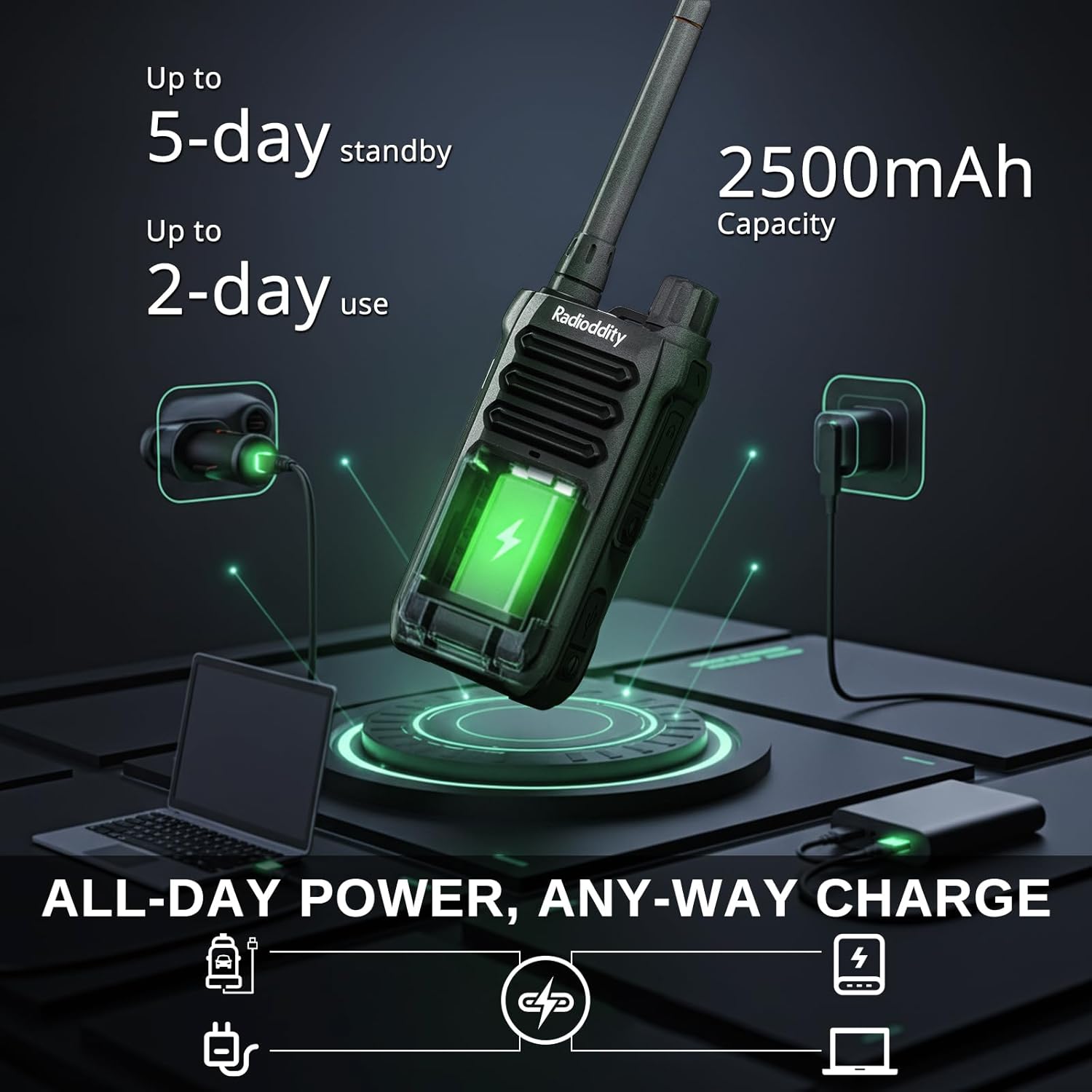
Image: The Radioddity X1 Walkie Talkie connected to a USB-C charger, illustrating the charging process.
3.3. Priedų pritvirtinimas
- Diržo segtukas: Secure the belt clip to the designated slot on the back of the walkie talkie.
- Rankinis dirželis: Thread the hand strap through the loop on the top or side of the walkie talkie for added security.
3.4. Įjungimas/išjungimas
To power on or off the device, rotate the power/volume knob located on the top of the unit clockwise to turn on, and counter-clockwise until it clicks to turn off.
4. Naudojimo instrukcijos
4.1. Kanalo pasirinkimas
The Radioddity X1 comes pre-programmed with 22 FRS channels. To select a channel:
- Paspauskite MENIU mygtuką, kad patektumėte į meniu.
- Naudokite Rodyklė aukštyn/žemyn buttons to navigate to the channel setting.
- Paspauskite OK kad patvirtintumėte, tada naudokite Rodyklė aukštyn/žemyn mygtukus, kad pasirinktumėte norimą kanalą (1–22).
- Paspauskite OK again to save the selection and MENIU išeiti.
4.2. Privatumo kodai (CTCSS/DCS)
The radio supports 155 privacy codes (CTCSS/DCS) to filter out unwanted conversations on a channel. While not providing true privacy, these codes ensure you only hear transmissions from radios set to the same channel and code.
- Paspauskite MENIU mygtuką.
- Navigate to the CTCSS or DCS setting using the Rodyklė aukštyn/žemyn mygtukai.
- Paspauskite OK, then select your desired code.
- Paspauskite OK išsaugoti ir MENIU to exit. Ensure all radios in your group use the same channel and privacy code.
4.3. Tiesioginio ryšio funkcija (PTT)
Norėdami perduoti, paspauskite ir palaikykite didelį PTT radijo šone esantį mygtuką. Aiškiai kalbėkite į mikrofoną. Atleiskite PTT mygtuką, kad galėtumėte klausytis.
4.4. VOX funkcija (balsu valdomas perdavimas)
The VOX function allows for hands-free operation. When activated, the radio transmits automatically when it detects your voice.
- Paspauskite MENIU mygtuką.
- Eikite į VOX nustatymą.
- Paspauskite OK, then select an appropriate sensitivity level (higher numbers for lower sensitivity).
- Paspauskite OK išsaugoti ir MENIU išeiti.

Image: Icon representing the Voice Operated Transmission (VOX) function.
4.5. NOAA orų perspėjimai
Stay informed with 10 built-in NOAA weather channels providing real-time alerts.
- Paspauskite MENIU mygtuką.
- Eikite į NOAA nustatymą.
- Paspauskite OK, then select the desired NOAA channel or activate weather alerts.
- Paspauskite OK išsaugoti ir MENIU išeiti.

Image: Icon representing the NOAA Scan & Alert feature.
4.6. Įrašymo atkūrimas
The Radioddity X1 features a unique recording playback function for up to 20 messages.
- To record, press and hold the dedicated ĮRAŠAS button (if available, or refer to specific menu options).
- To play back recorded messages, press the PAGRINDIMAS mygtuką.

Image: The Radioddity X1 display showing the recording and replay functions, highlighting its audio safety net capability.

Image: Icon representing the Recording function.
4.7. Triukšmo mažinimas
The dual-way noise reduction feature ensures clear communication even in noisy environments.

Image: The Radioddity X1 in a construction setting, illustrating its noise reduction capabilities for clear communication.
5. Priežiūra
5.1. IP67 Waterproof and Dustproof Care
The Radioddity X1 is rated IP67, meaning it is dustproof and can withstand submersion in up to 1 meter of water for 30 minutes. To maintain its integrity:
- Ensure all port covers (e.g., charging port, accessory port) are securely closed before exposure to water or dust.
- After exposure to water, wipe the radio dry with a clean cloth. Do not charge the radio if the charging port is wet.
- Venkite ilgalaikio panardinimo virš nurodyto gylio ir laiko.

Image: The Radioddity X1 Walkie Talkie submerged in clear water, demonstrating its IP67 waterproof capability.

Image: The Radioddity X1 Walkie Talkie partially covered in sand, highlighting its dustproof design.
5.2. Akumuliatoriaus priežiūra
The 2500mAh battery provides up to 48 hours of average use. To prolong battery life:
- Venkite reguliariai visiškai iškrauti akumuliatorių.
- Kai nenaudojate, radijo imtuvą laikykite vėsioje, sausoje vietoje.
- Naudokite tik pridedamą įkrovimo laidą ir adapterį.
5.3. Valymas
Nuvalykite radiją minkšta, damp audinys. Nenaudokite stiprių cheminių medžiagų ar abrazyvinių valiklių.
6. Problemų sprendimas
| Problema | Galima priežastis | Sprendimas |
|---|---|---|
| Nėra galios | Baterija išsikrovusi arba netinkamai įdėta. | Įkraukite bateriją arba įdėkite ją iš naujo. |
| Negalima perduoti ar priimti | Incorrect channel or privacy code. Out of range. | Verify channel and privacy code settings. Move closer to the other radio. |
| Prasta garso kokybė | Silpnas signalas, trukdžiai arba per mažas garsumas. | Adjust volume. Move to an area with less obstruction. Check for interference sources. |
| Trumpas ryšio diapazonas | Obstructions (buildings, terrain), low power channel. | Move to an open area. Use channels 1-7 or 15-22 for higher power output. |
7. Specifikacijos
| Funkcija | Detalė |
|---|---|
| Prekės ženklas | Spinduliavimas |
| Modelio numeris | X1 |
| Spalva | Juoda |
| Kanalų skaičius | 22 (FRS) |
| Dažnių diapazonas | FRS |
| Maksimalus pokalbio diapazonas | 5 Miles (open areas), 2 Miles (urban settings) |
| Atsparumo vandeniui lygis | IP67 Atsparus vandeniui |
| Ypatingos savybės | Dust Proof, Emergency Alarm (SOS), Long Range, Shockproof, Voice Operated Transmission (VOX), Noise Reduction, NOAA Weather Alerts, Recording Playback |
| Baterijos talpa | 2500mAh ličio |
| Vidutinis akumuliatoriaus veikimo laikas | 48 valandų |
| Įkrovimas | USB-C |
| Gaminio matmenys (D x P x A) | 1.1" x 2.4" x 7.1" |
| FCC ID | 2AN62-X1 |

Image: Visual representation of the Radioddity X1's communication range, showing up to 5 miles in open areas and 2 miles in urban settings.

Image: The Radioddity X1 Walkie Talkie on the ground at a construction site, illustrating its durability and shockproof design after 1,000+ drop tests.
8. Garantija ir palaikymas
8.1. Informacija apie garantiją
The Radioddity X1 Walkie Talkies come with an 18 mėnesių garantija from the date of purchase. This warranty covers manufacturing defects and ensures your product is free from material and workmanship flaws under normal use. Please retain your proof of purchase for warranty claims.
8.2. Pagalba klientams
For technical assistance, troubleshooting, or warranty inquiries, please visit the official Radioddity website or contact their customer support team. You can find contact information and additional resources on their websvetainė: www.radioddity.com.
9. Produktų vaizdo įrašai
Radioddity X1 | Built for Harsh Conditions
Video: This official Radioddity video demonstrates the X1's robust features, including its IP67 dustproof and waterproof capabilities, drop resistance, car-crush resistance, long-range communication, and noise-cancelling audio, highlighting its suitability for challenging environments.