
1. Įvadas
Thank you for choosing the OMOTON WK209 Wireless Keyboard and Mouse Set. This manual provides detailed instructions for setting up, operating, and maintaining your new wireless peripheral set. Please read this manual carefully before use to ensure optimal performance and longevity of your product.
2. Pakuotės turinys
The OMOTON WK209 Wireless Keyboard and Mouse Set package includes the following items:
- 1 x OMOTON WK209 Wireless Keyboard
- 1 x OMOTON Wireless Mouse
- 1 x USB 2.4 GHz Receiver
Note: AAA batteries are required for operation but are not included in the package.
3. Sąrankos vadovas
3.1. Baterijų įdėjimas
Before using the keyboard and mouse, you need to install batteries.
- Raskite baterijų skyrių klaviatūros ir pelės apačioje.
- Atidarykite baterijų dangtelius.
- Insert two AAA batteries into the keyboard and one AAA battery into the mouse, ensuring correct polarity (+/-).
- Tvirtai uždarykite baterijų dangtelius.

This image displays the battery compartments for the OMOTON WK209 keyboard and mouse. The keyboard requires two AAA batteries, and the mouse requires one AAA battery. Please note that batteries are not included with the product.
3.2. USB imtuvo prijungimas
The OMOTON WK209 set uses a single USB receiver for both the keyboard and mouse.
- Locate the USB 2.4 GHz receiver, usually stored in the mouse's battery compartment or packaging.
- Prijunkite USB imtuvą prie laisvo kompiuterio (nešiojamojo arba stacionaraus kompiuterio) USB prievado.
- The system will automatically detect and install the necessary drivers. This is a Plug & Play process and typically requires no manual installation.
- Turn on the mouse using the ON/OFF switch located on its underside. The keyboard does not have a separate power switch; it activates when keys are pressed.

This image illustrates the 2.4 GHz wireless connection of the OMOTON WK209 keyboard and mouse set. It highlights features such as Plug & Play functionality, a stable 2.4G connection, and a wireless range of up to 10 meters (33 feet).
3.3. Suderinamumas
The OMOTON WK209 set is compatible with a wide range of Windows operating systems.
- Operacinės sistemos: Windows 11, Windows 10, Windows 8, Windows 7, Windows XP.
- Įrenginiai: Laptop, Desktop PC.

This image demonstrates the broad compatibility of the OMOTON WK209 set with different Windows operating systems, including Windows 7, 8, 10, and 11, across desktop PCs and laptops.
4. Naudojimo instrukcijos
4.1. Klaviatūros naudojimas
The WK209 keyboard features a full-size QWERTZ layout with multimedia keys for enhanced productivity. Simply begin typing after successful connection.
- Multimedijos klavišai: Access functions like volume control, play/pause, and more directly from the keyboard.
- QWERTZ Layout: Standard German keyboard layout for familiar typing experience.
- 8° pakreipimas: The keyboard is designed with a natural 8-degree tilt for ergonomic comfort during extended use.

This image provides the physical dimensions of the OMOTON WK209 full-size QWERTZ keyboard (43.8 cm x 12.4 cm) and mouse (10.3 cm x 6.6 cm x 3.6 cm). It also notes the keyboard's natural 8-degree tilt for comfortable typing.
4.2. Pelės naudojimas
The WK209 mouse offers precise control and several functional buttons.
- Kairysis spustelėjimas: Standartinis pasirinkimas ir aktyvinimas.
- Dešiniuoju pelės mygtuku spustelėkite: Pasiekia kontekstinius meniu.
- Slinkties ratukas: Vertikalaus slinkimo ir vidurinio pelės mygtuko paspaudimo funkcijai.
- Atgal mygtukas: Naviguoja atgal web naršyklės arba file tyrinėtojai.
- Pirmyn mygtukas: Naviguoja pirmyn web naršyklės arba file tyrinėtojai.
- Desktop Show/Hide Button: Quickly minimizes all open windows to show the desktop, and restores them with another press.

This image highlights the features of the OMOTON WK209 wireless mouse, including the scroll wheel, left-click button, right-click button, back button, forward button, and a button for showing/hiding the desktop. It also emphasizes its ergonomic design and quiet click functionality.
5. Savybės
- 2.4 GHz Wireless Connection: Provides a stable and reliable connection with a range of up to 10 meters (33 feet).
- Plug & Play: Easy setup without the need for additional software or drivers.
- Full-size QWERTZ Layout: Comfortable and familiar typing experience.
- Multimedijos klavišai: Convenient access to media controls.
- Ergonomiškas dizainas: The mouse is shaped for comfortable use, and the keyboard features a natural 8-degree tilt.
- Tylus veikimas: Both the keyboard and mouse are designed for silent clicks and keystrokes, ideal for quiet environments.
- Senkančios baterijos indikatorius: The keyboard features an indicator light to alert you when batteries are running low.

This image illustrates the quiet operation of the OMOTON WK209 keyboard and mouse, highlighting its silent keys and noiseless mouse clicks, suitable for quiet environments.
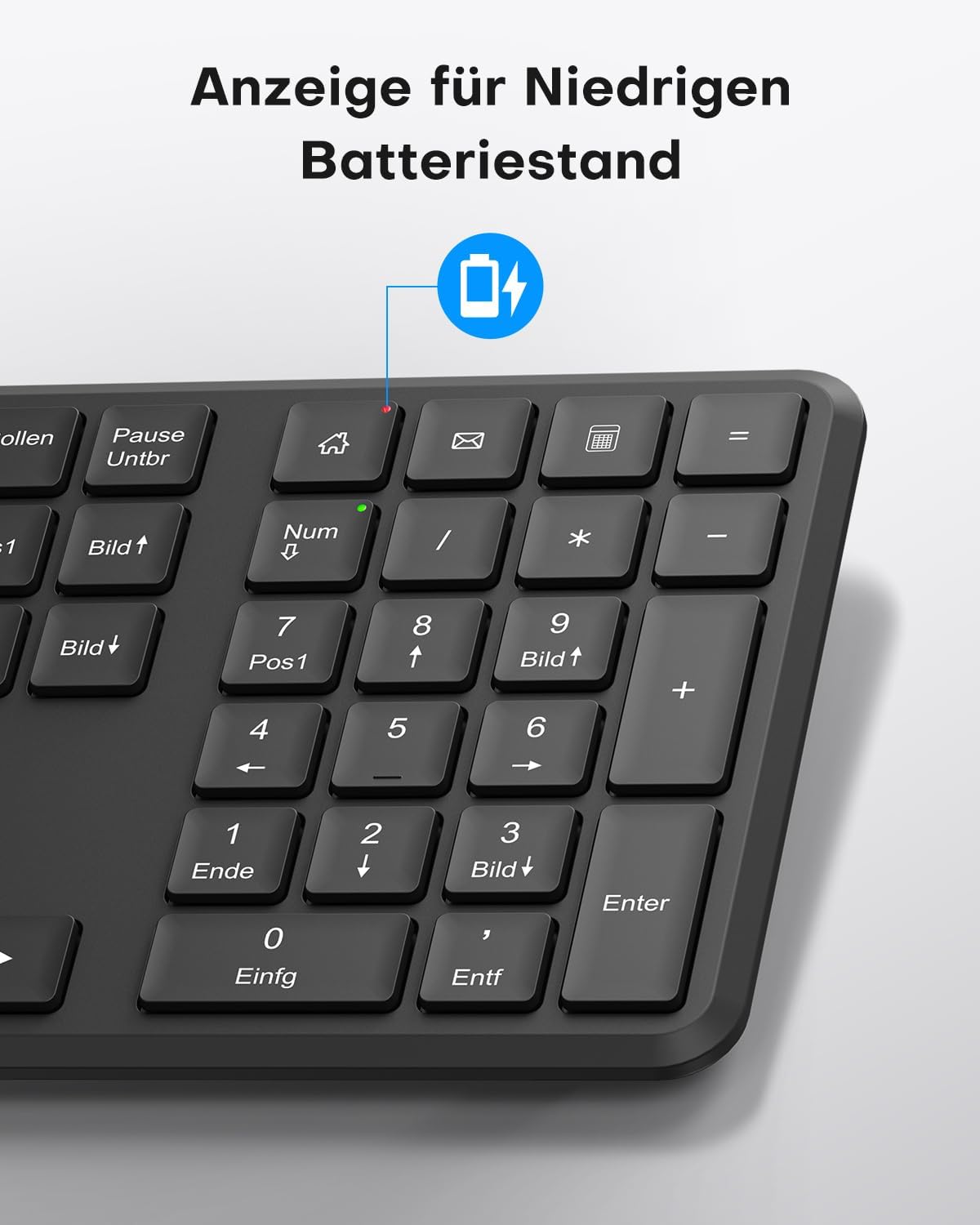
This image points out the low battery indicator on the OMOTON WK209 keyboard, which illuminates to alert the user when batteries need to be replaced.
6. Priežiūra
To ensure the longevity and optimal performance of your OMOTON WK209 set, follow these maintenance guidelines:
- Valymas: Klaviatūros ir pelės paviršiams valyti naudokite minkštą, sausą šluostę. Įsisenėjusius nešvarumus lengvai nuvalykite.amp Galima naudoti šluostę, tačiau įsitikinkite, kad į įrenginius nepatenka drėgmės.
- Baterijos keitimas: Replace batteries promptly when the low battery indicator appears or when performance degrades. Always use fresh, high-quality AAA batteries.
- Saugykla: Kai ilgesnį laiką nenaudojate, išimkite baterijas, kad išvengtumėte pratekėjimo. Laikykite prietaisus vėsioje, sausoje vietoje.
- Venkite skysčių: Laikykite klaviatūrą ir pelę atokiau nuo skysčių, kad nepažeistumėte jų.
7. Problemų sprendimas
If you encounter issues with your OMOTON WK209 set, try the following troubleshooting steps:
- Nėra atsako iš klaviatūros / pelės:
- Įsitikinkite, kad baterijos yra tinkamai įdėtos ir neišsikrovusios. Jei reikia, pakeiskite jas.
- Make sure the mouse's ON/OFF switch is in the 'ON' position.
- Patikrinkite, ar USB imtuvas tvirtai prijungtas prie veikiančio kompiuterio USB prievado. Išbandykite kitą USB prievadą.
- Iš naujo paleiskite kompiuterį.
- Vėlavimas arba nutrūkstamas ryšys:
- Perkelkite klaviatūrą ir pelę arčiau USB imtuvo.
- Ensure there are no large metal objects or other wireless devices (e.g., Wi-Fi routers, cordless phones) interfering with the 2.4 GHz signal.
- Try plugging the USB receiver into a front USB port or using a USB extension cable to bring it closer to the devices.
- Klavišai neveikia tinkamai:
- Patikrinkite, ar po klavišais nėra šiukšlių.
- Ensure the keyboard layout setting on your computer matches the QWERTZ layout.
- Pelės žymeklis šokinėja arba yra netikslus:
- Nuvalykite optinį jutiklį pelės apačioje.
- Pelę naudokite ant švaraus, neatspindinčio paviršiaus arba pelės kilimėlio.
8. Specifikacijos
| Funkcija | Detalė |
|---|---|
| Prekės ženklas | OMOTON |
| Modelis | WK209 |
| Spalva | Juoda |
| Ryšio technologija | 2.4 GHz belaidis ryšys |
| Klaviatūros išdėstymas | Full-size QWERTZ (German Layout) |
| Ypatingos savybės | 2.4 GHz, Full-size, QWERTZ-layout, Battery-operated, Multimedia keys |
| Suderinami įrenginiai | Nešiojamasis kompiuteris, kompiuteris |
| Suderinamos operacinės sistemos | Windows 11/10/8/7/XP |
| Maitinimo šaltinis | Battery-Powered (2x AAA for keyboard, 1x AAA for mouse - not included) |
| Prekės svoris (apytiksliai) | 514 Grams (total set, including packaging) |
| Pakuotės matmenys | 44.79 x 13.9 x 5.3 cm |
| ASIN | B0FQNS3FFB |
9. Garantija ir palaikymas
OMOTON products are designed for reliability and performance. For warranty information and customer support, please refer to the warranty card included with your purchase or visit the official OMOTON website. If you experience any issues that cannot be resolved using the troubleshooting guide, please contact OMOTON customer service for assistance.