
Įvadas
The Rapoo M308 is a versatile multi-mode wireless mouse designed for efficiency and comfort. It features an ambidextrous design, allowing comfortable use for both right-handed and left-handed individuals. With its dual connectivity options, Bluetooth 5.0 and 2.4 GHz wireless, you can seamlessly connect to up to three devices and switch between them with ease. The mouse is engineered for long-lasting performance, offering a battery life of up to 12 months.
Pakuotės turinys
- Rapoo M308 Multi-mode Wireless Mouse
- USB imtuvas (saugomas pelės viduje)
- 2 AA baterijos
- Greitos pradžios vadovas (šis vadovas)
Produktas baigtasview
Familiarize yourself with the components of your Rapoo M308 mouse.
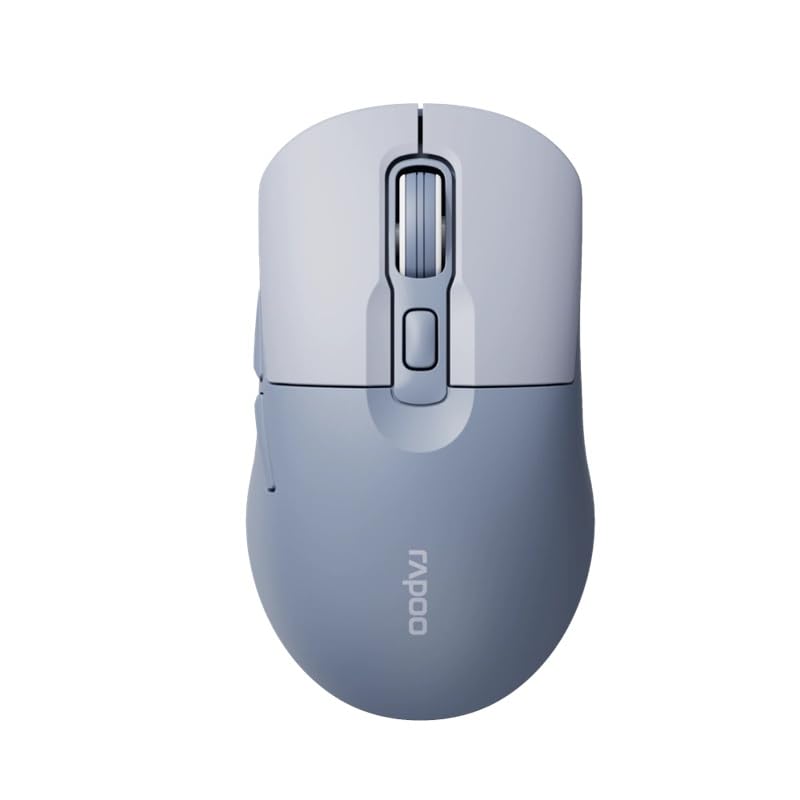
Image: The Rapoo M308 Multi-mode Wireless Mouse in blue, showcasing its ergonomic, ambidextrous design with a scroll wheel and multiple buttons.
- Kairysis mygtukas: Standartinė kairiojo pelės mygtuko paspaudimo funkcija.
- Dešinysis mygtukas: Standartinė dešiniojo pelės mygtuko paspaudimo funkcija.
- Slinkties ratukas: Slinkties ir vidurinio pelės mygtuko paspaudimo funkcijai.
- DPI mygtukas: Reguliuoja žymeklio jautrumą (DPI).
- Mode Switch Button/Indicator: Switches between connected devices (2.4G, Bluetooth 1, Bluetooth 2) and indicates current mode.
- Šoniniai mygtukai: Forward/Backward navigation (programmable).
- Baterijų skyrius: Located on the underside, holds 2 AA batteries.
- USB Receiver Slot: Located inside the battery compartment for storage.
Sąranka
1. Akumuliatoriaus įdėjimas
- Atidarykite baterijų skyriaus dangtelį, esantį pelės apačioje.
- Įdėkite dvi AA baterijas, užtikrindami teisingą poliškumą (+/-).
- Uždarykite akumuliatoriaus skyriaus dangtelį.
2. Connecting via 2.4 GHz Wireless
- Remove the USB receiver from its storage slot inside the battery compartment.
- Prijunkite USB imtuvą prie laisvo kompiuterio USB prievado.
- Turn on the mouse. The mouse should automatically connect to your computer. The mode indicator light will show a steady green light for a few seconds.
3. Prisijungimas per Bluetooth
The M308 mouse supports two Bluetooth connections (BT1 and BT2).
- Įjunkite pelę.
- Press the mode switch button to select either Bluetooth 1 (blue light flashes slowly) or Bluetooth 2 (blue light flashes slowly).
- Press and hold the mode switch button for 3 seconds until the blue light starts flashing rapidly. This indicates the mouse is in pairing mode.
- Kompiuteryje arba įrenginyje eikite į „Bluetooth“ nustatymus ir ieškokite naujų įrenginių.
- Select "Rapoo M308" from the list of available devices to pair.
- Once paired, the blue light will become steady for a few seconds and then turn off.
Naudojimo instrukcijos
Perjungimas tarp įrenginių
The Rapoo M308 allows you to connect to up to three devices (one 2.4G wireless and two Bluetooth devices) and switch between them.
- Briefly press the mode switch button to cycle through the connected devices: 2.4G (green light), Bluetooth 1 (blue light), Bluetooth 2 (blue light).
- The indicator light will briefly illuminate in the corresponding color to confirm the selected mode.
DPI reguliavimas
Press the DPI button (usually located behind the scroll wheel) to cycle through different DPI settings. This changes the cursor speed and sensitivity. The indicator light may flash to show the current DPI level (e.g., one flash for low DPI, two for medium, etc.).
Priežiūra
- Valymas: Pelę valykite minkšta, sausa šluoste. Įsisenėjusius nešvarumus lengvai nuvalykite.amp Galima naudoti šluostę, tačiau įsitikinkite, kad į įrenginį nepatenka drėgmės.
- Baterijos keitimas: When the mouse performance degrades or the indicator light signals low battery, replace the two AA batteries following the installation steps.
- Saugykla: When not in use for extended periods, turn off the mouse to conserve battery life. Store the USB receiver inside the mouse to prevent loss.
Trikčių šalinimas
- Pelė nereaguoja:
- Patikrinkite, ar pelė įjungta.
- Įsitikinkite, kad baterijos įdėtos teisingai ir nėra išsikrovusios. Jei reikia, pakeiskite.
- For 2.4G connection, ensure the USB receiver is securely plugged into a working USB port. Try a different USB port.
- For Bluetooth connection, ensure the mouse is in the correct Bluetooth mode (BT1 or BT2) and successfully paired with your device. Re-pair if needed.
- Žymeklio judėjimas yra netolygus arba lėtas:
- Nuvalykite optinį jutiklį pelės apačioje.
- Įsitikinkite, kad pelę naudojate ant tinkamo paviršiaus (neatspindinčio, nepermatomo).
- DPI nustatymą reguliuokite naudodami DPI mygtuką.
- Cannot switch between devices:
- Ensure all devices are properly connected (2.4G receiver plugged in, Bluetooth devices paired).
- Briefly press the mode switch button to cycle through modes. A long press will initiate Bluetooth pairing mode.
Specifikacijos
| Prekės ženklo pavadinimas | Rapoo |
| Modelis | M308 |
| Ryšio technologija | Bluetooth 5.0, 2.4 GHz Radio Frequency |
| Ypatingos savybės | Lengvas |
| Judesio aptikimas | Optinis |
| Mygtukų kiekis | 4 |
| Rankų orientacija | Abipusis |
| Rekomenduojami naudojimo būdai | Biuras |
| Suderinami įrenginiai | Asmeninis kompiuteris, nešiojamas kompiuteris |
| Prekės svoris | 50 gramų |
| Operacinė sistema | Linux, Mac, Windows |
| Baterijos veikimo laikas | 12 mėnesių |
| Baterijų skaičius | 2 AA (įtraukta) |
| Maitinimo šaltinis | Maitinamas baterijomis |
| Reikalinga minimali OS | Mac OS 14 Sonoma, Windows 11 |
| Medžiaga | Plastikiniai |
| Kilmės šalis | Kinija |
| Įtraukti komponentai | Pelė |
Garantija ir palaikymas
The Rapoo M308 Multi-mode Wireless Mouse comes with a 2 metų garantija nuo įsigijimo datos. Ši garantija taikoma gamybos defektams ir gedimams įprasto naudojimo metu.
For technical support, warranty claims, or further assistance, please refer to the contact information provided on the Rapoo official website or your local distributor's support channels. Please retain your proof of purchase for warranty validation.